Devices & Components
16x2 LCD display with I²C interface
Arduino Nano
Breadboard (generic)
HC-05 Bluetooth Module
Jumper wires (generic)
Project description
Code
lcdbluetooth.ino
arduino
1#include <LiquidCrystal_I2C.h> //For defining the lcd 2#include <Wire.h> //Same here too 3LiquidCrystal_I2C lcd(0x27, 2, 1, 0, 4, 5, 6, 7, 3, POSITIVE);//This is the address of the LCD.If you have another address,change it. 4char data = '5'; //Variable for storing received data 5int xpos=0;//Columm of the LCD 6int ypos=0;//Row of the LCD 7 8void setup() { 9 // put your setup code here, to run once: 10 Serial.begin(9600); //Sets the baud for serial data transmission 11 lcd.begin(16,2);//Setting up the lCD 12 lcd.clear();//Clearing the waste 13 14} 15 16void loop() { 17 // put your main code here, to run repeatedly: 18 if(Serial.available() > 0) // Perform only when you receive data: 19 { 20 data = Serial.read(); 21if(data=='-'){//That means if we insert backspace key - in the android app 22 xpos--; //Delete it - come back one character 23if (xpos<0 && ypos==1) //if already reached to beginning of line2 24 { 25 ypos=0; //come to line 1 26 xpos=15; //last column 27 } 28 29 Serial.print("Backspace received: xpos=");//Testing if the backspace key works 30 Serial.println(xpos); 31 lcd.setCursor(xpos,ypos); 32 lcd.blink();//Knowing where are we inserting backspace key 33 lcd.print(" "); 34 lcd.setCursor(xpos,ypos); 35 36 37 38} 39else{ //else print the data 40 lcd.setCursor(xpos,ypos); //set the chracter location 41 lcd.print(data); //print character on LCD 42 Serial.println(xpos); // for debug 43 lcd.noBlink(); //remove any blinking if set due to backspace 44xpos++; // increase the column position 45} 46if(xpos>15){//if the first line is full, 47 xpos=0; //Goto first column of 48 ypos++;//the next line. 49} 50if(xpos<0) 51{xpos=0; 52 53} 54 55} 56 57}//Have fun!!!! 58
Downloadable files
Paste the code in any version of arduino app
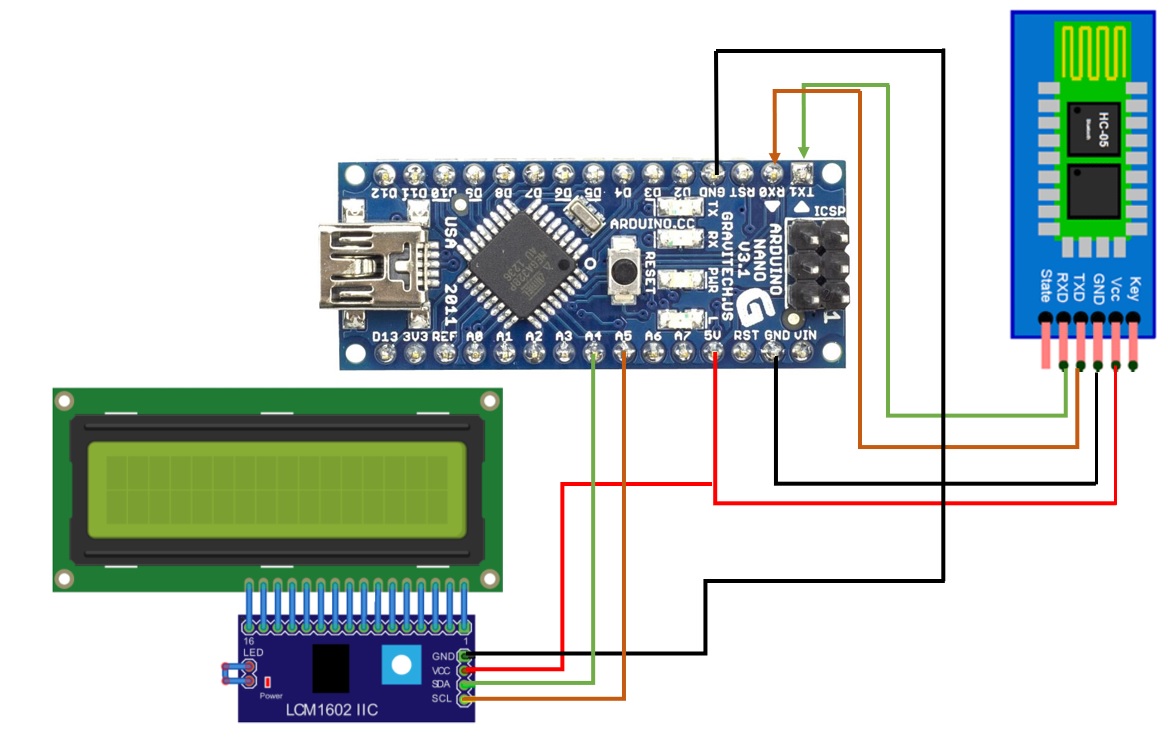
Paste the code in any version of arduino app

Comments
Only logged in users can leave comments