SONAR Based Obstacle Avoidance Robot
I implement a SONAR like system to provide autonomy to an old RC robot.
Devices & Components

Arduino Uno Rev3
Jumper wires (generic)
SG90 Micro-servo motor
HC-05 Bluetooth Module
Ultrasonic Sensor - HC-SR04 (Generic)
Solderless Breadboard Half Size
Project description
Code
Processing IDE Code
processing
This code was not originally made by me. Full credits to How To Mechatronics
1import processing.serial.*; // imports library for serial communication
2import  java.awt.event.KeyEvent; // imports library for reading the data from the serial  port
3import java.io.IOException;
4Serial myPort; // defines Object Serial
5//  defubes variables
6String angle="";
7String distance="";
8String data="";
9String  noObject;
10float pixsDistance;
11int iAngle, iDistance;
12int index1=0;
13int  index2=0;
14PFont orcFont;
15void setup() {
16
17 size (1920, 1080); // ***CHANGE  THIS TO YOUR SCREEN RESOLUTION***
18 smooth();
19 myPort = new Serial(this,"COM4",  9600); // starts the serial communication
20 myPort.bufferUntil('.'); // reads  the data from the serial port up to the character '.'. So actually it reads this:  angle,distance.
21 orcFont = loadFont("OCRAExtended-30.vlw");
22
23 delay(1000);
24}
25void  draw() {
26
27  fill(98,245,31);
28  textFont(orcFont);
29  // simulating  motion blur and slow fade of the moving line
30  noStroke();
31  fill(0,4);
32  rect(0, 0, width, height-height*0.065);
33
34  fill(98,245,31); // green  color
35  // calls the functions for drawing the radar
36  drawRadar();
37  drawLine();
38  drawObject();
39  drawText();
40}
41void serialEvent (Serial myPort) { // starts  reading data from the Serial Port
42  // reads the data from the Serial Port up  to the character '.' and puts it into the String variable "data".
43  data =  myPort.readStringUntil('.');
44  data = data.substring(0,data.length()-1);
45
46  index1 = data.indexOf(","); // find the character ',' and puts it into  the variable "index1"
47  angle= data.substring(0, index1); // read the data  from position "0" to position of the variable index1 or thats the value of the  angle the Arduino Board sent into the Serial Port
48  distance= data.substring(index1+1,  data.length()); // read the data from position "index1" to the end of the data  pr thats the value of the distance
49
50  // converts the String variables into  Integer
51  iAngle = int(angle);
52  iDistance = int(distance);
53}
54void drawRadar()  {
55  pushMatrix();
56  translate(width/2,height-height*0.074); // moves the starting  coordinats to new location
57  noFill();
58  strokeWeight(2);
59  stroke(98,245,31);
60  // draws the arc lines
61  arc(0,0,(width-width*0.0625),(width-width*0.0625),PI,TWO_PI);
62  arc(0,0,(width-width*0.27),(width-width*0.27),PI,TWO_PI);
63  arc(0,0,(width-width*0.479),(width-width*0.479),PI,TWO_PI);
64  arc(0,0,(width-width*0.687),(width-width*0.687),PI,TWO_PI);
65  // draws the  angle lines
66  line(-width/2,0,width/2,0);
67  line(0,0,(-width/2)*cos(radians(30)),(-width/2)*sin(radians(30)));
68  line(0,0,(-width/2)*cos(radians(60)),(-width/2)*sin(radians(60)));
69  line(0,0,(-width/2)*cos(radians(90)),(-width/2)*sin(radians(90)));
70  line(0,0,(-width/2)*cos(radians(120)),(-width/2)*sin(radians(120)));
71  line(0,0,(-width/2)*cos(radians(150)),(-width/2)*sin(radians(150)));
72  line((-width/2)*cos(radians(30)),0,width/2,0);
73  popMatrix();
74}
75void  drawObject() {
76  pushMatrix();
77  translate(width/2,height-height*0.074); //  moves the starting coordinats to new location
78  strokeWeight(9);
79  stroke(255,10,10);  // red color
80  pixsDistance = iDistance*((height-height*0.1666)*0.025); // covers  the distance from the sensor from cm to pixels
81  // limiting the range to 40  cms
82  if(iDistance<15){
83    // draws the object according to the angle and  the distance
84  line(pixsDistance*cos(radians(iAngle)),-pixsDistance*sin(radians(iAngle)),(width-width*0.505)*cos(radians(iAngle)),-(width-width*0.505)*sin(radians(iAngle)));
85  }
86  popMatrix();
87}
88void drawLine() {
89  pushMatrix();
90  strokeWeight(9);
91  stroke(30,250,60);
92  translate(width/2,height-height*0.074); // moves the starting  coordinats to new location
93  line(0,0,(height-height*0.12)*cos(radians(iAngle)),-(height-height*0.12)*sin(radians(iAngle)));  // draws the line according to the angle
94  popMatrix();
95}
96void drawText()  { // draws the texts on the screen
97
98  pushMatrix();
99  if(iDistance>10)  {
100  noObject = "Out of Range";
101  }
102  else {
103  noObject = "In Range";
104  }
105  fill(0,0,0);
106  noStroke();
107  rect(0, height-height*0.0648, width,  height);
108  fill(98,245,31);
109  textSize(25);
110
111  text("10cm",width-width*0.3854,height-height*0.0833);
112  text("20cm",width-width*0.281,height-height*0.0833);
113  text("30cm",width-width*0.177,height-height*0.0833);
114  text("40cm",width-width*0.0729,height-height*0.0833);
115  textSize(40);
116  text("Object: " + noObject, width-width*0.875, height-height*0.0277);
117  text("Angle:  " + iAngle +" °", width-width*0.48, height-height*0.0277);
118  text("Distance:  ", width-width*0.26, height-height*0.0277);
119  if(iDistance<10) {
120  text("        " + iDistance +" cm", width-width*0.225, height-height*0.0277);
121  }
122  textSize(25);
123  fill(98,245,60);
124  translate((width-width*0.4994)+width/2*cos(radians(30)),(height-height*0.0907)-width/2*sin(radians(30)));
125  rotate(-radians(-60));
126  text("30°",0,0);
127  resetMatrix();
128  translate((width-width*0.503)+width/2*cos(radians(60)),(height-height*0.0888)-width/2*sin(radians(60)));
129  rotate(-radians(-30));
130  text("60°",0,0);
131  resetMatrix();
132  translate((width-width*0.507)+width/2*cos(radians(90)),(height-height*0.0833)-width/2*sin(radians(90)));
133  rotate(radians(0));
134  text("90°",0,0);
135  resetMatrix();
136  translate(width-width*0.513+width/2*cos(radians(120)),(height-height*0.07129)-width/2*sin(radians(120)));
137  rotate(radians(-30));
138  text("120°",0,0);
139  resetMatrix();
140  translate((width-width*0.5104)+width/2*cos(radians(150)),(height-height*0.0574)-width/2*sin(radians(150)));
141  rotate(radians(-60));
142  text("150°",0,0);
143  popMatrix();
144}
Processing IDE Code
processing
This code was not originally made by me. Full credits to How To Mechatronics
1import processing.serial.*; // imports library for serial communication
2import
3  java.awt.event.KeyEvent; // imports library for reading the data from the serial
4  port
5import java.io.IOException;
6Serial myPort; // defines Object Serial
7//
8  defubes variables
9String angle="";
10String distance="";
11String data="";
12String
13  noObject;
14float pixsDistance;
15int iAngle, iDistance;
16int index1=0;
17int
18  index2=0;
19PFont orcFont;
20void setup() {
21
22 size (1920, 1080); // ***CHANGE
23  THIS TO YOUR SCREEN RESOLUTION***
24 smooth();
25 myPort = new Serial(this,"COM4",
26  9600); // starts the serial communication
27 myPort.bufferUntil('.'); // reads
28  the data from the serial port up to the character '.'. So actually it reads this:
29  angle,distance.
30 orcFont = loadFont("OCRAExtended-30.vlw");
31
32 delay(1000);
33}
34void
35  draw() {
36
37  fill(98,245,31);
38  textFont(orcFont);
39  // simulating
40  motion blur and slow fade of the moving line
41  noStroke();
42  fill(0,4);
43
44  rect(0, 0, width, height-height*0.065);
45
46  fill(98,245,31); // green
47  color
48  // calls the functions for drawing the radar
49  drawRadar();
50  drawLine();
51
52  drawObject();
53  drawText();
54}
55void serialEvent (Serial myPort) { // starts
56  reading data from the Serial Port
57  // reads the data from the Serial Port up
58  to the character '.' and puts it into the String variable "data".
59  data =
60  myPort.readStringUntil('.');
61  data = data.substring(0,data.length()-1);
62
63
64  index1 = data.indexOf(","); // find the character ',' and puts it into
65  the variable "index1"
66  angle= data.substring(0, index1); // read the data
67  from position "0" to position of the variable index1 or thats the value of the
68  angle the Arduino Board sent into the Serial Port
69  distance= data.substring(index1+1,
70  data.length()); // read the data from position "index1" to the end of the data
71  pr thats the value of the distance
72
73  // converts the String variables into
74  Integer
75  iAngle = int(angle);
76  iDistance = int(distance);
77}
78void drawRadar()
79  {
80  pushMatrix();
81  translate(width/2,height-height*0.074); // moves the starting
82  coordinats to new location
83  noFill();
84  strokeWeight(2);
85  stroke(98,245,31);
86
87  // draws the arc lines
88  arc(0,0,(width-width*0.0625),(width-width*0.0625),PI,TWO_PI);
89
90  arc(0,0,(width-width*0.27),(width-width*0.27),PI,TWO_PI);
91  arc(0,0,(width-width*0.479),(width-width*0.479),PI,TWO_PI);
92
93  arc(0,0,(width-width*0.687),(width-width*0.687),PI,TWO_PI);
94  // draws the
95  angle lines
96  line(-width/2,0,width/2,0);
97  line(0,0,(-width/2)*cos(radians(30)),(-width/2)*sin(radians(30)));
98
99  line(0,0,(-width/2)*cos(radians(60)),(-width/2)*sin(radians(60)));
100  line(0,0,(-width/2)*cos(radians(90)),(-width/2)*sin(radians(90)));
101
102  line(0,0,(-width/2)*cos(radians(120)),(-width/2)*sin(radians(120)));
103  line(0,0,(-width/2)*cos(radians(150)),(-width/2)*sin(radians(150)));
104
105  line((-width/2)*cos(radians(30)),0,width/2,0);
106  popMatrix();
107}
108void
109  drawObject() {
110  pushMatrix();
111  translate(width/2,height-height*0.074); //
112  moves the starting coordinats to new location
113  strokeWeight(9);
114  stroke(255,10,10);
115  // red color
116  pixsDistance = iDistance*((height-height*0.1666)*0.025); // covers
117  the distance from the sensor from cm to pixels
118  // limiting the range to 40
119  cms
120  if(iDistance<15){
121    // draws the object according to the angle and
122  the distance
123  line(pixsDistance*cos(radians(iAngle)),-pixsDistance*sin(radians(iAngle)),(width-width*0.505)*cos(radians(iAngle)),-(width-width*0.505)*sin(radians(iAngle)));
124
125  }
126  popMatrix();
127}
128void drawLine() {
129  pushMatrix();
130  strokeWeight(9);
131
132  stroke(30,250,60);
133  translate(width/2,height-height*0.074); // moves the starting
134  coordinats to new location
135  line(0,0,(height-height*0.12)*cos(radians(iAngle)),-(height-height*0.12)*sin(radians(iAngle)));
136  // draws the line according to the angle
137  popMatrix();
138}
139void drawText()
140  { // draws the texts on the screen
141
142  pushMatrix();
143  if(iDistance>10)
144  {
145  noObject = "Out of Range";
146  }
147  else {
148  noObject = "In Range";
149
150  }
151  fill(0,0,0);
152  noStroke();
153  rect(0, height-height*0.0648, width,
154  height);
155  fill(98,245,31);
156  textSize(25);
157
158  text("10cm",width-width*0.3854,height-height*0.0833);
159
160  text("20cm",width-width*0.281,height-height*0.0833);
161  text("30cm",width-width*0.177,height-height*0.0833);
162
163  text("40cm",width-width*0.0729,height-height*0.0833);
164  textSize(40);
165
166  text("Object: " + noObject, width-width*0.875, height-height*0.0277);
167  text("Angle:
168  " + iAngle +" °", width-width*0.48, height-height*0.0277);
169  text("Distance:
170  ", width-width*0.26, height-height*0.0277);
171  if(iDistance<10) {
172  text("
173        " + iDistance +" cm", width-width*0.225, height-height*0.0277);
174  }
175
176  textSize(25);
177  fill(98,245,60);
178  translate((width-width*0.4994)+width/2*cos(radians(30)),(height-height*0.0907)-width/2*sin(radians(30)));
179
180  rotate(-radians(-60));
181  text("30°",0,0);
182  resetMatrix();
183  translate((width-width*0.503)+width/2*cos(radians(60)),(height-height*0.0888)-width/2*sin(radians(60)));
184
185  rotate(-radians(-30));
186  text("60°",0,0);
187  resetMatrix();
188  translate((width-width*0.507)+width/2*cos(radians(90)),(height-height*0.0833)-width/2*sin(radians(90)));
189
190  rotate(radians(0));
191  text("90°",0,0);
192  resetMatrix();
193  translate(width-width*0.513+width/2*cos(radians(120)),(height-height*0.07129)-width/2*sin(radians(120)));
194
195  rotate(radians(-30));
196  text("120°",0,0);
197  resetMatrix();
198  translate((width-width*0.5104)+width/2*cos(radians(150)),(height-height*0.0574)-width/2*sin(radians(150)));
199
200  rotate(radians(-60));
201  text("150°",0,0);
202  popMatrix();
203}
Full Code (ARDUINO IDE)
c_cpp
NOTE: I didn't originally plan to share this code, so it's a little messy. You should still be able to get a general understanding of how the system works
1#include <Servo.h>
2
3
4// ULTRASONIC SENSOR
5const int trigPin  = 7; //Define Trig pin
6const int echoPin = 6; //Define Echo pin
7
8//ARRAYS
9static  float dist_table[82];
10static float pos_table[82];
11int face_here = 0;
12
13//SERVO
14Servo  servo;
15
16//74HC595 PINS
17int outputEnablePin = 12;//Pin connected to Output  enable of 74HC595
18int dataPin = 11; //Pin connected to DS of 74HC595
19int latchPin  = 10;//Pin connected to ST_CP of 74HC595
20int clockPin = 9;//Pin connected to  SH_CP of 74HC595
21
22//REGISTER ADDRESSES and CONTROL
23byte FWD = 0x46; //Foward
24byte  BCK = 0x8A; //Backwards
25byte L = 0x4A; //Left
26byte R = 0x86; //Right
27byte  CLEAR = 0x3; //Clear Register
28
29byte data;
30int delayTime;
31
32int PWM=250;
33
34
35void  setup() {
36  pinMode(trigPin, OUTPUT);
37  pinMode(echoPin, INPUT);
38
39  pinMode(dataPin,  OUTPUT);
40  pinMode(clockPin, OUTPUT);
41  pinMode(latchPin, OUTPUT);
42   pinMode(outputEnablePin,  OUTPUT);
43
44  servo.attach(8);
45  Serial.begin(9600);
46  servo.write(87);
47
48  Clear_Reg();
49
50  //START SEQUENCE
51  delay(10000);
52  SonarscanA();
53  delay(50);
54  servo.write(87);
55  delay(50);
56  Positioning();
57  delay(50);
58  Short_Exploration();
59
60}
61
62
63void loop() {}
64
65//Distance Measurments
66float  UltrasonicMeasuring () {
67  float duration, distance;
68  digitalWrite(trigPin,  LOW); //Start low for 2 milliseconds
69  delayMicroseconds(2);
70  digitalWrite(trigPin,  HIGH); //Sonic burst of 8 cycles for 10 milliseconds
71  delayMicroseconds(10);
72  digitalWrite(trigPin, LOW);
73  duration = pulseIn(echoPin, HIGH);
74  distance  = (duration * .0343) / 2;
75  return distance;
76}
77
78//SCAN Process
79float*SonarscanA()  {
80  float distance;
81  float distA;
82  float distB;
83  int pos = 10;
84  int p = 20;
85  int i = 0;
86  int j = 0;
87  int prev = 0;
88  int check;
89  int RD;
90  servo.write(10);
91  delay(50);
92
93  for (pos = 10; pos <= 170;  pos += 2) {
94    servo.write(pos);
95    Serial.print(pos);
96    Serial.print(",");
97    delayMicroseconds(50);
98    distA = UltrasonicMeasuring ();
99    delay(p);
100    distB = UltrasonicMeasuring ();
101    delay(p);
102    distance = (distA +  distB) / 2;
103
104    RD = round(distance);
105    Serial.print(RD);
106    Serial.print(".");
107
108    dist_table[i] = distance;
109    pos_table[i] = pos;
110    i = i + 1;
111  }
112  for (pos = 170; pos >= 10; pos -= 2) {
113    servo.write(pos);
114    Serial.print(pos);
115    Serial.print(",");
116    delayMicroseconds(50);
117    distA = UltrasonicMeasuring  ();
118    delay(p);
119    distB = UltrasonicMeasuring ();
120    delay(p);
121    distance = (distA + distB) / 2;
122
123    RD = round(distance);
124    Serial.print(RD);
125    Serial.print(".");
126
127    dist_table[81 - j] = (dist_table[81 - j] + distance)  / 2;
128    j = j + 1;
129  }
130
131  for (int c = 0; c < 81; c++) {
132    check  = dist_table[c];
133    if (check >= prev) {
134      face_here = pos_table[c];
135      prev = check;
136    }
137  }
138  return face_here;
139}
140
141//Determin  direction to face after scan
142void Positioning() {
143  if (face_here >= 0 &&  face_here <= 19) {
144    data = R;
145    delayTime = 510;
146    Register();
147  }
148  if (face_here >= 20 && face_here <= 39) {
149    data = R;
150    delayTime  = 410;
151    Register();
152  }
153  if (face_here >= 40 && face_here <= 59) {
154    data = R;
155    delayTime = 310;
156    Register();
157  }
158  if (face_here  >= 60 && face_here <= 79) {
159    data = R;
160    delayTime = 160;
161    Register();
162  }
163  if (face_here >= 80 && face_here <= 99) {
164    data = FWD;
165    delayTime  = 100;
166    Register();
167  }
168  if (face_here >= 100 && face_here <= 119)  {
169    data = L;
170    delayTime = 160;
171    Register();
172  }
173  if (face_here  >= 120 && face_here <= 139) {
174    data = L;
175    delayTime = 310;
176    Register();
177  }
178  if (face_here >= 140 && face_here <= 159) {
179    data = L;
180    delayTime  = 410;
181    Register();
182  }
183  if (face_here >= 160 && face_here <= 179)  {
184    data = L;
185    delayTime = 510;
186    Register();
187  }
188}
189
190
191//Register
192void  shiftWrite(int desiredPin, boolean desiredState) {
193  bitWrite(data, desiredPin,  desiredState);
194  shiftOut(dataPin, clockPin, MSBFIRST, data);
195  digitalWrite(latchPin,  HIGH);
196  digitalWrite(latchPin, LOW);
197}
198
199void Register()
200{
201  int  index;
202  setpwm(PWM);
203  for (index = 0; index <= 7; index++) {
204    shiftWrite(index,  HIGH);
205    delay(delayTime);
206    shiftWrite(index, LOW);
207  }
208}
209
210//TEST  EXPLORATION
211void Short_Exploration() {
212  int thresh = 15; //Sensor distance  threshold
213  float distance;
214  int finish = 0;
215  int RD;
216  int pos =  90;
217  while (finish < 10) {  //As a test the robot completes 10 turns before  stopping
218    Serial.print(pos);
219    Serial.print(",");
220    distance =  UltrasonicMeasuring ();
221    RD = round(distance);
222    Serial.print(RD);
223    Serial.print(".");
224    if (distance < thresh) {
225      Clear_Reg();
226      Decide_Direction();
227      finish = finish + 1;
228    }
229    else {
230      Move_FWD();
231    }
232  }
233}
234
235//MOVE FOWARD Function
236void Move_FWD()  {
237  data = FWD;
238  digitalWrite(latchPin, 0);
239  shiftOut(dataPin, clockPin,  data);
240  digitalWrite(latchPin, 1);
241}
242
243//Shifting bits into the register
244void  shiftOut(int myDataPin, int myClockPin, byte myDataOut) {
245  int i = 0;
246  int  pinState;
247  pinMode(myClockPin, OUTPUT);
248  pinMode(myDataPin, OUTPUT);
249  digitalWrite(myDataPin, 0);
250  digitalWrite(myClockPin, 0);
251  for (i = 7;  i >= 0; i--)  {
252    digitalWrite(myClockPin, 0);
253    if ( myDataOut & (1 <<  i) ) {
254      pinState = 1;
255    }
256    else {
257      pinState = 0;
258    }
259    digitalWrite(myDataPin, pinState);
260    digitalWrite(myClockPin,  1);
261    digitalWrite(myDataPin, 0);
262  }
263  digitalWrite(myClockPin, 0);
264}
265
266//  Direction Decision
267float Decide_Direction() {
268  float distA, distB;
269  float  Left, Right;
270  float Turn;
271  int RD;
272  int l = 130;
273  int r = 50;
274  servo.write(130);
275  Serial.print(l);
276  Serial.print(",");
277  delay(350);
278  distA = UltrasonicMeasuring ();
279  delay(20);
280  distB = UltrasonicMeasuring  ();
281  Left = (distA + distB) / 2;
282
283  RD = round(Left);
284  Serial.print(RD);
285  Serial.print(".");
286
287  servo.write(50);
288  Serial.print(r);
289  Serial.print(",");
290  delay(350);
291  distA = UltrasonicMeasuring ();
292  delay(20);
293  distB =  UltrasonicMeasuring ();
294  Right = (distA + distB) / 2;
295
296  RD = round(Right);
297  Serial.print(RD);
298  Serial.print(".");
299
300  servo.write(87);
301
302  if (Left > Right) {
303    data = L;
304    delayTime = 350;
305    Register();
306  }
307  if (Right > Left) {
308    data = R;
309    delayTime = 350;
310    Register();
311  }
312}
313
314//CLAR REGISTER
315void Clear_Reg() {
316  data = CLEAR;
317  delayTime  = 150;
318  Register();
319}
320
321
322//PWM setup
323void setpwm(byte pwm) //  0 to 255
324{
325  analogWrite(outputEnablePin, 255-pwm);
326}
Downloadable files
Basic Schematic
Note: Certain components are not shown as they were specific to this project. I find it more beneficial to all to see and understand the concepts behind the motor control and sornar system.
Basic Schematic
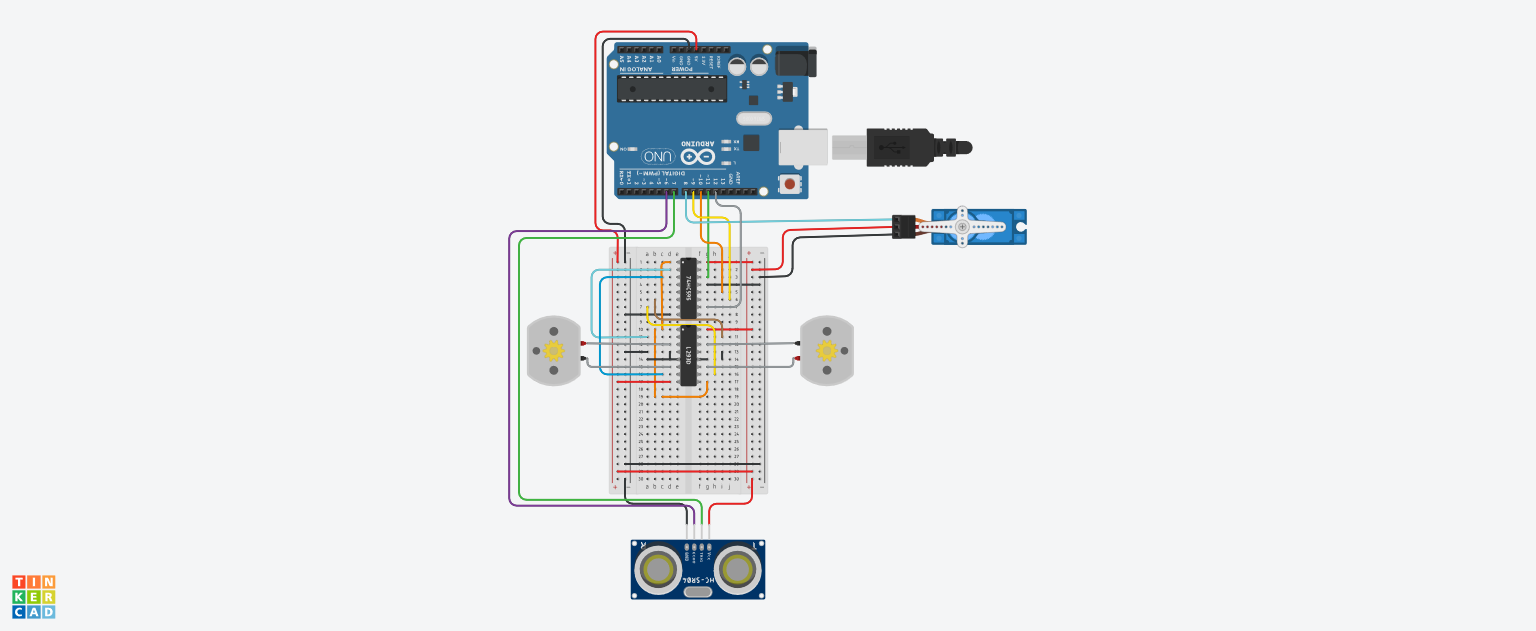
Basic Schematic
Note: Certain components are not shown as they were specific to this project. I find it more beneficial to all to see and understand the concepts behind the motor control and sornar system.
Basic Schematic
Comments
Only logged in users can leave comments