Devices & Components
Arduino Uno Rev3
Resistor 330 ohm
Button
Jumper wires (generic)
Solderless Breadboard Half Size
LED (generic)
Software & Tools
Arduino IDE
Project description
Code
Button.Default.Code
arduino
Use this code!
1/* 2 3 ***Created by Lucian R*** 4 All Rights Reserved. Use at own risk. 5 BUTTON DEFAULT CODE 6 7 */ 8 9// Put your variables here: 10int led = 6; // Change this to your LED's DigitalPin 11int button = 2; // Change this to your button's DigitalPin 12int value = 0; //Don't change this!! 13 14void setup() { 15 // Put your setup code here, to run once: 16pinMode(led, OUTPUT); 17// This declares the LED as an OUTPUT 18pinMode(button, INPUT); 19// This declares the button as an INPUT 20} 21 22void loop() { 23 // Put your main code here, to run repeatedly: 24value = digitalRead(button); 25// This checks and gives us the state of the button: Pressed (HIGH), Released (LOW). It's funny- "value" was an integer, now it's a boolean. LOL 26if (value == HIGH) { 27 // This checks if it's pressed. 28 digitalWrite(led, HIGH); 29 // And this turns the LED on. 30} 31else { 32 // This checks if it's NOT pressed. 33 digitalWrite(led,LOW); 34 // This turns the LED off. 35} 36}
Downloadable files
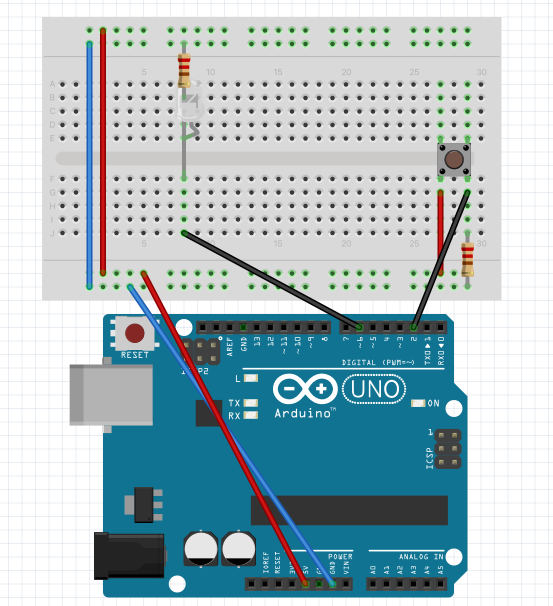
Button.Default.Wiring
The Button wiring: Red: goes to POSITIVE Blue: goes to NEGATIVE Black: MISC
Button.Default.Wiring
Comments
Only logged in users can leave comments