Devices & Components
Soil Moisture Sensor
NPN Bipolar Transistor(2N2222A)
Submersible Mini Water Pump - 3-6V DC
Resistor 1k ohm
NODEMCU - ESP8266 Wifi
Software & Tools
Blynk
Project description
Code
[Code-3] Get Time from NTP server
arduino
This code will get the real time data from the NTP server and store the hour in variable name H
1#include <NTPClient.h>
2#include <ESP8266WiFi.h>
3#include <WiFiUdp.h>
4
5const  char *ssid     = "Galaxy";        //change Galaxy to your wifi name
6const char  *password = "12345678901";   //change 12345678901 to your wifi password
7
8const  long utcOffsetInSeconds = 19800;
9char daysOfTheWeek[7][12] = {"Sunday", "Monday",  "Tuesday", "Wednesday", "Thursday", "Friday", "Saturday"};
10
11// Define  NTP Client to get time
12WiFiUDP ntpUDP;
13NTPClient timeClient(ntpUDP, "pool.ntp.org",  utcOffsetInSeconds);
14void setup()
15{
16  Serial.begin(115200);
17  WiFi.begin(ssid,  password);
18  while ( WiFi.status() != WL_CONNECTED )
19  {
20    delay ( 500  );
21    Serial.print ( "." );
22  }
23  timeClient.begin();
24}
25
26void  loop()
27{
28  timeClient.update();
29  Serial.print("Time: ");
30  Serial.println(timeClient.getFormattedTime());
31  int H=timeClient.getHours();
32  Serial.print("H= ");
33  Serial.println(H);
34  delay(1000);
35}
[Code-2] Water Pump test
arduino
This code helps to test your actuator(water pump) and adjust amount of water to be pumped to the plant.
1const int pumpPin = D1;
2int amountToPump = 5000;
3void setup()
4       {
5
6          Serial.begin(115200);
7          pinMode(pumpPin,   OUTPUT);
8      }
9void loop ()
10{
11       digitalWrite(pumpPin, HIGH);
12        Serial.println("pump on");
13       delay(amountToPump);           //keep   pumping water for 5 sec
14       digitalWrite(pumpPin, LOW);
15       Serial.println("pump   off");
16       delay(10000);
17}
[Code-3] Get Time from NTP server
arduino
This code will get the real time data from the NTP server and store the hour in variable name H
1#include <NTPClient.h>
2#include <ESP8266WiFi.h>
3#include <WiFiUdp.h>
4
5const   char *ssid     = "Galaxy";        //change Galaxy to your wifi name
6const char   *password = "12345678901";   //change 12345678901 to your wifi password
7
8const   long utcOffsetInSeconds = 19800;
9char daysOfTheWeek[7][12] = {"Sunday", "Monday",   "Tuesday", "Wednesday", "Thursday", "Friday", "Saturday"};
10
11// Define   NTP Client to get time
12WiFiUDP ntpUDP;
13NTPClient timeClient(ntpUDP, "pool.ntp.org",   utcOffsetInSeconds);
14void setup()
15{
16  Serial.begin(115200);
17  WiFi.begin(ssid,   password);
18  while ( WiFi.status() != WL_CONNECTED )
19  {
20    delay ( 500   );
21    Serial.print ( "." );
22  }
23  timeClient.begin();
24}
25
26void   loop()
27{
28  timeClient.update();
29  Serial.print("Time: ");
30  Serial.println(timeClient.getFormattedTime());
31   int H=timeClient.getHours();
32  Serial.print("H= ");
33  Serial.println(H);
34   delay(1000);
35}
[Code-5] Automate irrigation [Happy Plant] MAIN_CODE
arduino
This code is used to automate the watering system using weather forecasts, as well as to monitor the smart plant using the Blynk server.
1#define BLYNK_TEMPLATE_ID "TMPLfdchHbXn"
2#define BLYNK_DEVICE_NAME  "Happy Plant"
3#define BLYNK_AUTH_TOKEN "tkOSK7PS4-kAzsdc1tm9EMqVJjB_aNmk"
4#include  <ESP8266WiFi.h>
5#include <ESP8266HTTPClient.h>
6#include <WiFiClient.h>
7#include  <Arduino_JSON.h>
8#include <BlynkSimpleEsp8266.h>
9#include <WiFiUdp.h>
10#include  <NTPClient.h>
11
12const long oneSecond = 1000;                        // a second  is a thousand milliseconds
13const long oneMinute = oneSecond * 60;
14const long  oneHour = oneMinute * 60;
15const int moistureSensorPin = A0;                   //  Analog input pin used to check the moisture level of the
16int moistureSensorValue  = 0;
17const int pumpPin = D1;                             //  Digital output pin that the water pump is attached to
18const int ledPin = D0;                              // In NODE_MCU pin D0 is connected to no board LED
19double  checkInterval = 30;                          // Time to wait before checking the  soil moisture level - default it to an hour = 1800000
20int extreme_dryness = 885;                          // Soil is 80% dry [(100-80)=20] that means there is only  20% of moisture in the soil
21int dryness = 746;                                  //  Soil is 60% dry [(100-60)=40] that means there is only 40% of moisture in the soil
22int  amountToPump_when_extreme_dryness = 4000;       // Amount of water to pump during  extreme_dryness [it pumps for 5 secounds, about 26.25 millimeter}
23int amountToPump_when_dryness  = 2000;               // Amount of water to pump during dryness [it pumps for 2  secounds, about 10.5 millimeter}
24
25
26const char* ssid = "Galaxy";
27const  char* password = "12345678901";
28
29const long utcOffsetInSeconds = 19800;              //UTC of india +5:30
30WiFiUDP ntpUDP;
31NTPClient timeClient(ntpUDP,  "pool.ntp.org", utcOffsetInSeconds);
32
33String openWeatherMapApiKey = "d33c5770088a432699242527210952";   // Enter your APi key
34String city = "Mudbidri";   // Replace with your city  name
35
36unsigned long lastTime = 0;
37unsigned long timerDelay = 1000;
38String  jsonBuffer;
39
40void setup()
41{
42  Serial.begin(115200);
43  pinMode(ledPin,  OUTPUT);
44  pinMode(moistureSensorPin, INPUT);
45  pinMode(pumpPin, OUTPUT);
46  for (int i=0; i <= 4; i++)    //LED will blink 5 times to indicate the system  is ON
47  {
48        digitalWrite(ledPin, HIGH);
49        delay(400);
50        digitalWrite(ledPin,  LOW);
51        delay(400);
52  }
53  Blynk.begin(BLYNK_AUTH_TOKEN, ssid, password);
54  WiFi.begin(ssid, password);
55  Serial.println("Connecting");
56  while(WiFi.status()  != WL_CONNECTED)
57  {
58    delay(500);
59    Serial.print(".");
60  }
61  Serial.println("");
62  Serial.print("Connected to WiFi network with IP Address:  ");
63  Serial.println(WiFi.localIP());
64  for (int i=0; i <= 14; i++)   //LED  will blink fast to indicate that Nodemcu is connected to internet
65  {
66        digitalWrite(ledPin,  HIGH);
67        delay(100);
68        digitalWrite(ledPin, LOW);
69        delay(100);
70  }
71  timeClient.begin();
72
73}
74
75void loop()
76{
77  if ((millis()  - lastTime) > timerDelay)   // Send an HTTP GET request
78  {
79    if(WiFi.status()==  WL_CONNECTED)    // Check WiFi connection status
80    {
81      timeClient.update();
82      Serial.println(timeClient.getFormattedTime());
83      int H=timeClient.getHours();
84      String serverPath = "http://api.weatherapi.com/v1/forecast.json?key=" +  openWeatherMapApiKey + "&q=" + city + "&day=1&hour=" + H ;
85      jsonBuffer  = httpGETRequest(serverPath.c_str());
86      JSONVar myObject = JSON.parse(jsonBuffer);
87      if (JSON.typeof(myObject) == "undefined")
88      {
89        Serial.println("Parsing  input failed!");
90        return;
91      }
92      Serial.print("JSON object  = ");
93      Serial.println(myObject);
94
95      Serial.print("Location:");    //Forecasted location
96      Serial.println(myObject ["location"]["name"]);
97      Blynk.virtualWrite(V0, city);
98
99      Serial.print("Time: ");   //Forecasted data time
100      Serial.println(timeClient.getFormattedTime());
101      Blynk.virtualWrite(V1, timeClient.getFormattedTime());
102
103      double  Temperature = myObject ["current"]["temp_c"];  //current temperature value
104      Serial.print("Current Temperature = ");
105      Serial.println(Temperature);
106      Blynk.virtualWrite(V2, Temperature);
107
108
109      double Windspeed  = myObject ["current"]["wind_kph"];     //current windspeed
110      Serial.print("Current  Windspeed = ");
111      Serial.println(Windspeed);
112      Blynk.virtualWrite(V3,  Windspeed);
113
114      int Will_It_Rain = myObject ["forecast"] ["forecastday"][0]  ["hour"][0] ["will_it_rain"];
115      Serial.print("Will It Rain: ");
116      if (Will_It_Rain==1)
117      {
118        Serial.println("YES");
119        Blynk.virtualWrite(V4,  "YES");
120      }
121      else
122      {
123        Serial.println("NO");
124        Blynk.virtualWrite(V4, "NO");
125      }
126
127      int Chance_Of_Rain  = myObject ["forecast"] ["forecastday"][0] ["hour"][0] ["chance_of_rain"];
128      Serial.print("Chance of Rain: ");
129      Serial.println(Chance_Of_Rain);
130
131      moistureSensorValue = analogRead(moistureSensorPin);    //read the  value of the moisture Sensor
132      Serial.print("Moisture level sensor value:  ");    //print it to the serial monitor
133      Serial.println(moistureSensorValue);
134      Blynk.virtualWrite(V5, moistureSensorValue);
135      if(moistureSensorValue  >= extreme_dryness)
136      {
137          digitalWrite(pumpPin, HIGH);
138          Serial.println("pump  on for 4 seconds");
139          delay(amountToPump_when_extreme_dryness);
140          digitalWrite(pumpPin, LOW);
141          Serial.println("pump off");
142          delay(6*oneHour);   //delay for 6 hours
143      }
144      else if(moistureSensorValue  >= dryness)
145      {
146           if(Will_It_Rain == 1)
147           {
148                delay(6*oneHour);     //delay for 6 hours
149           }
150           else
151           {
152                 digitalWrite(pumpPin, HIGH);
153                 Serial.println("pump  on for 2 seconds");
154                 delay(amountToPump_when_dryness);
155                 digitalWrite(pumpPin, LOW);
156                 Serial.println("pump  off");
157                 delay(6*oneHour);    //delay for 6 hours
158           }
159       }
160    }
161    else
162    {
163      Serial.println("WiFi Disconnected");
164    }
165    lastTime = millis();
166  }
167  delay(6*oneHour);     //delay for  6 hours
168}
169
170String httpGETRequest(const char* serverName) {
171  WiFiClient  client;
172  HTTPClient http;
173  http.begin(client, serverName);   // Your IP  address with path or Domain name with URL path
174  int httpResponseCode = http.GET();    // Send HTTP POST request
175  String payload = "{}";
176  if (httpResponseCode>0)  {
177    Serial.print("HTTP Response code: ");
178    Serial.println(httpResponseCode);
179    payload = http.getString();
180  }
181  else {
182    Serial.print("Error code:  ");
183    Serial.println(httpResponseCode);
184  }
185  http.end();
186  return  payload;
187}
[Code-4] Grab Forecast Data
arduino
This code is used to get weather forecast data from the weatherapi server
1#include <ESP8266WiFi.h>
2#include <ESP8266HTTPClient.h>
3#include  <WiFiClient.h>
4#include <Arduino_JSON.h>
5#include <WiFiUdp.h>
6#include  <NTPClient.h>
7
8const char* ssid = "Galaxy";
9const char* password = "12345678901";
10
11const  long utcOffsetInSeconds = 19800;
12WiFiUDP ntpUDP;
13NTPClient timeClient(ntpUDP,  "pool.ntp.org", utcOffsetInSeconds);
14
15String openWeatherMapApiKey = "d33c5770088a432699242527210952";   // Enter your APi key
16String city = "Mudbidri";   // Replace with your country  code and city
17
18unsigned long lastTime = 0;
19unsigned long timerDelay = 10000;   // every 10 second we get weather data from the server
20String jsonBuffer;
21
22void  setup()
23{
24  Serial.begin(115200);
25  WiFi.begin(ssid, password);
26  Serial.println("Connecting");
27  while(WiFi.status() != WL_CONNECTED)
28  {
29    delay(500);
30    Serial.print(".");
31  }
32  Serial.println("");
33  Serial.print("Connected to WiFi network with  IP Address: ");
34  Serial.println(WiFi.localIP());
35  Serial.println("Timer  set to 10 seconds (timerDelay variable), it will take 10 seconds before publishing  the first reading.");
36  timeClient.begin();
37}
38void loop()
39{
40  if  ((millis() - lastTime) > timerDelay)
41  {
42    if(WiFi.status()== WL_CONNECTED)    // Check WiFi connection status
43    {
44      timeClient.update();
45      Serial.println(timeClient.getFormattedTime());
46      int H=timeClient.getHours();
47      String serverPath = "http://api.weatherapi.com/v1/forecast.json?key="  + openWeatherMapApiKey + "&q=" + city + "&day=1&hour=" + H ;
48      jsonBuffer  = httpGETRequest(serverPath.c_str());
49      JSONVar myObject = JSON.parse(jsonBuffer);
50      if (JSON.typeof(myObject) == "undefined")
51      {
52        Serial.println("Parsing  input failed!");
53        return;
54      }
55      Serial.print("JSON object  = ");
56      Serial.println(myObject);
57
58      Serial.print("Time:  ");   //Forecasted data time
59      Serial.println(timeClient.getFormattedTime());
60
61      Serial.print("Location:");      //Forecasted location
62      Serial.println(myObject  ["location"]["name"]);
63
64      double Temperature = myObject ["current"]["temp_c"];  //current temperature value
65      Serial.print("Current Temperature = ");
66      Serial.println(Temperature);
67
68      double Windspeed = myObject ["current"]["wind_kph"];   //current windspeed
69      Serial.print("Current Windspeed = ");
70      Serial.println(Windspeed);
71
72
73      int Will_It_Rain = myObject ["forecast"] ["forecastday"][0] ["hour"][0]  ["will_it_rain"];
74      Serial.print("Will It Rain: ");
75      if (Will_It_Rain==1)
76      {
77        Serial.println("YES");
78      }
79      else
80      {
81        Serial.println("NO");
82      }
83
84      int Chance_Of_Rain  = myObject ["forecast"] ["forecastday"][0] ["hour"][0] ["chance_of_rain"];
85      Serial.print("Chance of Rain: ");
86      Serial.println(Chance_Of_Rain);
87      Serial.println("");
88    }
89    else
90    {
91    Serial.println("WiFi  Disconnected");
92    }
93    lastTime = millis();
94  }
95}
96
97String  httpGETRequest(const char* serverName) {
98  WiFiClient client;
99  HTTPClient  http;
100  http.begin(client, serverName);// Your IP address with path or Domain  name with URL path
101  int httpResponseCode = http.GET();// Send HTTP POST request
102  String payload = "{}";
103  if (httpResponseCode>0)
104  {
105    Serial.print("HTTP  Response code: ");
106    Serial.println(httpResponseCode);
107    payload = http.getString();
108  }
109  else
110  {
111    Serial.print("Error code: ");
112    Serial.println(httpResponseCode);
113  }
114  http.end();
115  return payload;
116}
[Code-5] Automate irrigation [Happy Plant] MAIN_CODE
arduino
This code is used to automate the watering system using weather forecasts, as well as to monitor the smart plant using the Blynk server.
1#define BLYNK_TEMPLATE_ID "TMPLfdchHbXn"
2#define BLYNK_DEVICE_NAME
3  "Happy Plant"
4#define BLYNK_AUTH_TOKEN "tkOSK7PS4-kAzsdc1tm9EMqVJjB_aNmk"
5#include
6  <ESP8266WiFi.h>
7#include <ESP8266HTTPClient.h>
8#include <WiFiClient.h>
9#include
10  <Arduino_JSON.h>
11#include <BlynkSimpleEsp8266.h>
12#include <WiFiUdp.h>
13#include
14  <NTPClient.h>
15
16const long oneSecond = 1000;                        // a second
17  is a thousand milliseconds
18const long oneMinute = oneSecond * 60;
19const long
20  oneHour = oneMinute * 60;
21const int moistureSensorPin = A0;                   //
22  Analog input pin used to check the moisture level of the
23int moistureSensorValue
24  = 0;
25const int pumpPin = D1;                             //
26  Digital output pin that the water pump is attached to
27const int ledPin = D0;
28                              // In NODE_MCU pin D0 is connected to no board LED
29double
30  checkInterval = 30;                          // Time to wait before checking the
31  soil moisture level - default it to an hour = 1800000
32int extreme_dryness = 885;
33                          // Soil is 80% dry [(100-80)=20] that means there is only
34  20% of moisture in the soil
35int dryness = 746;                                  //
36  Soil is 60% dry [(100-60)=40] that means there is only 40% of moisture in the soil
37int
38  amountToPump_when_extreme_dryness = 4000;       // Amount of water to pump during
39  extreme_dryness [it pumps for 5 secounds, about 26.25 millimeter}
40int amountToPump_when_dryness
41  = 2000;               // Amount of water to pump during dryness [it pumps for 2
42  secounds, about 10.5 millimeter}
43
44
45const char* ssid = "Galaxy";
46const
47  char* password = "12345678901";
48
49const long utcOffsetInSeconds = 19800;
50              //UTC of india +5:30
51WiFiUDP ntpUDP;
52NTPClient timeClient(ntpUDP,
53  "pool.ntp.org", utcOffsetInSeconds);
54
55String openWeatherMapApiKey = "d33c5770088a432699242527210952";
56   // Enter your APi key
57String city = "Mudbidri";   // Replace with your city
58  name
59
60unsigned long lastTime = 0;
61unsigned long timerDelay = 1000;
62String
63  jsonBuffer;
64
65void setup()
66{
67  Serial.begin(115200);
68  pinMode(ledPin,
69  OUTPUT);
70  pinMode(moistureSensorPin, INPUT);
71  pinMode(pumpPin, OUTPUT);
72
73  for (int i=0; i <= 4; i++)    //LED will blink 5 times to indicate the system
74  is ON
75  {
76        digitalWrite(ledPin, HIGH);
77        delay(400);
78        digitalWrite(ledPin,
79  LOW);
80        delay(400);
81  }
82  Blynk.begin(BLYNK_AUTH_TOKEN, ssid, password);
83
84  WiFi.begin(ssid, password);
85  Serial.println("Connecting");
86  while(WiFi.status()
87  != WL_CONNECTED)
88  {
89    delay(500);
90    Serial.print(".");
91  }
92
93  Serial.println("");
94  Serial.print("Connected to WiFi network with IP Address:
95  ");
96  Serial.println(WiFi.localIP());
97  for (int i=0; i <= 14; i++)   //LED
98  will blink fast to indicate that Nodemcu is connected to internet
99  {
100        digitalWrite(ledPin,
101  HIGH);
102        delay(100);
103        digitalWrite(ledPin, LOW);
104        delay(100);
105
106  }
107  timeClient.begin();
108
109}
110
111void loop()
112{
113  if ((millis()
114  - lastTime) > timerDelay)   // Send an HTTP GET request
115  {
116    if(WiFi.status()==
117  WL_CONNECTED)    // Check WiFi connection status
118    {
119      timeClient.update();
120
121      Serial.println(timeClient.getFormattedTime());
122      int H=timeClient.getHours();
123
124      String serverPath = "http://api.weatherapi.com/v1/forecast.json?key=" +
125  openWeatherMapApiKey + "&q=" + city + "&day=1&hour=" + H ;
126      jsonBuffer
127  = httpGETRequest(serverPath.c_str());
128      JSONVar myObject = JSON.parse(jsonBuffer);
129
130      if (JSON.typeof(myObject) == "undefined")
131      {
132        Serial.println("Parsing
133  input failed!");
134        return;
135      }
136      Serial.print("JSON object
137  = ");
138      Serial.println(myObject);
139
140      Serial.print("Location:");
141    //Forecasted location
142      Serial.println(myObject ["location"]["name"]);
143
144      Blynk.virtualWrite(V0, city);
145
146      Serial.print("Time: ");
147   //Forecasted data time
148      Serial.println(timeClient.getFormattedTime());
149
150      Blynk.virtualWrite(V1, timeClient.getFormattedTime());
151
152      double
153  Temperature = myObject ["current"]["temp_c"];  //current temperature value
154
155      Serial.print("Current Temperature = ");
156      Serial.println(Temperature);
157
158      Blynk.virtualWrite(V2, Temperature);
159
160
161      double Windspeed
162  = myObject ["current"]["wind_kph"];     //current windspeed
163      Serial.print("Current
164  Windspeed = ");
165      Serial.println(Windspeed);
166      Blynk.virtualWrite(V3,
167  Windspeed);
168
169      int Will_It_Rain = myObject ["forecast"] ["forecastday"][0]
170  ["hour"][0] ["will_it_rain"];
171      Serial.print("Will It Rain: ");
172
173      if (Will_It_Rain==1)
174      {
175        Serial.println("YES");
176        Blynk.virtualWrite(V4,
177  "YES");
178      }
179      else
180      {
181        Serial.println("NO");
182
183        Blynk.virtualWrite(V4, "NO");
184      }
185
186      int Chance_Of_Rain
187  = myObject ["forecast"] ["forecastday"][0] ["hour"][0] ["chance_of_rain"];
188
189      Serial.print("Chance of Rain: ");
190      Serial.println(Chance_Of_Rain);
191
192
193      moistureSensorValue = analogRead(moistureSensorPin);    //read the
194  value of the moisture Sensor
195      Serial.print("Moisture level sensor value:
196  ");    //print it to the serial monitor
197      Serial.println(moistureSensorValue);
198
199      Blynk.virtualWrite(V5, moistureSensorValue);
200      if(moistureSensorValue
201  >= extreme_dryness)
202      {
203          digitalWrite(pumpPin, HIGH);
204          Serial.println("pump
205  on for 4 seconds");
206          delay(amountToPump_when_extreme_dryness);
207
208          digitalWrite(pumpPin, LOW);
209          Serial.println("pump off");
210
211          delay(6*oneHour);   //delay for 6 hours
212      }
213      else if(moistureSensorValue
214  >= dryness)
215      {
216           if(Will_It_Rain == 1)
217           {
218                delay(6*oneHour);
219     //delay for 6 hours
220           }
221           else
222           {
223
224                 digitalWrite(pumpPin, HIGH);
225                 Serial.println("pump
226  on for 2 seconds");
227                 delay(amountToPump_when_dryness);
228
229                 digitalWrite(pumpPin, LOW);
230                 Serial.println("pump
231  off");
232                 delay(6*oneHour);    //delay for 6 hours
233           }
234
235       }
236    }
237    else
238    {
239      Serial.println("WiFi Disconnected");
240
241    }
242    lastTime = millis();
243  }
244  delay(6*oneHour);     //delay for
245  6 hours
246}
247
248String httpGETRequest(const char* serverName) {
249  WiFiClient
250  client;
251  HTTPClient http;
252  http.begin(client, serverName);   // Your IP
253  address with path or Domain name with URL path
254  int httpResponseCode = http.GET();
255    // Send HTTP POST request
256  String payload = "{}";
257  if (httpResponseCode>0)
258  {
259    Serial.print("HTTP Response code: ");
260    Serial.println(httpResponseCode);
261
262    payload = http.getString();
263  }
264  else {
265    Serial.print("Error code:
266  ");
267    Serial.println(httpResponseCode);
268  }
269  http.end();
270  return
271  payload;
272}
[Code-2] Water Pump test
arduino
This code helps to test your actuator(water pump) and adjust amount of water to be pumped to the plant.
1const int pumpPin = D1;
2int amountToPump = 5000;
3void setup()
4      {
5
6          Serial.begin(115200);
7          pinMode(pumpPin,  OUTPUT);
8      }
9void loop ()
10{
11       digitalWrite(pumpPin, HIGH);
12       Serial.println("pump on");
13       delay(amountToPump);           //keep  pumping water for 5 sec
14       digitalWrite(pumpPin, LOW);
15       Serial.println("pump  off");
16       delay(10000);
17}
[Code-4] Grab Forecast Data
arduino
This code is used to get weather forecast data from the weatherapi server
1#include <ESP8266WiFi.h>
2#include <ESP8266HTTPClient.h>
3#include
4  <WiFiClient.h>
5#include <Arduino_JSON.h>
6#include <WiFiUdp.h>
7#include
8  <NTPClient.h>
9
10const char* ssid = "Galaxy";
11const char* password = "12345678901";
12
13const
14  long utcOffsetInSeconds = 19800;
15WiFiUDP ntpUDP;
16NTPClient timeClient(ntpUDP,
17  "pool.ntp.org", utcOffsetInSeconds);
18
19String openWeatherMapApiKey = "d33c5770088a432699242527210952";
20   // Enter your APi key
21String city = "Mudbidri";   // Replace with your country
22  code and city
23
24unsigned long lastTime = 0;
25unsigned long timerDelay = 10000;
26   // every 10 second we get weather data from the server
27String jsonBuffer;
28
29void
30  setup()
31{
32  Serial.begin(115200);
33  WiFi.begin(ssid, password);
34  Serial.println("Connecting");
35
36  while(WiFi.status() != WL_CONNECTED)
37  {
38    delay(500);
39    Serial.print(".");
40
41  }
42  Serial.println("");
43  Serial.print("Connected to WiFi network with
44  IP Address: ");
45  Serial.println(WiFi.localIP());
46  Serial.println("Timer
47  set to 10 seconds (timerDelay variable), it will take 10 seconds before publishing
48  the first reading.");
49  timeClient.begin();
50}
51void loop()
52{
53  if
54  ((millis() - lastTime) > timerDelay)
55  {
56    if(WiFi.status()== WL_CONNECTED)
57    // Check WiFi connection status
58    {
59      timeClient.update();
60      Serial.println(timeClient.getFormattedTime());
61
62      int H=timeClient.getHours();
63      String serverPath = "http://api.weatherapi.com/v1/forecast.json?key="
64  + openWeatherMapApiKey + "&q=" + city + "&day=1&hour=" + H ;
65      jsonBuffer
66  = httpGETRequest(serverPath.c_str());
67      JSONVar myObject = JSON.parse(jsonBuffer);
68
69      if (JSON.typeof(myObject) == "undefined")
70      {
71        Serial.println("Parsing
72  input failed!");
73        return;
74      }
75      Serial.print("JSON object
76  = ");
77      Serial.println(myObject);
78
79      Serial.print("Time:
80  ");   //Forecasted data time
81      Serial.println(timeClient.getFormattedTime());
82
83
84      Serial.print("Location:");      //Forecasted location
85      Serial.println(myObject
86  ["location"]["name"]);
87
88      double Temperature = myObject ["current"]["temp_c"];
89  //current temperature value
90      Serial.print("Current Temperature = ");
91
92      Serial.println(Temperature);
93
94      double Windspeed = myObject ["current"]["wind_kph"];
95   //current windspeed
96      Serial.print("Current Windspeed = ");
97      Serial.println(Windspeed);
98
99
100
101      int Will_It_Rain = myObject ["forecast"] ["forecastday"][0] ["hour"][0]
102  ["will_it_rain"];
103      Serial.print("Will It Rain: ");
104      if (Will_It_Rain==1)
105
106      {
107        Serial.println("YES");
108      }
109      else
110      {
111
112        Serial.println("NO");
113      }
114
115      int Chance_Of_Rain
116  = myObject ["forecast"] ["forecastday"][0] ["hour"][0] ["chance_of_rain"];
117
118      Serial.print("Chance of Rain: ");
119      Serial.println(Chance_Of_Rain);
120
121      Serial.println("");
122    }
123    else
124    {
125    Serial.println("WiFi
126  Disconnected");
127    }
128    lastTime = millis();
129  }
130}
131
132String
133  httpGETRequest(const char* serverName) {
134  WiFiClient client;
135  HTTPClient
136  http;
137  http.begin(client, serverName);// Your IP address with path or Domain
138  name with URL path
139  int httpResponseCode = http.GET();// Send HTTP POST request
140
141  String payload = "{}";
142  if (httpResponseCode>0)
143  {
144    Serial.print("HTTP
145  Response code: ");
146    Serial.println(httpResponseCode);
147    payload = http.getString();
148
149  }
150  else
151  {
152    Serial.print("Error code: ");
153    Serial.println(httpResponseCode);
154
155  }
156  http.end();
157  return payload;
158}
[Code-1] Soil Moisture test
arduino
This code helps you to test soil moisture sensor and set predetermined values for Dryness and Extreme Dryness threshold.
1const int moistureSensorPin = A0;
2int moistureSensorValue = 0;
3void  setup() {
4  Serial.begin(115200);
5  pinMode(moistureSensorPin, INPUT);
6}
7
8void  loop() {
9  moistureSensorValue = analogRead(moistureSensorPin);              //read  the values of the moisture Sensor
10  Serial.print("Moisture level sensor value:  ");                    //prints it to the serial monitor
11  Serial.println(moistureSensorValue);
12  delay(1000);
13
14}
Downloadable files
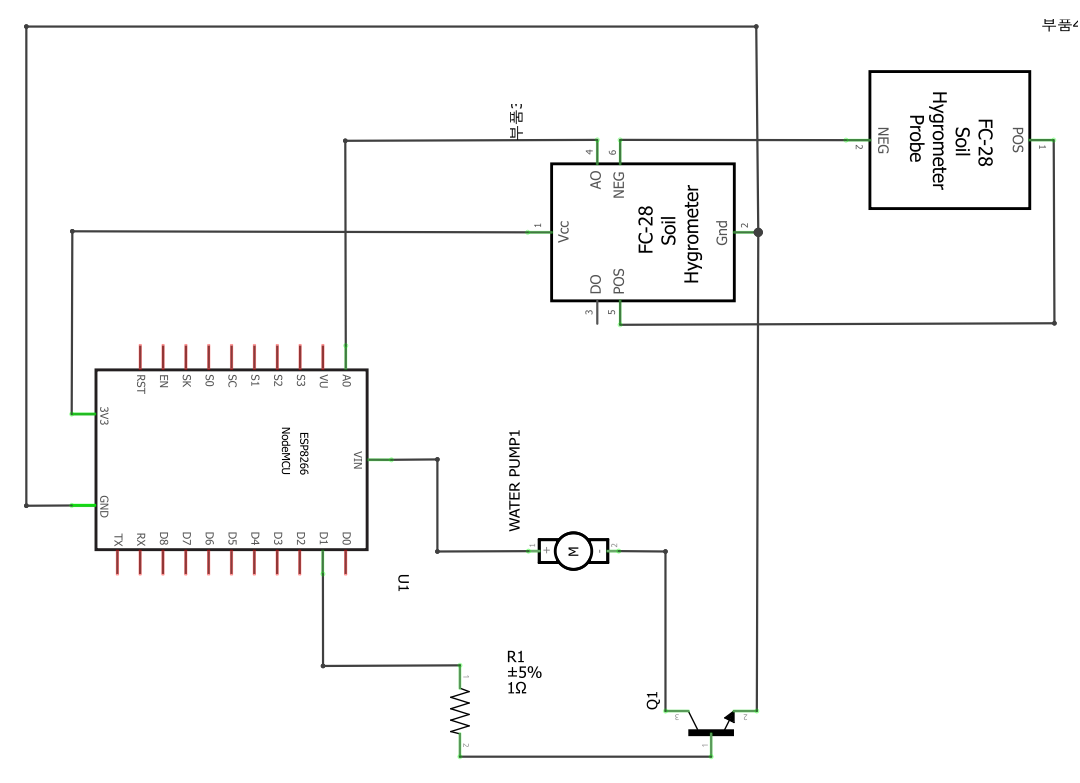
Schematic View
Schematic View
Breadboard view
This is a smart plant circuit diagram
Breadboard view

Breadboard view
This is a smart plant circuit diagram
Breadboard view
Schematic View
Schematic View
Comments
Only logged in users can leave comments