Temperature, Humidity data logger- IoT controled LED
Simple Temperature, Humidity data logger with Time-Stamp and control LED over internet.
Components and supplies
1
DHT11 Temperature & Humidity Sensor (3 pins)
1
Arduino UNO
1
NodeMCU ESP8266 Breakout Board
1
5 mm LED: Red
Project description
Code
data-logger.ino
c_cpp
Stores data in SPIFF in CSV format.
1#include <DHT.h> // library of DHT11 temperature and humidity sensor
2#include  <CavyIoTdevelopmentBoard.h>
3
4//----------------------DHT11 connection------------------------------------
5DHT  dht(8, DHT11);
6//--------------------------------------------------------------------------
7
8//---------------For  communication with DevBoard ----------------------------
9#define rx 10
10#define  tx 11
11#define rst 13
12//---------------------------------------------------------------------------
13CavyIoT  myIoTdevice;       //Create instance of CavyIoT Object.
14//---------------------------------------------------------------------------
15//---------------------  Sensor Variables ------------------------------------
16float temp;
17float hum;
18
19//--------------------------------------------------------------------------
20void  setup()
21  {
22   Serial.begin(9600);
23   myIoTdevice.SetPort(rx,tx,rst);
24   dht.begin();
25
26//--------------------- Button Labels----------------------------------------
27
28  Serial.println("Wait for a while to connect!");
29  /*------To  start Device replace your own credentials here-----------------------------*/
30  myIoTdevice.StartDevice
31  /*Your Wi-Fi router->*/("WiFi-SSID","WiFi-password",
32   /* CavyIoT------>*/"Username","password","Device");//
33 //--------------------------------------------------------------------------
34   }
35
36void loop()
37  {
38
39    myIoTdevice.loop();  //Updates the Status variable.
40
41   Serial.println("Device  Status:-"+myIoTdevice.Status);
42
43   //---------Read values from sensor  ---------------------
44
45   temp=dht.readTemperature();
46   hum=dht.readHumidity();
47
48   //----------------Sending data to server----------------------------------
49   myIoTdevice.UpdateSensorData
50      ( "Temperature",String(temp),  "C",
51         "humidity",  String(hum),   "Rh"
52      );
53
54}//End of loop
55
data-logger.ino
c_cpp
Stores data in SPIFF in CSV format.
1#include <DHT.h> // library of DHT11 temperature and humidity sensor
2#include
3  <CavyIoTdevelopmentBoard.h>
4
5//----------------------DHT11 connection------------------------------------
6DHT
7  dht(8, DHT11);
8//--------------------------------------------------------------------------
9
10//---------------For
11  communication with DevBoard ----------------------------
12#define rx 10
13#define
14  tx 11
15#define rst 13
16//---------------------------------------------------------------------------
17CavyIoT
18  myIoTdevice;       //Create instance of CavyIoT Object.
19//---------------------------------------------------------------------------
20//---------------------
21  Sensor Variables ------------------------------------
22float temp;
23float hum;
24
25//--------------------------------------------------------------------------
26void
27  setup()
28  {
29   Serial.begin(9600);
30   myIoTdevice.SetPort(rx,tx,rst);
31
32   dht.begin();
33
34//--------------------- Button Labels----------------------------------------
35
36
37  Serial.println("Wait for a while to connect!");
38  /*------To
39  start Device replace your own credentials here-----------------------------*/
40
41  myIoTdevice.StartDevice
42  /*Your Wi-Fi router->*/("WiFi-SSID","WiFi-password",
43
44   /* CavyIoT------>*/"Username","password","Device");//
45 //--------------------------------------------------------------------------
46
47   }
48
49void loop()
50  {
51
52    myIoTdevice.loop();
53  //Updates the Status variable.
54
55   Serial.println("Device
56  Status:-"+myIoTdevice.Status);
57
58   //---------Read values from sensor
59  ---------------------
60
61   temp=dht.readTemperature();
62   hum=dht.readHumidity();
63
64
65   //----------------Sending data to server----------------------------------
66
67   myIoTdevice.UpdateSensorData
68      ( "Temperature",String(temp),  "C",
69
70         "humidity",  String(hum),   "Rh"
71      );
72
73}//End of loop
74
Downloadable files
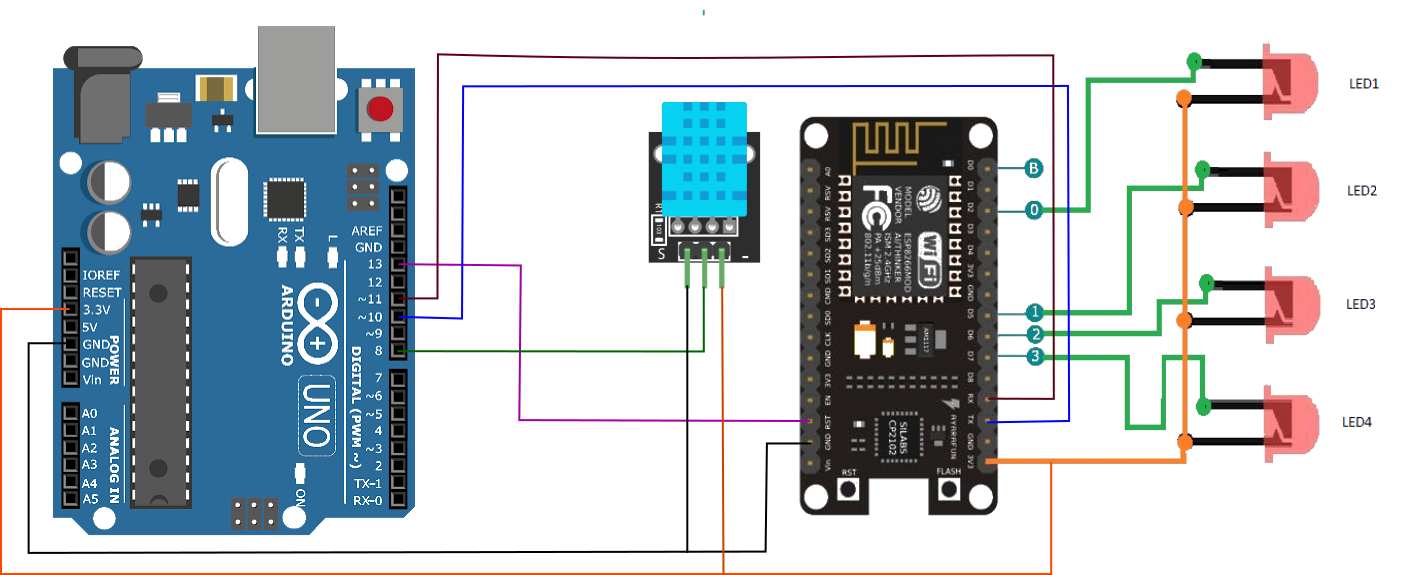
data-logger connections
Temperature ,Humidity logger with Time Stamp.
data-logger connections
Comments
Only logged in users can leave comments