Devices & Components
Arduino Uno Rev3
Ultrasonic Sensor - HC-SR04 (Generic)
Infrared Module (Generic)
Motor Drivers
DC motor (generic)
Project description
Code
Avoider code
c_cpp
The code that is used by the bot in the video.
1byte la=2,lb=3,ra=5,rb=4,trig=6,echo=7,ls=8,rs=9; 2float duration=1,distance; 3float d; 4void setup() { 5 pinMode(la,OUTPUT); 6 pinMode(lb,OUTPUT); 7 pinMode(ra,OUTPUT); 8 pinMode(rb,OUTPUT); 9 pinMode(trig,OUTPUT); 10 pinMode(echo,INPUT); 11 pinMode(ls,INPUT); 12 pinMode(rs,INPUT); 13 Serial.begin(9600); 14} 15float dis(){ 16 digitalWrite(trig,LOW); 17 delayMicroseconds(2); 18 digitalWrite(trig,HIGH); 19 delayMicroseconds(10); 20 digitalWrite(trig,LOW); 21 duration=pulseIn(echo,HIGH); 22 distance=duration*(0.034/2); 23 Serial.print("distance ="); 24 Serial.println(distance); 25 return distance; 26 delay(1000); 27} 28void drive(){ 29 digitalWrite(ra,1); 30 digitalWrite(la,1); 31 digitalWrite(lb,0); 32 digitalWrite(rb,0); 33} 34void stoper(){ 35 digitalWrite(ra,0); 36 digitalWrite(la,0); 37 digitalWrite(lb,0); 38 digitalWrite(rb,0); 39} 40void reverse(){ 41 digitalWrite(ra,0); 42 digitalWrite(la,0); 43 digitalWrite(lb,1); 44 digitalWrite(rb,1); 45} 46void right(){ 47 digitalWrite(ra,0); 48 digitalWrite(la,1); 49 digitalWrite(lb,0); 50 digitalWrite(rb,1); 51} 52void left(){ 53 digitalWrite(ra,1); 54 digitalWrite(la,0); 55 digitalWrite(lb,1); 56 digitalWrite(rb,0); 57} 58void loop() { 59 d=dis(); 60 drive(); 61 if(d<=15) 62 { 63 if(digitalRead(ls)==1 && digitalRead(rs)==0) 64 { 65 stoper(); 66 delay(1000); 67 reverse(); 68 delay(1000); 69 right(); 70 delay(500); 71 stoper(); 72 } 73 else 74 if(digitalRead(rs)==1 && digitalRead(ls)==0) 75 { 76 stoper(); 77 delay(1000); 78 reverse(); 79 delay(1000); 80 left(); 81 delay(500); 82 stoper(); 83 } 84 else 85 { 86 stoper(); 87 delay(1000); 88 reverse(); 89 delay(1000); 90 right(); 91 delay(2000); 92 } 93 } 94 else 95 if(digitalRead(ls)==1 || digitalRead(rs) ==1) 96 { 97 if(digitalRead(ls)==1) 98 { 99 stoper(); 100 delay(1000); 101 reverse(); 102 delay(1000); 103 right(); 104 delay(500); 105 } 106 else 107 { 108 stoper(); 109 delay(1000); 110 reverse(); 111 delay(1000); 112 left(); 113 delay(500); 114 } 115 } 116} 117
Downloadable files
Scenarios
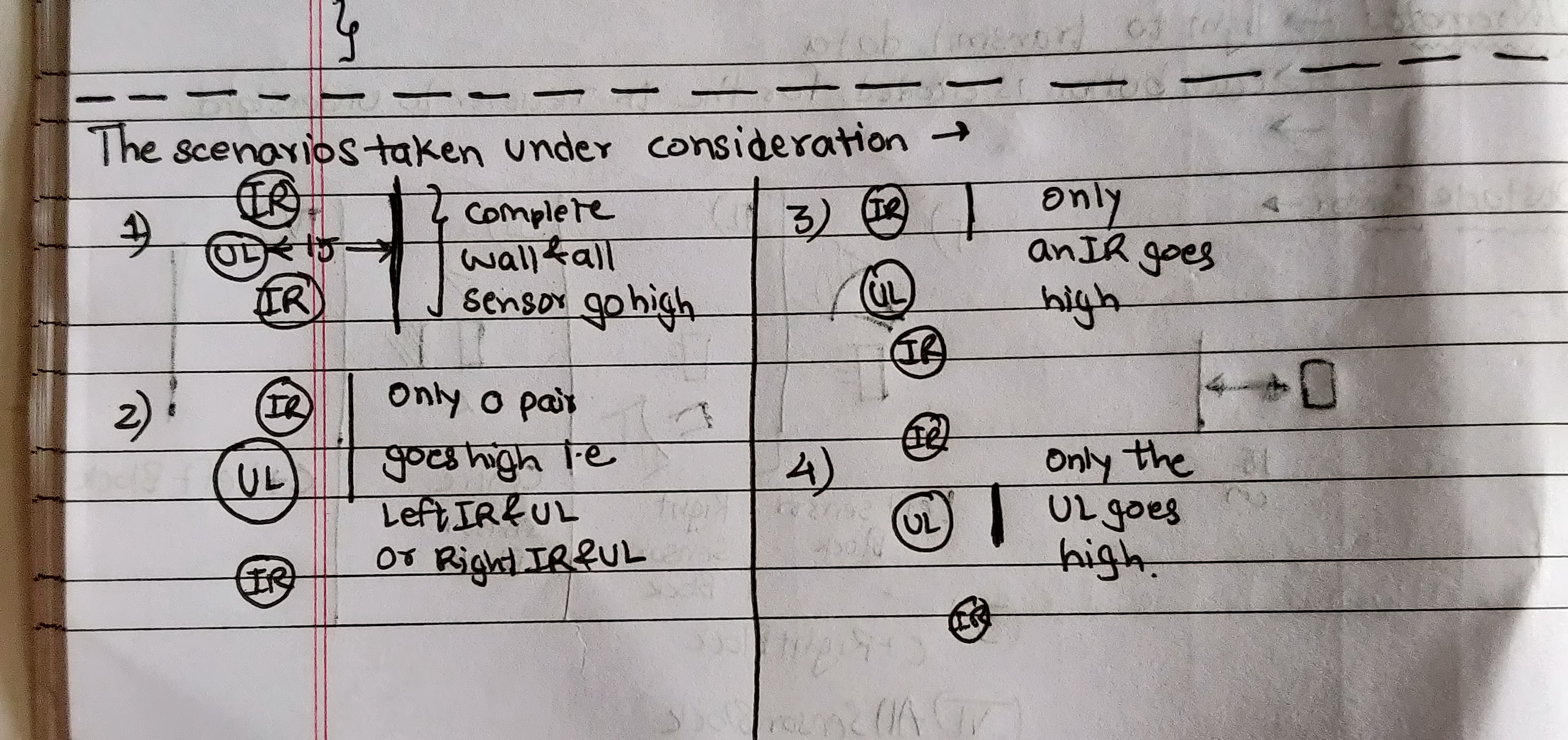
The photo below specifies the cases taken under consideration for the position of the obstacle and from what sensor the input would be provided to the bot.
Scenarios
Circuit Diagram
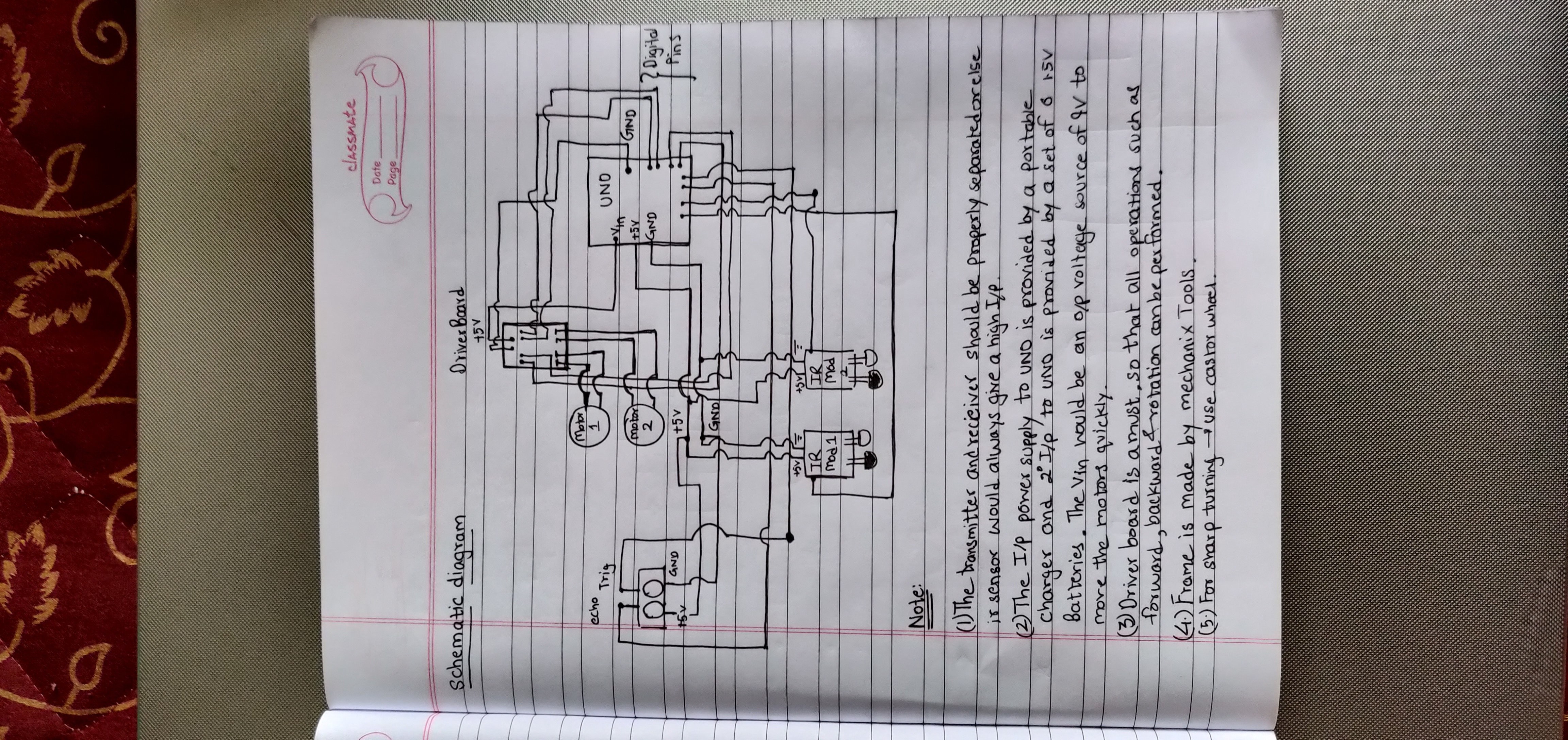
The photo uploaded describes the circuit connection of the whole bot.
Circuit Diagram
Scenarios
The photo below specifies the cases taken under consideration for the position of the obstacle and from what sensor the input would be provided to the bot.
Scenarios

Circuit Diagram
The photo uploaded describes the circuit connection of the whole bot.
Circuit Diagram

Comments
Only logged in users can leave comments