Devices & Components

Arduino Uno Rev3
Alphanumeric LCD, 16 x 2
Resistor 2.21k ohm
Resistor 1k ohm
HC-06 Bluetooth Module
Jumper wires (generic)
Single Turn Potentiometer- 10k ohms
Breadboard (generic)
Hardware & Tools
Soldering iron (generic)
Wire Stripper & Cutter, 18-10 AWG / 0.75-4mm² Capacity Wires
Solder Wire, Lead Free
Solder Flux, Soldering
Plier, Round Nose
Software & Tools
Arduino LCD Playground Android App (Unofficial)

Arduino IDE
Project description
Code
Arduino LCD Playground companion sketch V1.0
c_cpp
Please note that this version may change over time and the latest version will be on the website at: http://installtekz.com/ArduinoLCD
1#include <LiquidCrystal.h> 2 3// Sketch Version 1.0 4// Campatable with Arduino LCD Playground Version 1.0 (Version number can be found in the 'Settings' screen of the app) 5// 6// This Arduino sketch is the companion sketch to the 'Bluetooth Arduino LCD Playground' App for Android devices (Both created by installtekz.com) 7// Control a 16x2 LCD display on Arduino Uno via Android over Bluetooth communication. 8// 9// The standard LiquidCrystal library works with all LCD displays that are compatible with the Hitachi HD44780 driver and you can usually identify them by the 16-pin interface 10// 11// You are free to do as you wish with this code. 12 13 14 15// ################################################### Incoming Text Strings From The Arduino LCD Playground App: ##################################### 16// TEXTd - example: "Hellod" 17// DECIMAL_AS_STRINGb - example: "31,31,31,31,31,31,31,31b" 18// Resetr 19// Beginc 20// ClearScreenc 21// Displayc 22// NoDisplayc 23// ShowCursorONc 24// ShowCursorOFFc 25// CursorBlockc 26// CursorBlinkOFFc 27// LCDhomec 28// Autoscrollc 29// NoAutoscrollc 30// LeftToRightc 31// RightToLeftc 32// Scroll display (Left or Right), (number of positions), (time interval in milliseconds) # as a separator - example: ScrollDisplayRight#3#150c 33// set cursor example: SetCursor0,0c 34// ################################################################################################################################################# 35 36 37//Initialize the LCD with the arduino. LiquidCrystal(rs, enable, d4, d5, d6, d7) 38LiquidCrystal lcd(12, 11, 5, 4, 3, 2); 39 40String inbound; 41char lastchar; 42 43int createdChars = 0; 44 45 46 47void initializeLCD() { 48 lcd.begin(16, 2); 49} 50 51 52 53 54void setup() { 55 Serial.begin(9600); 56 initializeLCD(); 57} 58 59 60 61 62 63void loop() { 64 while(Serial.available()) { 65 delay(50); 66 char c=Serial.read(); 67 lastchar=c; 68 inbound+=c; 69 } 70 71 72 if (inbound.length()>0) { 73 //strip the last character (control data) from "inbound" string 74 inbound.remove(inbound.length()-1); 75 76 //############### Display Text ###################### 77 if (lastchar == 'd') { 78 lcd.print(inbound); 79 } 80 //############### Create Characters ################# 81 else if 82 (lastchar == 'b') { // Example: 31,31,31,31,31,31,31,31b 83 84 int valA = 0; 85 int valB = 0; 86 int valC = 0; 87 int valD = 0; 88 int valE = 0; 89 int valF = 0; 90 int valG = 0; 91 int valH = 0; 92 String valMixed = ""; 93 94 95 for (int i = 0; i < inbound.length(); i++) { 96 if (inbound.substring(i, i+1) == ",") { 97 valA = inbound.substring(0, i).toInt(); 98 valMixed = inbound.substring(i+1); 99 break; 100 } 101 } 102 103 for (int i = 0; i < valMixed.length(); i++) { 104 if (valMixed.substring(i, i+1) == ",") { 105 valB = valMixed.substring(0, i).toInt(); 106 valMixed = valMixed.substring(i+1); 107 break; 108 } 109 } 110 111 for (int i = 0; i < valMixed.length(); i++) { 112 if (valMixed.substring(i, i+1) == ",") { 113 valC = valMixed.substring(0, i).toInt(); 114 valMixed = valMixed.substring(i+1); 115 break; 116 } 117 } 118 119 for (int i = 0; i < valMixed.length(); i++) { 120 if (valMixed.substring(i, i+1) == ",") { 121 valD = valMixed.substring(0, i).toInt(); 122 valMixed = valMixed.substring(i+1); 123 break; 124 } 125 } 126 127 for (int i = 0; i < valMixed.length(); i++) { 128 if (valMixed.substring(i, i+1) == ",") { 129 valE = valMixed.substring(0, i).toInt(); 130 valMixed = valMixed.substring(i+1); 131 break; 132 } 133 } 134 135 for (int i = 0; i < valMixed.length(); i++) { 136 if (valMixed.substring(i, i+1) == ",") { 137 valF = valMixed.substring(0, i).toInt(); 138 valMixed = valMixed.substring(i+1); 139 break; 140 } 141 } 142 143 for (int i = 0; i < valMixed.length(); i++) { 144 if (valMixed.substring(i, i+1) == ",") { 145 valG = valMixed.substring(0, i).toInt(); 146 valMixed = valMixed.substring(i+1); 147 break; 148 } 149 } 150 151 valH = valMixed.toInt(); 152 153 byte byte1 = (byte) valA; 154 byte byte2 = (byte) valB; 155 byte byte3 = (byte) valC; 156 byte byte4 = (byte) valD; 157 byte byte5 = (byte) valE; 158 byte byte6 = (byte) valF; 159 byte byte7 = (byte) valG; 160 byte byte8 = (byte) valH; 161 162 if (createdChars == 0) { 163 createdChars = 1; 164 byte char1[8] = { 165 byte1, 166 byte2, 167 byte3, 168 byte4, 169 byte5, 170 byte6, 171 byte7, 172 byte8 173 }; 174 lcd.createChar(0, char1); 175 } 176 else if (createdChars == 1) { 177 createdChars = 2; 178 byte char2[8] = { 179 byte1, 180 byte2, 181 byte3, 182 byte4, 183 byte5, 184 byte6, 185 byte7, 186 byte8 187 }; 188 lcd.createChar(1, char2); 189 } 190 else if (createdChars == 2) { 191 createdChars = 3; 192 byte char3[8] = { 193 byte1, 194 byte2, 195 byte3, 196 byte4, 197 byte5, 198 byte6, 199 byte7, 200 byte8 201 }; 202 lcd.createChar(2, char3); 203 } 204 else if (createdChars == 3) { 205 createdChars = 4; 206 byte char4[8] = { 207 byte1, 208 byte2, 209 byte3, 210 byte4, 211 byte5, 212 byte6, 213 byte7, 214 byte8 215 }; 216 lcd.createChar(3, char4); 217 } 218 else if (createdChars == 4) { 219 createdChars = 5; 220 byte char5[8] = { 221 byte1, 222 byte2, 223 byte3, 224 byte4, 225 byte5, 226 byte6, 227 byte7, 228 byte8 229 }; 230 lcd.createChar(4, char5); 231 } 232 else if (createdChars == 5) { 233 createdChars = 6; 234 byte char6[8] = { 235 byte1, 236 byte2, 237 byte3, 238 byte4, 239 byte5, 240 byte6, 241 byte7, 242 byte8 243 }; 244 lcd.createChar(5, char6); 245 } 246 else if (createdChars == 6) { 247 createdChars = 7; 248 byte char7[8] = { 249 byte1, 250 byte2, 251 byte3, 252 byte4, 253 byte5, 254 byte6, 255 byte7, 256 byte8 257 }; 258 lcd.createChar(6, char7); 259 } 260 else if (createdChars == 7) { 261 createdChars = 8; 262 byte char8[8] = { 263 byte1, 264 byte2, 265 byte3, 266 byte4, 267 byte5, 268 byte6, 269 byte7, 270 byte8 271 }; 272 lcd.createChar(7, char8); 273 } 274 } 275 276 //############## Display Characters ################# 277 else if 278 (lastchar == 'a'){ 279 if (inbound == "Char1") { 280 lcd.write(byte(0)); 281 } 282 else if (inbound == "Char2") { 283 lcd.write(byte(1)); 284 } 285 else if (inbound == "Char3") { 286 lcd.write(byte(2)); 287 } 288 else if (inbound == "Char4") { 289 lcd.write(byte(3)); 290 } 291 else if (inbound == "Char5") { 292 lcd.write(byte(4)); 293 } 294 else if (inbound == "Char6") { 295 lcd.write(byte(5)); 296 } 297 else if (inbound == "Char7") { 298 lcd.write(byte(6)); 299 } 300 else if (inbound == "Char8") { 301 lcd.write(byte(7)); 302 } 303 } 304 //############## Reset Characters ################# 305 else if 306 (lastchar == 'r') { 307 createdChars = 0; 308 byte *char1=malloc(10*sizeof(byte)); 309 free(char1); 310 byte *char2=malloc(10*sizeof(byte)); 311 free(char2); 312 byte *char3=malloc(10*sizeof(byte)); 313 free(char3); 314 byte *char4=malloc(10*sizeof(byte)); 315 free(char4); 316 byte *char5=malloc(10*sizeof(byte)); 317 free(char5); 318 byte *char6=malloc(10*sizeof(byte)); 319 free(char6); 320 byte *char7=malloc(10*sizeof(byte)); 321 free(char7); 322 byte *char8=malloc(10*sizeof(byte)); 323 free(char8); 324 initializeLCD(); 325 } 326 327 //############## Process Commands ################## 328 else if 329 (lastchar == 'c') { 330 if 331 (inbound == "Begin"){ 332 initializeLCD(); 333 } 334 else if 335 (inbound == "ClearScreen"){ 336 lcd.clear(); 337 } 338 else if 339 (inbound == "Display"){ 340 lcd.display(); 341 } 342 else if 343 (inbound == "NoDisplay"){ 344 lcd.noDisplay(); 345 } 346 else if 347 (inbound == "ShowCursorON"){ 348 lcd.cursor(); 349 } 350 else if 351 (inbound == "ShowCursorOFF"){ 352 lcd.noCursor(); 353 } 354 else if 355 (inbound == "CursorBlock"){ 356 lcd.blink(); 357 } 358 else if 359 (inbound == "CursorBlinkOFF"){ 360 lcd.noBlink(); 361 } 362 else if 363 (inbound == "LCDhome"){ 364 lcd.home(); 365 } 366 else if 367 (inbound == "Autoscroll"){ 368 lcd.autoscroll(); 369 } 370 else if 371 (inbound == "NoAutoscroll"){ 372 lcd.noAutoscroll(); 373 } 374 else if 375 (inbound == "LeftToRight"){ // Direction of text (left to right) 376 lcd.leftToRight(); 377 } 378 else if 379 (inbound == "RightToLeft"){ // Direction of text (right to left) 380 lcd.rightToLeft(); 381 } 382 else if 383 (inbound.startsWith("ScrollDisplayLeft")){ // Example of incoming: scrollDisplayLeft#3#150 (#, 1-100 (number of positions), #, delay in milliseconds) 384 String mixedVal; 385 int positions, interval; 386 387 mixedVal=inbound.substring(18); //3#150 388 389 for (int i = 0; i < mixedVal.length(); i++) { 390 if (mixedVal.substring(i, i+1) == "#") { 391 positions = mixedVal.substring(0, i).toInt(); 392 interval = mixedVal.substring(i+1).toInt(); 393 break; 394 } 395 } 396 397 for (int positionCounter = 0; positionCounter < positions; positionCounter++) { 398 lcd.scrollDisplayLeft(); 399 delay(interval); 400 } 401 } 402 else if 403 (inbound.startsWith("ScrollDisplayRight")){ // Example of incoming: scrollDisplayRight#3#150 (#, 1-100 (number of positions), #, delay in milliseconds) 404 String mixedVal1; 405 int positions1, interval1; 406 407 mixedVal1=inbound.substring(19); // Example: 3#150 408 409 for (int i = 0; i < mixedVal1.length(); i++) { 410 if (mixedVal1.substring(i, i+1) == "#") { 411 positions1 = mixedVal1.substring(0, i).toInt(); 412 interval1 = mixedVal1.substring(i+1).toInt(); 413 break; 414 } 415 } 416 417 for (int positionCounter = 0; positionCounter < positions1; positionCounter++) { 418 lcd.scrollDisplayRight(); 419 delay(interval1); 420 } 421 } 422 else if 423 (inbound.startsWith("SetCursor")){ 424 425 String setCursorRaw = inbound.substring(9); 426 int cursorColumn = 0; 427 int cursorRow = 0; 428 429 for (int i = 0; i < setCursorRaw.length(); i++) { 430 if (setCursorRaw.substring(i, i+1) == ",") { 431 cursorColumn = setCursorRaw.substring(0, i).toInt(); 432 cursorRow = setCursorRaw.substring(i+1).toInt(); 433 break; 434 } 435 } 436 lcd.setCursor(cursorColumn,cursorRow); 437 } 438 } 439 } 440 //########################################### 441 442 inbound=""; 443 lastchar=""; 444 }
Arduino LCD Playground companion sketch V1.0
c_cpp
Please note that this version may change over time and the latest version will be on the website at: http://installtekz.com/ArduinoLCD
1#include <LiquidCrystal.h> 2 3// Sketch Version 1.0 4// Campatable with Arduino LCD Playground Version 1.0 (Version number can be found in the 'Settings' screen of the app) 5// 6// This Arduino sketch is the companion sketch to the 'Bluetooth Arduino LCD Playground' App for Android devices (Both created by installtekz.com) 7// Control a 16x2 LCD display on Arduino Uno via Android over Bluetooth communication. 8// 9// The standard LiquidCrystal library works with all LCD displays that are compatible with the Hitachi HD44780 driver and you can usually identify them by the 16-pin interface 10// 11// You are free to do as you wish with this code. 12 13 14 15// ################################################### Incoming Text Strings From The Arduino LCD Playground App: ##################################### 16// TEXTd - example: "Hellod" 17// DECIMAL_AS_STRINGb - example: "31,31,31,31,31,31,31,31b" 18// Resetr 19// Beginc 20// ClearScreenc 21// Displayc 22// NoDisplayc 23// ShowCursorONc 24// ShowCursorOFFc 25// CursorBlockc 26// CursorBlinkOFFc 27// LCDhomec 28// Autoscrollc 29// NoAutoscrollc 30// LeftToRightc 31// RightToLeftc 32// Scroll display (Left or Right), (number of positions), (time interval in milliseconds) # as a separator - example: ScrollDisplayRight#3#150c 33// set cursor example: SetCursor0,0c 34// ################################################################################################################################################# 35 36 37//Initialize the LCD with the arduino. LiquidCrystal(rs, enable, d4, d5, d6, d7) 38LiquidCrystal lcd(12, 11, 5, 4, 3, 2); 39 40String inbound; 41char lastchar; 42 43int createdChars = 0; 44 45 46 47void initializeLCD() { 48 lcd.begin(16, 2); 49} 50 51 52 53 54void setup() { 55 Serial.begin(9600); 56 initializeLCD(); 57} 58 59 60 61 62 63void loop() { 64 while(Serial.available()) { 65 delay(50); 66 char c=Serial.read(); 67 lastchar=c; 68 inbound+=c; 69 } 70 71 72 if (inbound.length()>0) { 73 //strip the last character (control data) from "inbound" string 74 inbound.remove(inbound.length()-1); 75 76 //############### Display Text ###################### 77 if (lastchar == 'd') { 78 lcd.print(inbound); 79 } 80 //############### Create Characters ################# 81 else if 82 (lastchar == 'b') { // Example: 31,31,31,31,31,31,31,31b 83 84 int valA = 0; 85 int valB = 0; 86 int valC = 0; 87 int valD = 0; 88 int valE = 0; 89 int valF = 0; 90 int valG = 0; 91 int valH = 0; 92 String valMixed = ""; 93 94 95 for (int i = 0; i < inbound.length(); i++) { 96 if (inbound.substring(i, i+1) == ",") { 97 valA = inbound.substring(0, i).toInt(); 98 valMixed = inbound.substring(i+1); 99 break; 100 } 101 } 102 103 for (int i = 0; i < valMixed.length(); i++) { 104 if (valMixed.substring(i, i+1) == ",") { 105 valB = valMixed.substring(0, i).toInt(); 106 valMixed = valMixed.substring(i+1); 107 break; 108 } 109 } 110 111 for (int i = 0; i < valMixed.length(); i++) { 112 if (valMixed.substring(i, i+1) == ",") { 113 valC = valMixed.substring(0, i).toInt(); 114 valMixed = valMixed.substring(i+1); 115 break; 116 } 117 } 118 119 for (int i = 0; i < valMixed.length(); i++) { 120 if (valMixed.substring(i, i+1) == ",") { 121 valD = valMixed.substring(0, i).toInt(); 122 valMixed = valMixed.substring(i+1); 123 break; 124 } 125 } 126 127 for (int i = 0; i < valMixed.length(); i++) { 128 if (valMixed.substring(i, i+1) == ",") { 129 valE = valMixed.substring(0, i).toInt(); 130 valMixed = valMixed.substring(i+1); 131 break; 132 } 133 } 134 135 for (int i = 0; i < valMixed.length(); i++) { 136 if (valMixed.substring(i, i+1) == ",") { 137 valF = valMixed.substring(0, i).toInt(); 138 valMixed = valMixed.substring(i+1); 139 break; 140 } 141 } 142 143 for (int i = 0; i < valMixed.length(); i++) { 144 if (valMixed.substring(i, i+1) == ",") { 145 valG = valMixed.substring(0, i).toInt(); 146 valMixed = valMixed.substring(i+1); 147 break; 148 } 149 } 150 151 valH = valMixed.toInt(); 152 153 byte byte1 = (byte) valA; 154 byte byte2 = (byte) valB; 155 byte byte3 = (byte) valC; 156 byte byte4 = (byte) valD; 157 byte byte5 = (byte) valE; 158 byte byte6 = (byte) valF; 159 byte byte7 = (byte) valG; 160 byte byte8 = (byte) valH; 161 162 if (createdChars == 0) { 163 createdChars = 1; 164 byte char1[8] = { 165 byte1, 166 byte2, 167 byte3, 168 byte4, 169 byte5, 170 byte6, 171 byte7, 172 byte8 173 }; 174 lcd.createChar(0, char1); 175 } 176 else if (createdChars == 1) { 177 createdChars = 2; 178 byte char2[8] = { 179 byte1, 180 byte2, 181 byte3, 182 byte4, 183 byte5, 184 byte6, 185 byte7, 186 byte8 187 }; 188 lcd.createChar(1, char2); 189 } 190 else if (createdChars == 2) { 191 createdChars = 3; 192 byte char3[8] = { 193 byte1, 194 byte2, 195 byte3, 196 byte4, 197 byte5, 198 byte6, 199 byte7, 200 byte8 201 }; 202 lcd.createChar(2, char3); 203 } 204 else if (createdChars == 3) { 205 createdChars = 4; 206 byte char4[8] = { 207 byte1, 208 byte2, 209 byte3, 210 byte4, 211 byte5, 212 byte6, 213 byte7, 214 byte8 215 }; 216 lcd.createChar(3, char4); 217 } 218 else if (createdChars == 4) { 219 createdChars = 5; 220 byte char5[8] = { 221 byte1, 222 byte2, 223 byte3, 224 byte4, 225 byte5, 226 byte6, 227 byte7, 228 byte8 229 }; 230 lcd.createChar(4, char5); 231 } 232 else if (createdChars == 5) { 233 createdChars = 6; 234 byte char6[8] = { 235 byte1, 236 byte2, 237 byte3, 238 byte4, 239 byte5, 240 byte6, 241 byte7, 242 byte8 243 }; 244 lcd.createChar(5, char6); 245 } 246 else if (createdChars == 6) { 247 createdChars = 7; 248 byte char7[8] = { 249 byte1, 250 byte2, 251 byte3, 252 byte4, 253 byte5, 254 byte6, 255 byte7, 256 byte8 257 }; 258 lcd.createChar(6, char7); 259 } 260 else if (createdChars == 7) { 261 createdChars = 8; 262 byte char8[8] = { 263 byte1, 264 byte2, 265 byte3, 266 byte4, 267 byte5, 268 byte6, 269 byte7, 270 byte8 271 }; 272 lcd.createChar(7, char8); 273 } 274 } 275 276 //############## Display Characters ################# 277 else if 278 (lastchar == 'a'){ 279 if (inbound == "Char1") { 280 lcd.write(byte(0)); 281 } 282 else if (inbound == "Char2") { 283 lcd.write(byte(1)); 284 } 285 else if (inbound == "Char3") { 286 lcd.write(byte(2)); 287 } 288 else if (inbound == "Char4") { 289 lcd.write(byte(3)); 290 } 291 else if (inbound == "Char5") { 292 lcd.write(byte(4)); 293 } 294 else if (inbound == "Char6") { 295 lcd.write(byte(5)); 296 } 297 else if (inbound == "Char7") { 298 lcd.write(byte(6)); 299 } 300 else if (inbound == "Char8") { 301 lcd.write(byte(7)); 302 } 303 } 304 //############## Reset Characters ################# 305 else if 306 (lastchar == 'r') { 307 createdChars = 0; 308 byte *char1=malloc(10*sizeof(byte)); 309 free(char1); 310 byte *char2=malloc(10*sizeof(byte)); 311 free(char2); 312 byte *char3=malloc(10*sizeof(byte)); 313 free(char3); 314 byte *char4=malloc(10*sizeof(byte)); 315 free(char4); 316 byte *char5=malloc(10*sizeof(byte)); 317 free(char5); 318 byte *char6=malloc(10*sizeof(byte)); 319 free(char6); 320 byte *char7=malloc(10*sizeof(byte)); 321 free(char7); 322 byte *char8=malloc(10*sizeof(byte)); 323 free(char8); 324 initializeLCD(); 325 } 326 327 //############## Process Commands ################## 328 else if 329 (lastchar == 'c') { 330 if 331 (inbound == "Begin"){ 332 initializeLCD(); 333 } 334 else if 335 (inbound == "ClearScreen"){ 336 lcd.clear(); 337 } 338 else if 339 (inbound == "Display"){ 340 lcd.display(); 341 } 342 else if 343 (inbound == "NoDisplay"){ 344 lcd.noDisplay(); 345 } 346 else if 347 (inbound == "ShowCursorON"){ 348 lcd.cursor(); 349 } 350 else if 351 (inbound == "ShowCursorOFF"){ 352 lcd.noCursor(); 353 } 354 else if 355 (inbound == "CursorBlock"){ 356 lcd.blink(); 357 } 358 else if 359 (inbound == "CursorBlinkOFF"){ 360 lcd.noBlink(); 361 } 362 else if 363 (inbound == "LCDhome"){ 364 lcd.home(); 365 } 366 else if 367 (inbound == "Autoscroll"){ 368 lcd.autoscroll(); 369 } 370 else if 371 (inbound == "NoAutoscroll"){ 372 lcd.noAutoscroll(); 373 } 374 else if 375 (inbound == "LeftToRight"){ // Direction of text (left to right) 376 lcd.leftToRight(); 377 } 378 else if 379 (inbound == "RightToLeft"){ // Direction of text (right to left) 380 lcd.rightToLeft(); 381 } 382 else if 383 (inbound.startsWith("ScrollDisplayLeft")){ // Example of incoming: scrollDisplayLeft#3#150 (#, 1-100 (number of positions), #, delay in milliseconds) 384 String mixedVal; 385 int positions, interval; 386 387 mixedVal=inbound.substring(18); //3#150 388 389 for (int i = 0; i < mixedVal.length(); i++) { 390 if (mixedVal.substring(i, i+1) == "#") { 391 positions = mixedVal.substring(0, i).toInt(); 392 interval = mixedVal.substring(i+1).toInt(); 393 break; 394 } 395 } 396 397 for (int positionCounter = 0; positionCounter < positions; positionCounter++) { 398 lcd.scrollDisplayLeft(); 399 delay(interval); 400 } 401 } 402 else if 403 (inbound.startsWith("ScrollDisplayRight")){ // Example of incoming: scrollDisplayRight#3#150 (#, 1-100 (number of positions), #, delay in milliseconds) 404 String mixedVal1; 405 int positions1, interval1; 406 407 mixedVal1=inbound.substring(19); // Example: 3#150 408 409 for (int i = 0; i < mixedVal1.length(); i++) { 410 if (mixedVal1.substring(i, i+1) == "#") { 411 positions1 = mixedVal1.substring(0, i).toInt(); 412 interval1 = mixedVal1.substring(i+1).toInt(); 413 break; 414 } 415 } 416 417 for (int positionCounter = 0; positionCounter < positions1; positionCounter++) { 418 lcd.scrollDisplayRight(); 419 delay(interval1); 420 } 421 } 422 else if 423 (inbound.startsWith("SetCursor")){ 424 425 String setCursorRaw = inbound.substring(9); 426 int cursorColumn = 0; 427 int cursorRow = 0; 428 429 for (int i = 0; i < setCursorRaw.length(); i++) { 430 if (setCursorRaw.substring(i, i+1) == ",") { 431 cursorColumn = setCursorRaw.substring(0, i).toInt(); 432 cursorRow = setCursorRaw.substring(i+1).toInt(); 433 break; 434 } 435 } 436 lcd.setCursor(cursorColumn,cursorRow); 437 } 438 } 439 } 440 //########################################### 441 442 inbound=""; 443 lastchar=""; 444 }
Downloadable files
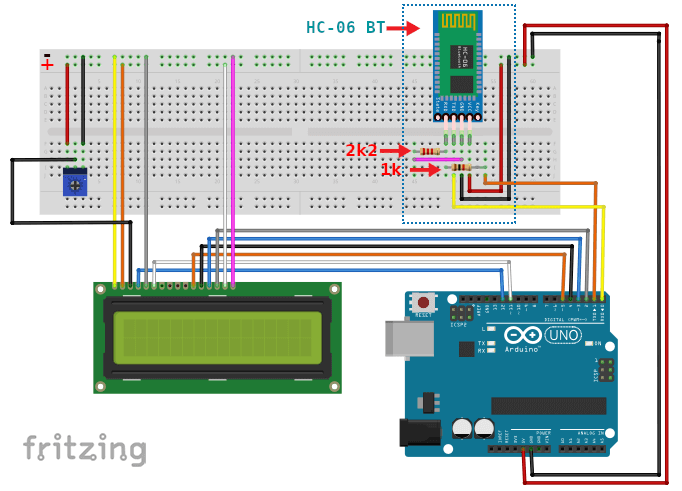
Arduino Uno with HC-06 Bluetooth module and 16x2 LCD
Standard configuration
Arduino Uno with HC-06 Bluetooth module and 16x2 LCD
Comments
Only logged in users can leave comments