Devices & Components
Breadboard - 400 contacts
Arduino Nano
2k ohm resistor
0.96 Inch I2C OLED (blue)
Electrical Cables
1K ohm resistor
HC-05 Bluetooth Module
Software & Tools
Arduino Bluetooth Controller
Arduino IDE
Project description
Code
Read with OLED Display
cpp
Note: Programming language is Arduino not C++
1#include <SoftwareSerial.h> 2#include <SPI.h> 3#include <Wire.h> 4#include <Adafruit_GFX.h> 5#include <Adafruit_SSD1306.h> 6 7#define STATEPIN 2 8#define OLED_RESET 4 9 10Adafruit_SSD1306 display(OLED_RESET); 11SoftwareSerial bluetooth(10, 11); 12 13String data = ""; 14 15void setup() { 16 Serial.begin(9600); 17 bluetooth.begin(9600); 18 pinMode(STATEPIN, INPUT); 19 display.begin(SSD1306_SWITCHCAPVCC, 0x3C); 20 display.clearDisplay(); 21 display.setTextSize(1); 22 display.setTextColor(WHITE); 23 display.setCursor(0, 0); 24 display.println("Data Recieved: "); 25 display.display(); 26} 27 28void loop() { 29 if (digitalRead(STATEPIN) == 1) 30 { 31 Serial.println("Client Connected"); 32 33 while (bluetooth.available() > 0) 34 { 35 data = bluetooth.readString(); 36 Serial.println(data); 37 bluetooth.stopListening(); 38 bluetooth.println("read"); 39 bluetooth.listen(); 40 } 41 display.clearDisplay(); 42 display.setCursor(0, 0); 43 display.println("Data Recieved: "); 44 display.setCursor(0, 20); 45 display.println(data); 46 display.setCursor(0, 10); 47 display.println("Connected"); 48 display.display(); 49 } 50 else 51 { 52 data = ""; 53 Serial.println("Disconnected"); 54 display.clearDisplay(); 55 display.setCursor(0, 0); 56 display.println("Data Recieved: "); 57 display.setCursor(0, 10); 58 display.println("Not Connected"); 59 display.display(); 60 } 61}
Downloadable files
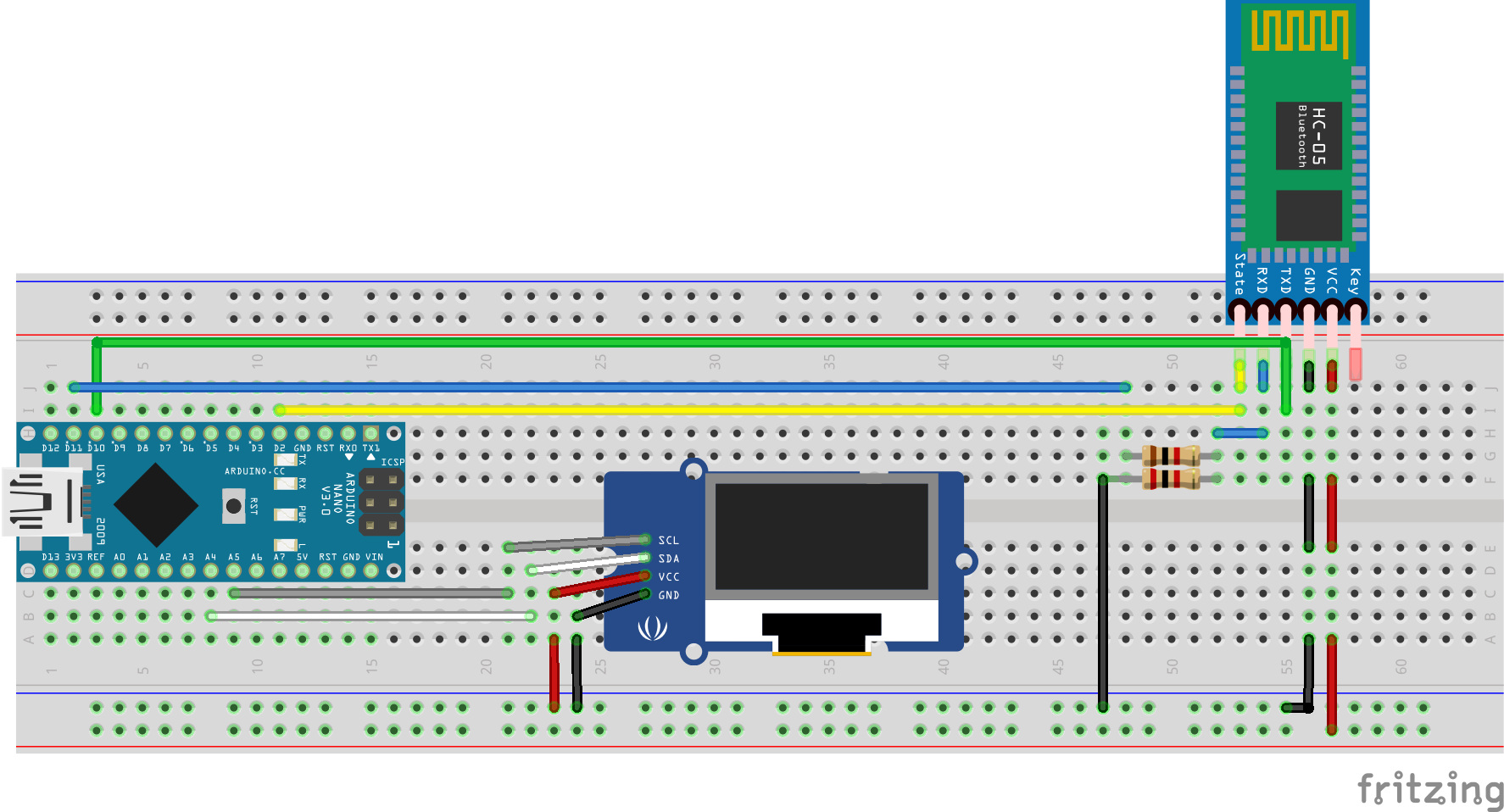
Schematic
Bluetooth_OLED_Receive_Data.png
Comments
Only logged in users can leave comments