Compact Memory Game for Arduino Nano with Buzzer Sound
Better code of a previously posted project for the memory "simon says" game where you remember what order the 4 different colors blink in and keep adding on to the pattern. Pressing the last button will start the game with sound. The next button starts it silently.
Devices & Components
1
10 jumper wires 150mm male
1
Arduino Nano
1
Green LED
1
Small Breadboard
4
1K resistor, 1/8w
4
push button
1
Red LED x 1
1
Blue LED
1
Piezo buzzer
1
1206 Yellow LED
Hardware & Tools
1
Computer with USB ports and Internet Access
Software & Tools

Arduino IDE
Project description
Code
MemoryGame.ino
c
Main code for the project.
1/*This sketch is a simple version of the famous Simon Says game. You can  use it and improved it adding
2levels and everything you want to increase the  diffuculty!
3
4There are 4 LEDs conencted to pins 8 - 11 that pulse in a different order you have to remember
5There are 4 buttons connected to pins 4 - 7 that you use to replicate the right sequence
6One of the buttons is the start button
7
8When you get the sequence right a happy beep will play
9When a wrong sequence is inserted a sad tone will play
10
11The original code and idea is from Arduino_Scuola on the Arduino Project Hub
12https://projecthub.arduino.cc/Arduino_Scuola/a-simple-simon-says-game-6f7fef
13It has been modified to have variables for pins and use for loops
14And to use buzzers for each pin and winning/losing sounds
15*/
16//#include "pitches.h"
17#define NOTE_C4 262
18#define NOTE_D4 294
19#define NOTE_E4 330
20#define NOTE_G4 392
21#define NOTE_C5 523
22#define NOTE_C3 131
23
24// Notes to play from the "pitches" library
25int notes[] = { NOTE_C4, NOTE_D4, NOTE_E4, NOTE_G4 };
26//Pins used for buttons
27const int buttonPins[] = { 4, 5, 6, 7 };
28const int buttonCount = 4;//You could add more buttons and tones
29const int actualSpeakerPin = 3;//Track speaker pin, but be able to turn it off
30int speakerPin = actualSpeakerPin;
31const int unusedPin = 2;
32//Pins used for LEDs
33const int ledPins[] = {8, 9, 10, 11};//{11, 10, 9, 8}
34//The wiring might have these flipped
35//If so, reverse their order in this array
36
37const int startSpeed = 1000;//If you think its too slow, start at 300-500
38const int minSpeed = 50;//If you don't stop it here, it is too fast
39
40const int MAX_LEVEL  = 100;
41int sequence[MAX_LEVEL];
42int your_sequence[MAX_LEVEL];
43int level  = 1;
44
45int velocity = startSpeed;
46
47void setup() {
48  //Using a for loop to set all the pins as input
49  for (int i = 0; i < buttonCount; i++) {
50    pinMode(buttonPins[i], INPUT_PULLUP);
51  }
52  //LED output pins
53  for (int i = 0; i < buttonCount; i++) {
54    pinMode(ledPins[i], OUTPUT);
55    //Start them off
56    digitalWrite(ledPins[i], LOW);
57  }
58}
59
60void loop()
61{
62  if  (level == 1)
63  generate_sequence();//generate a sequence;
64
65  if (digitalRead(buttonPins[3])  == LOW) //If first button is pressed or you're winning
66  {
67    //Start game normally with buzzer
68    speakerPin = 3;
69  show_sequence();    //show the sequence
70  get_sequence();     //wait for your sequence
71  }else if (digitalRead(buttonPins[2])  == LOW) //If 2nd butotn pressed
72  {
73    //Start game silently
74    speakerPin = 2; //Disable speaker
75  show_sequence();    //show the sequence
76  get_sequence();     //wait for your sequence
77  }else if (level != 1) //Or if winning
78  {
79  show_sequence();    //show the sequence
80  get_sequence();     //wait for your sequence
81  }
82}
83
84void show_sequence(){
85  //Start off
86  allLow();
87  delay(100);
88  //Show the sequence
89  for (int i = 0; i < level; i++){
90    digitalWrite(ledPins[sequence[i]], HIGH); // Use index, not pin number
91    tone(speakerPin, notes[sequence[i]], 160);
92    delay(velocity);
93    digitalWrite(ledPins[sequence[i]], LOW);
94    noTone(speakerPin);
95    delay(200);
96  }
97  delay(100);
98}
99
100void get_sequence() {
101  for (int i = 0; i < level; i++) {
102    bool pressed = false;
103    while (!pressed) {
104      for (int j = 0; j < buttonCount; j++) {
105        if (digitalRead(buttonPins[j]) == LOW) {
106          delay(20); // debounce: wait for signal to settle
107          if (digitalRead(buttonPins[j]) == LOW) { // confirm still pressed
108            digitalWrite(ledPins[j], HIGH);
109            tone(speakerPin, notes[j]);
110            your_sequence[i] = j;
111            delay(200); // LED/sound feedback
112            digitalWrite(ledPins[j], LOW);
113            noTone(speakerPin);
114            // Wait for button release to avoid double press
115            while (digitalRead(buttonPins[j]) == LOW) { delay(10); }
116            delay(50); // debounce: wait after release
117            pressed = true;
118            if (your_sequence[i] != sequence[i]) {
119              wrong_sequence();
120              return;
121            }
122            break;
123          }
124        }
125      }
126    }
127  }
128  right_sequence();
129}
130
131void generate_sequence(){
132  //Generate a random sequence
133  randomSeed(millis());
134  for (int i = 0; i < MAX_LEVEL; i++)
135  {
136    sequence[i]  = random(0, buttonCount); // Store index (0-3)
137  }
138}
139
140void wrong_sequence()
141{
142  // Play a sad low note
143  tone(speakerPin, NOTE_C3, 500); // C3 is a low note
144  for (int i = 0; i < 3;  i++)
145  {
146    //Blink 3 times
147    allHigh();
148    delay(250);
149    allLow();
150    delay(250);
151  }
152  noTone(speakerPin);
153  //Rest level
154  level  = 1;
155  velocity = startSpeed;
156}
157
158void right_sequence(){
159  // // Play a happy melody: C-E-G-C
160  // int melody[] = { NOTE_C4, NOTE_E4, NOTE_G4, NOTE_C5 };
161  // int noteDurations[] = { 150, 150, 150, 300 };
162  // for (int i = 0; i < 4; i++) {
163  //   tone(speakerPin, melody[i], noteDurations[i]);
164  //   delay(noteDurations[i]);
165  //   noTone(speakerPin);
166  //   delay(30);
167  // }
168  tone(speakerPin, NOTE_C5, 500); // C5 is a high note
169  //Blink all
170  allLow();
171  delay(250);
172  allHigh();
173  delay(400);
174  noTone(speakerPin);
175  allLow();
176  delay(40);
177
178  if  (level < MAX_LEVEL);
179  level++;
180
181  velocity -= 50; //increase difficulty
182  //But set minimum
183  if (velocity < minSpeed){
184    velocity = minSpeed;
185  }
186}
187void allHigh(){
188  for (int i = 0; i < buttonCount; i++) {
189    digitalWrite(ledPins[i], HIGH);
190  }
191}
192void allLow(){
193  for (int i = 0; i < buttonCount; i++) {
194    digitalWrite(ledPins[i], LOW);
195  }
196}
Downloadable files
MemoryGame.ino
Same file
MemoryGame_Buzzer_4colors.ino
Documentation
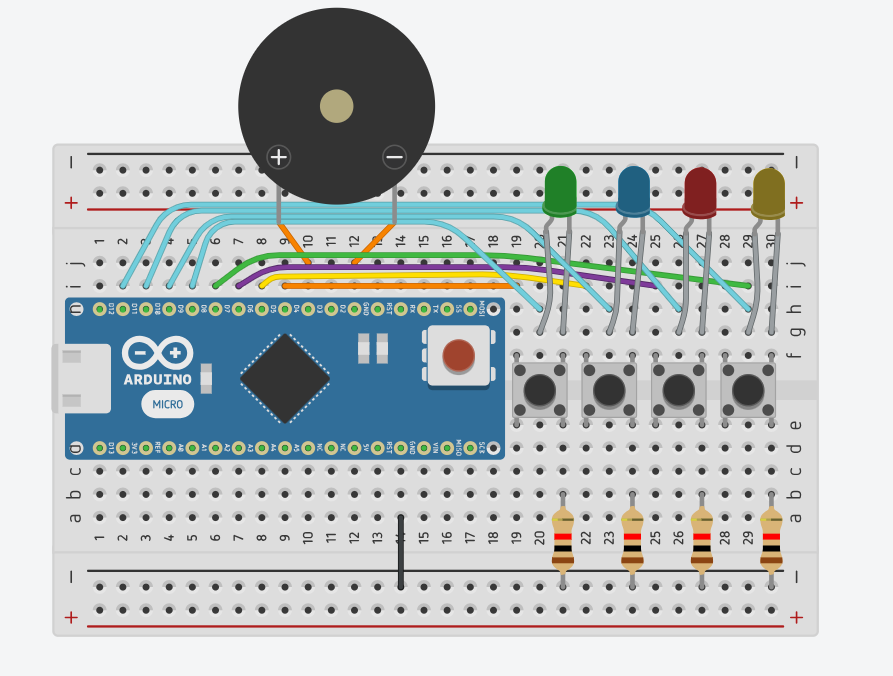
MemoryGameCircuitDiagram
Physical circuit model using tinkercad
Screenshot 2026-01-23 192138.png
Comments
Only logged in users can leave comments