Devices & Components
2
2×8 cm PCB
2
ESP32S
2
LED (generic)
1
Pushbutton switch 12mm
2
Resistor 1k ohm
1
dfplayer
Hardware & Tools
1
Soldering iron (generic)
1
3D Printer (generic)
Project description
Code
Sender Code
arduino
1/*
2 * Sources:
3 * https://www.arduino.cc/en/Tutorial/Button
4  * https://techtutorialsx.com/2017/05/19/esp32-http-get-requests/
5 */
6
7#include  <WiFi.h>
8#include <HTTPClient.h>
9
10const char* ssid     = "WiFi SSID";
11const  char* password = "WiFi password";
12const char* bellUrl = "http://192.168.1.149/bell/on";
13
14const  int buttonPin = 21;    // the number of the pushbutton pin
15const int ledPin =  23;      // the number of the LED pin
16int buttonState = 0;
17
18
19void  setup() {
20
21  Serial.begin(115200);
22  btStop(); // turn off bluetooth
23
24  pinMode(ledPin, OUTPUT);
25  pinMode(buttonPin, INPUT);
26
27  connectWifi();
28
29}
30
31void loop() {
32
33  if ((WiFi.status() == WL_CONNECTED)) {
34
35    buttonState  = digitalRead(buttonPin);
36    delay(100);
37
38    if (buttonState == HIGH)  {
39      digitalWrite(ledPin, HIGH);
40
41      HTTPClient http;
42
43      http.begin(bellUrl);
44      Serial.print("GET ");
45      Serial.println(bellUrl);
46      int httpCode = http.GET();
47
48      if (httpCode > 0) {
49          //String  payload = http.getString();
50          Serial.println(httpCode);
51          //Serial.println(payload);
52        }
53      else {
54        Serial.println("Error on HTTP request");
55      }
56
57      http.end();
58      delay(200);
59    }
60    else {
61      digitalWrite(ledPin, LOW);
62    }
63  }
64  else {
65    Serial.println("WiFi  not connected!");
66    digitalWrite(ledPin, HIGH);
67    delay(200);
68    digitalWrite(ledPin,  LOW);
69    delay(50);
70    digitalWrite(ledPin, HIGH);
71    delay(200);
72    digitalWrite(ledPin, LOW);
73    connectWifi();
74  }
75
76}
77
78void  connectWifi() {
79  boolean ledStatus = false;
80  Serial.print("Connecting to  ");
81  Serial.println(ssid);
82  WiFi.begin(ssid, password);
83  while (WiFi.status()  != WL_CONNECTED) {
84    delay(500);
85    Serial.print(".");
86    ledStatus  = !ledStatus;
87    digitalWrite(ledPin, ledStatus);
88  }
89
90  Serial.println("WiFi  connected.");
91  Serial.println("IP address: ");
92  Serial.println(WiFi.localIP());
93}
94
95
Speaker Code
arduino
1/* 2Sources: 3https://www.youtube.com/watch?v=kq2RLz65_w0 4https://www.dfrobot.com/wiki/index.php/DFPlayer_Mini_SKU:DFR0299 5https://github.com/pcbreflux/espressif/blob/master/esp32/arduino/sketchbook/ESP32_DFPlayer_full/ESP32_DFPlayer_full.ino 6https://github.com/pcbreflux/espressif/blob/master/esp32/arduino/sketchbook/ESP32_DFPlayer_full/setup.png 7https://randomnerdtutorials.com/esp32-web-server-arduino-ide/ 8*/ 9 10#include <Arduino.h> 11#include "DFRobotDFPlayerMini.h" 12#include <WiFi.h> 13 14HardwareSerial hwSerial(1); 15DFRobotDFPlayerMini dfPlayer; 16int volume = 5; 17 18const char* ssid = "WiFi SSID"; 19const char* password = "WiFi password"; 20WiFiServer server(80); // Set web server port number to 80 21 22String header; 23String ledState = ""; 24const int ledPin = 26; 25 26unsigned long timestamp = 0; 27 28 29void setup() 30{ 31 btStop(); // turn off bluetooth 32 hwSerial.begin(9600, SERIAL_8N1, 18, 19); // speed, type, TX, RX 33 Serial.begin(115200); 34 35// WiFi & LED ================================================================== 36 pinMode(ledPin, OUTPUT); 37 digitalWrite(ledPin, LOW); 38 39 // Connect to Wi-Fi network with SSID and password 40 Serial.print("Connecting to "); 41 Serial.println(ssid); 42 WiFi.begin(ssid, password); 43 while (WiFi.status() != WL_CONNECTED) { 44 delay(500); 45 Serial.print("."); 46 } 47 // Print local IP address and start web server 48 Serial.println(""); 49 Serial.println("WiFi connected."); 50 Serial.println("IP address: "); 51 Serial.println(WiFi.localIP()); 52 server.begin(); 53 delay(500); 54 55 dfPlayer.begin(hwSerial); //Use softwareSerial to communicate with mp3 56 dfPlayer.setTimeOut(500); //Set serial communication time out 500ms 57 dfPlayer.volume(volume); //Set volume value (0~30). 58 dfPlayer.EQ(DFPLAYER_EQ_NORMAL); 59 dfPlayer.outputDevice(DFPLAYER_DEVICE_SD); 60 61 ledState = "on"; 62 digitalWrite(ledPin, HIGH); 63 timestamp = millis(); 64 dfPlayer.play(1); //Play the first mp3 65 66} 67 68void loop() { 69 70 WiFiClient client = server.available(); // Listen for incoming clients 71 72 if (ledState == "on" && (millis() - timestamp) > 2000) { 73 ledState = "off"; 74 digitalWrite(ledPin, LOW); 75 } 76 77 if (client) { 78 String currentLine = ""; // make a String to hold incoming data from the client 79 while (client.connected()) { // loop while the client's connected 80 if (client.available()) { // if there's bytes to read from the client, 81 char c = client.read(); // read a byte, then 82 Serial.write(c); // print it out the serial monitor 83 header += c; 84 if (c == '\ 85') { // if the byte is a newline character 86 // if the current line is blank, you got two newline characters in a row. 87 // that's the end of the client HTTP request, so send a response: 88 if (currentLine.length() == 0) { 89 // HTTP headers always start with a response code (e.g. HTTP/1.1 200 OK) 90 // and a content-type so the client knows what's coming, then a blank line: 91 client.println("HTTP/1.1 200 OK"); 92 client.println("Content-type:text/html"); 93 client.println("Connection: close"); 94 client.println(); 95 96 // turns the GPIOs on and off 97 if (header.indexOf("GET /bell/on") >= 0) { 98 ledState = "on"; 99 digitalWrite(ledPin, HIGH); 100 timestamp = millis(); 101 dfPlayer.play(1); //Play the first mp3 102 } 103 else if (header.indexOf("GET /volume/") >= 0) { // yes, I know this is not RESTful 104 String str1 = header; 105 str1 = str1.substring(header.indexOf("GET /volume/") + 12); 106 volume = str1.substring(0, str1.indexOf(" ")).toInt(); 107 108 if (volume < 0) { 109 volume = 0; 110 } 111 else if (volume > 30) { 112 volume = 30; 113 } 114 115 dfPlayer.volume(volume); 116 Serial.print("volume set to "); 117 Serial.println(volume); 118 } 119 120 // Display the HTML web page 121 client.println("<!DOCTYPE html><html>"); 122 client.println("<head><meta name=\\"viewport\\" content=\\"width=device-width, initial-scale=1\\">"); 123 client.println("<link rel=\\"icon\\" href=\\"data:,\\">"); 124 client.println("<style>html { font-family: sans-serif; display: inline-block; margin: 0px auto; text-align: center; }"); 125 client.println(".button { background-color: #4CAF50; border: none; color: white; padding: 16px 40px; text-decoration: none; font-size: 30px; margin: 2px; cursor: pointer;}"); 126 client.println(".button2 { background-color: #4CAF50; border: none; color: white; padding: 4px 10px; text-decoration: none; margin: 1px; cursor: pointer;}</style></head>"); 127 128 client.println("<body><h1>LeWe Türklingel</h1>"); 129 client.println("<p>Volume: <a href=\\"/volume/" + String(volume-1) + "\\"><button class=\\"button2\\">−</button></a> " + String(volume) + " <a href=\\"/volume/" + String(volume+1) + "\\"><button class=\\"button2\\">+</button></a></p>"); 130 client.println("<p><a href=\\"/bell/on\\"><button class=\\"button\\">Klingeln</button></a></p>"); 131 client.println("<p style='margin-top: 40px; font-size: 8px;'>dfplayer status: " + printDetail(dfPlayer.readType(), dfPlayer.read()) + "</p>"); 132 client.println("<p style='font-size: 8px;'>LED - State " + ledState + "</p>"); 133 client.println("</body></html>"); 134 135 // The HTTP response ends with another blank line 136 client.println(); 137 138 // Break out of the while loop 139 break; 140 } else { // if you got a newline, then clear currentLine 141 currentLine = ""; 142 } 143 } else if (c != '\ ') { // if you got anything else but a carriage return character, 144 currentLine += c; // add it to the end of the currentLine 145 } 146 } 147 } 148 // Clear the header variable 149 header = ""; 150 // Close the connection 151 client.stop(); 152 Serial.println("Client disconnected."); 153 Serial.println(""); 154 } 155} 156 157String printDetail(uint8_t type, int value){ 158 switch (type) { 159 case TimeOut: 160 return "Time Out!"; 161 break; 162 case WrongStack: 163 return "Stack Wrong!"; 164 break; 165 case DFPlayerCardInserted: 166 return "Card Inserted!"; 167 break; 168 case DFPlayerCardRemoved: 169 return "Card Removed!"; 170 break; 171 case DFPlayerCardOnline: 172 return "Card Online!"; 173 break; 174 case DFPlayerPlayFinished: 175 return "Play Finished!"; 176 break; 177 case DFPlayerError: 178 switch (value) { 179 case Busy: 180 return "Error: Card not found"; 181 break; 182 case Sleeping: 183 return "Error: Sleeping"; 184 break; 185 case SerialWrongStack: 186 return "Error: Get Wrong Stack"; 187 break; 188 case CheckSumNotMatch: 189 return "Error: Check Sum Not Match"; 190 break; 191 case FileIndexOut: 192 return "Error: File Index Out of Bound"; 193 break; 194 case FileMismatch: 195 return "Error: Cannot Find File"; 196 break; 197 case Advertise: 198 return "Error: In Advertise"; 199 break; 200 default: 201 break; 202 } 203 break; 204 default: 205 break; 206 } 207} 208 209
Speaker Code
arduino
1/* 2Sources: 3https://www.youtube.com/watch?v=kq2RLz65_w0 4https://www.dfrobot.com/wiki/index.php/DFPlayer_Mini_SKU:DFR0299 5https://github.com/pcbreflux/espressif/blob/master/esp32/arduino/sketchbook/ESP32_DFPlayer_full/ESP32_DFPlayer_full.ino 6https://github.com/pcbreflux/espressif/blob/master/esp32/arduino/sketchbook/ESP32_DFPlayer_full/setup.png 7https://randomnerdtutorials.com/esp32-web-server-arduino-ide/ 8*/ 9 10#include <Arduino.h> 11#include "DFRobotDFPlayerMini.h" 12#include <WiFi.h> 13 14HardwareSerial hwSerial(1); 15DFRobotDFPlayerMini dfPlayer; 16int volume = 5; 17 18const char* ssid = "WiFi SSID"; 19const char* password = "WiFi password"; 20WiFiServer server(80); // Set web server port number to 80 21 22String header; 23String ledState = ""; 24const int ledPin = 26; 25 26unsigned long timestamp = 0; 27 28 29void setup() 30{ 31 btStop(); // turn off bluetooth 32 hwSerial.begin(9600, SERIAL_8N1, 18, 19); // speed, type, TX, RX 33 Serial.begin(115200); 34 35// WiFi & LED ================================================================== 36 pinMode(ledPin, OUTPUT); 37 digitalWrite(ledPin, LOW); 38 39 // Connect to Wi-Fi network with SSID and password 40 Serial.print("Connecting to "); 41 Serial.println(ssid); 42 WiFi.begin(ssid, password); 43 while (WiFi.status() != WL_CONNECTED) { 44 delay(500); 45 Serial.print("."); 46 } 47 // Print local IP address and start web server 48 Serial.println(""); 49 Serial.println("WiFi connected."); 50 Serial.println("IP address: "); 51 Serial.println(WiFi.localIP()); 52 server.begin(); 53 delay(500); 54 55 dfPlayer.begin(hwSerial); //Use softwareSerial to communicate with mp3 56 dfPlayer.setTimeOut(500); //Set serial communication time out 500ms 57 dfPlayer.volume(volume); //Set volume value (0~30). 58 dfPlayer.EQ(DFPLAYER_EQ_NORMAL); 59 dfPlayer.outputDevice(DFPLAYER_DEVICE_SD); 60 61 ledState = "on"; 62 digitalWrite(ledPin, HIGH); 63 timestamp = millis(); 64 dfPlayer.play(1); //Play the first mp3 65 66} 67 68void loop() { 69 70 WiFiClient client = server.available(); // Listen for incoming clients 71 72 if (ledState == "on" && (millis() - timestamp) > 2000) { 73 ledState = "off"; 74 digitalWrite(ledPin, LOW); 75 } 76 77 if (client) { 78 String currentLine = ""; // make a String to hold incoming data from the client 79 while (client.connected()) { // loop while the client's connected 80 if (client.available()) { // if there's bytes to read from the client, 81 char c = client.read(); // read a byte, then 82 Serial.write(c); // print it out the serial monitor 83 header += c; 84 if (c == '\n') { // if the byte is a newline character 85 // if the current line is blank, you got two newline characters in a row. 86 // that's the end of the client HTTP request, so send a response: 87 if (currentLine.length() == 0) { 88 // HTTP headers always start with a response code (e.g. HTTP/1.1 200 OK) 89 // and a content-type so the client knows what's coming, then a blank line: 90 client.println("HTTP/1.1 200 OK"); 91 client.println("Content-type:text/html"); 92 client.println("Connection: close"); 93 client.println(); 94 95 // turns the GPIOs on and off 96 if (header.indexOf("GET /bell/on") >= 0) { 97 ledState = "on"; 98 digitalWrite(ledPin, HIGH); 99 timestamp = millis(); 100 dfPlayer.play(1); //Play the first mp3 101 } 102 else if (header.indexOf("GET /volume/") >= 0) { // yes, I know this is not RESTful 103 String str1 = header; 104 str1 = str1.substring(header.indexOf("GET /volume/") + 12); 105 volume = str1.substring(0, str1.indexOf(" ")).toInt(); 106 107 if (volume < 0) { 108 volume = 0; 109 } 110 else if (volume > 30) { 111 volume = 30; 112 } 113 114 dfPlayer.volume(volume); 115 Serial.print("volume set to "); 116 Serial.println(volume); 117 } 118 119 // Display the HTML web page 120 client.println("<!DOCTYPE html><html>"); 121 client.println("<head><meta name=\\"viewport\\" content=\\"width=device-width, initial-scale=1\\">"); 122 client.println("<link rel=\\"icon\\" href=\\"data:,\\">"); 123 client.println("<style>html { font-family: sans-serif; display: inline-block; margin: 0px auto; text-align: center; }"); 124 client.println(".button { background-color: #4CAF50; border: none; color: white; padding: 16px 40px; text-decoration: none; font-size: 30px; margin: 2px; cursor: pointer;}"); 125 client.println(".button2 { background-color: #4CAF50; border: none; color: white; padding: 4px 10px; text-decoration: none; margin: 1px; cursor: pointer;}</style></head>"); 126 127 client.println("<body><h1>LeWe Türklingel</h1>"); 128 client.println("<p>Volume: <a href=\\"/volume/" + String(volume-1) + "\\"><button class=\\"button2\\">−</button></a> " + String(volume) + " <a href=\\"/volume/" + String(volume+1) + "\\"><button class=\\"button2\\">+</button></a></p>"); 129 client.println("<p><a href=\\"/bell/on\\"><button class=\\"button\\">Klingeln</button></a></p>"); 130 client.println("<p style='margin-top: 40px; font-size: 8px;'>dfplayer status: " + printDetail(dfPlayer.readType(), dfPlayer.read()) + "</p>"); 131 client.println("<p style='font-size: 8px;'>LED - State " + ledState + "</p>"); 132 client.println("</body></html>"); 133 134 // The HTTP response ends with another blank line 135 client.println(); 136 137 // Break out of the while loop 138 break; 139 } else { // if you got a newline, then clear currentLine 140 currentLine = ""; 141 } 142 } else if (c != '\r') { // if you got anything else but a carriage return character, 143 currentLine += c; // add it to the end of the currentLine 144 } 145 } 146 } 147 // Clear the header variable 148 header = ""; 149 // Close the connection 150 client.stop(); 151 Serial.println("Client disconnected."); 152 Serial.println(""); 153 } 154} 155 156String printDetail(uint8_t type, int value){ 157 switch (type) { 158 case TimeOut: 159 return "Time Out!"; 160 break; 161 case WrongStack: 162 return "Stack Wrong!"; 163 break; 164 case DFPlayerCardInserted: 165 return "Card Inserted!"; 166 break; 167 case DFPlayerCardRemoved: 168 return "Card Removed!"; 169 break; 170 case DFPlayerCardOnline: 171 return "Card Online!"; 172 break; 173 case DFPlayerPlayFinished: 174 return "Play Finished!"; 175 break; 176 case DFPlayerError: 177 switch (value) { 178 case Busy: 179 return "Error: Card not found"; 180 break; 181 case Sleeping: 182 return "Error: Sleeping"; 183 break; 184 case SerialWrongStack: 185 return "Error: Get Wrong Stack"; 186 break; 187 case CheckSumNotMatch: 188 return "Error: Check Sum Not Match"; 189 break; 190 case FileIndexOut: 191 return "Error: File Index Out of Bound"; 192 break; 193 case FileMismatch: 194 return "Error: Cannot Find File"; 195 break; 196 case Advertise: 197 return "Error: In Advertise"; 198 break; 199 default: 200 break; 201 } 202 break; 203 default: 204 break; 205 } 206} 207 208
Downloadable files
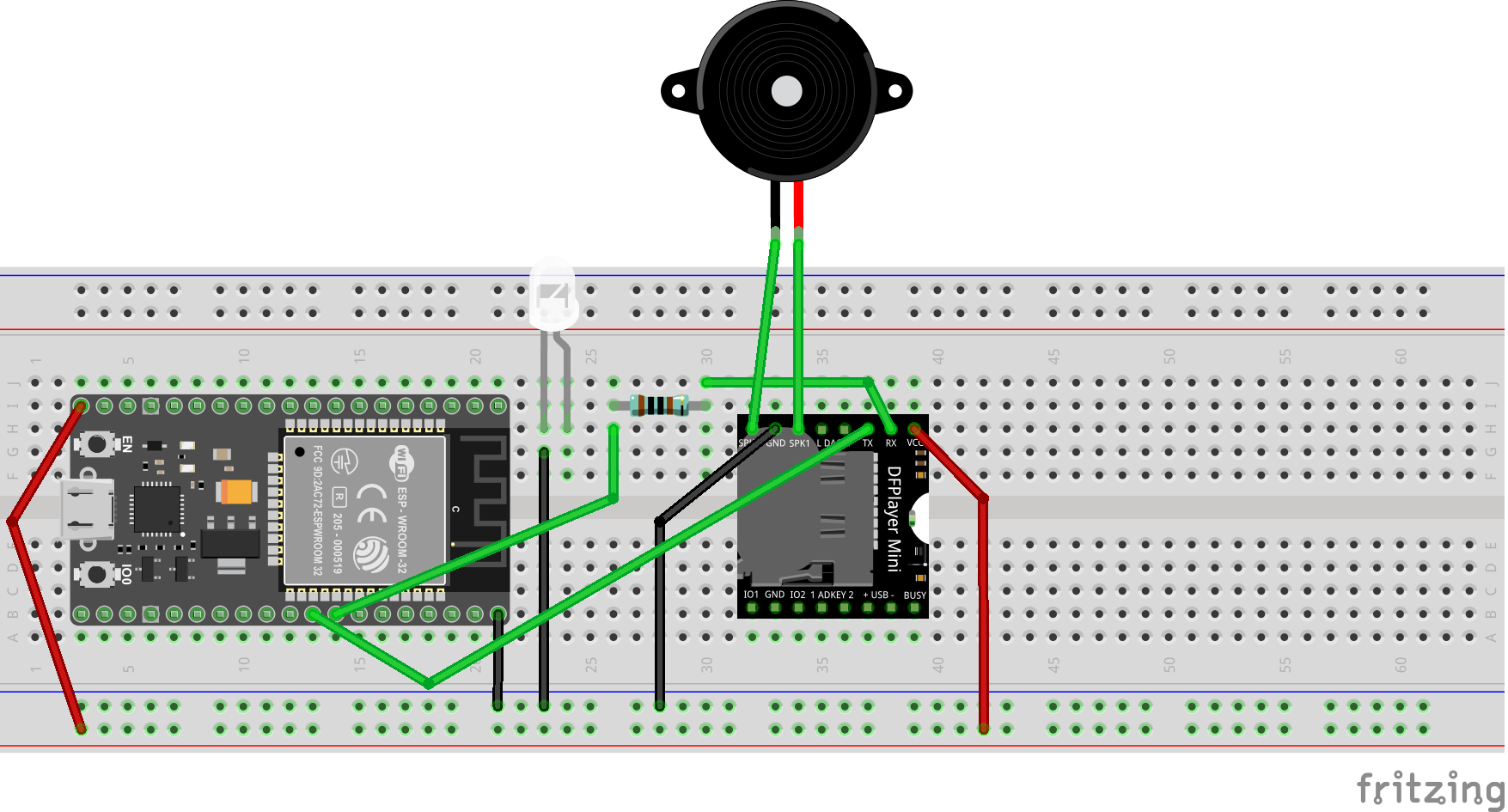
Doorbell Speaker
Doorbell Speaker
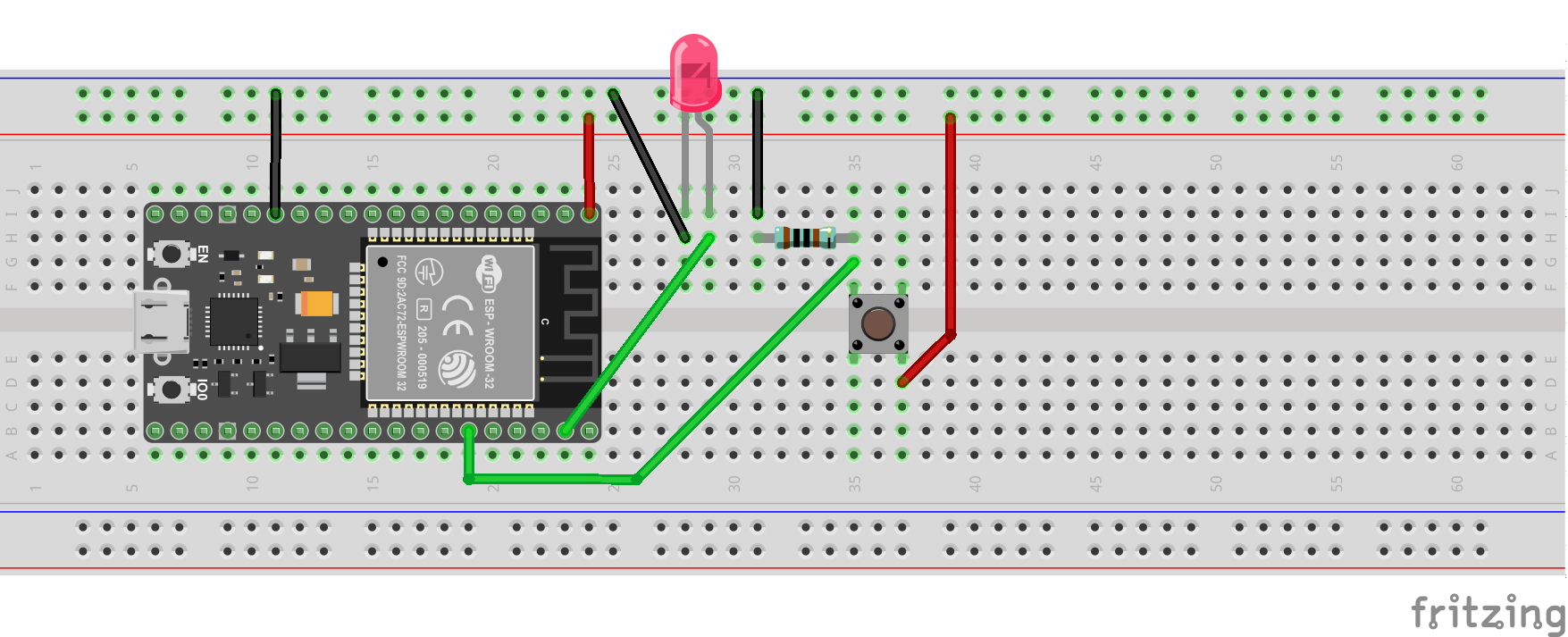
Doorbell Sender
Doorbell Sender
Doorbell Speaker
Doorbell Speaker
Doorbell Sender
Doorbell Sender
Documentation
Speaker Case
Speaker Case
Sender Case
Sender Case
Sender Case
Sender Case
Speaker Case
Speaker Case
Comments
Only logged in users can leave comments