Devices & Components
Arduino Uno Rev3
Cardboard
Male/Female Jumper Wires
Chopstick
Jumper wires (generic)
Popsicle Stick
SG90 Micro-servo motor
Ultrasonic Sensor - HC-SR04 (Generic)
Paper
Hardware & Tools
Hot glue gun (generic)
Software & Tools
Arduino IDE
Project description
Code
Code
c_cpp
1// ---------------------------------------------------------------- // 2// Arduino Ultrasoninc Sensor HC-SR04 3// Re-writed by Arbi Abdul Jabbaar 4// Using Arduino IDE 1.8.7 5// Using HC-SR04 Module 6// Tested on 17 September 2019 7// Modified by tinker_knight 7 of October 2021 8// ---------------------------------------------------------------- // 9#include <Servo.h> // includes the servo library 10 11#define echoPin 2 // attach pin D2 Arduino to pin Echo of HC-SR04 12#define trigPin 3 //attach pin D3 Arduino to pin Trig of HC-SR0 13 14// defines variables 15long duration; // variable for the duration of sound wave travel 16int distance; // variable for the distance measurement 17Servo myservo; // defines the Servo motor as "myservo" 18 19void setup() { 20 pinMode(trigPin, OUTPUT); // Sets the trigPin as an OUTPUT 21 pinMode(echoPin, INPUT); // Sets the echoPin as an INPUT 22 Serial.begin(9600); // // Serial Communication is starting with 9600 of baudrate speed 23 Serial.println("Ultrasonic Sensor HC-SR04 Test"); // print some text in Serial Monitor 24 Serial.println("with Arduino UNO R3"); 25 myservo.attach(7); // tells the arduino that the servo, myservo, is attached to pin 7 26} 27void loop() { 28 // Clears the trigPin condition 29 myservo.write(0); // sets the servo to 0 degrees 30 digitalWrite(trigPin, LOW); 31 delayMicroseconds(2); 32 // Sets the trigPin HIGH (ACTIVE) for 10 microseconds 33 digitalWrite(trigPin, HIGH); 34 delayMicroseconds(10); 35 digitalWrite(trigPin, LOW); 36 // Reads the echoPin, returns the sound wave travel time in microseconds 37 duration = pulseIn(echoPin, HIGH); 38 // Calculating the distance 39 distance = duration * 0.034 / 2; // Speed of sound wave divided by 2 (go and back) 40 // Displays the distance on the Serial Monitor 41 Serial.print("Distance: "); 42 Serial.print(distance); 43 Serial.println(" cm"); 44 45 if (distance < 30) { 46 myservo.write(90); // raises the servo to 90 degrees 47 delay(3000); // keep this delay the same so the ultra sensor won't slow down! 48 myservo.write(180); // lowers the servo back to normal 49 } 50}
Downloadable files
Build Schematic
Build Schematic
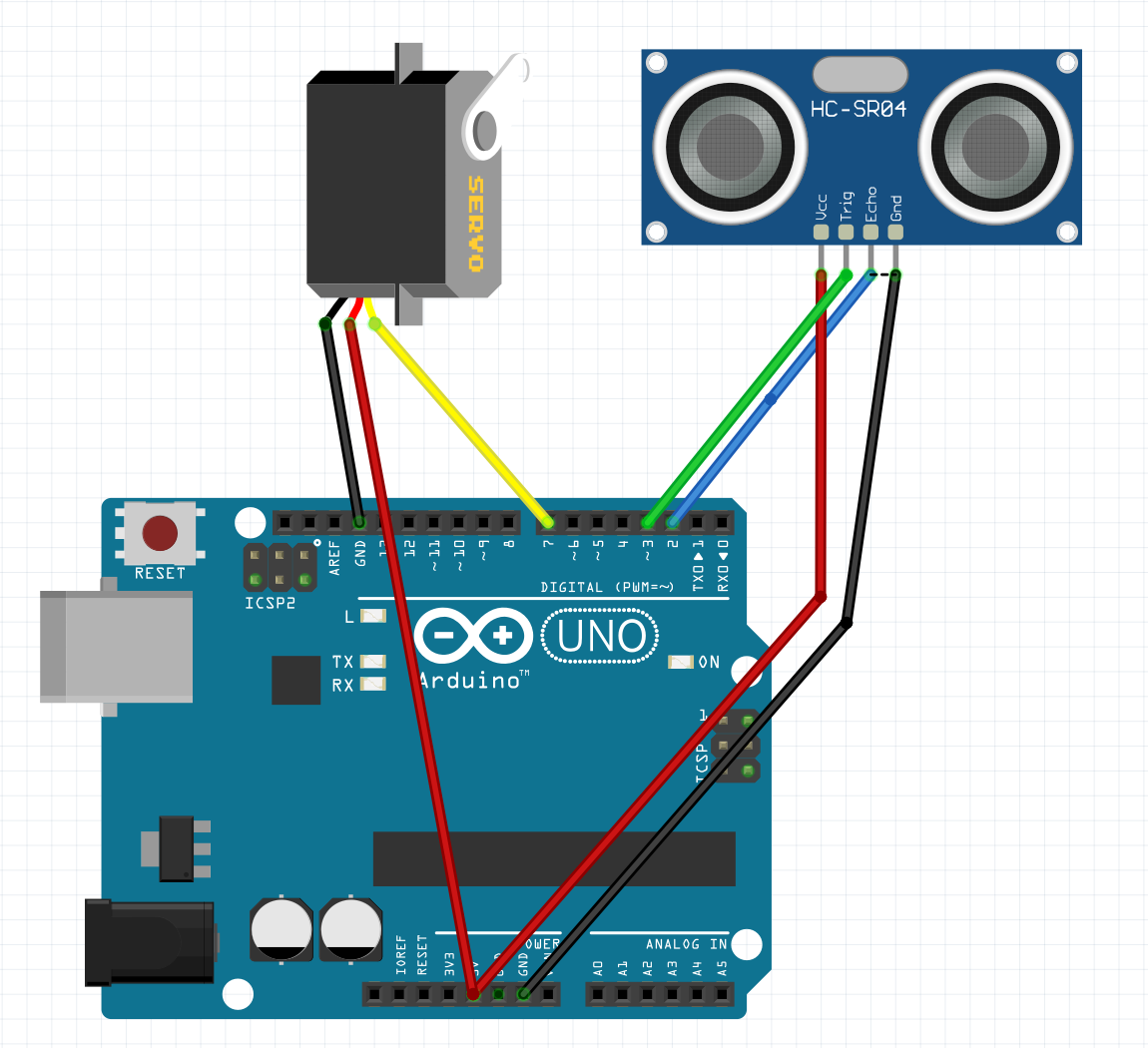
Build Schematic
Build Schematic

Comments
Only logged in users can leave comments