Talk to the Hand: ASL Gesture Recognition Glove
Creating a functional glove to bridge the communication gap between hearing and non-hearing individuals!
Devices & Components
1
Bluetooth Low Energy 4.0 Module - HM-10
1
Grove - 6-Axis Accelerometer & Gyroscope
1
Breadboard - 400 contacts
1
USB 2.0 Cable Type A/B
1
40 colored male-female jumper wires
1
Box 525 1% precision resistors - 17 values
1
Arduino Uno Rev3
1
40 colored male-male jumper wires
1
40 colored female-female jumper wires
1
Black Gloves
1
foam sheet
Software & Tools

Arduino IDE
1
DSD Tech
Project description
Code
cpp
Code can be adjusted to personal preferences
1//#include <Dabble.h>
2 #include <SoftwareSerial.h>
3#include <Adafruit_MPU6050.h>
4#include <Adafruit_Sensor.h>
5#include <Wire.h>
6Adafruit_MPU6050 mpu;
7
8
9// Define Bluetooth module pins
10SoftwareSerial BTSerial(10, 11); // RX | TX (Arduino pins)
11
12
13// Define the analog pins for each flex sensor
14const int flexSensor1 = A0;
15const int flexSensor2 = A1;
16const int flexSensor3 = A2;
17const int flexSensor4 = A3;
18const int flexSensor5 = A4;
19
20
21//char Incoming_value[] = "abc";
22
23
24
25
26// Thresholds for identifying movements
27const int thresholdLow = 200;
28const int thresholdHigh = 220;
29
30
31
32
33// Variable to hold current mode (0 = Letter Mode, 1 = Number Mode)
34int currentMode = 0;
35
36
37
38
39void setup() {
40  // Start the serial communication
41  Serial.begin(9600);
42  BTSerial.begin(9600);
43  pinMode(2, INPUT_PULLUP);  // Pin 2 for mode switch (connect a button)
44
45
46	// Try to initialize!
47	if (!mpu.begin()) {
48		Serial.println("Failed to find MPU6050 chip");
49		while (1) {
50		  delay(10);
51		}
52	}
53
54
55	// set accelerometer range to +-8G
56	mpu.setAccelerometerRange(MPU6050_RANGE_8_G);
57
58
59	// set gyro range to +- 500 deg/s
60	mpu.setGyroRange(MPU6050_RANGE_500_DEG);
61
62
63	// set filter bandwidth to 21 Hz
64	mpu.setFilterBandwidth(MPU6050_BAND_21_HZ);
65
66
67
68
69  if (currentMode == 0) {
70    BTSerial.println("Word Mode");
71  } else {
72    BTSerial.println("Number Mode");
73  }
74}
75
76
77
78
79
80
81
82
83void loop() {
84  // Read button to toggle between letter and number mode
85  //if (digitalRead(2) == LOW) {  // Assuming button press is LOW
86    //currentMode = !currentMode;  // Toggle between 0 (letters) and 1 (numbers)
87    //delay(1300);  // Debounce delay
88  //}
89
90
91
92
93//if (BTSerial.available()>0){
94  String Incoming_value = BTSerial.readString();
95  Serial.println("Incoming value is :");
96  Serial.println(Incoming_value);
97  Serial.println("\n");
98//}
99
100
101
102
103  // Read values from each flex sensor
104  int sensorValue1 = analogRead(flexSensor1);
105  int sensorValue2 = analogRead(flexSensor2);
106  int sensorValue3 = analogRead(flexSensor3);
107  int sensorValue4 = analogRead(flexSensor4);
108  int sensorValue5 = analogRead(flexSensor5);
109
110
111
112
113
114
115
116
117  // Print raw sensor values for debugging
118  Serial.print("Sensor 1: ");
119  Serial.print(sensorValue1);
120  Serial.print(" | Sensor 2: ");
121  Serial.print(sensorValue2);
122  Serial.print(" | Sensor 3: ");
123  Serial.print(sensorValue3);
124  Serial.print(" | Sensor 4: ");
125  Serial.print(sensorValue4);
126  Serial.print(" | Sensor 5: ");
127  Serial.println(sensorValue5);
128
129  // Call a function to identify gestures and print the result
130  if (currentMode == 0) {
131    Serial.println("Letter Mode");
132    identifyLetters(sensorValue1, sensorValue2, sensorValue3, sensorValue4, sensorValue5);
133  } else {
134    Serial.println("Number Mode");
135    identifyNumbers(sensorValue1, sensorValue2, sensorValue3, sensorValue4, sensorValue5);
136  }
137
138
139//Reading the motion sensor
140	sensors_event_t a, g, temp;
141	mpu.getEvent(&a, &g, &temp);
142	Serial.print("Acceleration X: ");
143Serial.print(a.acceleration.x);
144Serial.print(", Y: ");
145Serial.print(a.acceleration.y);
146Serial.print(", Z: ");
147Serial.print(a.acceleration.z);
148Serial.println(" m/s^2");
149
150
151
152
153
154
155
156
157  // Delay to avoid overwhelming the Serial Monitor
158  delay(5000);
159}
160
161
162
163
164
165
166
167
168void identifyLetters(int val1, int val2, int val3, int val4, int val5) {
169  if (val1 > thresholdHigh && val2 > thresholdHigh && val3 < thresholdLow && val4 < thresholdLow && val5 < thresholdLow) {
170    Serial.println("G");
171    BTSerial.println("G");
172  }
173  else if (val1 > thresholdHigh && val2 > thresholdHigh && val3 > thresholdHigh && val4 < thresholdLow && val5 < thresholdLow) {
174    Serial.println("Hi");
175    BTSerial.println("Hi");
176  }
177  else if (val1 < thresholdLow && val2 < thresholdLow && val3 < thresholdLow && val4 < thresholdLow && val5 > thresholdHigh) {
178    Serial.println("I");
179    BTSerial.println("I");
180  }
181  else if (val1 < thresholdLow && val2 < thresholdLow && val3 < thresholdLow && val4 < thresholdLow && val5 < thresholdLow) {
182    Serial.println("S");
183    BTSerial.println("S");
184  } else {
185    Serial.println("Unknown Letter");
186    BTSerial.println("Unknown Letter");
187  }
188}
189
190
191
192
193
194
195
196
197void identifyNumbers(int val1, int val2, int val3, int val4, int val5) {
198  if (val1 < thresholdLow && val2 < thresholdLow && val3 < thresholdLow && val4 < thresholdLow && val5 < thresholdLow) {
199    Serial.println("0");
200    BTSerial.println("0");
201  }
202  else if (val1 < thresholdLow && val2 > thresholdHigh && val3 < thresholdLow && val4 < thresholdLow && val5 < thresholdLow) {
203    Serial.println("1");
204    BTSerial.println("1");
205  }
206  else if (val1 < thresholdLow && val2 > thresholdHigh && val3 > thresholdHigh && val4 < thresholdLow && val5 < thresholdLow) {
207    Serial.println("2");
208    BTSerial.println("2");
209  }
210  else if (val1 > thresholdHigh && val2 > thresholdHigh && val3 > thresholdHigh && val4 < thresholdLow && val5 < thresholdLow) {
211    Serial.println("3");
212    BTSerial.println("3");
213  }
214  else if (val1 < thresholdLow && val2 > thresholdHigh && val3 > thresholdHigh && val4 > thresholdHigh && val5 > thresholdHigh) {
215    Serial.println("4");
216    BTSerial.println("4");
217  }
218  else if (val1 > thresholdHigh && val2 > thresholdHigh && val3 > thresholdHigh && val4 > thresholdHigh && val5 > thresholdHigh) {
219    Serial.println("5");
220    BTSerial.println("5");
221  } else {
222    Serial.println("Unknown Number");
223    BTSerial.println("Unknown Number");
224  }
225}
226
227
228
229
230
231
232============================
233
234
235float valX = a.acceleration.x;
236float valY = a.acceleration.y;
237float valZ = a.acceleration.z;
Documentation
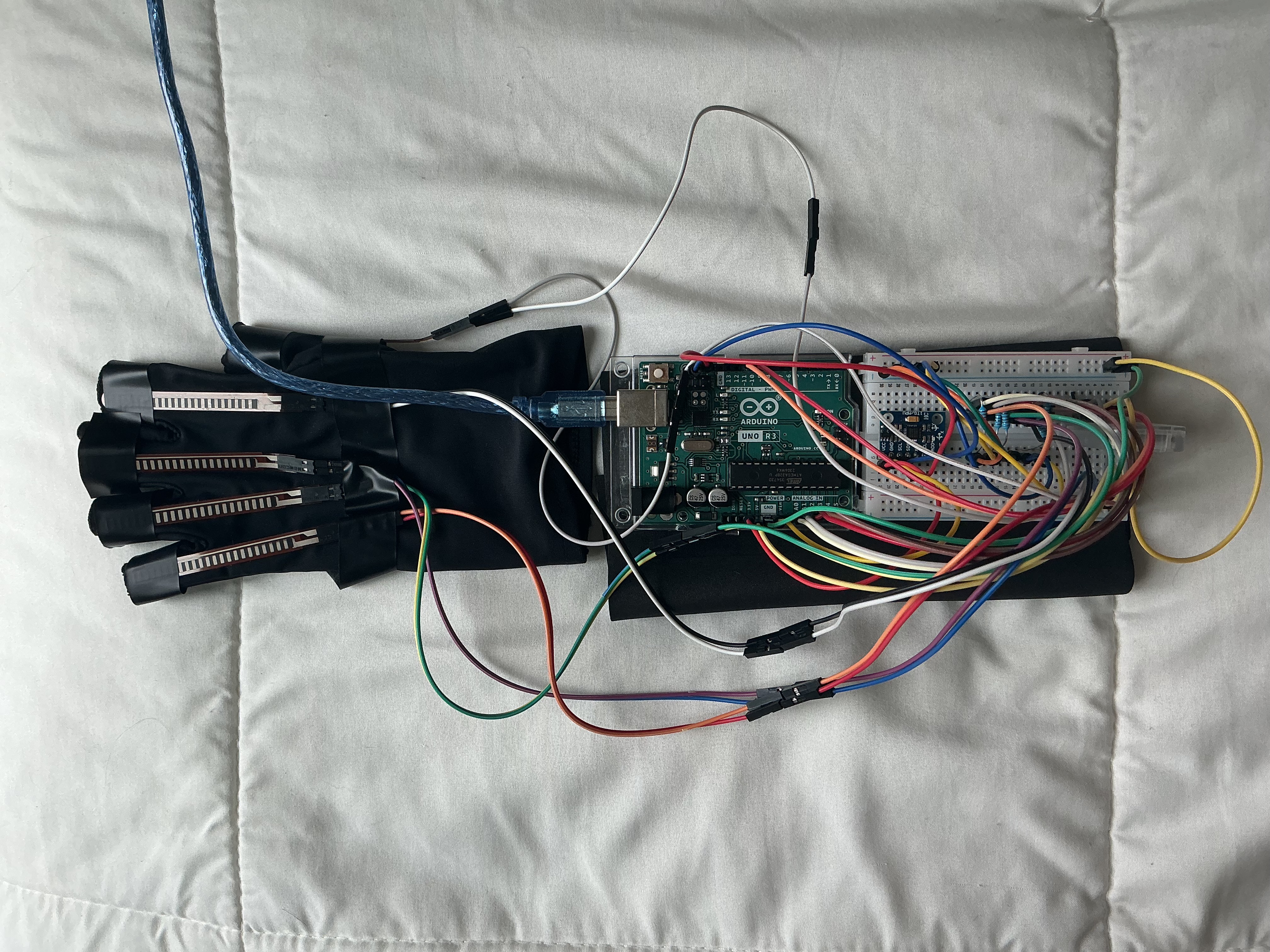
IMG_5681
IMG_5681.jpeg
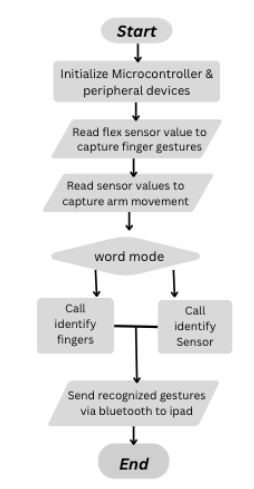
Flowchart
Flowchart showing sequence of translation
Screenshot (3).png
Comments
Only logged in users can leave comments