Devices & Components
16x2 LCD display with I²C interface
Arduino Uno Rev3
Micro servo SG90
Extra RFID Cards
jumper wire ( male to male)
Jumper Wire Female to Male
RFID-RC522
Hardware & Tools
Breadboard, 830 Tie Points
Software & Tools
Arduino IDE
TINKERCAD
Project description
Code
The final code
After getting UID then change to this code
1#include <SPI.h> 2#include <MFRC522.h> 3#include <Servo.h> 4#include <Wire.h> 5#include <LiquidCrystal_I2C.h> 6 7// Pins 8#define SS_PIN 10 9#define RST_PIN 9 10#define SERVO_PIN 3 11 12// Devices 13MFRC522 rfid(SS_PIN, RST_PIN); 14Servo myServo; 15LiquidCrystal_I2C lcd(0x27, 16, 2); 16 17// Authorized UIDs and names 18const int NUM_USERS = 2; 19 20const String authorizedUIDs[NUM_USERS] = { 21 "AA BB CC DD", // Replace with actual UID 1 22 "EE FF GG HH" // Replace with actual UID 2 23}; 24 25const String userNames[NUM_USERS] = { 26 "Type your name 1", 27 "Type your name 2" 28}; 29 30bool userStatus[NUM_USERS] = {false, false}; // false = outside, true = inside 31 32// Convert UID to string 33String getUID(MFRC522::Uid uid) { 34 String uidStr = ""; 35 for (byte i = 0; i < uid.size; i++) { 36 uidStr += String(uid.uidByte[i], HEX); 37 if (i < uid.size - 1) uidStr += " "; 38 } 39 uidStr.toUpperCase(); 40 return uidStr; 41} 42 43void setup() { 44 Serial.begin(9600); 45 SPI.begin(); 46 rfid.PCD_Init(); 47 48 myServo.attach(SERVO_PIN); 49 myServo.write(0); // Closed 50 51 lcd.init(); 52 lcd.backlight(); 53 lcd.setCursor(0, 0); 54 lcd.print("Scan your card"); 55 56 } 57 58void loop() { 59 if (!rfid.PICC_IsNewCardPresent() || !rfid.PICC_ReadCardSerial()) return; 60 61 String scannedUID = getUID(rfid.uid); 62 Serial.print("Scanned UID: "); 63 Serial.println(scannedUID); 64 65 int userIndex = -1; 66 for (int i = 0; i < NUM_USERS; i++) { 67 if (scannedUID == authorizedUIDs[i]) { 68 userIndex = i; 69 break; 70 } 71 } 72 73 lcd.clear(); 74 75 if (userIndex != -1) { 76 String userName = userNames[userIndex]; 77 78 if (!userStatus[userIndex]) { 79 // Entry 80 lcd.setCursor(0, 0); 81 lcd.print("Welcome,"); 82 lcd.setCursor(0, 1); 83 lcd.print(userName); 84 Serial.println("Entry granted to: " + userName); 85 userStatus[userIndex] = true; 86 } else { 87 // Exit 88 lcd.setCursor(0, 0); 89 lcd.print("Thank You,"); 90 lcd.setCursor(0, 1); 91 lcd.print(userName); 92 Serial.println("Exit recorded for: " + userName); 93 userStatus[userIndex] = false; 94 } 95 96 myServo.write(87); // Open 97 delay(3000); 98 myServo.write(0); // Close 99 } else { 100 lcd.setCursor(0, 0); 101 lcd.print("Access Denied"); 102 Serial.println("Unknown UID!"); 103 delay(3000); 104 } 105 106 rfid.PICC_HaltA(); 107 rfid.PCD_StopCrypto1(); 108 109 delay(1000); 110 lcd.clear(); 111 lcd.setCursor(0, 0); 112 lcd.print("Scan your card"); 113}
To get UID of the card
1#include <SPI.h> 2#include <MFRC522.h> 3#include <Wire.h> 4#include <LiquidCrystal_I2C.h> 5 6// Pin definitions for RFID 7#define SS_PIN 10 8#define RST_PIN 9 9 10// RFID and LCD setup 11MFRC522 rfid(SS_PIN, RST_PIN); 12LiquidCrystal_I2C lcd(0x27, 16, 2); // Adjust I2C address if needed 13 14// Function to convert UID to String 15String getUID(MFRC522::Uid uid) { 16 String uidStr = ""; 17 for (byte i = 0; i < uid.size; i++) { 18 uidStr += String(uid.uidByte[i], HEX); 19 if (i < uid.size - 1) uidStr += " "; 20 } 21 uidStr = uidStr.toUpperCase(); // make uppercase 22 return uidStr; 23} 24 25void setup() { 26 Serial.begin(9600); 27 SPI.begin(); 28 rfid.PCD_Init(); 29 30 lcd.init(); 31 lcd.backlight(); 32 lcd.setCursor(0, 0); 33 lcd.print("Scan your card"); 34} 35 36void loop() { 37 // Wait for a card 38 if (!rfid.PICC_IsNewCardPresent() || !rfid.PICC_ReadCardSerial()) return; 39 40 // Get and display UID 41 String scannedUID = getUID(rfid.uid); 42 Serial.print("Card UID: "); 43 Serial.println(scannedUID); 44 45 lcd.clear(); 46 lcd.setCursor(0, 0); 47 lcd.print("Card UID:"); 48 lcd.setCursor(0, 1); 49 lcd.print(scannedUID); 50 51 delay(5000); // Hold message for 5 seconds 52 53 // Reset 54 rfid.PICC_HaltA(); 55 rfid.PCD_StopCrypto1(); 56 lcd.clear(); 57 lcd.setCursor(0, 0); 58 lcd.print("Scan your card"); 59}
Downloadable files
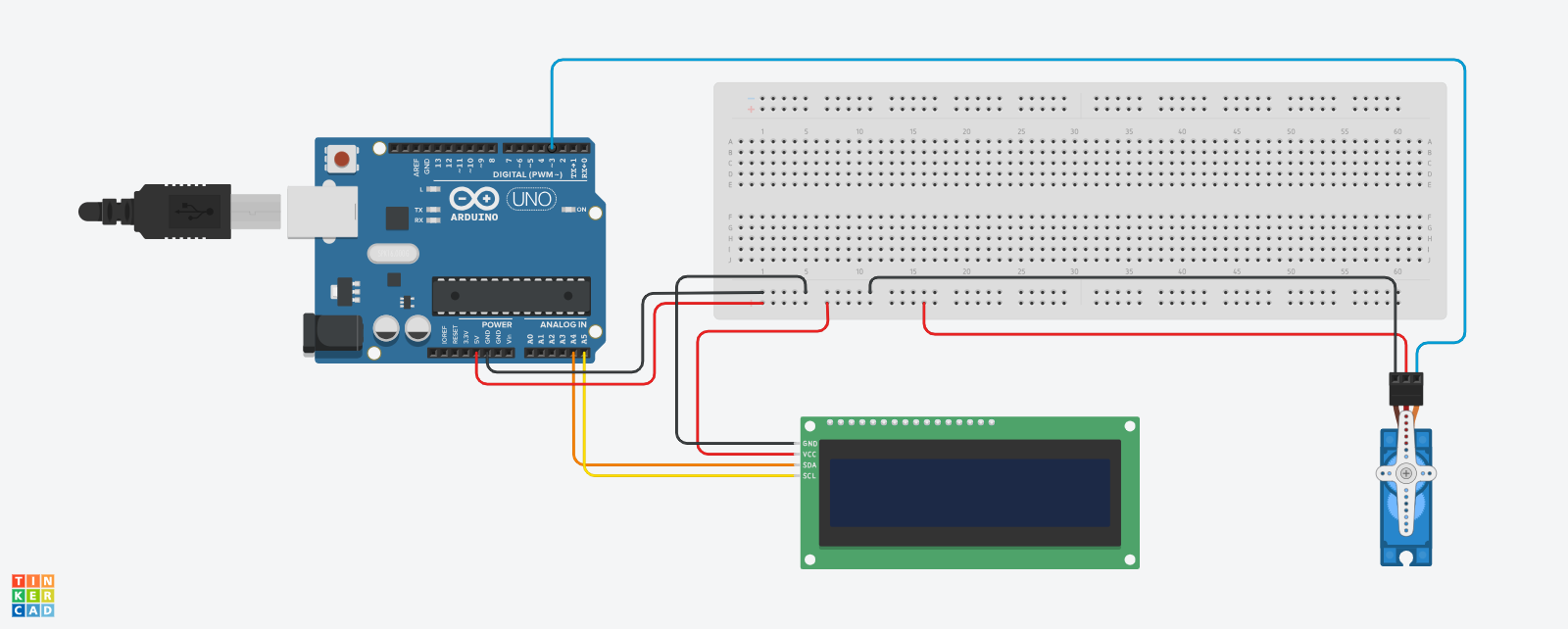
This the circuit diagram
Unfortunately, we dont have RFID in the Tinkercad.
file.None
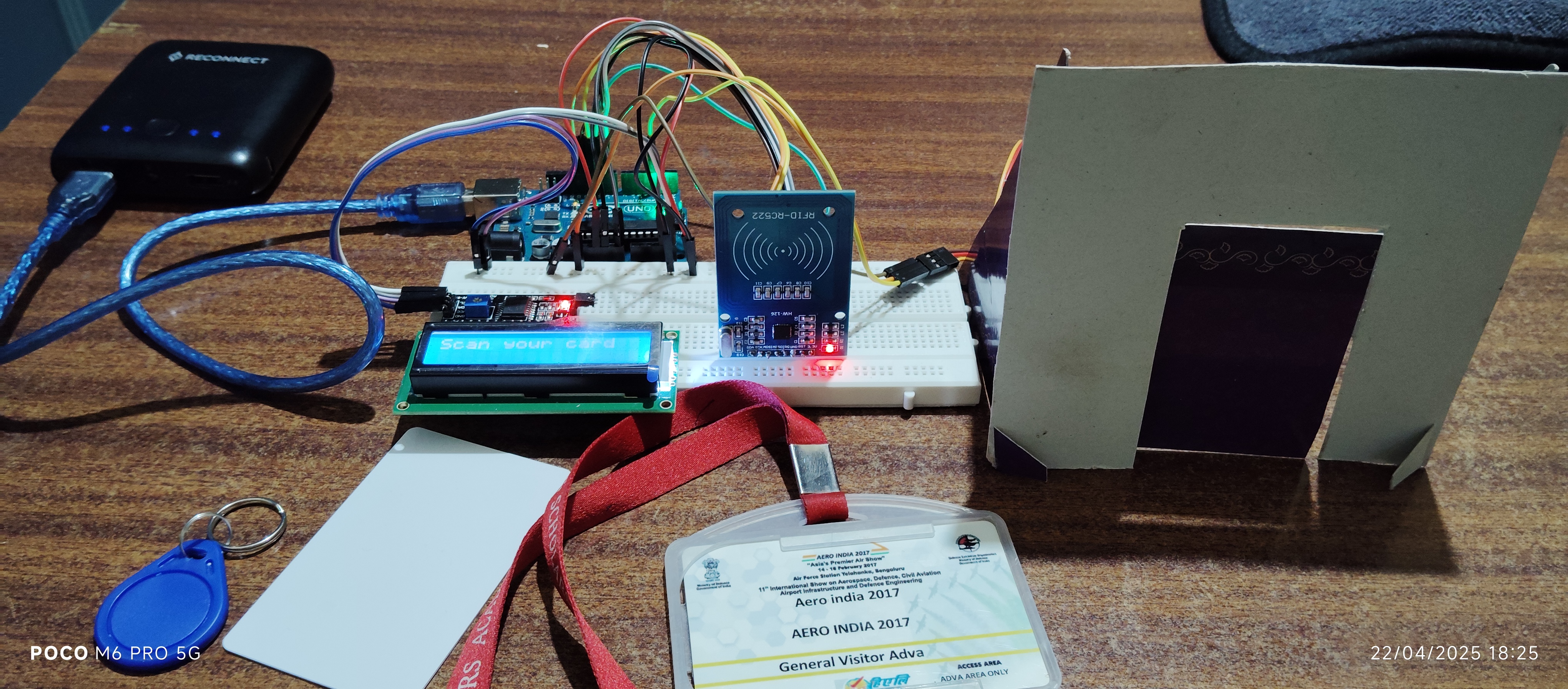
This is the final project
VID_20250422_184443.mp4
image
IMG_20250422_182553.jpg
Comments
Only logged in users can leave comments