Devices & Components
Box 525 1% precision resistors - 17 values
16x2 LCD display with I²C interface
Arduino Uno Rev3
SG90 Micro-servo Motor
jumper cables
Ultrasonic Distance Sensor HC-SR04
Large breadboard
Software & Tools
Arduino IDE
Project description
Code
Smart Bin
js
1#include <Servo.h> 2#include <LiquidCrystal.h> 3 4// LCD pins: RS, E, D4, D5, D6, D7 5LiquidCrystal lcd(2, 3, 4, 5, 6, 7); 6 7Servo lidServo; 8 9// PING))) ultrasonic sensors 10const int handSensorPin = 12; // front sensor for hand detection 11const int fullSensorPin = 13; // inside sensor for bin full detection 12 13// Actuators 14const int servoPin = A0; 15 16const int redPin = 9; 17const int greenPin = 11; 18const int bluePin = 10; 19 20// Distance settings in cm 21const int handDistance = 50; // hand detected if closer than 20 cm 22const int fullDistance = 20; // bin full if trash is closer than 8 cm 23 24void setup() { 25 lcd.begin(16, 2); 26 27 lidServo.attach(servoPin); 28 lidServo.write(0); // lid closed 29 30 pinMode(redPin, OUTPUT); 31 pinMode(greenPin, OUTPUT); 32 pinMode(bluePin, OUTPUT); 33 34 lcd.clear(); 35 lcd.setCursor(0, 0); 36 lcd.print("Smart Trash Bin"); 37 lcd.setCursor(0, 1); 38 lcd.print("Starting..."); 39 delay(2000); 40} 41 42void loop() { 43 int handDist = readPing(handSensorPin); 44 int fullDist = readPing(fullSensorPin); 45 46 bool binFull = fullDist > 0 && fullDist <= fullDistance; 47 bool handDetected = handDist > 0 && handDist <= handDistance; 48 49 if (binFull) { 50 setRGB(255, 0, 0); // red 51 52 lcd.clear(); 53 lcd.setCursor(0, 0); 54 lcd.print("BIN FULL"); 55 lcd.setCursor(0, 1); 56 lcd.print("Please Empty"); 57 58 lidServo.write(0); // keep closed 59 } 60 else { 61 setRGB(0, 255, 0); // green 62 63 if (handDetected) { 64 lidServo.write(90); // open lid 65 66 lcd.clear(); 67 lcd.setCursor(0,0); 68 lcd.print("Lid Open"); 69 70 lcd.setCursor(0,1); 71 lcd.print("Throw Trash"); 72 73 delay(3000); // keep lid open for 3 sec 74 75 lcd.clear(); 76 lcd.setCursor(0,0); 77 lcd.print("Remove Hand"); 78 79 lcd.setCursor(0,1); 80 lcd.print("Closing Lid"); 81 82 delay(1500); // let user read message 83 84 lidServo.write(0); // close lid 85 86 delay(1000); 87 lcd.clear(); 88 89 } 90 else { 91 lcd.setCursor(0, 0); 92 lcd.print("Smart Bin Ready "); 93 lcd.setCursor(0, 1); 94 lcd.print("Not Full "); 95 } 96 } 97 98 delay(300); 99} 100 101// Function for PING))) sensor 102int readPing(int pin) { 103 long duration; 104 int distance; 105 106 pinMode(pin, OUTPUT); 107 digitalWrite(pin, LOW); 108 delayMicroseconds(2); 109 digitalWrite(pin, HIGH); 110 delayMicroseconds(5); 111 digitalWrite(pin, LOW); 112 113 pinMode(pin, INPUT); 114 duration = pulseIn(pin, HIGH, 30000); 115 116 if (duration == 0) { 117 return -1; 118 } 119 120 distance = duration / 29 / 2; 121 return distance; 122} 123 124// RGB LED control 125void setRGB(int redValue, int greenValue, int blueValue) { 126 analogWrite(redPin, redValue); 127 analogWrite(greenPin, greenValue); 128 analogWrite(bluePin, blueValue); 129}
Documentation
Tinkercad Link
https://www.tinkercad.com/things/3cgqoVUQ0WV-smart-trash-bin?sharecode=Yxxz3TfmbR_wjLy873BpEQILzLEdcEjtUfoc4u6G254
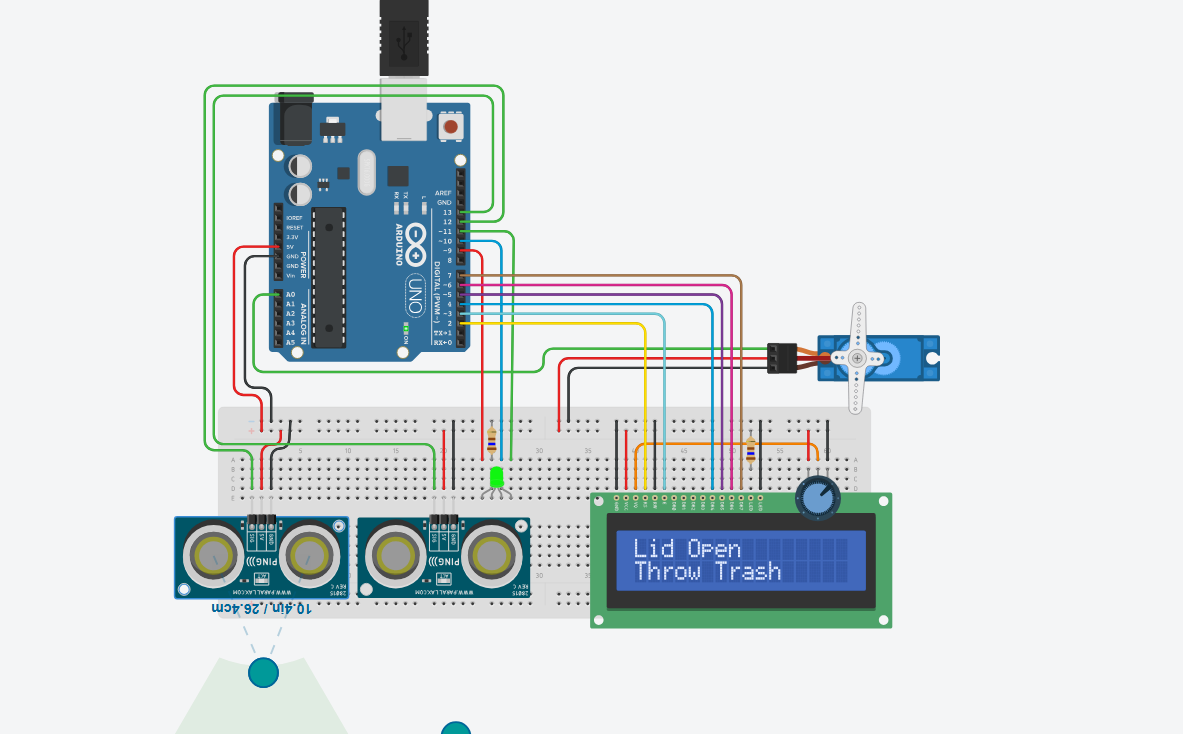
bin opening
cp2.png
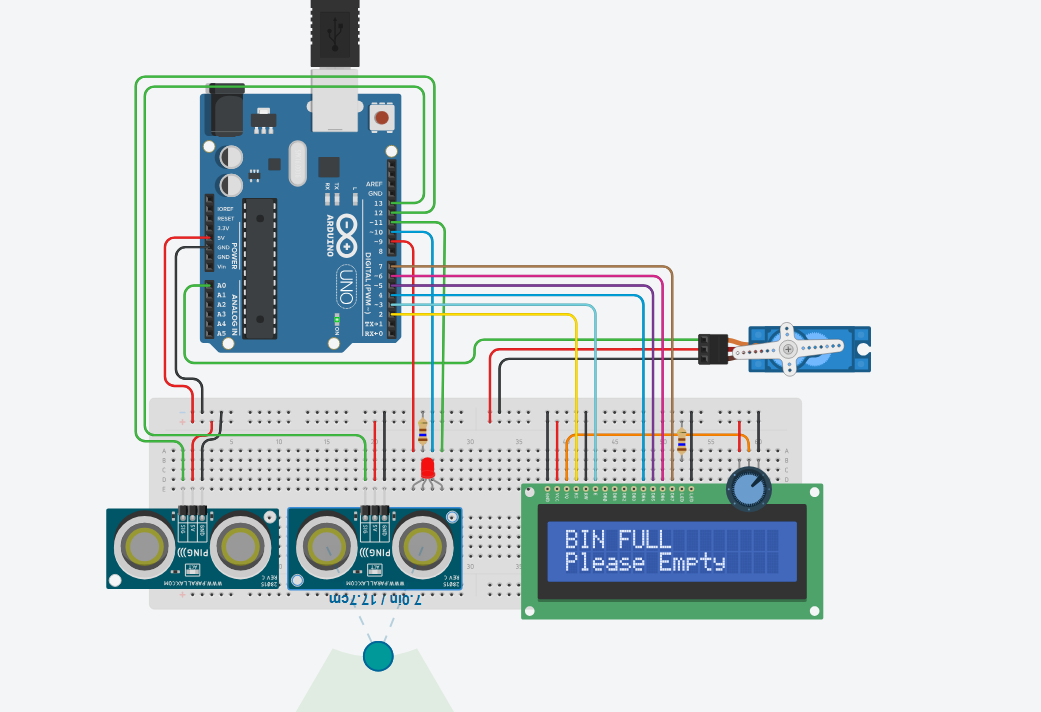
bin full
cp1.png
Comments
Only logged in users can leave comments