Devices & Components

Arduino Uno Rev3
AA Batteries
WS2812 Addressable LED Strip
60W PCIe 12V 5A Power Supply
Brushless Fan DC 12V - 3000 rpm
Jumper wires (generic)
Nextion NX4827T043 - 4.3” TFT LCD Intelligent Touch Display
Battery Holder, AA x 8
Battery Holder, AA x 6
Momentary switch DBWLI
Line tracker - SEN-KY033LT
Hardware & Tools
3D Printer (generic)
Laser cutter (generic)
Plier, Cutting
Soldering iron (generic)
Tape, Painters Tape
Sticker printer
Project description
Code
Air Football - Arduino IDE code
arduino
1// AIR FOOTBALL BY SILAS HANSEN
2// CREATIVE DESIGN & TECHNOLOGY
3//  SAXION UNIVERSITY
4// 30.01.2022
5
6const int buttonPin = 8;                               //  Integer to indicated which pin the button is connected to.
7int buttonState =  0;                                   // Integer to store data from the button.
8int  scoreBlue = 0;                                     // Variable to count the score  for the blue team.
9int scoreRed = 0;                                      //  Variable to count the score for the red team.
10boolean addScoreBlue = false;                          //  Boolean to trigger animation, blue lights and increase in score for the blue team.
11boolean  addScoreRed = false;                           // Boolean to trigger animation,  red lights and increase in score for the red team.
12int lineTrackerTriggeredBlue  = 0;                      // Variable to display animation and blue light show first  and then add the score afterwards.
13int lineTrackerTriggeredRed = 0;                       //  Variable to display animation and red light show first and then add the score afterwards.
14#include  <Adafruit_NeoPixel.h>                         // Including Adafruit library to control  the NeoPixel.
15int lightDelay = 10;                                   // Integer  for length of delay in light shows.
16const int Pin = 7;                                     //  Varible for the pin where the NeoPixel strip is connected to
17const int NumberOfPixels  = 56;                         // Variable for the number of pixels in the NeoPixel  strip
18Adafruit_NeoPixel pixels(NumberOfPixels, Pin, NEO_GRB + NEO_KHZ800); //The  type of NeoPixel is defined.
19
20void setup() {
21  Serial.begin(9600);                                  //  Initializes the serial monitor and Nextion display.
22  attachInterrupt(0,addscoreblue,FALLING);             // Calls the function "addscoreblue" when signal from blue's line  tracker is triggered.
23  attachInterrupt(1,addscorered,FALLING);              //  Calls the function "addscorered" when signal from red's line tracker is triggered.
24  pinMode(buttonPin, INPUT_PULLUP);                    // Defining the button as  an input.
25  pixels.begin();                                      // Initialises  the NeoPixel strip.
26}
27
28void loop() {
29  for(int i=0; i<28; i++) {                            //  For loop to manage one half of the LED strip.
30    pixels.setPixelColor(i, pixels.Color(0,  0, 255));  // Half of the LED's is set to blue.
31    pixels.show();}                                    //  Send the updated pixel colors to the hardware.
32
33  for(int i=28; i<NumberOfPixels;  i++) {               // For loop to manage the other half of the LED strip.
34    pixels.setPixelColor(i, pixels.Color(255, 0, 0));  // Sets the other half of  LED's to red.
35    pixels.show();}                                    // Send  the updated pixel colors to the hardware.
36
37  if (addScoreBlue==true){                             // If the blue team scores, the following code is executed.
38    lineTrackerTriggeredBlue++;
39      if(lineTrackerTriggeredBlue  == 1){               // When the puck covers the line tracker, the animation and  blue light show are displayed.
40        dynamicPixelsBlue();                           //  Function to display the blue light show is called.
41        Serial.print("page  1");                        // The page number is send to the Nextion display.
42        Serial.write(0xff);                            // When something is send  to a Nextion display, these three lines need to be called.
43        Serial.write(0xff);
44        Serial.write(0xff);
45        delay(5000);                                   //  Delay to let the animation play for 5 secs.
46        Serial.print("page 0");                        // The page number is send to the Nextion display to display  the scoreboard again.
47        Serial.write(0xff);
48        Serial.write(0xff);
49        Serial.write(0xff);}
50      if(lineTrackerTriggeredBlue == 2){               //  When is removed from the goal, the score is added in the Nextion display.
51        scoreBlue  = scoreBlue + 1;
52        lineTrackerTriggeredBlue = 0;}                 // Resets  the value, so code above can be repeated if blue team scores again.
53  }
54  addScoreBlue  = false;                                // Sets the boolean to false again, so code  above can be repeated if blue team scores again.
55  Serial.print("n0.val=");                             // Defines that the following variable is a number.
56  Serial.print(scoreBlue);                             // The variable of the blue  team's score is send to the display.
57  Serial.write(0xff);
58  Serial.write(0xff);
59  Serial.write(0xff);
60
61  if (addScoreRed==true){                              //  If the red team scores, the following code is executed.
62    lineTrackerTriggeredRed++;
63      if(lineTrackerTriggeredRed == 1){                // When the puck covers the  line tracker, the animation and red light show are displayed.
64        dynamicPixelsRed();                            // Function to display the red light show is called.
65        Serial.print("page 1");                        // The page number is send  to the Nextion display.
66        Serial.write(0xff);
67        Serial.write(0xff);
68        Serial.write(0xff);
69        delay(5000);                                   //  Delay to let the animation play for 5 secs.
70        Serial.print("page 0");                        // The page number is send to the Nextion display to display  the scoreboard again.
71        Serial.write(0xff);
72        Serial.write(0xff);
73        Serial.write(0xff);}
74      if(lineTrackerTriggeredRed == 2){                //  When is removed from the goal, the score is added in the Nextion display.
75        scoreRed  = scoreRed + 1;
76        lineTrackerTriggeredRed = 0;}                  // Resets  the value, so code above can be repeated if red team scores again.
77  }
78  addScoreRed  = false;                                 // Sets the boolean to false again, so  code above can be repeated if red team scores again.
79  Serial.print("n1.val=");                             // Defines that the following variable is a number.
80  Serial.print(scoreRed);                              // The variable of the red  team's score is send to the display.
81  Serial.write(0xff);
82  Serial.write(0xff);
83  Serial.write(0xff);
84
85  buttonState = digitalRead(buttonPin);                //  The Arduino recieves data from the button and sets it as buttonState.
86  resetScore();                                        // Calls a function that detect if score  needs to be resetted.
87  WhoWins();                                           //  Calls a function to detect if one of the players won the game.
88}
89
90void  addscoreblue(){                                   // Function that is called when  blue team scores.
91  addScoreBlue = true;}                                // Sets  boolean to true, so statement in loop is triggered.
92
93void addscorered(){                                    //  Function that is called when red team scores.
94  addScoreRed = true;}                                 //  Sets boolean to true, so statement in loop is triggered.
95
96void resetScore(){                                     // Function to reset the score if the button  is pressed.
97 if (buttonState == LOW) {
98  scoreRed = 0;
99  scoreBlue = 0;}
100}
101
102void  resetScoreAfterWin(){                             // Function to reset score when  one of the players won the game.
103  scoreRed = 0;
104  scoreBlue = 0;}
105
106void  dynamicPixelsBlue() {                             // Function to make a light show  when blue team scores.
107  pixels.clear();                                      //  Turns off all LED's, so it's ready for the following light pattern.
108  for(int  i=0; i<NumberOfPixels; i++) {                // For loop to make wave effect with  10 pixels.
109    pixels.setPixelColor(i, pixels.Color(0, 0, 255));  // Pixel i  is set to blue.
110    pixels.setPixelColor(i-10, pixels.Color(0, 0, 0)); // The  pixel that is 10 behind of pixel i is turned off.
111    pixels.show();                                     //  Send the updated pixel colors to the hardware.
112    delay(lightDelay);}                                //  Pause before next pass through loop
113
114  for(int i=56; i>0; i--) {                            //  For loop to make wave effect with 10 pixels but in the other direction than above.
115    pixels.setPixelColor(i, pixels.Color(0, 0, 255));  // Pixel i is set to blue.
116    pixels.setPixelColor(i+10, pixels.Color(0, 0, 0)); // The pixel that is 10 infront  of pixel i is turned off.
117    pixels.show();                                     //  Send the updated pixel colors to the hardware.
118    delay(lightDelay);}                                //  Pause before next pass through loop
119
120  for(int i=0; i<NumberOfPixels;  i++){                 // For loop to turn on all pixels.
121    pixels.setPixelColor(i,  pixels.Color(0, 0, 255));} // Sets all pixels to blue.
122    pixels.show();                                     //  Send the updated pixel colors to the hardware.
123    delay(lightDelay+200);                             //  Keeps all LED's on for 210 millisecs.
124
125  for(int i=0; i<NumberOfPixels;  i++){                 // For loop to turn off all pixels.
126    pixels.setPixelColor(i,  pixels.Color(0, 0, 0));}   // Sets all pixels to no color (off).
127    pixels.show();                                     // Send the updated pixel colors to the hardware.
128    delay(lightDelay+200);                             // Keeps all LED's off for  210 millisecs.
129
130  for(int i=0; i<NumberOfPixels; i++){                 //  For loop to turn on all pixels.
131    pixels.setPixelColor(i, pixels.Color(0, 0,  255));} // Sets all pixels to blue.
132    pixels.show();                                     //  Send the updated pixel colors to the hardware.
133    delay(lightDelay+200);                             //  Keeps all LED's on for 210 millisecs.
134
135  for(int i=0; i<NumberOfPixels;  i++){                 // For loop to turn off all pixels.
136    pixels.setPixelColor(i,  pixels.Color(0, 0, 0));}   // Sets all pixels to no color (off).
137    pixels.show();                                     // Send the updated pixel colors to the hardware.
138    delay(lightDelay+200);                             // Keeps all LED's off for  210 millisecs.
139}
140
141void dynamicPixelsRed() {                              //  Exactly same function and structure as the blue light show, but the color is instead  red.
142  pixels.clear();
143  for(int i=0; i<NumberOfPixels; i++) {
144    pixels.setPixelColor(i,  pixels.Color(255, 0, 0));
145    pixels.setPixelColor(i-10, pixels.Color(0, 0, 0));
146    pixels.show();
147    delay(lightDelay);}
148
149  for(int i=56;  i>0; i--) {
150    pixels.setPixelColor(i, pixels.Color(255, 0, 0));
151    pixels.setPixelColor(i+10,  pixels.Color(0, 0, 0));
152    pixels.show();
153    delay(lightDelay);}
154
155  for(int i=0; i<NumberOfPixels; i++){
156    pixels.setPixelColor(i, pixels.Color(255,  0, 0));}
157    pixels.show();
158    delay(lightDelay+200);
159
160  for(int  i=0; i<NumberOfPixels; i++){
161    pixels.setPixelColor(i, pixels.Color(0, 0, 0));}
162    pixels.show();
163    delay(lightDelay+200);
164
165  for(int i=0; i<NumberOfPixels;  i++){
166    pixels.setPixelColor(i, pixels.Color(255, 0, 0));}
167    pixels.show();
168    delay(lightDelay+200);
169
170  for(int i=0; i<NumberOfPixels; i++){
171    pixels.setPixelColor(i, pixels.Color(0, 0, 0));}
172    pixels.show();
173    delay(lightDelay+200);
174}
175
176void WhoWins(){                                        //  Function to display winner animation.
177  if(scoreBlue==3){                                    //  If blue team scores three goals, the blue winner animation is displayed.
178    resetScoreAfterWin();                              // Calls function to reset score.
179    Serial.print("page  2");                            // The page number is send to the Nextion display.
180    Serial.write(0xff);
181    Serial.write(0xff);
182    Serial.write(0xff);
183    delay(5000);                                       // Delay to let the animation  play for 5 secs.
184    Serial.print("page 0");                            //  The page number is send to the Nextion display to display the scoreboard again.
185    Serial.write(0xff);
186    Serial.write(0xff);
187    Serial.write(0xff);}
188
189  if(scoreRed==3){                                     // If red team scores  three goals, the blue winner animation is displayed.
190    resetScoreAfterWin();
191    Serial.print("page 3");                            // The page number is send  to the Nextion display.
192    Serial.write(0xff);
193    Serial.write(0xff);
194    Serial.write(0xff);
195    delay(5000);                                       //  Delay to let the animation play for 5 secs.
196    Serial.print("page 0");                            //  The page number is send to the Nextion display to display the scoreboard again.
197    Serial.write(0xff);
198    Serial.write(0xff);
199    Serial.write(0xff);}
200}
201
Air Football - Arduino IDE code
arduino
1// AIR FOOTBALL BY SILAS HANSEN
2// CREATIVE DESIGN & TECHNOLOGY
3//
4  SAXION UNIVERSITY
5// 30.01.2022
6
7const int buttonPin = 8;                               //
8  Integer to indicated which pin the button is connected to.
9int buttonState =
10  0;                                   // Integer to store data from the button.
11int
12  scoreBlue = 0;                                     // Variable to count the score
13  for the blue team.
14int scoreRed = 0;                                      //
15  Variable to count the score for the red team.
16boolean addScoreBlue = false;                          //
17  Boolean to trigger animation, blue lights and increase in score for the blue team.
18boolean
19  addScoreRed = false;                           // Boolean to trigger animation,
20  red lights and increase in score for the red team.
21int lineTrackerTriggeredBlue
22  = 0;                      // Variable to display animation and blue light show first
23  and then add the score afterwards.
24int lineTrackerTriggeredRed = 0;                       //
25  Variable to display animation and red light show first and then add the score afterwards.
26#include
27  <Adafruit_NeoPixel.h>                         // Including Adafruit library to control
28  the NeoPixel.
29int lightDelay = 10;                                   // Integer
30  for length of delay in light shows.
31const int Pin = 7;                                     //
32  Varible for the pin where the NeoPixel strip is connected to
33const int NumberOfPixels
34  = 56;                         // Variable for the number of pixels in the NeoPixel
35  strip
36Adafruit_NeoPixel pixels(NumberOfPixels, Pin, NEO_GRB + NEO_KHZ800); //The
37  type of NeoPixel is defined.
38
39void setup() {
40  Serial.begin(9600);                                  //
41  Initializes the serial monitor and Nextion display.
42  attachInterrupt(0,addscoreblue,FALLING);
43             // Calls the function "addscoreblue" when signal from blue's line
44  tracker is triggered.
45  attachInterrupt(1,addscorered,FALLING);              //
46  Calls the function "addscorered" when signal from red's line tracker is triggered.
47
48  pinMode(buttonPin, INPUT_PULLUP);                    // Defining the button as
49  an input.
50  pixels.begin();                                      // Initialises
51  the NeoPixel strip.
52}
53
54void loop() {
55  for(int i=0; i<28; i++) {                            //
56  For loop to manage one half of the LED strip.
57    pixels.setPixelColor(i, pixels.Color(0,
58  0, 255));  // Half of the LED's is set to blue.
59    pixels.show();}                                    //
60  Send the updated pixel colors to the hardware.
61
62  for(int i=28; i<NumberOfPixels;
63  i++) {               // For loop to manage the other half of the LED strip.
64
65    pixels.setPixelColor(i, pixels.Color(255, 0, 0));  // Sets the other half of
66  LED's to red.
67    pixels.show();}                                    // Send
68  the updated pixel colors to the hardware.
69
70  if (addScoreBlue==true){
71                             // If the blue team scores, the following code is executed.
72
73    lineTrackerTriggeredBlue++;
74      if(lineTrackerTriggeredBlue
75  == 1){               // When the puck covers the line tracker, the animation and
76  blue light show are displayed.
77        dynamicPixelsBlue();                           //
78  Function to display the blue light show is called.
79        Serial.print("page
80  1");                        // The page number is send to the Nextion display.
81
82        Serial.write(0xff);                            // When something is send
83  to a Nextion display, these three lines need to be called.
84        Serial.write(0xff);
85
86        Serial.write(0xff);
87        delay(5000);                                   //
88  Delay to let the animation play for 5 secs.
89        Serial.print("page 0");
90                        // The page number is send to the Nextion display to display
91  the scoreboard again.
92        Serial.write(0xff);
93        Serial.write(0xff);
94
95        Serial.write(0xff);}
96      if(lineTrackerTriggeredBlue == 2){               //
97  When is removed from the goal, the score is added in the Nextion display.
98        scoreBlue
99  = scoreBlue + 1;
100        lineTrackerTriggeredBlue = 0;}                 // Resets
101  the value, so code above can be repeated if blue team scores again.
102  }
103  addScoreBlue
104  = false;                                // Sets the boolean to false again, so code
105  above can be repeated if blue team scores again.
106  Serial.print("n0.val=");
107                             // Defines that the following variable is a number.
108
109  Serial.print(scoreBlue);                             // The variable of the blue
110  team's score is send to the display.
111  Serial.write(0xff);
112  Serial.write(0xff);
113
114  Serial.write(0xff);
115
116  if (addScoreRed==true){                              //
117  If the red team scores, the following code is executed.
118    lineTrackerTriggeredRed++;
119
120      if(lineTrackerTriggeredRed == 1){                // When the puck covers the
121  line tracker, the animation and red light show are displayed.
122        dynamicPixelsRed();
123                            // Function to display the red light show is called.
124
125        Serial.print("page 1");                        // The page number is send
126  to the Nextion display.
127        Serial.write(0xff);
128        Serial.write(0xff);
129
130        Serial.write(0xff);
131        delay(5000);                                   //
132  Delay to let the animation play for 5 secs.
133        Serial.print("page 0");
134                        // The page number is send to the Nextion display to display
135  the scoreboard again.
136        Serial.write(0xff);
137        Serial.write(0xff);
138
139        Serial.write(0xff);}
140      if(lineTrackerTriggeredRed == 2){                //
141  When is removed from the goal, the score is added in the Nextion display.
142        scoreRed
143  = scoreRed + 1;
144        lineTrackerTriggeredRed = 0;}                  // Resets
145  the value, so code above can be repeated if red team scores again.
146  }
147  addScoreRed
148  = false;                                 // Sets the boolean to false again, so
149  code above can be repeated if red team scores again.
150  Serial.print("n1.val=");
151                             // Defines that the following variable is a number.
152
153  Serial.print(scoreRed);                              // The variable of the red
154  team's score is send to the display.
155  Serial.write(0xff);
156  Serial.write(0xff);
157
158  Serial.write(0xff);
159
160  buttonState = digitalRead(buttonPin);                //
161  The Arduino recieves data from the button and sets it as buttonState.
162  resetScore();
163                                        // Calls a function that detect if score
164  needs to be resetted.
165  WhoWins();                                           //
166  Calls a function to detect if one of the players won the game.
167}
168
169void
170  addscoreblue(){                                   // Function that is called when
171  blue team scores.
172  addScoreBlue = true;}                                // Sets
173  boolean to true, so statement in loop is triggered.
174
175void addscorered(){                                    //
176  Function that is called when red team scores.
177  addScoreRed = true;}                                 //
178  Sets boolean to true, so statement in loop is triggered.
179
180void resetScore(){
181                                     // Function to reset the score if the button
182  is pressed.
183 if (buttonState == LOW) {
184  scoreRed = 0;
185  scoreBlue = 0;}
186}
187
188void
189  resetScoreAfterWin(){                             // Function to reset score when
190  one of the players won the game.
191  scoreRed = 0;
192  scoreBlue = 0;}
193
194void
195  dynamicPixelsBlue() {                             // Function to make a light show
196  when blue team scores.
197  pixels.clear();                                      //
198  Turns off all LED's, so it's ready for the following light pattern.
199  for(int
200  i=0; i<NumberOfPixels; i++) {                // For loop to make wave effect with
201  10 pixels.
202    pixels.setPixelColor(i, pixels.Color(0, 0, 255));  // Pixel i
203  is set to blue.
204    pixels.setPixelColor(i-10, pixels.Color(0, 0, 0)); // The
205  pixel that is 10 behind of pixel i is turned off.
206    pixels.show();                                     //
207  Send the updated pixel colors to the hardware.
208    delay(lightDelay);}                                //
209  Pause before next pass through loop
210
211  for(int i=56; i>0; i--) {                            //
212  For loop to make wave effect with 10 pixels but in the other direction than above.
213
214    pixels.setPixelColor(i, pixels.Color(0, 0, 255));  // Pixel i is set to blue.
215
216    pixels.setPixelColor(i+10, pixels.Color(0, 0, 0)); // The pixel that is 10 infront
217  of pixel i is turned off.
218    pixels.show();                                     //
219  Send the updated pixel colors to the hardware.
220    delay(lightDelay);}                                //
221  Pause before next pass through loop
222
223  for(int i=0; i<NumberOfPixels;
224  i++){                 // For loop to turn on all pixels.
225    pixels.setPixelColor(i,
226  pixels.Color(0, 0, 255));} // Sets all pixels to blue.
227    pixels.show();                                     //
228  Send the updated pixel colors to the hardware.
229    delay(lightDelay+200);                             //
230  Keeps all LED's on for 210 millisecs.
231
232  for(int i=0; i<NumberOfPixels;
233  i++){                 // For loop to turn off all pixels.
234    pixels.setPixelColor(i,
235  pixels.Color(0, 0, 0));}   // Sets all pixels to no color (off).
236    pixels.show();
237                                     // Send the updated pixel colors to the hardware.
238
239    delay(lightDelay+200);                             // Keeps all LED's off for
240  210 millisecs.
241
242  for(int i=0; i<NumberOfPixels; i++){                 //
243  For loop to turn on all pixels.
244    pixels.setPixelColor(i, pixels.Color(0, 0,
245  255));} // Sets all pixels to blue.
246    pixels.show();                                     //
247  Send the updated pixel colors to the hardware.
248    delay(lightDelay+200);                             //
249  Keeps all LED's on for 210 millisecs.
250
251  for(int i=0; i<NumberOfPixels;
252  i++){                 // For loop to turn off all pixels.
253    pixels.setPixelColor(i,
254  pixels.Color(0, 0, 0));}   // Sets all pixels to no color (off).
255    pixels.show();
256                                     // Send the updated pixel colors to the hardware.
257
258    delay(lightDelay+200);                             // Keeps all LED's off for
259  210 millisecs.
260}
261
262void dynamicPixelsRed() {                              //
263  Exactly same function and structure as the blue light show, but the color is instead
264  red.
265  pixels.clear();
266  for(int i=0; i<NumberOfPixels; i++) {
267    pixels.setPixelColor(i,
268  pixels.Color(255, 0, 0));
269    pixels.setPixelColor(i-10, pixels.Color(0, 0, 0));
270
271    pixels.show();
272    delay(lightDelay);}
273
274  for(int i=56;
275  i>0; i--) {
276    pixels.setPixelColor(i, pixels.Color(255, 0, 0));
277    pixels.setPixelColor(i+10,
278  pixels.Color(0, 0, 0));
279    pixels.show();
280    delay(lightDelay);}
281
282
283  for(int i=0; i<NumberOfPixels; i++){
284    pixels.setPixelColor(i, pixels.Color(255,
285  0, 0));}
286    pixels.show();
287    delay(lightDelay+200);
288
289  for(int
290  i=0; i<NumberOfPixels; i++){
291    pixels.setPixelColor(i, pixels.Color(0, 0, 0));}
292
293    pixels.show();
294    delay(lightDelay+200);
295
296  for(int i=0; i<NumberOfPixels;
297  i++){
298    pixels.setPixelColor(i, pixels.Color(255, 0, 0));}
299    pixels.show();
300
301    delay(lightDelay+200);
302
303  for(int i=0; i<NumberOfPixels; i++){
304
305    pixels.setPixelColor(i, pixels.Color(0, 0, 0));}
306    pixels.show();
307
308    delay(lightDelay+200);
309}
310
311void WhoWins(){                                        //
312  Function to display winner animation.
313  if(scoreBlue==3){                                    //
314  If blue team scores three goals, the blue winner animation is displayed.
315    resetScoreAfterWin();
316                              // Calls function to reset score.
317    Serial.print("page
318  2");                            // The page number is send to the Nextion display.
319
320    Serial.write(0xff);
321    Serial.write(0xff);
322    Serial.write(0xff);
323
324    delay(5000);                                       // Delay to let the animation
325  play for 5 secs.
326    Serial.print("page 0");                            //
327  The page number is send to the Nextion display to display the scoreboard again.
328
329    Serial.write(0xff);
330    Serial.write(0xff);
331    Serial.write(0xff);}
332
333
334  if(scoreRed==3){                                     // If red team scores
335  three goals, the blue winner animation is displayed.
336    resetScoreAfterWin();
337
338    Serial.print("page 3");                            // The page number is send
339  to the Nextion display.
340    Serial.write(0xff);
341    Serial.write(0xff);
342
343    Serial.write(0xff);
344    delay(5000);                                       //
345  Delay to let the animation play for 5 secs.
346    Serial.print("page 0");                            //
347  The page number is send to the Nextion display to display the scoreboard again.
348
349    Serial.write(0xff);
350    Serial.write(0xff);
351    Serial.write(0xff);}
352}
353
Downloadable files
Electrical circuit
The electrical components are connected in two separate circuits. One for the fan and one to provide the interaction with the Arduino, sensors, and actuators. Be aware that the shield in the schematic is different from the one I made, but it serves the same purpose of providing more 5V and GND pins.
Electrical circuit
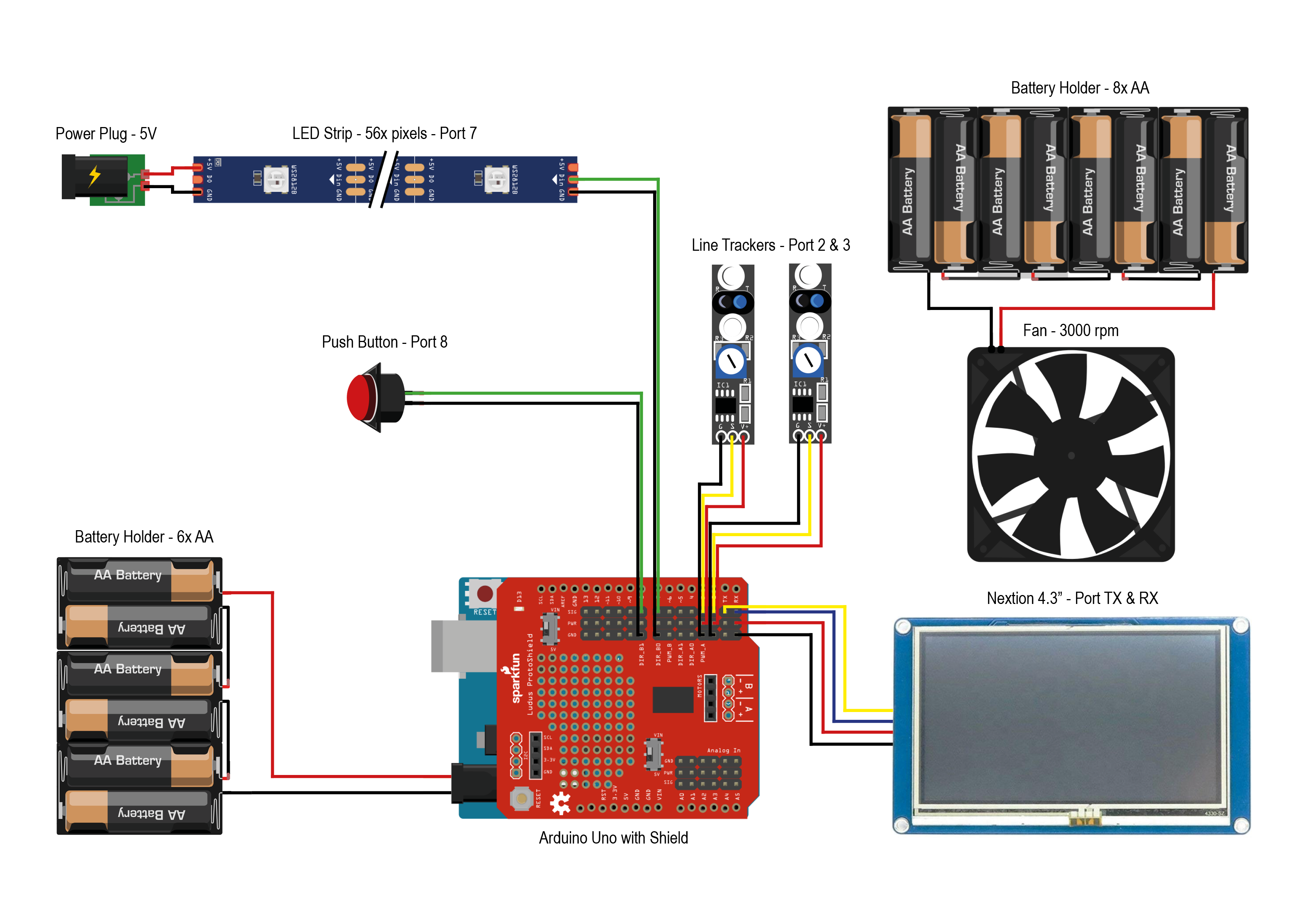
Electrical circuit
The electrical components are connected in two separate circuits. One for the fan and one to provide the interaction with the Arduino, sensors, and actuators. Be aware that the shield in the schematic is different from the one I made, but it serves the same purpose of providing more 5V and GND pins.
Electrical circuit
Documentation
Nextion Setup and Images
Nextion Setup and Images
EPS-files for printing stickers
EPS-files for printing stickers
STL files for 3D print
STL files for 3D print
Technical Drawings
Technical Drawings
SVG files for laser cut
SVG files for laser cut
SVG files for laser cut
SVG files for laser cut
Nextion Setup and Images
Nextion Setup and Images
EPS-files for printing stickers
EPS-files for printing stickers
Technical Drawings
Technical Drawings
Comments
Only logged in users can leave comments