MIDI Pedal Board for guitar multieffect FX-500
A pedal board to send MIDI Program Change to my old guitar multieffect that has a MIDI IN port.
Devices & Components
1
Arduino Micro
1
DIN Audio / Video Connector, 5 Contacts
2
Resistor 220 ohm
1
Alphanumeric LCD, 20 x 4
6
Resistor 10k ohm
1
SNAP ACTION SWITCH Z15G1307
Hardware & Tools
1
Soldering iron (generic)
Software & Tools

Arduino IDE
Project description
Code
MIDI pedal board Arduino code
arduino
1/*
25v-tx-gnd-
3
4pin 7-8-9-10-11-12
5pos 1-2-3- 4 -5-AB
6*/
7
8#include  <MIDI.h>
9#include <LiquidCrystal_I2C.h>
10LiquidCrystal_I2C lcd(0x27,20,4);  // set the LCD address to 0x27 for a 20 chars and 4 line display
11
12MIDI_CREATE_DEFAULT_INSTANCE();
13String  bank ="A";
14int effA1=10;
15int effA2=20;
16int effA3=30;
17int effA4=40;
18int  effA5=50;
19int effB1=12;
20int effB2=22;
21int effB3=32;
22int effB4=42;
23int  effB5=52;
24int PedBankAB = 0;
25int Ped1 = 0;int Ped2 = 0;int Ped3 = 0;int Ped4  = 0;int Ped5 = 0;
26int PrCh =0;
27int activePedal=1;
28long lastDebounceTime=0;  //the last time the output pin was toggled
29long debounceDelay=800;//the debounce  time; increase if the output flickers
30
31void setup() {
32  // put your setup  code here, to run once:
33  pinMode(7, INPUT);pinMode(8, INPUT);pinMode(9, INPUT);pinMode(10,  INPUT);pinMode(11, INPUT);
34  pinMode(12, INPUT);
35  MIDI.begin(14);
36  MIDI.sendProgramChange(effA1,  1);
37  lcd.init();                      // initialize the lcd
38  lcd.backlight();
39  lcd.clear(); //pulisci lo schermo
40  lcd.setCursor(0, 0); lcd.print("   YAMAHA  FX-500");
41  lcd.setCursor(0, 1); lcd.print("Bank: ");lcd.print(bank);
42  lcd.setCursor(0, 2); lcd.print("Mem: ");lcd.print(effA1);
43  lcd.setCursor(0,  3); lcd.print("Ped: ");lcd.print(activePedal);
44}
45
46void loop() {
47  //  put your main code here, to run repeatedly:
48  Ped1 = digitalRead(7);  Ped2 =  digitalRead(8);  Ped3 = digitalRead(9);  Ped4 = digitalRead(10);  Ped5 = digitalRead(11);
49  PedBankAB = digitalRead(12);
50  if((millis()-lastDebounceTime)>debounceDelay)  {
51    // pressing bank (A or B)
52    if (PedBankAB == HIGH) {
53      if  (bank=="A") {bank="B";
54        if (activePedal==1) {PrCh=effB1;}
55        if  (activePedal==2) {PrCh=effB2;}
56        if (activePedal==3) {PrCh=effB3;}
57        if (activePedal==4) {PrCh=effB4;}
58        if (activePedal==5) {PrCh=effB5;}
59        MIDI.sendProgramChange(PrCh, 1);
60        lastDebounceTime=millis(); //set  the current time
61        }
62    else {bank="A";
63        if (activePedal==1)  {PrCh=effA1;}
64        if (activePedal==2) {PrCh=effA2;}
65        if (activePedal==3)  {PrCh=effA3;}
66        if (activePedal==4) {PrCh=effA4;}
67        if (activePedal==5)  {PrCh=effA5;}
68        MIDI.sendProgramChange(PrCh, 1);
69        lastDebounceTime=millis();  //set the current time
70        }
71    }
72    // pressing pedal 1 to 5
73    if (Ped1 == HIGH) {
74      activePedal= 1;
75      if (bank == "A") {PrCh=  effA1;}
76      if (bank == "B") {PrCh= effB1;}
77      MIDI.sendProgramChange(PrCh,  1);
78      lastDebounceTime=millis(); //set the current time
79    }
80    if  (Ped2 == HIGH) {
81      activePedal= 2;
82      if (bank == "A") {PrCh= effA2;}
83      if (bank == "B") {PrCh= effB2;}
84      MIDI.sendProgramChange(PrCh, 1);
85      lastDebounceTime=millis(); //set the current time
86    }
87    if (Ped3  == HIGH) {
88      activePedal= 3;
89      if (bank == "A") {PrCh= effA3;}
90      if (bank == "B") {PrCh= effB3;}
91      MIDI.sendProgramChange(PrCh, 1);
92      lastDebounceTime=millis(); //set the current time
93    }
94    if (Ped4  == HIGH) {
95      activePedal= 4;
96      if (bank == "A") {PrCh= effA4;}
97      if (bank == "B") {PrCh= effB4;}
98      MIDI.sendProgramChange(PrCh, 1);
99      lastDebounceTime=millis(); //set the current time
100    }
101    if (Ped5  == HIGH) {
102      activePedal= 5;
103      if (bank == "A") {PrCh= effA5;}
104      if (bank == "B") {PrCh= effB5;}
105      MIDI.sendProgramChange(PrCh, 1);
106      lastDebounceTime=millis(); //set the current time
107    }
108    lcd.setCursor(0,  1); lcd.print("Bank: ");lcd.print(bank);
109    lcd.setCursor(0, 2); lcd.print("Mem:  ");lcd.print(PrCh);
110    lcd.setCursor(0, 3); lcd.print("Ped: ");lcd.print(activePedal);
111
112  }
113}
MIDI pedal board Arduino code
arduino
1/*
25v-tx-gnd-
3
4pin 7-8-9-10-11-12
5pos 1-2-3- 4 -5-AB
6*/
7
8#include   <MIDI.h>
9#include <LiquidCrystal_I2C.h>
10LiquidCrystal_I2C lcd(0x27,20,4);   // set the LCD address to 0x27 for a 20 chars and 4 line display
11
12MIDI_CREATE_DEFAULT_INSTANCE();
13String   bank ="A";
14int effA1=10;
15int effA2=20;
16int effA3=30;
17int effA4=40;
18int   effA5=50;
19int effB1=12;
20int effB2=22;
21int effB3=32;
22int effB4=42;
23int   effB5=52;
24int PedBankAB = 0;
25int Ped1 = 0;int Ped2 = 0;int Ped3 = 0;int Ped4   = 0;int Ped5 = 0;
26int PrCh =0;
27int activePedal=1;
28long lastDebounceTime=0;   //the last time the output pin was toggled
29long debounceDelay=800;//the debounce   time; increase if the output flickers
30
31void setup() {
32  // put your setup   code here, to run once:
33  pinMode(7, INPUT);pinMode(8, INPUT);pinMode(9, INPUT);pinMode(10,   INPUT);pinMode(11, INPUT);
34  pinMode(12, INPUT);
35  MIDI.begin(14);
36  MIDI.sendProgramChange(effA1,   1);
37  lcd.init();                      // initialize the lcd
38  lcd.backlight();
39   lcd.clear(); //pulisci lo schermo
40  lcd.setCursor(0, 0); lcd.print("   YAMAHA   FX-500");
41  lcd.setCursor(0, 1); lcd.print("Bank: ");lcd.print(bank);
42   lcd.setCursor(0, 2); lcd.print("Mem: ");lcd.print(effA1);
43  lcd.setCursor(0,   3); lcd.print("Ped: ");lcd.print(activePedal);
44}
45
46void loop() {
47  //   put your main code here, to run repeatedly:
48  Ped1 = digitalRead(7);  Ped2 =   digitalRead(8);  Ped3 = digitalRead(9);  Ped4 = digitalRead(10);  Ped5 = digitalRead(11);
49   PedBankAB = digitalRead(12);
50  if((millis()-lastDebounceTime)>debounceDelay)   {
51    // pressing bank (A or B)
52    if (PedBankAB == HIGH) {
53      if   (bank=="A") {bank="B";
54        if (activePedal==1) {PrCh=effB1;}
55        if   (activePedal==2) {PrCh=effB2;}
56        if (activePedal==3) {PrCh=effB3;}
57         if (activePedal==4) {PrCh=effB4;}
58        if (activePedal==5) {PrCh=effB5;}
59         MIDI.sendProgramChange(PrCh, 1);
60        lastDebounceTime=millis(); //set   the current time
61        }
62    else {bank="A";
63        if (activePedal==1)   {PrCh=effA1;}
64        if (activePedal==2) {PrCh=effA2;}
65        if (activePedal==3)   {PrCh=effA3;}
66        if (activePedal==4) {PrCh=effA4;}
67        if (activePedal==5)   {PrCh=effA5;}
68        MIDI.sendProgramChange(PrCh, 1);
69        lastDebounceTime=millis();   //set the current time
70        }
71    }
72    // pressing pedal 1 to 5
73     if (Ped1 == HIGH) {
74      activePedal= 1;
75      if (bank == "A") {PrCh=   effA1;}
76      if (bank == "B") {PrCh= effB1;}
77      MIDI.sendProgramChange(PrCh,   1);
78      lastDebounceTime=millis(); //set the current time
79    }
80    if   (Ped2 == HIGH) {
81      activePedal= 2;
82      if (bank == "A") {PrCh= effA2;}
83       if (bank == "B") {PrCh= effB2;}
84      MIDI.sendProgramChange(PrCh, 1);
85       lastDebounceTime=millis(); //set the current time
86    }
87    if (Ped3   == HIGH) {
88      activePedal= 3;
89      if (bank == "A") {PrCh= effA3;}
90       if (bank == "B") {PrCh= effB3;}
91      MIDI.sendProgramChange(PrCh, 1);
92       lastDebounceTime=millis(); //set the current time
93    }
94    if (Ped4   == HIGH) {
95      activePedal= 4;
96      if (bank == "A") {PrCh= effA4;}
97       if (bank == "B") {PrCh= effB4;}
98      MIDI.sendProgramChange(PrCh, 1);
99       lastDebounceTime=millis(); //set the current time
100    }
101    if (Ped5   == HIGH) {
102      activePedal= 5;
103      if (bank == "A") {PrCh= effA5;}
104       if (bank == "B") {PrCh= effB5;}
105      MIDI.sendProgramChange(PrCh, 1);
106       lastDebounceTime=millis(); //set the current time
107    }
108    lcd.setCursor(0,   1); lcd.print("Bank: ");lcd.print(bank);
109    lcd.setCursor(0, 2); lcd.print("Mem:   ");lcd.print(PrCh);
110    lcd.setCursor(0, 3); lcd.print("Ped: ");lcd.print(activePedal);
111
112  }
113}
MIDI pedal board Arduino code
arduino
1/*
25v-tx-gnd-
3
4pin 7-8-9-10-11-12
5pos 1-2-3- 4 -5-AB
6*/
7
8#include
9  <MIDI.h>
10#include <LiquidCrystal_I2C.h>
11LiquidCrystal_I2C lcd(0x27,20,4);
12  // set the LCD address to 0x27 for a 20 chars and 4 line display
13
14MIDI_CREATE_DEFAULT_INSTANCE();
15String
16  bank ="A";
17int effA1=10;
18int effA2=20;
19int effA3=30;
20int effA4=40;
21int
22  effA5=50;
23int effB1=12;
24int effB2=22;
25int effB3=32;
26int effB4=42;
27int
28  effB5=52;
29int PedBankAB = 0;
30int Ped1 = 0;int Ped2 = 0;int Ped3 = 0;int Ped4
31  = 0;int Ped5 = 0;
32int PrCh =0;
33int activePedal=1;
34long lastDebounceTime=0;
35  //the last time the output pin was toggled
36long debounceDelay=800;//the debounce
37  time; increase if the output flickers
38
39void setup() {
40  // put your setup
41  code here, to run once:
42  pinMode(7, INPUT);pinMode(8, INPUT);pinMode(9, INPUT);pinMode(10,
43  INPUT);pinMode(11, INPUT);
44  pinMode(12, INPUT);
45  MIDI.begin(14);
46  MIDI.sendProgramChange(effA1,
47  1);
48  lcd.init();                      // initialize the lcd
49  lcd.backlight();
50
51  lcd.clear(); //pulisci lo schermo
52  lcd.setCursor(0, 0); lcd.print("   YAMAHA
53  FX-500");
54  lcd.setCursor(0, 1); lcd.print("Bank: ");lcd.print(bank);
55
56  lcd.setCursor(0, 2); lcd.print("Mem: ");lcd.print(effA1);
57  lcd.setCursor(0,
58  3); lcd.print("Ped: ");lcd.print(activePedal);
59}
60
61void loop() {
62  //
63  put your main code here, to run repeatedly:
64  Ped1 = digitalRead(7);  Ped2 =
65  digitalRead(8);  Ped3 = digitalRead(9);  Ped4 = digitalRead(10);  Ped5 = digitalRead(11);
66
67  PedBankAB = digitalRead(12);
68  if((millis()-lastDebounceTime)>debounceDelay)
69  {
70    // pressing bank (A or B)
71    if (PedBankAB == HIGH) {
72      if
73  (bank=="A") {bank="B";
74        if (activePedal==1) {PrCh=effB1;}
75        if
76  (activePedal==2) {PrCh=effB2;}
77        if (activePedal==3) {PrCh=effB3;}
78
79        if (activePedal==4) {PrCh=effB4;}
80        if (activePedal==5) {PrCh=effB5;}
81
82        MIDI.sendProgramChange(PrCh, 1);
83        lastDebounceTime=millis(); //set
84  the current time
85        }
86    else {bank="A";
87        if (activePedal==1)
88  {PrCh=effA1;}
89        if (activePedal==2) {PrCh=effA2;}
90        if (activePedal==3)
91  {PrCh=effA3;}
92        if (activePedal==4) {PrCh=effA4;}
93        if (activePedal==5)
94  {PrCh=effA5;}
95        MIDI.sendProgramChange(PrCh, 1);
96        lastDebounceTime=millis();
97  //set the current time
98        }
99    }
100    // pressing pedal 1 to 5
101
102    if (Ped1 == HIGH) {
103      activePedal= 1;
104      if (bank == "A") {PrCh=
105  effA1;}
106      if (bank == "B") {PrCh= effB1;}
107      MIDI.sendProgramChange(PrCh,
108  1);
109      lastDebounceTime=millis(); //set the current time
110    }
111    if
112  (Ped2 == HIGH) {
113      activePedal= 2;
114      if (bank == "A") {PrCh= effA2;}
115
116      if (bank == "B") {PrCh= effB2;}
117      MIDI.sendProgramChange(PrCh, 1);
118
119      lastDebounceTime=millis(); //set the current time
120    }
121    if (Ped3
122  == HIGH) {
123      activePedal= 3;
124      if (bank == "A") {PrCh= effA3;}
125
126      if (bank == "B") {PrCh= effB3;}
127      MIDI.sendProgramChange(PrCh, 1);
128
129      lastDebounceTime=millis(); //set the current time
130    }
131    if (Ped4
132  == HIGH) {
133      activePedal= 4;
134      if (bank == "A") {PrCh= effA4;}
135
136      if (bank == "B") {PrCh= effB4;}
137      MIDI.sendProgramChange(PrCh, 1);
138
139      lastDebounceTime=millis(); //set the current time
140    }
141    if (Ped5
142  == HIGH) {
143      activePedal= 5;
144      if (bank == "A") {PrCh= effA5;}
145
146      if (bank == "B") {PrCh= effB5;}
147      MIDI.sendProgramChange(PrCh, 1);
148
149      lastDebounceTime=millis(); //set the current time
150    }
151    lcd.setCursor(0,
152  1); lcd.print("Bank: ");lcd.print(bank);
153    lcd.setCursor(0, 2); lcd.print("Mem:
154  ");lcd.print(PrCh);
155    lcd.setCursor(0, 3); lcd.print("Ped: ");lcd.print(activePedal);
156
157
158  }
159}
Downloadable files
MIDI pedal board schematic
MIDI pedal board schematic
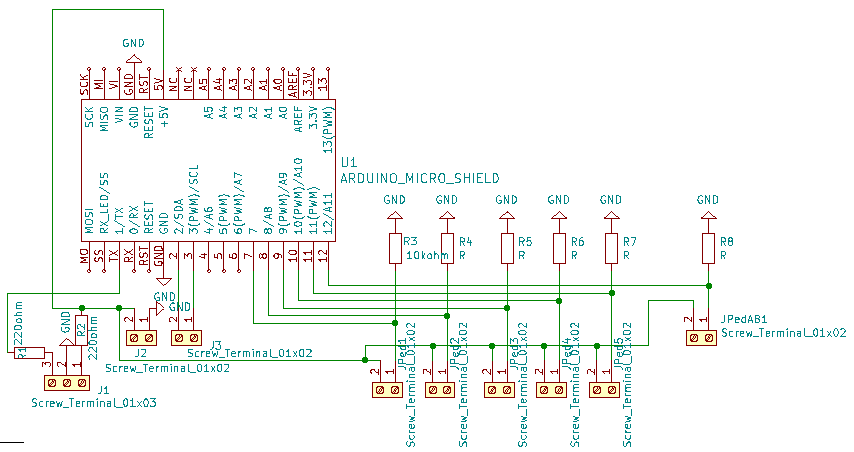
MIDI pedal board schematic
MIDI pedal board schematic
Comments
Only logged in users can leave comments