Devastator Tank (with Android Control)
Controlling the tank with Arduino Move the tank with the Android smartphone app
Devices & Components
1
Arduino Nano Every
1
Dual H-Bridge motor drivers L298
1
NeoPixel Ring: WS2812 5050 RGB LED
1
HC-06 Bluetooth Module
Hardware & Tools
1
Breadboard, 170 Pin
Project description
Code
Arduino CODE
c_cpp
1//==========================================================================
2//  Name :    ARDUINO NANO EVERY TANK with BLUETOOTH CONTROL
3//  Created : 2021-11-15
4//  Author :  Darseon. Park (shunnys@naver.com)
5// ---------------------------------------------------------------------------------
6//  Arduino Nano Every
7//  HC-06 Bluetooth Slave
8//  A2 L298N Motor Driver
9//==========================================================================
10
11#include  <SoftwareSerial.h>
12#include <LiquidCrystal_I2C.h>
13#include <Adafruit_NeoPixel.h>
14
15#define   ENA   9
16#define   IN1   8
17#define   IN2   7
18#define   ENB   5
19#define   IN3   4
20#define   IN4   3
21#define   BL_TX 14
22#define   BL_RX 15
23#define   NEOPIXEL_PIN      21
24#define   NEOPIXEL_BRIGHT   200
25
26SoftwareSerial  bluetooth(BL_TX, BL_RX);
27LiquidCrystal_I2C lcd(0x27,20,4);
28int right_speed  = 0;
29int left_speed = 0;
30String recv_data = "";
31
32Adafruit_NeoPixel  strip = Adafruit_NeoPixel(24, NEOPIXEL_PIN, NEO_GRBW + NEO_KHZ800);
33int neo_pixel_position  = 0;
34int neo_pixel_nextstep = 0;
35
36//==========================================================================
37
38void  setup() {
39
40  pinMode(ENA, OUTPUT);
41  pinMode(IN1, OUTPUT);
42  pinMode(IN2,  OUTPUT);
43  pinMode(ENB, OUTPUT);
44  pinMode(IN3, OUTPUT);
45  pinMode(IN4,  OUTPUT);
46
47  Serial.begin(9600);
48  bluetooth.begin(9600);
49
50  strip.begin();
51  strip.setBrightness(NEOPIXEL_BRIGHT);
52  whiteOverRainbow(75, 5);
53  colorWipe(strip.Color(0,  0, 0), 0);
54  strip.show();
55
56  lcd.init();
57  lcd.backlight();
58
59  lcd.setCursor(0, 0), lcd.print("Program START");
60}
61
62//==========================================================================
63
64void  loop() {
65
66  //AF000R000E0Z
67  //012345678901
68  //F000R000E0
69  //012345678901
70
71  recv_data = bluetooth.readStringUntil('*');
72
73  if (recv_data.charAt(0) ==  'A' && recv_data.charAt(11) == 'Z') {
74    tankRun();
75  }
76}
77
78void  tankRun() {
79
80  Serial.println(recv_data);
81
82  char recv_leftway =  recv_data.charAt(1);
83  int left_speed = recv_data.substring(2,5).toInt();
84  char recv_rightway = recv_data.charAt(5);
85  int right_speed = recv_data.substring(6,9).toInt();
86  char recv_led = recv_data.charAt(10);
87  int led_gage = left_speed + right_speed;
88
89  analogWrite(ENA, right_speed);
90  analogWrite(ENB, left_speed);
91
92  if  (recv_leftway == 'F') {
93    digitalWrite(IN3, LOW);
94    digitalWrite(IN4,  HIGH);
95  } else if (recv_leftway == 'R') {
96    digitalWrite(IN3, HIGH);
97    digitalWrite(IN4, LOW);
98  } else {
99    digitalWrite(IN3, LOW);
100    digitalWrite(IN4,  LOW);
101  }
102
103  if (recv_rightway == 'F') {
104    digitalWrite(IN1, LOW);
105    digitalWrite(IN2, HIGH);
106  } else if (recv_rightway == 'R') {
107    digitalWrite(IN1,  HIGH);
108    digitalWrite(IN2, LOW);
109  } else {
110    digitalWrite(IN1, LOW);
111    digitalWrite(IN2, LOW);
112  }
113
114  if (recv_led == '1') {
115    if (led_gage  >= 400) {
116      colorWipe(strip.Color(255, 0, 0), 0);
117    } else if (led_gage  >= 300) {
118      colorWipe(strip.Color(255, 255, 0), 0);
119    } else if (led_gage  > 0) {
120      colorWipe(strip.Color(0, 255, 0), 0);
121    } else {
122      colorWipe(strip.Color(0,  0, 0), 0);
123    }
124  }
125}
126
127//==========================================================================
128
129
130void  neo_pixel_normal()
131{
132  if (neo_pixel_position >= 256 * 5) neo_pixel_position  = 0;
133  else neo_pixel_position++;
134
135  for (neo_pixel_nextstep = 0; neo_pixel_nextstep  < strip.numPixels(); neo_pixel_nextstep++)
136  {
137    strip.setPixelColor(neo_pixel_nextstep,  Wheel(((neo_pixel_nextstep * 256 / strip.numPixels()) + neo_pixel_position) & 255));
138  }
139
140  strip.show();
141}
142
143void disconnect_led()
144{
145  colorWipe(strip.Color(0,  0, 0, 255), 30);
146  delay(100);
147}
148
149void colorWipe(uint32_t c, uint8_t  wait)
150{
151  for (uint16_t i = 0; i < strip.numPixels(); i++) {
152    strip.setPixelColor(i,  c);
153    strip.show();
154    delay(wait);
155  }
156}
157
158void whiteOverRainbow(int  whiteSpeed, int whiteLength)
159{
160  if (whiteLength >= strip.numPixels()) whiteLength  = strip.numPixels() - 1;
161
162  int      head = whiteLength - 1;
163  int      tail  = 0;
164  int      loops = 1;
165  int      loopNum = 0;
166  uint32_t lastTime  = millis();
167  uint32_t firstPixelHue = 0;
168
169  for (;;) { // Repeat forever  (or until a 'break' or 'return')
170    for (int i = 0; i < strip.numPixels(); i++)  {  // For each pixel in strip...
171      if (((i >= tail) && (i <= head)) ||      //  If between head & tail...
172        ((tail > head) && ((i >= tail) || (i <= head))))  {
173        strip.setPixelColor(i, strip.Color(0, 0, 0, 255)); // Set white
174      }
175      else {                                             // else set  rainbow
176        int pixelHue = firstPixelHue + (i * 65536L / strip.numPixels());
177        strip.setPixelColor(i, strip.gamma32(strip.ColorHSV(pixelHue)));
178      }
179    }
180
181    strip.show(); // Update strip with new contents
182    // There's  no delay here, it just runs full-tilt until the timer and
183    // counter combination  below runs out.
184
185    firstPixelHue += 40; // Advance just a little along the  color wheel
186
187    if ((millis() - lastTime) > whiteSpeed) { // Time to update  head/tail?
188      if (++head >= strip.numPixels()) {      // Advance head, wrap  around
189        head = 0;
190        if (++loopNum >= loops) return;
191      }
192      if (++tail >= strip.numPixels()) {      // Advance tail, wrap around
193        tail  = 0;
194      }
195      lastTime = millis();                   // Save time of  last movement
196    }
197  }
198}
199
200uint32_t Wheel(byte WheelPos)
201{
202  WheelPos = 255 - WheelPos;
203  if (WheelPos < 85) {
204    return strip.Color(255  - WheelPos * 3, 0, WheelPos * 3);
205  }
206  if (WheelPos < 170) {
207    WheelPos  -= 85;
208    return strip.Color(0, WheelPos * 3, 255 - WheelPos * 3);
209  }
210  WheelPos -= 170;
211  return strip.Color(WheelPos * 3, 255 - WheelPos * 3, 0);
212}
213
Downloadable files
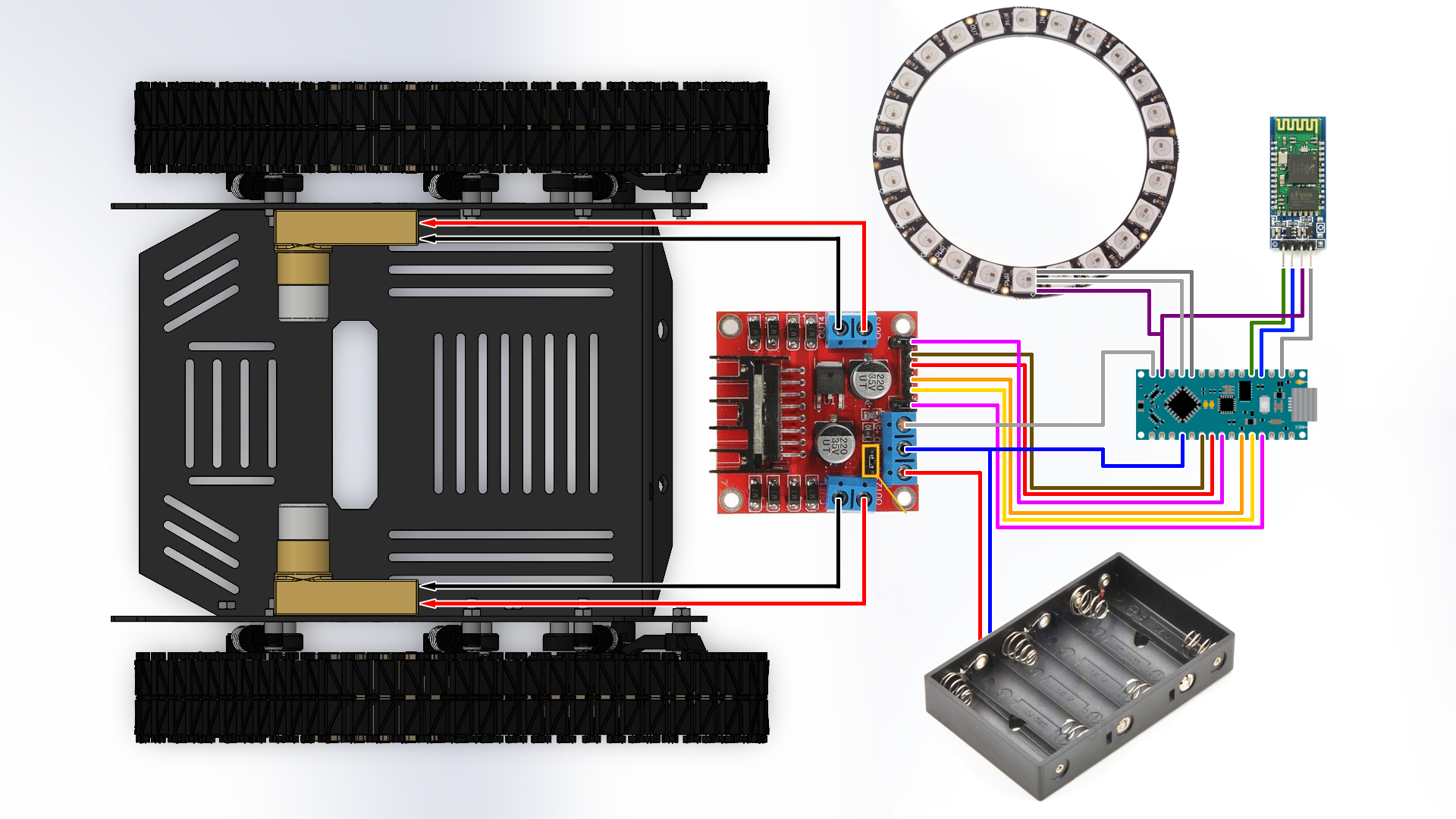
Circuit diagram
Circuit diagram
Comments
Only logged in users can leave comments