Wireless alert bell using Adafruit IO
Uses a single button to trigger 2 types of alert via the internet.
Devices & Components
1
Arduino Uno Rev3
1
Tactile Switch, Top Actuated
1
NodeMCU ESP8266 Breakout Board
1
Jumper wires (generic)
1
ESP8266 ESP-01
1
Resistor 47.5k ohm
1
Buzzer
1
LED (generic)
1
Battery Holder, AA x 2
1
Resistor 221 ohm
1
AA Batteries
Software & Tools
1
Adafruit IO

Arduino IDE
Project description
Code
NodeMCU Code
arduino
1/***************************************************
2  Adafruit MQTT   Library ESP8266 Example
3
4  Must use ESP8266 Arduino from:
5    https://github.com/esp8266/Arduino
6
7   Works great with Adafruit's Huzzah ESP board & Feather
8  ----> https://www.adafruit.com/product/2471
9   ----> https://www.adafruit.com/products/2821
10
11  Adafruit invests time and   resources providing this open source code,
12  please support Adafruit and open-source   hardware by purchasing
13  products from Adafruit!
14
15  Written by Tony DiCola   for Adafruit Industries.
16  MIT license, all text above must be included in any   redistribution
17 ****************************************************/
18#include   <ESP8266WiFi.h>
19#include "Adafruit_MQTT.h"
20#include "Adafruit_MQTT_Client.h"
21
22/*************************   WiFi Access Point *********************************/
23
24#define WLAN_SSID       "enter   SSID"
25#define WLAN_PASS       "enter Password"
26
27/*************************   Adafruit.io Setup *********************************/
28
29#define AIO_SERVER      "io.adafruit.com"
30#define   AIO_SERVERPORT  1883                   // use 8883 for SSL
31#define AIO_USERNAME     "enter username"
32#define AIO_KEY         "enter aio key"
33
34/************   Global State (you don't need to change this!) ******************/
35
36#define   buzzerpin D1
37// Create an ESP8266 WiFiClient class to connect to the MQTT server.
38WiFiClient   client;
39// or... use WiFiFlientSecure for SSL
40//WiFiClientSecure client;
41
42//   Setup the MQTT client class by passing in the WiFi client and MQTT server and login   details.
43Adafruit_MQTT_Client mqtt(&client, AIO_SERVER, AIO_SERVERPORT, AIO_USERNAME,   AIO_KEY);
44
45/****************************** Feeds ***************************************/
46
47//   Notice MQTT paths for AIO follow the form: <username>/feeds/<feedname>
48//modified   by Shubham Santosh
49// Setup a feed called 'alert' for subscribing to changes.
50Adafruit_MQTT_Subscribe   buzzer = Adafruit_MQTT_Subscribe(&mqtt, AIO_USERNAME "/feeds/alert");
51
52/***************************   Sketch Code ************************************/
53
54// Bug workaround for Arduino   1.6.6, it seems to need a function declaration
55// for some reason (only affects   ESP8266, likely an arduino-builder bug).
56void MQTT_connect();
57
58void setup()   {
59  Serial.begin(115200);
60  pinMode(buzzerpin,OUTPUT);
61  pinMode(LED_BUILTIN,OUTPUT);
62   delay(10);
63
64  Serial.println(F("MQTT SOS Receiver"));
65
66  // Connect   to WiFi access point.
67  Serial.println(); Serial.println();
68  Serial.print("Connecting   to ");
69  Serial.println(WLAN_SSID);
70
71  WiFi.begin(WLAN_SSID, WLAN_PASS);
72   while (WiFi.status() != WL_CONNECTED) {
73    delay(500);
74    Serial.print(".");
75   }
76  Serial.println();
77
78  Serial.println("WiFi connected");
79  Serial.println("IP   address: "); Serial.println(WiFi.localIP());
80
81  // Setup MQTT subscription   for alert feed.
82  mqtt.subscribe(&buzzer);
83}
84int value;
85
86void loop()   {
87  // Ensure the connection to the MQTT server is alive (this will make the   first
88  // connection and automatically reconnect when disconnected).  See the   MQTT_connect
89  // function definition further below.
90  MQTT_connect();
91
92   // this is our 'wait for incoming subscription packets' busy subloop
93  // try   to spend your time here
94
95  Adafruit_MQTT_Subscribe *subscription;
96  while   ((subscription = mqtt.readSubscription(200))) {
97    if (subscription == &buzzer)   {
98      Serial.print(F("Got: "));
99      value=atoi((char *)buzzer.lastread);
100       Serial.println(value);
101    }
102  }
103    if(value==2)    // triggers   alert-1
104      {
105      digitalWrite(buzzerpin,HIGH);
106      digitalWrite(LED_BUILTIN,LOW);
107       delay(500);
108      digitalWrite(buzzerpin,LOW);
109      digitalWrite(LED_BUILTIN,HIGH);
110       }
111    else if(value==3)     // triggers alert-2
112    {
113    digitalWrite(buzzerpin,HIGH);
114     digitalWrite(LED_BUILTIN,LOW);
115    }
116    else            // disable alerts
117     {
118    digitalWrite(buzzerpin,LOW);
119    digitalWrite(LED_BUILTIN,HIGH);
120}
121}
122//   Function to connect and reconnect as necessary to the MQTT server.
123// Should   be called in the loop function and it will take care if connecting.
124void MQTT_connect()   {
125  int8_t ret;
126
127  // Stop if already connected.
128  if (mqtt.connected())   {
129    return;
130  }
131
132  Serial.print("Connecting to MQTT... ");
133
134   uint8_t retries = 3;
135  while ((ret = mqtt.connect()) != 0) { // connect will   return 0 for connected
136       Serial.println(mqtt.connectErrorString(ret));
137        Serial.println("Retrying MQTT connection in 5 seconds...");
138       mqtt.disconnect();
139        delay(5000);  // wait 5 seconds
140       retries--;
141       if (retries   == 0) {
142         // basically die and wait for WDT to reset me
143         while   (1);
144       }
145  }
146  Serial.println("MQTT Connected!");
147  digitalWrite(LED_BUILTIN,LOW);
148   delay(1000);
149 digitalWrite(LED_BUILTIN,HIGH);   // to show MQTT is connected
150}
ESP8266-01 Code
arduino
1/***************************************************
2  Adafruit MQTT   Library ESP8266 Example
3
4  Must use ESP8266 Arduino from:
5    https://github.com/esp8266/Arduino
6
7   Works great with Adafruit's Huzzah ESP board & Feather
8  ----> https://www.adafruit.com/product/2471
9   ----> https://www.adafruit.com/products/2821
10
11  Adafruit invests time and   resources providing this open source code,
12  please support Adafruit and open-source   hardware by purchasing
13  products from Adafruit!
14
15  Written by Tony DiCola   for Adafruit Industries.
16  MIT license, all text above must be included in any   redistribution
17 ****************************************************/
18#include   <ESP8266WiFi.h>
19#include "Adafruit_MQTT.h"
20#include "Adafruit_MQTT_Client.h"
21
22/*************************   WiFi Access Point *********************************/
23
24#define WLAN_SSID       "your   SSID"
25#define WLAN_PASS       "enter Password "
26
27/*************************   Adafruit.io Setup *********************************/
28
29#define AIO_SERVER      "io.adafruit.com"
30#define   AIO_SERVERPORT  1883                   // use 8883 for SSL
31#define AIO_USERNAME     "Enter Username"
32#define AIO_KEY         "Enter Aio key"
33
34/************   Global State (you don't need to change this!) ******************/
35
36// Create   an ESP8266 WiFiClient class to connect to the MQTT server.
37WiFiClient client;
38//   or... use WiFiFlientSecure for SSL
39//WiFiClientSecure client;
40
41// Setup   the MQTT client class by passing in the WiFi client and MQTT server and login details.
42Adafruit_MQTT_Client   mqtt(&client, AIO_SERVER, AIO_SERVERPORT, AIO_USERNAME, AIO_KEY);
43
44/******************************   Feeds ***************************************/
45
46
47// modified by Shubham   Santosh
48// publish to the feed 'alert'
49Adafruit_MQTT_Publish alertbutton   = Adafruit_MQTT_Publish(&mqtt, AIO_USERNAME "/feeds/alert");
50
51/***************************   Sketch Code ************************************/
52
53// Bug workaround for Arduino   1.6.6, it seems to need a function declaration
54// for some reason (only affects   ESP8266, likely an arduino-builder bug).
55void MQTT_connect();
56void setup()   {
57
58  pinMode(0,INPUT);            // reads button press
59  pinMode(2,OUTPUT);          //connected to LED providing status
60  Serial.begin(115200);
61  delay(10);
62   Serial.println(F("Adafruit MQTT demo"));
63
64  // Connect to WiFi access   point.
65  Serial.println(); Serial.println();
66  Serial.print("Connecting to   ");
67  Serial.println(WLAN_SSID);
68
69  WiFi.begin(WLAN_SSID, WLAN_PASS);
70   while (WiFi.status() != WL_CONNECTED) {
71    delay(500);
72    Serial.print(".");
73   }
74  Serial.println();
75  Serial.println("WiFi connected");
76  Serial.println("IP   address: "); Serial.println(WiFi.localIP());
77
78}
79int newstatus=0,buttonstats=1;
80void   loop() {
81  // Ensure the connection to the MQTT server is alive (this will make   the first
82  // connection and automatically reconnect when disconnected).  See   the MQTT_connect
83  // function definition further below.
84  MQTT_connect();
85   // this is our 'wait for incoming subscription packets' busy subloop
86
87
88   if(digitalRead(0)==HIGH)
89  {
90   buttonstats= readbutton();
91  if(buttonstats==2)
92   {
93  Serial.println("Alert-1 triggered");
94  digitalWrite(2,HIGH);
95  delay(500);
96   digitalWrite(2,LOW);
97  }
98  else if(buttonstats==3)
99  {
100  Serial.println("Alert-2   triggered");
101  digitalWrite(2,HIGH);
102  }
103  else
104  {
105  Serial.println("ALerts   Disabled");
106  digitalWrite(2,LOW);
107  }
108  }
109  if(newstatus!=buttonstats)       //if a change of button state is detected
110  {
111  Serial.print(F("\
112Sending   button status "));
113   // Now we can publish stuff!
114  if (! alertbutton.publish(buttonstats))   {
115    Serial.println(F("Failed"));
116  } else {
117    Serial.println(F("OK!"));
118   }
119  newstatus=buttonstats;
120  delay(1000);
121  }
122delay(50);
123  // ping   the server to keep the mqtt connection alive
124  // NOT required if you are publishing   once every KEEPALIVE seconds
125  /*
126  if(! mqtt.ping()) {
127    mqtt.disconnect();
128   }
129  */
130}
131
132// Function to connect and reconnect as necessary to the   MQTT server.
133// Should be called in the loop function and it will take care if   connecting.
134void MQTT_connect() {
135  int8_t ret;
136
137  // Stop if already   connected.
138  if (mqtt.connected()) {
139    return;
140  }
141
142  Serial.print("Connecting   to MQTT... ");
143
144  uint8_t retries = 3;
145  while ((ret = mqtt.connect())   != 0) { // connect will return 0 for connected
146       Serial.println(mqtt.connectErrorString(ret));
147        Serial.println("Retrying MQTT connection in 5 seconds...");
148       mqtt.disconnect();
149        delay(5000);  // wait 5 seconds
150       retries--;
151       if (retries   == 0) {
152         // basically die and wait for WDT to reset me
153         while   (1);
154       }
155  }
156  Serial.println("MQTT Connected!");
157  digitalWrite(2,HIGH);
158   delay(1000);
159  digitalWrite(2,LOW);
160}
161int readbutton()          // reads   the button status
162{
163int alert1time=1500;
164float times=0;
165  while(digitalRead(0)==HIGH)
166   {
167    times=times+50;
168        delay(50);
169    }
170    digitalWrite(2,LOW);
171    if (times>500  and times<alert1time)
172   return(2);
173   else if(times>alert1time)
174    return(3);
175   else if(times<500)
176   return(1);
177}
NodeMCU Code
arduino
1/***************************************************
2  Adafruit MQTT  Library ESP8266 Example
3
4  Must use ESP8266 Arduino from:
5    https://github.com/esp8266/Arduino
6
7  Works great with Adafruit's Huzzah ESP board & Feather
8  ----> https://www.adafruit.com/product/2471
9  ----> https://www.adafruit.com/products/2821
10
11  Adafruit invests time and  resources providing this open source code,
12  please support Adafruit and open-source  hardware by purchasing
13  products from Adafruit!
14
15  Written by Tony DiCola  for Adafruit Industries.
16  MIT license, all text above must be included in any  redistribution
17 ****************************************************/
18#include  <ESP8266WiFi.h>
19#include "Adafruit_MQTT.h"
20#include "Adafruit_MQTT_Client.h"
21
22/*************************  WiFi Access Point *********************************/
23
24#define WLAN_SSID       "enter  SSID"
25#define WLAN_PASS       "enter Password"
26
27/*************************  Adafruit.io Setup *********************************/
28
29#define AIO_SERVER      "io.adafruit.com"
30#define  AIO_SERVERPORT  1883                   // use 8883 for SSL
31#define AIO_USERNAME    "enter username"
32#define AIO_KEY         "enter aio key"
33
34/************  Global State (you don't need to change this!) ******************/
35
36#define  buzzerpin D1
37// Create an ESP8266 WiFiClient class to connect to the MQTT server.
38WiFiClient  client;
39// or... use WiFiFlientSecure for SSL
40//WiFiClientSecure client;
41
42//  Setup the MQTT client class by passing in the WiFi client and MQTT server and login  details.
43Adafruit_MQTT_Client mqtt(&client, AIO_SERVER, AIO_SERVERPORT, AIO_USERNAME,  AIO_KEY);
44
45/****************************** Feeds ***************************************/
46
47//  Notice MQTT paths for AIO follow the form: <username>/feeds/<feedname>
48//modified  by Shubham Santosh
49// Setup a feed called 'alert' for subscribing to changes.
50Adafruit_MQTT_Subscribe  buzzer = Adafruit_MQTT_Subscribe(&mqtt, AIO_USERNAME "/feeds/alert");
51
52/***************************  Sketch Code ************************************/
53
54// Bug workaround for Arduino  1.6.6, it seems to need a function declaration
55// for some reason (only affects  ESP8266, likely an arduino-builder bug).
56void MQTT_connect();
57
58void setup()  {
59  Serial.begin(115200);
60  pinMode(buzzerpin,OUTPUT);
61  pinMode(LED_BUILTIN,OUTPUT);
62  delay(10);
63
64  Serial.println(F("MQTT SOS Receiver"));
65
66  // Connect  to WiFi access point.
67  Serial.println(); Serial.println();
68  Serial.print("Connecting  to ");
69  Serial.println(WLAN_SSID);
70
71  WiFi.begin(WLAN_SSID, WLAN_PASS);
72  while (WiFi.status() != WL_CONNECTED) {
73    delay(500);
74    Serial.print(".");
75  }
76  Serial.println();
77
78  Serial.println("WiFi connected");
79  Serial.println("IP  address: "); Serial.println(WiFi.localIP());
80
81  // Setup MQTT subscription  for alert feed.
82  mqtt.subscribe(&buzzer);
83}
84int value;
85
86void loop()  {
87  // Ensure the connection to the MQTT server is alive (this will make the  first
88  // connection and automatically reconnect when disconnected).  See the  MQTT_connect
89  // function definition further below.
90  MQTT_connect();
91
92  // this is our 'wait for incoming subscription packets' busy subloop
93  // try  to spend your time here
94
95  Adafruit_MQTT_Subscribe *subscription;
96  while  ((subscription = mqtt.readSubscription(200))) {
97    if (subscription == &buzzer)  {
98      Serial.print(F("Got: "));
99      value=atoi((char *)buzzer.lastread);
100      Serial.println(value);
101    }
102  }
103    if(value==2)    // triggers  alert-1
104      {
105      digitalWrite(buzzerpin,HIGH);
106      digitalWrite(LED_BUILTIN,LOW);
107      delay(500);
108      digitalWrite(buzzerpin,LOW);
109      digitalWrite(LED_BUILTIN,HIGH);
110      }
111    else if(value==3)     // triggers alert-2
112    {
113    digitalWrite(buzzerpin,HIGH);
114    digitalWrite(LED_BUILTIN,LOW);
115    }
116    else            // disable alerts
117    {
118    digitalWrite(buzzerpin,LOW);
119    digitalWrite(LED_BUILTIN,HIGH);
120}
121}
122//  Function to connect and reconnect as necessary to the MQTT server.
123// Should  be called in the loop function and it will take care if connecting.
124void MQTT_connect()  {
125  int8_t ret;
126
127  // Stop if already connected.
128  if (mqtt.connected())  {
129    return;
130  }
131
132  Serial.print("Connecting to MQTT... ");
133
134  uint8_t retries = 3;
135  while ((ret = mqtt.connect()) != 0) { // connect will  return 0 for connected
136       Serial.println(mqtt.connectErrorString(ret));
137       Serial.println("Retrying MQTT connection in 5 seconds...");
138       mqtt.disconnect();
139       delay(5000);  // wait 5 seconds
140       retries--;
141       if (retries  == 0) {
142         // basically die and wait for WDT to reset me
143         while  (1);
144       }
145  }
146  Serial.println("MQTT Connected!");
147  digitalWrite(LED_BUILTIN,LOW);
148  delay(1000);
149 digitalWrite(LED_BUILTIN,HIGH);   // to show MQTT is connected
150}
ESP8266-01 Code
arduino
1/***************************************************
2  Adafruit MQTT  Library ESP8266 Example
3
4  Must use ESP8266 Arduino from:
5    https://github.com/esp8266/Arduino
6
7  Works great with Adafruit's Huzzah ESP board & Feather
8  ----> https://www.adafruit.com/product/2471
9  ----> https://www.adafruit.com/products/2821
10
11  Adafruit invests time and  resources providing this open source code,
12  please support Adafruit and open-source  hardware by purchasing
13  products from Adafruit!
14
15  Written by Tony DiCola  for Adafruit Industries.
16  MIT license, all text above must be included in any  redistribution
17 ****************************************************/
18#include  <ESP8266WiFi.h>
19#include "Adafruit_MQTT.h"
20#include "Adafruit_MQTT_Client.h"
21
22/*************************  WiFi Access Point *********************************/
23
24#define WLAN_SSID       "your  SSID"
25#define WLAN_PASS       "enter Password "
26
27/*************************  Adafruit.io Setup *********************************/
28
29#define AIO_SERVER      "io.adafruit.com"
30#define  AIO_SERVERPORT  1883                   // use 8883 for SSL
31#define AIO_USERNAME    "Enter Username"
32#define AIO_KEY         "Enter Aio key"
33
34/************  Global State (you don't need to change this!) ******************/
35
36// Create  an ESP8266 WiFiClient class to connect to the MQTT server.
37WiFiClient client;
38//  or... use WiFiFlientSecure for SSL
39//WiFiClientSecure client;
40
41// Setup  the MQTT client class by passing in the WiFi client and MQTT server and login details.
42Adafruit_MQTT_Client  mqtt(&client, AIO_SERVER, AIO_SERVERPORT, AIO_USERNAME, AIO_KEY);
43
44/******************************  Feeds ***************************************/
45
46
47// modified by Shubham  Santosh
48// publish to the feed 'alert'
49Adafruit_MQTT_Publish alertbutton  = Adafruit_MQTT_Publish(&mqtt, AIO_USERNAME "/feeds/alert");
50
51/***************************  Sketch Code ************************************/
52
53// Bug workaround for Arduino  1.6.6, it seems to need a function declaration
54// for some reason (only affects  ESP8266, likely an arduino-builder bug).
55void MQTT_connect();
56void setup()  {
57
58  pinMode(0,INPUT);            // reads button press
59  pinMode(2,OUTPUT);         //connected to LED providing status
60  Serial.begin(115200);
61  delay(10);
62  Serial.println(F("Adafruit MQTT demo"));
63
64  // Connect to WiFi access  point.
65  Serial.println(); Serial.println();
66  Serial.print("Connecting to  ");
67  Serial.println(WLAN_SSID);
68
69  WiFi.begin(WLAN_SSID, WLAN_PASS);
70  while (WiFi.status() != WL_CONNECTED) {
71    delay(500);
72    Serial.print(".");
73  }
74  Serial.println();
75  Serial.println("WiFi connected");
76  Serial.println("IP  address: "); Serial.println(WiFi.localIP());
77
78}
79int newstatus=0,buttonstats=1;
80void  loop() {
81  // Ensure the connection to the MQTT server is alive (this will make  the first
82  // connection and automatically reconnect when disconnected).  See  the MQTT_connect
83  // function definition further below.
84  MQTT_connect();
85  // this is our 'wait for incoming subscription packets' busy subloop
86
87
88  if(digitalRead(0)==HIGH)
89  {
90   buttonstats= readbutton();
91  if(buttonstats==2)
92  {
93  Serial.println("Alert-1 triggered");
94  digitalWrite(2,HIGH);
95  delay(500);
96  digitalWrite(2,LOW);
97  }
98  else if(buttonstats==3)
99  {
100  Serial.println("Alert-2  triggered");
101  digitalWrite(2,HIGH);
102  }
103  else
104  {
105  Serial.println("ALerts  Disabled");
106  digitalWrite(2,LOW);
107  }
108  }
109  if(newstatus!=buttonstats)      //if a change of button state is detected
110  {
111  Serial.print(F("\
112Sending  button status "));
113   // Now we can publish stuff!
114  if (! alertbutton.publish(buttonstats))  {
115    Serial.println(F("Failed"));
116  } else {
117    Serial.println(F("OK!"));
118  }
119  newstatus=buttonstats;
120  delay(1000);
121  }
122delay(50);
123  // ping  the server to keep the mqtt connection alive
124  // NOT required if you are publishing  once every KEEPALIVE seconds
125  /*
126  if(! mqtt.ping()) {
127    mqtt.disconnect();
128  }
129  */
130}
131
132// Function to connect and reconnect as necessary to the  MQTT server.
133// Should be called in the loop function and it will take care if  connecting.
134void MQTT_connect() {
135  int8_t ret;
136
137  // Stop if already  connected.
138  if (mqtt.connected()) {
139    return;
140  }
141
142  Serial.print("Connecting  to MQTT... ");
143
144  uint8_t retries = 3;
145  while ((ret = mqtt.connect())  != 0) { // connect will return 0 for connected
146       Serial.println(mqtt.connectErrorString(ret));
147       Serial.println("Retrying MQTT connection in 5 seconds...");
148       mqtt.disconnect();
149       delay(5000);  // wait 5 seconds
150       retries--;
151       if (retries  == 0) {
152         // basically die and wait for WDT to reset me
153         while  (1);
154       }
155  }
156  Serial.println("MQTT Connected!");
157  digitalWrite(2,HIGH);
158  delay(1000);
159  digitalWrite(2,LOW);
160}
161int readbutton()          // reads  the button status
162{
163int alert1time=1500;
164float times=0;
165  while(digitalRead(0)==HIGH)
166  {
167    times=times+50;
168        delay(50);
169    }
170    digitalWrite(2,LOW);
171   if (times>500  and times<alert1time)
172   return(2);
173   else if(times>alert1time)
174   return(3);
175   else if(times<500)
176   return(1);
177}
Downloadable files
NodeMCU Schematic
NodeMCU Schematic
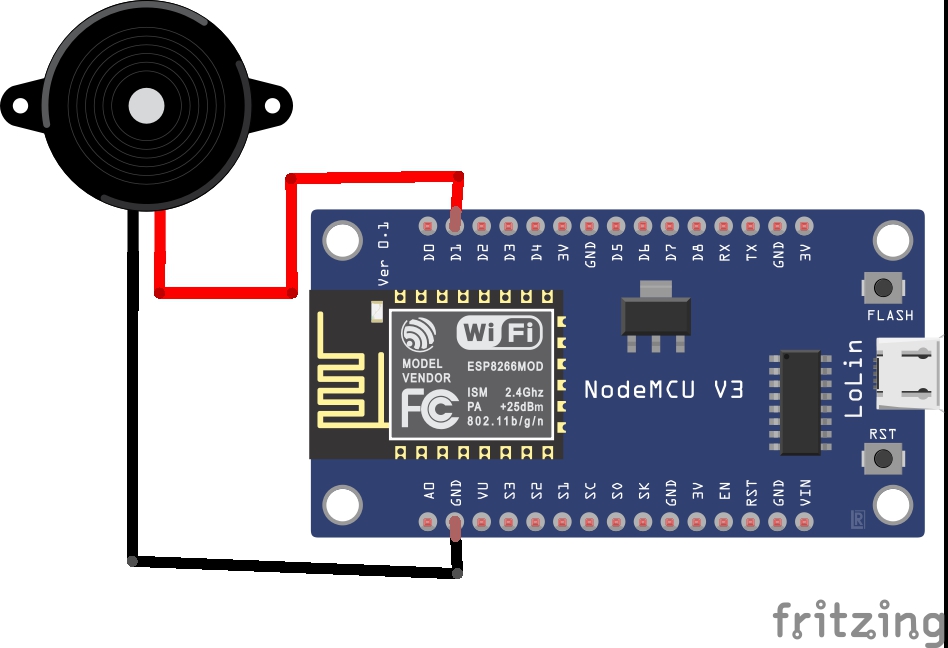
NodeMCU Schematic
NodeMCU Schematic
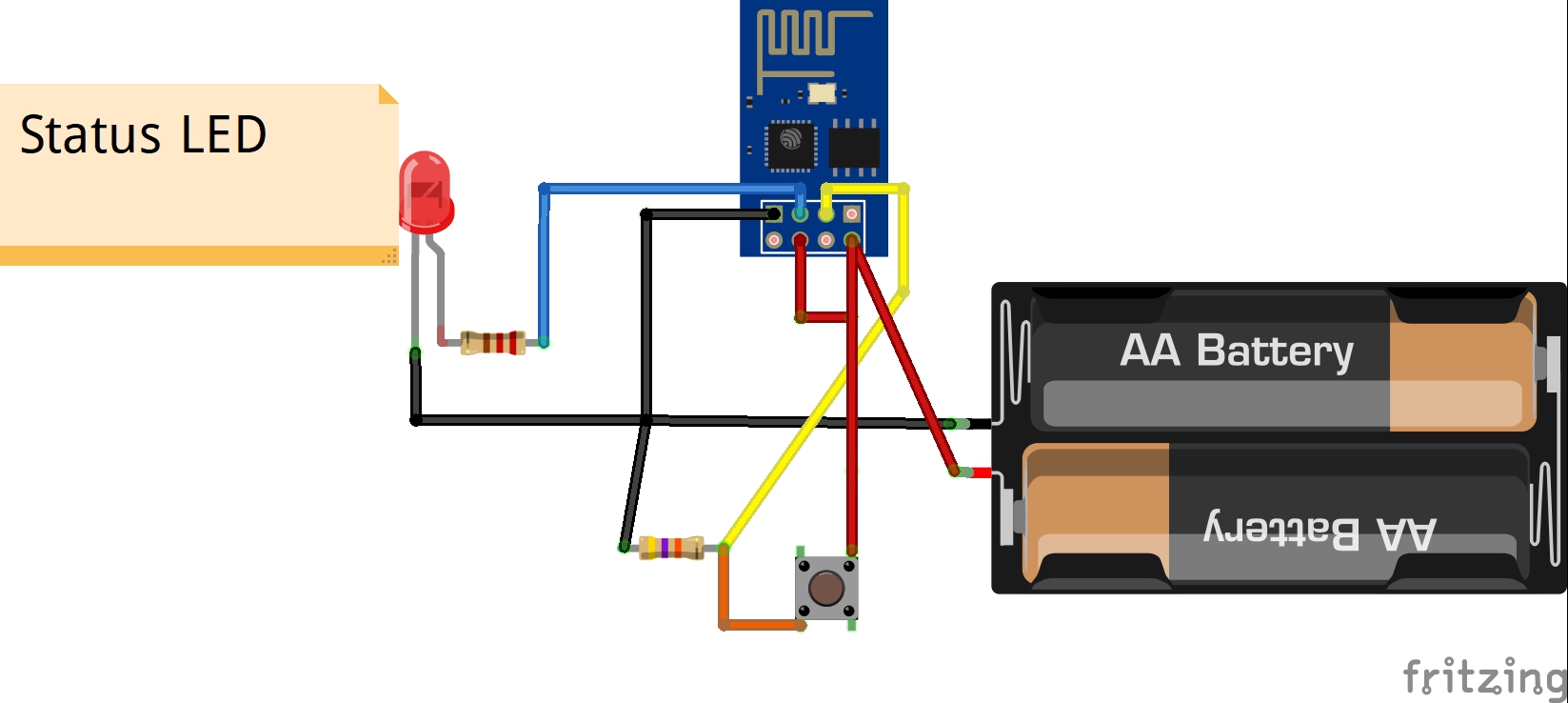
ESP8266-01 Schematic
ESP8266-01 Schematic
Comments
Only logged in users can leave comments