Devices & Components
1
Arduino Uno Rev3
1
Standard LCD - 16x2 White on Blue
1
Jumper wires (generic)
1
Breadboard (generic)
1
4x4 Keypad
1
I2C Module
Software & Tools

Arduino IDE
Project description
Code
Code
arduino
Code
1/*
2
3  This sketch converts a Decimal number into an Octal number.
4  The Decimal number is fed to the Arduino through a 4x4 Keypad.
5  A function  then converts this Decimal number to its Octal
6  equivalent. These numbers are  displayed on a Liquid Crystal Display
7  and Serial Monitor.
8
9  This program  is made by Shreyas for Electronics Champ YouTube Channel.
10  Please subscribe  to this channel. Thank You.
11
12*/
13
14// including the libraries
15#include  <LiquidCrystal_I2C.h>
16#include <Keypad.h>
17#include <Wire.h>
18
19// initialize  the variables
20const byte ROWS = 4;  //Four rows of Keypad
21const byte COLS  = 4;  //Four columns of Keypad
22char key;
23String decimalNum;
24long decimalNumber;
25String  octalNumber;
26
27//Define the symbols on the buttons of the keypad
28char Keys[ROWS][COLS]  = {
29
30  {'1', '2', '3', 'A'},
31  {'4', '5', '6', 'B'},
32  {'7', '8', '9',  'C'},
33  {'*', '0', '#', 'D'}
34
35};
36
37byte rowPins[ROWS] = {2, 3, 4,  5};
38byte colPins[COLS] = {6, 7, 8, 9};
39
40// create keypad and LCD objects
41Keypad  myKeypad = Keypad(makeKeymap(Keys), rowPins, colPins, ROWS, COLS);
42LiquidCrystal_I2C  lcd(0x27, 16, 2);
43
44void setup() {
45
46  // start Serial communication
47  Serial.begin(9600);
48  Serial.println("Electronics Champ");
49
50  // initialize  the lcd
51  lcd.init();
52  lcd.begin(16, 2);
53  lcd.clear();
54  lcd.backlight();
55  lcd.setCursor(0, 0);
56  lcd.print("Electronics");
57  lcd.setCursor(0, 1);
58  lcd.print("Champ");
59  delay(3000);
60  lcd.clear();
61  lcd.setCursor(0,  0);
62  lcd.print("D: ");
63  lcd.setCursor(3, 0);
64  lcd.print(0);
65  lcd.setCursor(0,  1);
66  lcd.print("O: ");
67  lcd.setCursor(3, 1);
68  lcd.print(0);
69
70}
71
72void loop() {
73
74  key = myKeypad.getKey();
75
76  if (key) {
77
78    if (key != 'A' and key != 'B' and key != 'C' and key != 'D' and key != '*' and  key != '#') {
79
80      decimalNum = decimalNum + String(key);
81      decimalNumber  = decimalNum.toInt();
82
83      //Converts Decimal to Octal
84      octalNumber  = convertDecimalToOctal(decimalNumber);
85
86      //Prints the Decimal and the  Octal numbers on the Display
87      lcd.clear();
88      lcd.setCursor(0, 0);
89      lcd.print("D: ");
90      lcd.setCursor(3, 0);
91      lcd.print(decimalNumber);
92      lcd.setCursor(0, 1);
93      lcd.print("O: ");
94      lcd.setCursor(3,  1);
95      lcd.print(octalNumber);
96
97      //Prints the Decimal number on  the Serial Monitor
98      Serial.print("Decimal: ");
99      Serial.print(decimalNumber);
100      Serial.print("      ");
101
102      //Prints the Octal number on the Serial  Monitor
103      Serial.print("Octal: ");
104      Serial.println(octalNumber);
105
106    }
107
108  }
109
110  //Clears the numbers
111  if (key == 'C') {
112
113    decimalNum = "";
114    decimalNumber = 0;
115    octalNumber = "0";
116    lcd.clear();
117    lcd.setCursor(0, 0);
118    lcd.print("D: ");
119    lcd.setCursor(3,  0);
120    lcd.print(decimalNumber);
121    lcd.setCursor(0, 1);
122    lcd.print("O:  ");
123    lcd.setCursor(3, 1);
124    lcd.print(octalNumber);
125
126  }
127
128}
129
130//This function converts a Decimal number to an Octal number
131String  convertDecimalToOctal(long n) {
132
133  String octalNum;
134  int remainder;
135
136  while (n > 0) {
137
138    remainder = n % 8;
139    n = n / 8;
140    octalNum  = String(remainder) + octalNum;
141
142  }
143
144  return octalNum;
145
146}
147
148
Downloadable files
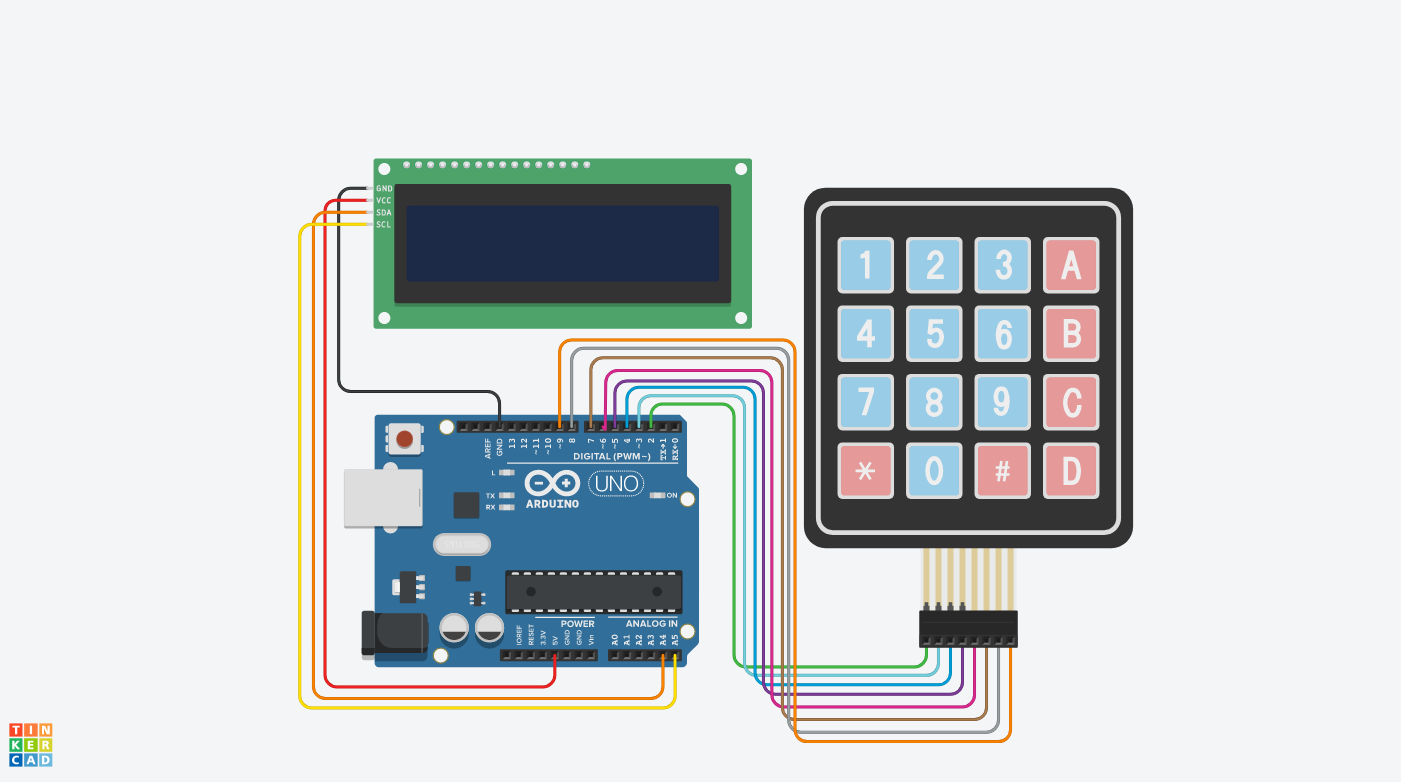
Schematic
Tinkercad software is used to design the schematic.
Schematic
Comments
Only logged in users can leave comments