Devices & Components
40 colored male-female jumper wires
Arduino Uno Rev3
16x2 LCD display with I²C interface
Red LEDs
9V Battery Clip
Magnetic Hall Sensor
Hardware & Tools
STRAWS
Spinner
Soldering kit
Screws
Copper Coil
Magnet, Button
Software & Tools
tinkercad circuits
circuito.io
Arduino IDE
Project description
Code
RPM
cpp
Download and compile the code
1#include <LiquidCrystal.h> 2 3LiquidCrystal lcd(12, 11, 6, 5, 4, 3); 4 5const int hallSensorPin = 2; // Hall sensor output connected to digital pin 2 6unsigned long lastTime = 0; // Variable to store the last time the sensor was read 7unsigned long currentTime = 0; // Variable to store the current time 8volatile int pulseCount = 0; // Counter for the number of pulses 9float rpm = 0; // Variable to store calculated rotations per minute 10 11void setup() { 12 Serial.begin(9600); // Initialize serial communication at 9600 baud 13 lcd.begin(16,2); 14 pinMode(hallSensorPin, INPUT); // Set the sensor pin as input 15 attachInterrupt(digitalPinToInterrupt(hallSensorPin), countPulse, RISING); // Attach interrupt on rising edge 16} 17 18void loop() { 19 // Calculate RPM every second 20 if (millis() - lastTime > 1000) { 21 detachInterrupt(digitalPinToInterrupt(hallSensorPin)); // Disable interrupt 22 rpm = (pulseCount / 3.0) * 60.0; // Calculate RPM considering 3 magnets 23 pulseCount = 0; // Reset pulse count 24 lastTime = millis(); // Update last time 25 attachInterrupt(digitalPinToInterrupt(hallSensorPin), countPulse, RISING); // Re-enable interrupt 26 Serial.print("RPM: "); 27 Serial.println(rpm); 28 29 30 lcd.setCursor(1,0); 31 lcd.print("RPM of Spinner"); 32 lcd.setCursor(5,1); 33 lcd.print(rpm); 34 lcd.setCursor(0,1); 35 delay(500); 36 37 38 } 39} 40 41void countPulse() { 42 pulseCount++; // Increment pulse count 43}
Downloadable files
LiquidCrystal
download and add library
LiquidCrystal-master.zip
Documentation
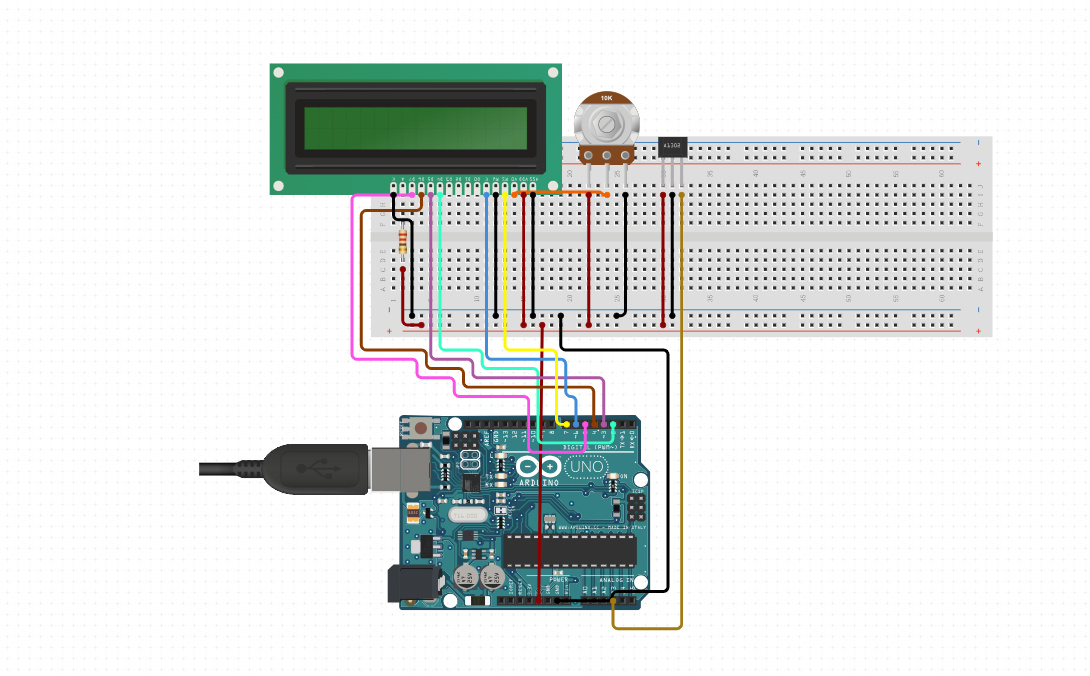
circuit diagram
connect circuit accordingly
Screenshot 2024-07-17 114631.png
Comments
Only logged in users can leave comments