Devices & Components
Arduino Uno Rev3
Water Flow Sensor
12 volt Adapter
7 segment 4 digit display
9V Battery Clip
jumper wires for arduino
Hardware & Tools
Soldering Gun Kit, Instant Heat
Solder Soldering Wire
Software & Tools
Arduino IDE
Project description
Code
Water Flow Sensor
cpp
1/* 2Liquid flow rate sensor -DIYhacking.com Arvind Sanjeev 3 4Measure the liquid/water flow rate using this code. 5Connect Vcc and Gnd of sensor to arduino, and the 6signal line to arduino digital pin 2. 7 8 */ 9 10 11#include <TM1637Display.h> 12 13byte statusLed = 11; 14 15#define CLK 5 16#define DIO 4 17 18// Initialize TM1637 display object 19TM1637Display display(CLK, DIO); 20 21// Interval for updating display (milliseconds) 22const unsigned long DISPLAY_UPDATE_INTERVAL = 1000; // Update every second 23 24//Water flow sensor pins 25byte sensorInterruptA = 0; // 0 = digital pin 2 26byte sensorInterruptB = 1; 27byte sensorPinA = 2; 28byte sensorPinB = 3; 29 30 31// The hall-effect flow sensor outputs approximately 4.5 pulses per second per 32// litre/minute of flow. 33float calibrationFactor = 4.5; 34volatile byte pulseCount; 35 36float flowRate; 37float thresholdFlowRate = 2; // flow rate limit 38unsigned long oldTime; 39 40void setup() 41{ 42 43 // Initialize a serial connection for reporting values to the host 44 Serial.begin(9600); 45 46 // Set up the status LED line as an output 47 pinMode(statusLed, OUTPUT); 48 display.setBrightness(7); // Set brightness level (0 to 7) 49 50 pinMode(sensorPinA, INPUT); 51 pinMode(sensorPinB, INPUT); 52 digitalWrite(sensorPinA, HIGH); 53 digitalWrite(sensorPinB, HIGH); 54 55 pulseCount = 0; 56 flowRate = 0.0; 57 oldTime = 0; 58 59 // The Hall-effect sensor is connected to pin 2 which uses interrupt 0. 60 // Configured to trigger on a FALLING state change (transition from HIGH 61 // state to LOW state) 62 attachInterrupt(sensorInterruptA, pulseCounter, FALLING); 63 attachInterrupt(sensorInterruptB, pulseCounter, FALLING); 64} 65 66/** 67 * Main program loop 68 */ 69void loop() 70{ 71 72 if((millis() - oldTime) > 1000) // Only process counters once per second 73 { 74 // Disable the interrupt while calculating flow rate and sending the value to 75 // the host 76 detachInterrupt(sensorInterruptA); 77 detachInterrupt(sensorInterruptB); 78 79 // Because this loop may not complete in exactly 1 second intervals we calculate 80 // the number of milliseconds that have passed since the last execution and use 81 // that to scale the output. We also apply the calibrationFactor to scale the output 82 // based on the number of pulses per second per units of measure (litres/minute in 83 // this case) coming from the sensor. 84 flowRate = ((1000.0 / (millis() - oldTime)) * pulseCount) / calibrationFactor; 85 86 // Note the time this processing pass was executed. Note that because we've 87 // disabled interrupts the millis() function won't actually be incrementing right 88 // at this point, but it will still return the value it was set to just before 89 // interrupts went away. 90 oldTime = millis(); 91 92 93 unsigned int frac; 94 95 // Print the flow rate for this second in litres / minute 96 Serial.print("Flow rate: "); 97 Serial.print(int(flowRate)); // Print the integer part of the variable 98 Serial.print(" L/min"); 99 Serial.print("\t"); // Print tab space 100 101 102 // Display flow rate on all 4 digits 103 int flowRateInt=int(flowRate); 104 display.showNumberDec(flowRateInt, true); 105 106 // Reset the pulse counter so we can start incrementing again 107 pulseCount = 0; 108 109 // Enable the interrupt again now that we've finished sending output 110 attachInterrupt(sensorInterruptA, pulseCounter, FALLING); 111 attachInterrupt(sensorInterruptB, pulseCounter, FALLING); 112 113 if (flowRate > thresholdFlowRate) { 114 digitalWrite(statusLed, HIGH); // Turn on buzzer 115 delay(500); // Buzzer on for 500ms 116 digitalWrite(statusLed, LOW); // Turn off buzzer 117 } 118 119 120 } 121} 122 123/* 124Insterrupt Service Routine 125 */ 126void pulseCounter() 127{ 128 // Increment the pulse counter 129 pulseCount++; 130}
Downloadable files
7 segment 4 digit Display
Download and include the file to the library
TM1637-master.zip
Documentation
Circuit Diagram
Connect the circuit according to the diagram
3ae756bf-c335-4dd2-98ff-08ba5011e243.png
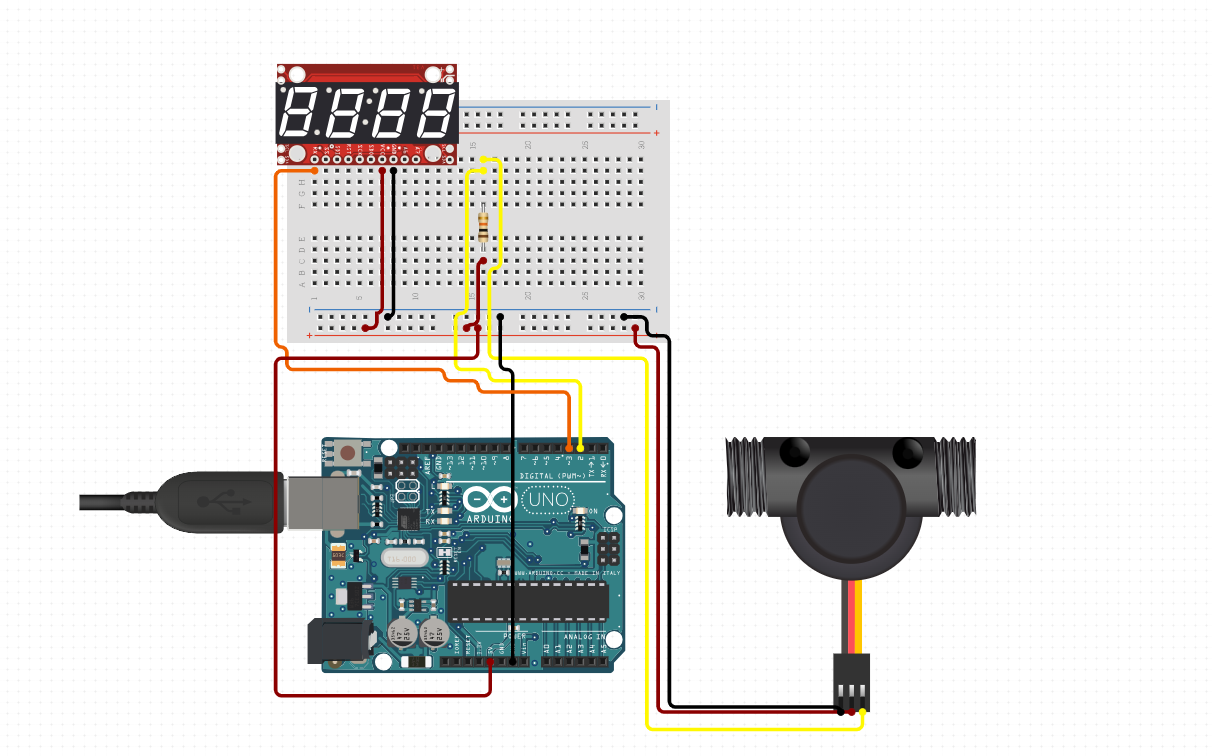
Connection
file.None
Comments
Only logged in users can leave comments