Clock with some useful innovations
Simple clock with variable brightness depending on ambient light intensity and easy switching for Daylight Saving Time
Devices & Components
1
Arduino Nano
Software & Tools

Arduino IDE
Project description
Code
Clock with DST and Dimmer
cpp
1// Digital clock incorporating Daylight Saving Time (DST) / Standard Time (ST) changeover and
2// auto dimming for night viewing
3
4//The SCL and SDA pins on the RTC connect to the Arduino I2C pins which are Analog pins 5 and 4 respectively.
5//There is no need to define these.
6
7#include <Wire.h>
8#include "RTClib.h"
9#include <TM1637Display.h>
10
11#define CLK 5                 //Defines digital pin 5 as the CLK pin connection on the TM1637
12#define DIO 6                 // Defines digital pin 6 as the DIO pin on the TM1637
13#define buttonPin 9           //Defines digital pin 9 as the pushbutton pin for DST/ST switching
14#define TIME_24_HOUR (true);  //Sets the readout to 24 hour time. Delete this is you want 12 hour time.
15
16int DSThour = 0;              //Variable for the time display variations. This will either be the ST or the ST plus 1 for DST
17int displaytime = 0;          //Variable for the time to be displayed on the LED readout
18bool dstOn = false;           //Boolean variable for the status of the pushbutton
19
20const int ldrPin = A0;        //Analog pin for the LDR voltage divider
21
22RTC_DS3231 rtc;               //Creates an object for the RTC
23
24TM1637Display display(CLK, DIO); //Creates and object for the LED readout
25
26void setup() {
27
28    pinMode (buttonPin,INPUT_PULLUP);//connects the pin to the internal pullup resistor
29
30      if (!rtc.begin()) {
31      while (1);
32      }
33
34    rtc.adjust(DateTime(F(__DATE__), F(__TIME__))); // IMPORTANT: Comment this line out and reload the sketch when the RTC time is set after inital bootup.
35 }
36
37void loop() {
38
39    int ldrStatus = analogRead(ldrPin);           //read the status of the LDR value
40    int buttonState = digitalRead (buttonPin);    //read the status of the button pin, HIGH or LOW
41    delay(100);
42
43  if (ldrStatus > 500) display.setBrightness(7);  // If the room is bright, make the readout bright.
44  else
45  display.setBrightness(0);                       // If the room is dim, make the readout dim.
46
47//The following section toggles the dstOn variable from one state to another.
48
49      if (buttonState == LOW && dstOn == true) dstOn = false;
50      else
51      if (buttonState == LOW && dstOn == false) dstOn = true;
52
53  DateTime now = rtc.now();// Get current date and time:
54
55
56//If dstOn is FALSE set the time as the Standard Time
57
58  if (dstOn == false)
59           {
60           DSThour = (now.hour());
61           displaytime = (DSThour * 100) + now.minute();
62           }
63
64  //If dstOn is TRUE set the time as the Standard Time plus one hour
65
66  if (dstOn == true)
67          {
68          DSThour = (now.hour() + 1);
69          displaytime = (DSThour * 100) + now.minute();
70          }
71
72  display.showNumberDecEx(displaytime, 0b11100000, false);  // Display the time data with a center colon:
73  }
Documentation
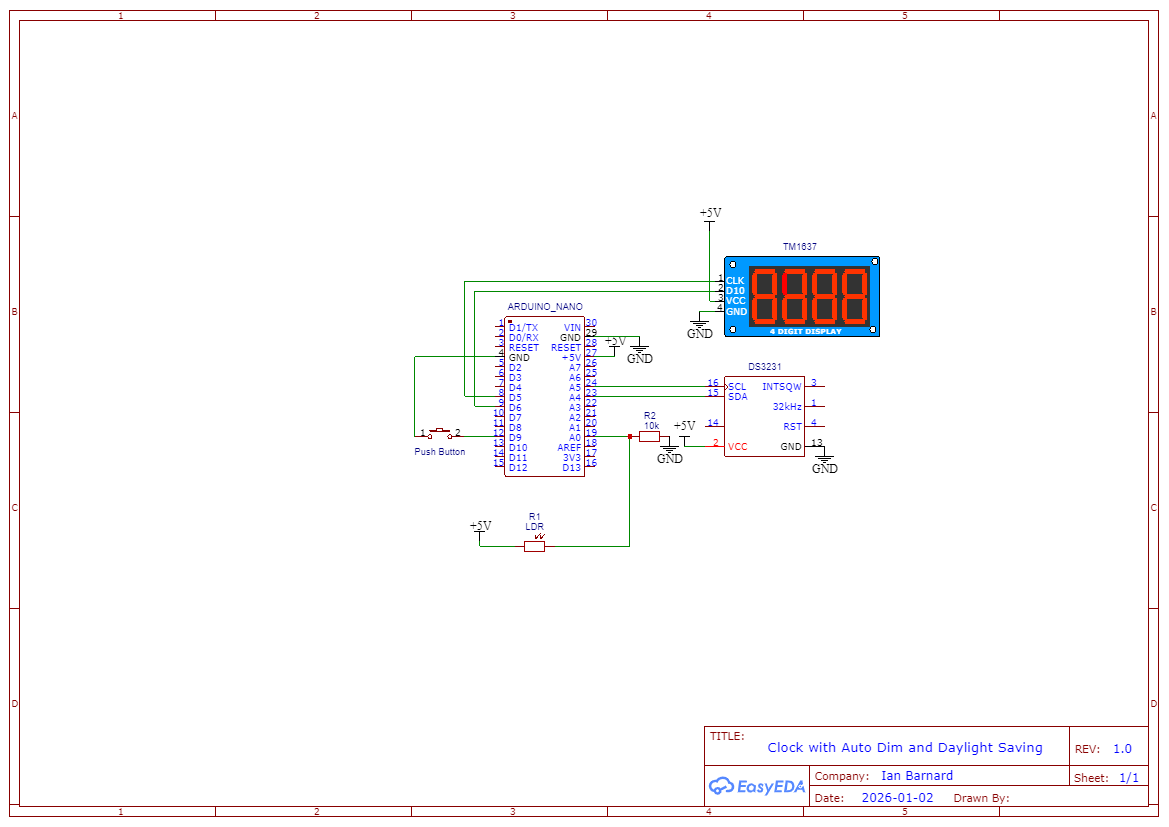
Schematic Clock_DST_Dim
Clock_DST_Dim.png
Comments
Only logged in users can leave comments