COVID-19 Desinfection and Monitoring tunnel
Tunnel to Combat COVID-19 with desinfectante solution sprinkler and company access counter with real-time communication with a online system
Devices & Components

Arduino Nano 33 IoT
Ultrasonic Sensor - HC-SR04 (Generic)
5 mm LED: Yellow
SparkFun RedBot Sensor - Line Follower
5 mm LED: Green
PIR Sensor, 7 m
Relay Module (Generic)
Resistor 221 ohm
Buzzer
Sensor Cable, Water-resistant
5 mm LED: Red
Hardware & Tools
Drill, Screwdriver
Plier, Cutting
Soldering iron (generic)
Tape, Electrical
Plier, Long Nose
Hot glue gun (generic)
Solder Wire, Lead Free
Software & Tools
Arduino IoT Cloud
Project description
Code
IOT Cloud thingProperties
arduino
1#include <ArduinoIoTCloud.h>
2#include <Arduino_ConnectionHandler.h>
3#include   "arduino_secrets.h"
4
5const char THING_ID[] = "a73f86b0-9b74-4e9f-9deb-3236b166ee8c";
6
7const   char SSID[]     = SECRET_SSID;    // Network SSID (name)
8const char PASS[]     =   SECRET_PASS;    // Network password (use for WPA, or use as key for WEP)
9
10void   onOcupacaoChange();
11void onTaxaMaximaOcupacaoChange();
12void onStatusTunelChange();
13
14int   ocupacao;
15float taxaMaximaOcupacao;
16bool statusTunel;
17
18void initProperties()   {
19
20  ArduinoCloud.setThingId(THING_ID);
21  ArduinoCloud.addProperty(ocupacao,   READWRITE, ON_CHANGE, onOcupacaoChange);
22  ArduinoCloud.addProperty(taxaMaximaOcupacao,   READWRITE, ON_CHANGE, onTaxaMaximaOcupacaoChange);
23  ArduinoCloud.addProperty(statusTunel,   READWRITE, ON_CHANGE, onStatusTunelChange);
24
25}
26
27WiFiConnectionHandler   ArduinoIoTPreferredConnection(SSID, PASS);
IOT Cloud sketch.json
arduino
1{"cpu":{"fqbn":"arduino:samd:nano_33_iot","name":"Arduino NANO   33 IoT","port":""},"secrets":[{"name":"SECRET_SSID","value":"","isOptional":false},{"name":"SECRET_PASS","value":"","isOptional":false}]}
2
IOT Cloud arduino_secrets
arduino
1#define SECRET_SSID ""
2#define SECRET_PASS ""
Main program
arduino
1/*
2   PROJECT OF SPRAY AGAINST COVID19
3   Version: 4.0
4   Commit:  Add send to internet.
5   Client: Pixels Escola de Design e Tecnologia
6   Start:  6/17/2020
7   Finish:
8   Update:
9*/
10
11#include "thingProperties.h"
12
13#define  SensorA_  1
14#define SensorB_ -1
15
16#define DETECTADO 0
17
18#define tempoEspera  1000
19
20#define MAXIMO_PESSOAS_ISOLAMENTO_SOCIAL 100,00
21
22//Definition  of the Arduino pins
23const byte pinInputSensor = 2; //Digital pin 2 of the Arduino  connected to sense 1 (Thread blue)
24const byte pinMiddleSensor = 3; //Digital  pin 3 of the Arduino connected to sense 2 (Thread yellow)
25const byte pinOutputSensor  = 4; //Digital pin 4 of the Arduino connected to sense 3 (Thread orange)
26const  byte pinRelayPump = 5; //Digital pin 5 of the Arduino connected to pin Relay of  Pump Water
27const byte pinBuzzer = 0; //Digital pin 6 of the Arduino connected  to buzzer (Thread green)
28const byte pinGreenLed = 8; // Digital pin 8 of the  Arduino connected to Led Green
29const byte pinYellowLed = 9; // Digital pin 9  of the Arduino connected to Led Yellow
30const byte pinRedLed = 10; // Digital  pin 10 of the Arduino connected to Led Red
31const byte pinMedLevelSensor = 11;  // Digital pin 12 of the Arduino connected to Sensor of Medium Level (Thread white)
32const  byte pinLowLevelSensor = 12; // Digital pin 11 of the Arduino connected to Sensor  of Low Level (Thread orange)
33const byte pinSensorPeopleEntering = 7; // Digital  pin 14 of the Arduino connected to Infrared Sensor of people entering
34const byte  pinSensorPeopleOut = 6; // Digital pin 15 of the Arduino connected to Infrared Sensor  of people comming out.
35
36//Definition of variables of the sensors
37bool inputSensor,  middleSensor, outputSensor; //Variables that keep the state of the of presence sensors
38bool  lowLevelSensor, medLevelSensor; //Variables that keep the state of the of water  level sensors
39bool sensorPeopleEntering, sensorPeopleOut; // Variables that keep  the state of the Infrared Sensor that counts people.
40int estadoSensores = 0;
41int  estadoSensoresAnt = 0;
42unsigned long controleTempo;
43
44void setup() {
45  Serial.begin(9600); //Starting serial communication
46  //Sets the Sensors pins
47  pinMode(pinInputSensor, INPUT_PULLUP); //Define the pin 2 as input
48  pinMode(pinMiddleSensor,  INPUT_PULLUP); //Define the pin 3 as input
49  pinMode(pinOutputSensor, INPUT_PULLUP);  //Define the pin 4 as input
50  pinMode(pinLowLevelSensor, INPUT_PULLUP); //Define  the pin 11 as input
51  pinMode(pinMedLevelSensor, INPUT_PULLUP); //Define the  pin 12 as input
52  pinMode(pinSensorPeopleEntering, INPUT_PULLUP); //Define the  pin 14 as input
53  pinMode(pinSensorPeopleOut, INPUT_PULLUP); //Define the pin  15 as input
54
55  //Sets the Actuators pins
56  pinMode(pinRelayPump, OUTPUT);  //Define the pin 5 as output
57  pinMode(pinBuzzer, OUTPUT); //Define the pin 6  as output
58  pinMode(pinGreenLed, OUTPUT); //Define the pin 8 as output
59  pinMode(pinYellowLed,  OUTPUT); //Define the pin 9 as output
60  pinMode(pinRedLed, OUTPUT); //Define  the pin 10 as output
61
62  // Defined in thingProperties.h
63  initProperties();
64
65  // Connect to Arduino IoT Cloud
66  ArduinoCloud.begin(ArduinoIoTPreferredConnection);
67
68}//End  of the setup
69
70void loop() {
71
72  ArduinoCloud.update();
73
74  //Checks  water level sensors
75  lowLevelSensor = digitalRead(pinLowLevelSensor);
76  medLevelSensor  = digitalRead(pinMedLevelSensor);
77
78  //Checks infrared sensor if passed person
79  sensorPeopleEntering = digitalRead(pinSensorPeopleEntering);
80  sensorPeopleOut  = digitalRead(pinSensorPeopleOut);
81
82  taxaMaximaOcupacao = float(ocupacao)  / MAXIMO_PESSOAS_ISOLAMENTO_SOCIAL;
83  Serial.println(ocupacao);
84  Serial.println(taxaMaximaOcupacao);
85
86  if (sensorPeopleEntering == DETECTADO && sensorPeopleOut == DETECTADO) {
87    controleTempo  = millis();
88
89  } else if (sensorPeopleEntering == DETECTADO || sensorPeopleOut  == DETECTADO) {
90
91    if (sensorPeopleEntering == DETECTADO) {
92
93      switch  (estadoSensoresAnt) {
94        case SensorB_ : {
95            estadoSensores  = 0;
96            ocupacao--;
97            controleTempo = millis();
98            break;
99          }
100        case 0 : {
101            estadoSensores = SensorA_;
102            controleTempo = millis();
103            break;
104          }
105        case  SensorA_ : {
106            estadoSensores = SensorA_;
107            controleTempo  = millis();
108            break;
109          }
110      }
111
112
113    }
114
115    if (sensorPeopleOut == DETECTADO) {
116
117      switch (estadoSensoresAnt)  {
118        case SensorA_ : {
119            estadoSensores = 0;
120            ocupacao++;
121            controleTempo = millis();
122            break;
123          }
124        case  0 : {
125            estadoSensores = SensorB_;
126            controleTempo = millis();
127            break;
128          }
129        case SensorB_ : {
130            estadoSensores  = SensorB_;
131            controleTempo = millis();
132            break;
133          }
134      }
135
136    }
137
138  } else {
139    if ( millis() - controleTempo > tempoEspera  ) {
140      estadoSensores = 0;
141      estadoSensoresAnt = estadoSensores;
142    }
143  }
144
145  estadoSensoresAnt = estadoSensores;
146
147  //Logic of water  level sensors: 0 --> With water | 1 --> No water
148
149  // If both sensors are  active (With water)
150  if ((lowLevelSensor == 0) and (medLevelSensor == 0)) {
151    digitalWrite(pinGreenLed, HIGH);
152    digitalWrite(pinYellowLed, LOW);
153    digitalWrite(pinRedLed, LOW);
154    enabledTunnel();// Tunnel operating function
155  }
156
157  // If the medium level sensor not activated (Low water)
158  if ((lowLevelSensor  == 0) and (medLevelSensor == 1)) {
159    digitalWrite(pinGreenLed, LOW);
160    digitalWrite(pinYellowLed,  HIGH);
161    digitalWrite(pinRedLed, LOW);
162    enabledTunnel();// Tunnel operating  function
163  }
164
165  // If the low level sensor not activated (no water) but  medium level sensor are active
166  if ((lowLevelSensor == 1) and (medLevelSensor  == 0)) {
167    //Error in sensors
168    digitalWrite(pinGreenLed, HIGH);
169    digitalWrite(pinYellowLed,  HIGH);
170    digitalWrite(pinRedLed, HIGH);
171    Serial.println("Level sensor  in ERROR!");
172    disableTunnel();
173  }
174
175  // If both sensors not activated  (empty tank)
176  if ((lowLevelSensor == 1) and (medLevelSensor == 1)) {
177    digitalWrite(pinGreenLed,  LOW);
178    digitalWrite(pinYellowLed, LOW);
179    digitalWrite(pinRedLed, HIGH);
180    disableTunnel();// Tunnel no operating function
181  }
182  Serial.println("======================================================");
183
184}  //End of the loop
185
186void enabledTunnel() {
187  Serial.println("Tunnel enabled.");
188
189  statusTunel = true;
190
191  //Reading the status of the sensors
192  inputSensor  = digitalRead(pinInputSensor);
193  middleSensor = digitalRead(pinMiddleSensor);
194  outputSensor = digitalRead(pinOutputSensor);
195
196  //Prints sensor readings  on the serial monitor
197  Serial.println("Input Sensor: " + String(inputSensor)  + " | Middle Sensor: " + String(middleSensor) + " | Output Sensor: " + String(outputSensor));
198
199  //If any of the 3 motion sensors is trigged
200  if ((inputSensor == LOW) || (middleSensor  == LOW) || (outputSensor == LOW)) {
201    Serial.println("Detected person presence  in the tunel.");
202    digitalWrite(pinRelayPump, HIGH); //Start the pump
203    noTone(pinBuzzer);
204    tone(pinBuzzer, 440, 200);
205    //delay(300);
206  }
207
208  else { //If you don't
209    Serial.println("No movement in the tunel.");
210    digitalWrite(pinRelayPump, LOW); //Turn off the pump
211    noTone(pinBuzzer);  //Disable the buzzer
212    //delay(300);
213  }
214
215}//end enabledTunnel
216
217void  disableTunnel() {
218  //Serial.println("Tunnel disabled.");
219
220  statusTunel  = false;
221
222  digitalWrite(pinRelayPump, LOW); //Turn off the pump
223  noTone(pinBuzzer);  //Disable the buzzer
224  //delay(500);
225  tone(pinBuzzer, 3000, 200);
226  //delay(500);
227}
228
229void  onOcupacaoChange() {
230
231}
232
233void onTaxaMaximaOcupacaoChange() {
234
235}
236
237void  onStatusTunelChange() {
238
239}
IOT Cloud sketch.json
arduino
1{"cpu":{"fqbn":"arduino:samd:nano_33_iot","name":"Arduino NANO  33 IoT","port":""},"secrets":[{"name":"SECRET_SSID","value":"","isOptional":false},{"name":"SECRET_PASS","value":"","isOptional":false}]}
2
IOT Cloud thingProperties
arduino
1#include <ArduinoIoTCloud.h>
2#include <Arduino_ConnectionHandler.h>
3#include  "arduino_secrets.h"
4
5const char THING_ID[] = "a73f86b0-9b74-4e9f-9deb-3236b166ee8c";
6
7const  char SSID[]     = SECRET_SSID;    // Network SSID (name)
8const char PASS[]     =  SECRET_PASS;    // Network password (use for WPA, or use as key for WEP)
9
10void  onOcupacaoChange();
11void onTaxaMaximaOcupacaoChange();
12void onStatusTunelChange();
13
14int  ocupacao;
15float taxaMaximaOcupacao;
16bool statusTunel;
17
18void initProperties()  {
19
20  ArduinoCloud.setThingId(THING_ID);
21  ArduinoCloud.addProperty(ocupacao,  READWRITE, ON_CHANGE, onOcupacaoChange);
22  ArduinoCloud.addProperty(taxaMaximaOcupacao,  READWRITE, ON_CHANGE, onTaxaMaximaOcupacaoChange);
23  ArduinoCloud.addProperty(statusTunel,  READWRITE, ON_CHANGE, onStatusTunelChange);
24
25}
26
27WiFiConnectionHandler  ArduinoIoTPreferredConnection(SSID, PASS);
IOT Cloud arduino_secrets
arduino
1#define SECRET_SSID ""
2#define SECRET_PASS ""
Downloadable files
Project Assembly Circuit
Component assembly scheme for the operation of the Disinfection Tunnel project.
Project Assembly Circuit
PNG image of the Assembly circuit.
Non-editable image of the assembly circuit of the components of the project COVID-19 of the disinfection tunnel.
PNG image of the Assembly circuit.
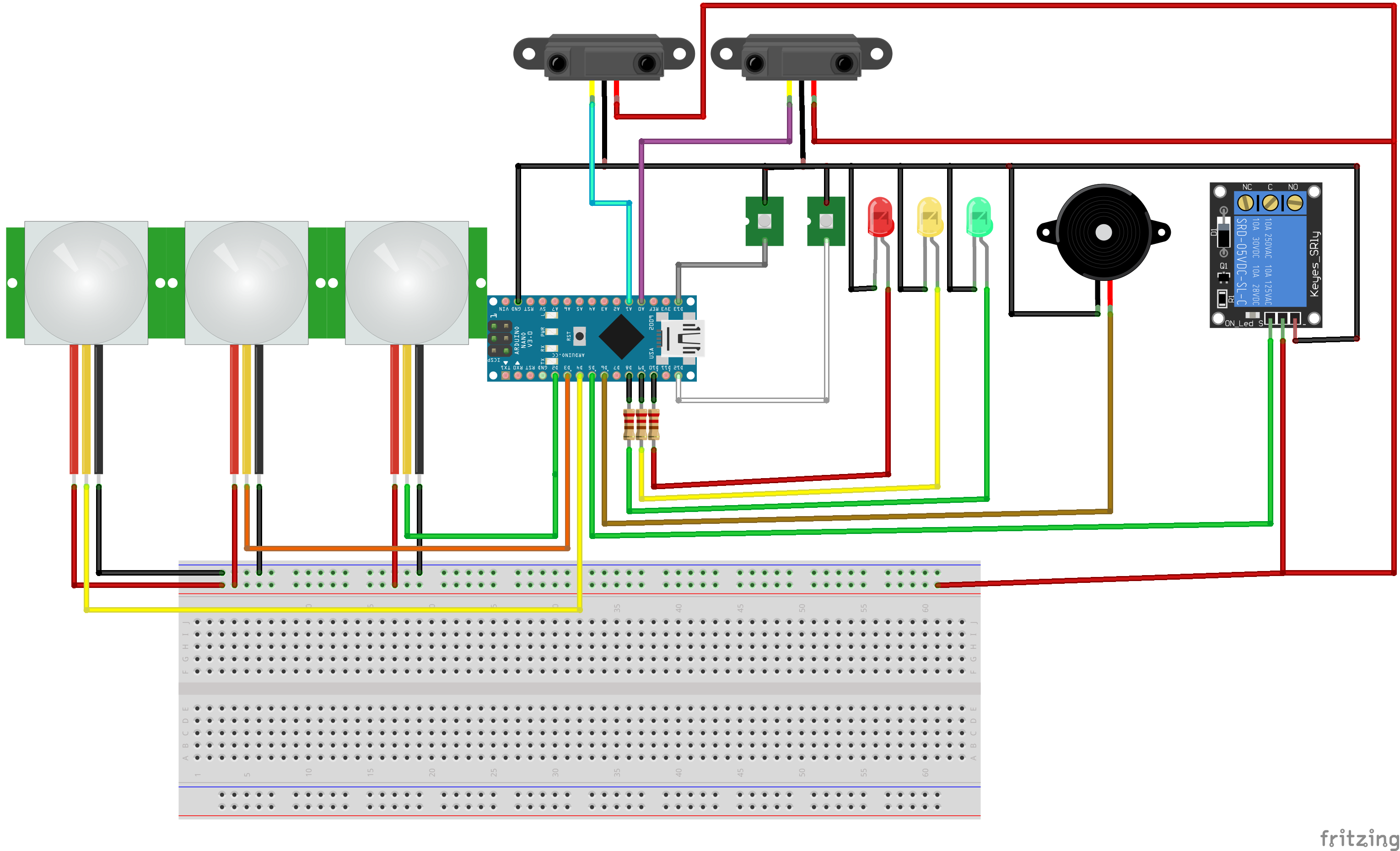
PNG image of the Assembly circuit.
Non-editable image of the assembly circuit of the components of the project COVID-19 of the disinfection tunnel.
PNG image of the Assembly circuit.
Project Assembly Circuit
Component assembly scheme for the operation of the Disinfection Tunnel project.
Project Assembly Circuit
Comments
Only logged in users can leave comments