Pet Care IoT
Take care of your pet from anywhere in world in a real-time with Arduino, Android and and ASP. NET Core.
Devices & Components
1
Arduino Nano
1
Arduino Uno Rev3
1
12V power suply
1
Dual H-Bridge motor drivers L298
1
ESP8266 ESP-01
2
5V 2.5A Switching Power Supply
1
Relay Module (Generic)
1
DC motor (generic)
1
NodeMCU ESP8266 Breakout Board
1
Jumper wires (generic)
1
SG90 Micro-servo motor
Software & Tools
1
SmarterAsp.net

Arduino IDE
1
Visual Studio 2017
Project description
Code
NodeMCU sketch
arduino
1#include <ESP8266WiFi.h>
2#include <ESP8266WiFiMulti.h>
3#include  <WiFiClient.h>
4#include <Wire.h>
5#include <ESP8266HTTPClient.h>
6#include  <WebSocketsClient_Generic.h>
7#include <Hash.h>
8#include <ArduinoJson.h>
9#include  "common.h"
10
11ESP8266WiFiMulti WiFiMulti;
12WebSocketsClient webSocket;
13IPAddress  serverIP(192, 168, 0, 132);
14
15bool alreadyConnected = false;
16String token  = "token:";
17
18void webSocketEvent(WStype_t type, uint8_t * payload, size_t  length){
19  switch (type){
20  case WStype_DISCONNECTED:
21    if (alreadyConnected)
22    {
23      Serial.println("Disconnected from websocket!");
24      alreadyConnected  = false;
25    }
26    break;
27  case WStype_CONNECTED:
28    {
29      alreadyConnected  = true;
30      Serial.print("Connected to websocket. ");
31    }
32    break;
33  case WStype_TEXT:
34    processPayload((char *) payload);
35    break;
36  default:
37    break;
38  }
39}
40
41void setup(){
42  Serial.begin(115200);
43  Serial.setDebugOutput(false);
44  Wire.begin(D1, D2);
45
46  Serial.println("Booting");
47  for (uint8_t t  = 4; t > 0; t--)
48  {
49    Serial.print(".");
50    delay(1000);
51  }
52
53  WiFiMulti.addAP(ssid, pass);
54  Serial.println("Connecting to network");
55  while (WiFiMulti.run() != WL_CONNECTED)
56  {
57    Serial.print(".");
58    delay(100);
59  }
60
61  login();
62
63  // Add jwt token after login
64  webSocket.setExtraHeaders(token.c_str());
65  webSocket.begin(serverIP, 61955,  "/");
66
67  webSocket.onEvent(webSocketEvent);
68  webSocket.setReconnectInterval(15000);
69  webSocket.enableHeartbeat(60000, 10000, 2);
70}
71unsigned long messageTimestamp  = 0;
72
73void loop(){
74  webSocket.loop();
75
76  uint64_t now = millis();
77  if (now - messageTimestamp > 2000)
78  {
79    messageTimestamp = now;
80    getWaterLevel();
81  }
82}
83
84void processPayload(char * payload){
85  StaticJsonDocument<300> doc;
86  String jsonObject = String(payload);
87
88  auto error = deserializeJson(doc, jsonObject);
89  if (error) {
90    Serial.println("Error  parsing object.");
91    return;
92  }
93
94  int messageType = doc["Type"];
95
96  writeToArduino(messageType);
97  readFromArduino(doc);
98}
99
100void  getWaterLevel(){
101  writeToArduino((int)GET_VALUES);
102  Wire.requestFrom(8,  16);
103
104  int level;
105  if(Wire.available()>0){
106    level = (Wire.read()  | Wire.read() << 8);
107  }
108  Serial.print("Water level: ");
109  Serial.println(level);
110
111}
112
113void readFromArduino(StaticJsonDocument<300> doc){
114  int c;
115  Wire.requestFrom(8, 4);
116  if(Wire.available()>0){
117    c = Wire.read();
118  }
119  if(c == DONE)
120  {
121    String myOutput ="";
122    doc["Type"]  = DONE;
123    serializeJson(doc, myOutput);
124    sendConfirmationMessage(myOutput);
125  }
126
127}
128
129void sendConfirmationMessage(String output){
130  String sendTo  = String("{\\"From\\":\\"Arduino\\", \\"Data\\" :") + output + ", \\"To\\":\\"\\"}";
131  webSocket.sendTXT(sendTo);
132}
133
134void writeToArduino(int code){
135  Wire.beginTransmission(I2CAddressESPWifi);
136  Wire.write(code);
137  Wire.endTransmission();
138  if(code == FEEDER_START)
139  {
140    delay(1000);
141  }
142
143  if(code == PUMP_START)
144  {
145    delay(5000);
146  }
147}
148
149void login(){
150  StaticJsonDocument<600> doc;
151  HTTPClient  http;
152  http.begin(serverLoginGlobal);
153
154  http.addHeader("Content-Type",  "application/json");
155  http.POST("{\\"username\\" : \\"arduino-esp\\",  \\"password\\" : \\"password\\"}");
156  delay(5000);
157
158  String payload  = http.getString();
159
160  auto error = deserializeJson(doc, payload);
161  if  (error) {
162    return;
163  }
164  String tokenValue =  doc["token"];
165  if(t.length()>1)
166  {
167     Serial.println("Login successful");
168  }
169  token += tokenValue;
170
171  http.end();
172}
common.h
h
1//Mesage codes
2#define FEEDER_START      1
3#define PUMP_START        2
4#define  LIGHT_ON          3
5#define LIGHT_OFF         4
6#define GET_VALUES        5
7#define  DONE              8
8
9#define WATER_LEVEL_LOW 750  // Over than 750 is near  empty, must start pump,
10#define WATER_LEVEL_HIGH 350 // Under 320 is near full,  must stop pumo.
11
12#define SERVO_PIN 3
13#define LIGHT_PIN 12
14#define I2CAddressESPWifi  8
15#define enA  9
16#define in1  8
17#define in2  7
18
19const char* ssid     = "WIFI name";
20const char* pass = "wifipass";
21
22String serverLoginGlobal  = "deployed_server_url/api/authenticate/login";
23String websocketGlobal = "deployed_websocket_url";
24String  serverLoginLocal = "http://localhost/api/authenticate/login";
25
26String websocketLocal  = "local_ip";
27
28int portLocal = 61955;
29int portGlobal = 80;
PetCareIoT project
Contains Android, Web and Arduino projects


NodeMCU sketch
arduino
1#include <ESP8266WiFi.h>
2#include <ESP8266WiFiMulti.h>
3#include   <WiFiClient.h>
4#include <Wire.h>
5#include <ESP8266HTTPClient.h>
6#include   <WebSocketsClient_Generic.h>
7#include <Hash.h>
8#include <ArduinoJson.h>
9#include   "common.h"
10
11ESP8266WiFiMulti WiFiMulti;
12WebSocketsClient webSocket;
13IPAddress   serverIP(192, 168, 0, 132);
14
15bool alreadyConnected = false;
16String token   = "token:";
17
18void webSocketEvent(WStype_t type, uint8_t * payload, size_t   length){
19  switch (type){
20  case WStype_DISCONNECTED:
21    if (alreadyConnected)
22     {
23      Serial.println("Disconnected from websocket!");
24      alreadyConnected   = false;
25    }
26    break;
27  case WStype_CONNECTED:
28    {
29      alreadyConnected   = true;
30      Serial.print("Connected to websocket. ");
31    }
32    break;
33   case WStype_TEXT:
34    processPayload((char *) payload);
35    break;
36  default:
37     break;
38  }
39}
40
41void setup(){
42  Serial.begin(115200);
43  Serial.setDebugOutput(false);
44   Wire.begin(D1, D2);
45
46  Serial.println("Booting");
47  for (uint8_t t   = 4; t > 0; t--)
48  {
49    Serial.print(".");
50    delay(1000);
51  }
52
53   WiFiMulti.addAP(ssid, pass);
54  Serial.println("Connecting to network");
55   while (WiFiMulti.run() != WL_CONNECTED)
56  {
57    Serial.print(".");
58     delay(100);
59  }
60
61  login();
62
63  // Add jwt token after login
64  webSocket.setExtraHeaders(token.c_str());
65  webSocket.begin(serverIP, 61955,   "/");
66
67  webSocket.onEvent(webSocketEvent);
68  webSocket.setReconnectInterval(15000);
69   webSocket.enableHeartbeat(60000, 10000, 2);
70}
71unsigned long messageTimestamp   = 0;
72
73void loop(){
74  webSocket.loop();
75
76  uint64_t now = millis();
77   if (now - messageTimestamp > 2000)
78  {
79    messageTimestamp = now;
80     getWaterLevel();
81  }
82}
83
84void processPayload(char * payload){
85   StaticJsonDocument<300> doc;
86  String jsonObject = String(payload);
87
88   auto error = deserializeJson(doc, jsonObject);
89  if (error) {
90    Serial.println("Error   parsing object.");
91    return;
92  }
93
94  int messageType = doc["Type"];
95
96   writeToArduino(messageType);
97  readFromArduino(doc);
98}
99
100void   getWaterLevel(){
101  writeToArduino((int)GET_VALUES);
102  Wire.requestFrom(8,   16);
103
104  int level;
105  if(Wire.available()>0){
106    level = (Wire.read()   | Wire.read() << 8);
107  }
108  Serial.print("Water level: ");
109  Serial.println(level);
110
111}
112
113void readFromArduino(StaticJsonDocument<300> doc){
114  int c;
115   Wire.requestFrom(8, 4);
116  if(Wire.available()>0){
117    c = Wire.read();
118   }
119  if(c == DONE)
120  {
121    String myOutput ="";
122    doc["Type"]   = DONE;
123    serializeJson(doc, myOutput);
124    sendConfirmationMessage(myOutput);
125   }
126
127}
128
129void sendConfirmationMessage(String output){
130  String sendTo   = String("{\\"From\\":\\"Arduino\\", \\"Data\\" :") + output + ", \\"To\\":\\"\\"}";
131   webSocket.sendTXT(sendTo);
132}
133
134void writeToArduino(int code){
135  Wire.beginTransmission(I2CAddressESPWifi);
136   Wire.write(code);
137  Wire.endTransmission();
138  if(code == FEEDER_START)
139   {
140    delay(1000);
141  }
142
143  if(code == PUMP_START)
144  {
145    delay(5000);
146   }
147}
148
149void login(){
150  StaticJsonDocument<600> doc;
151  HTTPClient   http;
152  http.begin(serverLoginGlobal);
153
154  http.addHeader("Content-Type",   "application/json");
155  http.POST("{\\"username\\" : \\"arduino-esp\\",   \\"password\\" : \\"password\\"}");
156  delay(5000);
157
158  String payload   = http.getString();
159
160  auto error = deserializeJson(doc, payload);
161  if   (error) {
162    return;
163  }
164  String tokenValue =  doc["token"];
165  if(t.length()>1)
166   {
167     Serial.println("Login successful");
168  }
169  token += tokenValue;
170
171   http.end();
172}
common.h
h
1//Mesage codes
2#define FEEDER_START      1
3#define PUMP_START        2
4#define
5  LIGHT_ON          3
6#define LIGHT_OFF         4
7#define GET_VALUES        5
8#define
9  DONE              8
10
11#define WATER_LEVEL_LOW 750  // Over than 750 is near
12  empty, must start pump,
13#define WATER_LEVEL_HIGH 350 // Under 320 is near full,
14  must stop pumo.
15
16#define SERVO_PIN 3
17#define LIGHT_PIN 12
18#define I2CAddressESPWifi
19  8
20#define enA  9
21#define in1  8
22#define in2  7
23
24const char* ssid
25     = "WIFI name";
26const char* pass = "wifipass";
27
28String serverLoginGlobal
29  = "deployed_server_url/api/authenticate/login";
30String websocketGlobal = "deployed_websocket_url";
31String
32  serverLoginLocal = "http://localhost/api/authenticate/login";
33
34String websocketLocal
35  = "local_ip";
36
37int portLocal = 61955;
38int portGlobal = 80;
PetCareIoT project
Contains Android, Web and Arduino projects
Arduino sketch
arduino
1#include <Servo.h>
2#include <SoftwareSerial.h>
3#include "common.h"
4#include  <Wire.h>
5#include <ArduinoJson.h>
6
7bool pumpState = false;
8bool servoState  = false;
9
10bool waitingForResponse = false;
11int sensor;
12int requestType;
13
14Servo  servo;
15
16void setup(){
17  Serial.begin(115200);
18
19  pinMode(enA, OUTPUT);
20  pinMode(in1, OUTPUT);
21  pinMode(in2, OUTPUT);
22  pinMode(LIGHT_PIN, OUTPUT);
23
24  digitalWrite(in1, LOW);
25  digitalWrite(in2, LOW);
26  digitalWrite(LIGHT_PIN,  LOW);
27
28  servo.attach(SERVO_PIN);
29  servo.write(4);
30
31  Wire.begin(I2CAddressESPWifi);
32  Wire.onReceive(espWifiReceiveEvent);
33  Wire.onRequest(espWifiRequestEvent);
34
35  delay(1000);
36  Serial.println("Started");
37}
38
39void espWifiReceiveEvent(int  count){
40  byte value;
41  value = Wire.read();
42  process(value);
43}
44void  process(int messageType){
45
46  if(messageType == (int)LIGHT_ON)
47  {
48    digitalWrite(LIGHT_PIN, HIGH);
49    waitingForResponse = true;
50  }
51  else if(messageType == (int)LIGHT_OFF)
52  {
53    digitalWrite(LIGHT_PIN, LOW);
54    waitingForResponse = true;
55  }
56  else if(messageType == (int)FEEDER_START)
57  {
58    servoState = true;
59  }
60  else if(messageType == (int)PUMP_START)
61  {
62    pumpState = true;
63  }
64  else if(messageType == (int)GET_VALUES)
65  {
66    requestType = (int)GET_VALUES;
67  }
68}
69void espWifiRequestEvent(){
70  if(waitingForResponse)
71  {
72    Wire.write(DONE);
73    waitingForResponse  = false;
74  }
75  else if(requestType == (int)GET_VALUES)
76  {
77
78    Wire.write(sensor);              // send the lower 8 bits
79    Wire.write((sensor  >> 8));   // send the upper 8 bits
80  }
81  else
82  {
83    -1;
84  }
85}
86void  startPump(){
87  int sensorLevel = analogRead(A3);
88
89  analogWrite(enA, 255);
90  digitalWrite(in1, HIGH);
91  digitalWrite(in2, LOW);
92
93  while(sensorLevel  >= WATER_LEVEL_HIGH)
94  {
95    sensorLevel=analogRead(A3);
96    delay(200);
97  }
98
99  digitalWrite(in1, LOW);
100  digitalWrite(in2, LOW);
101
102  pumpState  = false;
103  waitingForResponse = true;
104}
105void startServo(){
106
107  servo.write(180);
108  delay(700);
109  servo.write(4);
110  servoState = false;
111  waitingForResponse  = true;
112}
113void loop()
114{ if(pumpState == true)
115  {
116    startPump();
117  }
118  if(servoState == true)
119  {
120    startServo();
121  }
122
123  sensor  = analogRead(A3);
124  delay(10);
125
126  if(sensor>WATER_LEVEL_LOW)
127  {
128     startPump();
129  }
130}
Downloadable files
Circuit
Circuit
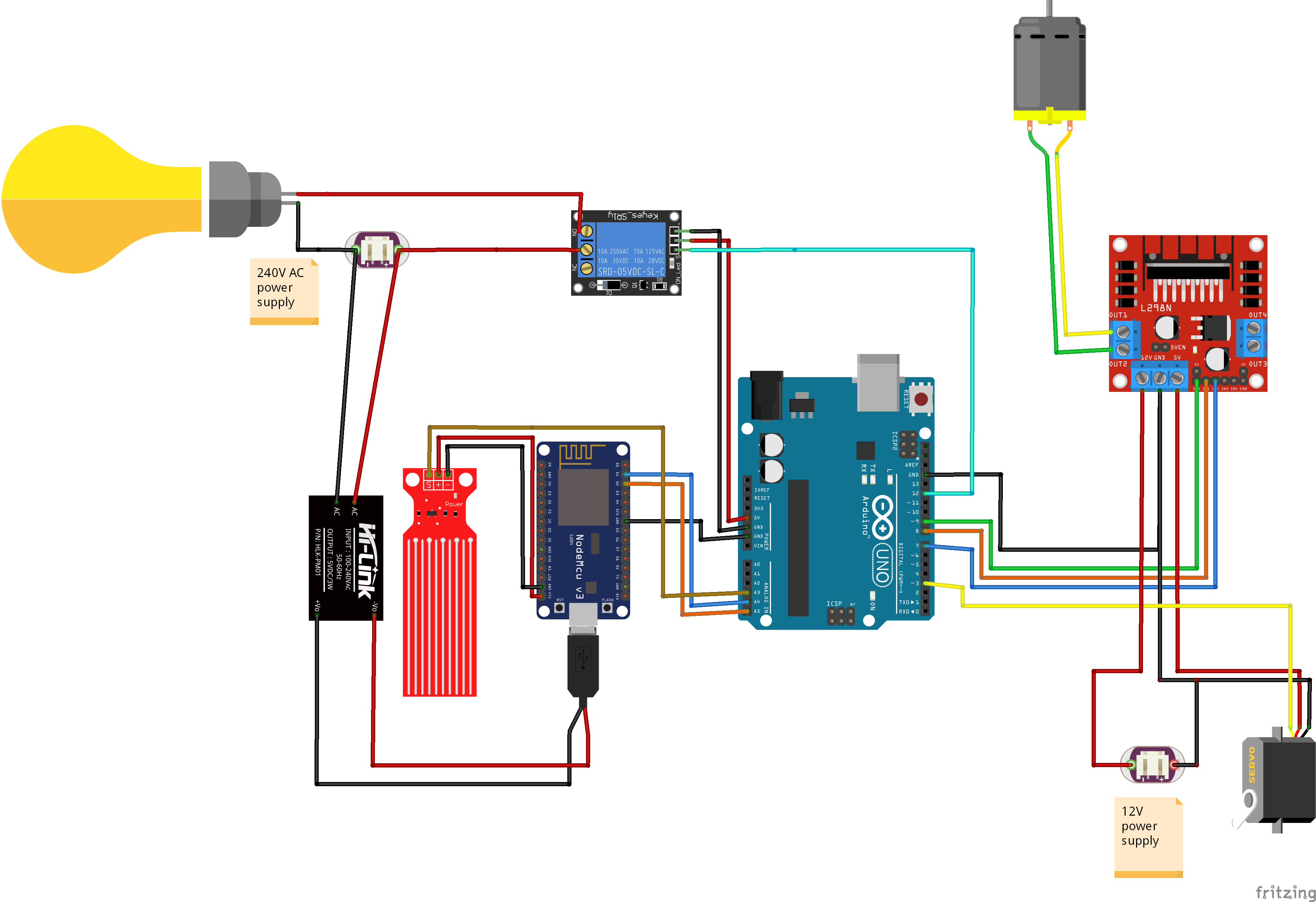
Circuit
Circuit
Comments
Only logged in users can leave comments