Devices & Components
Capacitive Soil Moisture Sensor 1 Channel 5V Relay Module and Water Pump + 2M Vinyl Tubing
ELEGOO UNO Project Super Starter Kit with Tutorial and UNO R3 Board Compatible with Arduino IDE
Software & Tools
Arduino IDE
Project description
Code
SparkForFun_WaterPump
cpp
1#define GREEN_LED 2 2#define YELLOW_LED 3 3#define RED_LED 4 4#define SoilSensor A5 // Connected the soil moistures reading through analog pin A5 5#define DRY_THRESHOLD 800 6#define WET_THRESHOLD 500 7#define Relay 7 8 9void setup () { 10 pinMode(GREEN_LED, OUTPUT); 11 pinMode(YELLOW_LED, OUTPUT); 12 pinMode(RED_LED, OUTPUT); 13 pinMode(Relay, OUTPUT); 14 15 digitalWrite(GREEN_LED, LOW); 16 digitalWrite(YELLOW_LED, LOW); 17 digitalWrite(RED_LED, LOW); 18 digitalWrite(Relay, LOW); 19 20 Serial.begin(9600);//Tells the arduino to read data at a certain speed 21 //this need to be the same as the serial monitors speed to be able to translate the values 22 delay(1000); //To give the port a second to wake up 23 } 24 25 void loop(){ 26 int SensorValue = analogRead(SoilSensor); 27 //Analog unlike digital spits out a range of values, int converts analog values from (Soilsensor) to integers. 28 //This is written under SensorValue 29 Serial.print("Soil Sensor Value: "); // This prints the Soil sensor analog values on the serial monitor 30 Serial.println(SensorValue); // This makes the values being printed after "Soil Sensor Value:" the values from SensorValue 31 32 if(SensorValue > 0 && SensorValue<=WET_THRESHOLD) { 33 //At 0 its completely wet, which means between 0 and Wet Threshold the green LED should turn on 34 digitalWrite(GREEN_LED, HIGH); 35 digitalWrite(YELLOW_LED, LOW); 36 digitalWrite(RED_LED, LOW); 37 digitalWrite(Relay, LOW); 38 } 39 else if (SensorValue > WET_THRESHOLD && SensorValue <= DRY_THRESHOLD) { 40 // Between the Wet thershold and dry threshold the yellow LED should will turn on 41 digitalWrite(GREEN_LED, LOW); 42 digitalWrite(YELLOW_LED, HIGH); 43 digitalWrite(RED_LED, LOW); 44 digitalWrite(Relay, LOW); 45 } 46 else if (SensorValue > DRY_THRESHOLD) { 47 // Anything greater than the Dry Threshold and red LED will turn on and the relay will turn on activating the water pump 48 digitalWrite(GREEN_LED, LOW); 49 digitalWrite(YELLOW_LED, LOW); 50 digitalWrite(RED_LED, HIGH); 51 digitalWrite(Relay, HIGH); 52 } 53}
Downloadable files
Automated Watering System
Automated Watering System.png
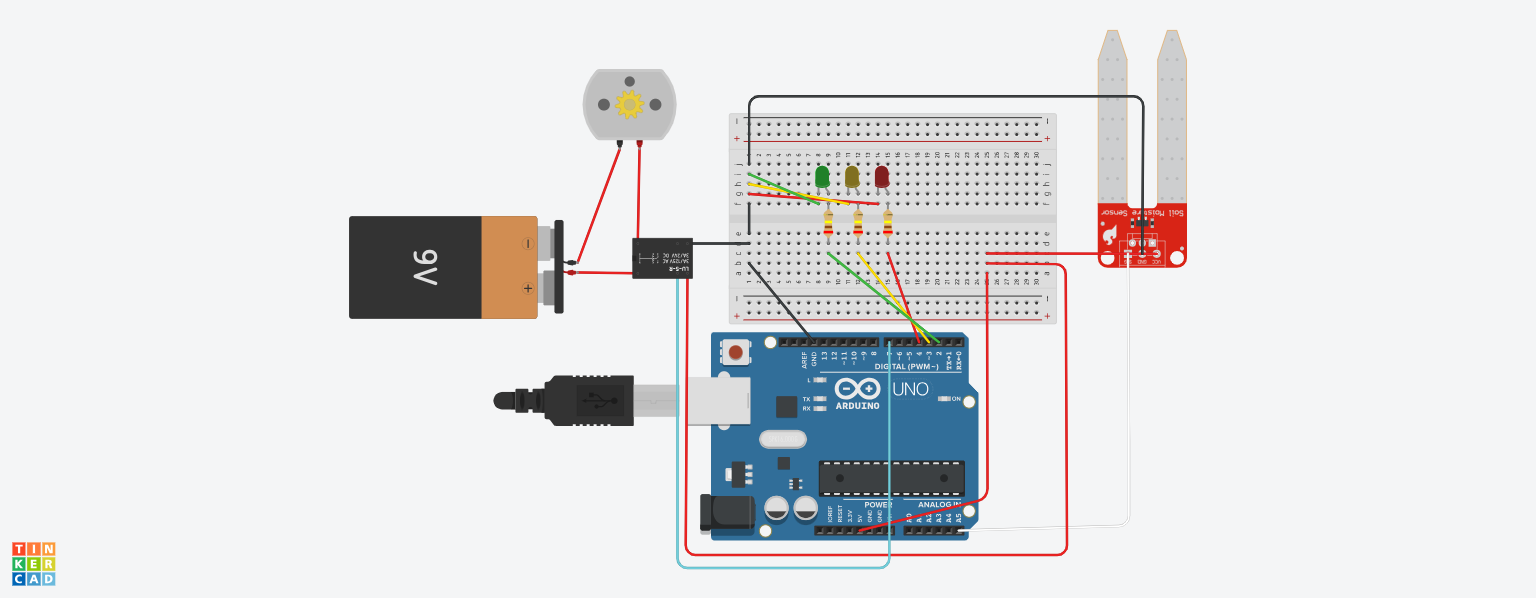
SparkForFun_WaterPump
SparkForFun_WaterPump.ino
Comments
Only logged in users can leave comments