ez_timers - unlimited timers
Define and operate any number of concurrent timers in your sketches, each independent and all non-blocking.
Devices & Components
1
Arduino Uno Rev3
8
5 mm LED: Red
9
Jumper wires (generic)
1
Solderless Breadboard Half Size
8
Resistor 220 ohm
Software & Tools

Arduino IDE
Project description
Code
ez_timers technique
c_cpp
A sketch that demonstrates the use of multilple, independent and concurrent timers that are non-blocking.
1//
2//   ez_timers - multiple, concurrent, independent non-blocking   timers
3//
4//   Ron D Bentley, Stafford, UK
5//   August 2021
6//
7//    This example and code is in the public domain and
8//   may be used without   restriction and without warranty.
9//
10
11// %%%%%%%%%%%%%%%%%%%%%%%%%%%%%%%%%%%%%%%%%%%%%%%%
12//   Timer definitions, declarations and functions...
13// %%%%%%%%%%%%%%%%%%%%%%%%%%%%%%%%%%%%%%%%%%%%%%%%
14#define   max_timers           8
15
16#define elapsed            true
17#define not_elapsed         !elapsed
18#define active             true
19#define not_active         !active     // double defined for user preference
20#define inactive           not_active   // double defined for user preference
21
22uint8_t timer; // general variable   for use dealing with timers
23
24// timer control struct(ure)
25struct timer_control   {
26  bool     timer_status;    // records status of a timer - active or not active
27   uint32_t start_time;      // records the millis time when a timer is started
28}   timers[max_timers];       // declare an entry for each timer - 0 to (max_timers-1)
29
30//
31//   set the given timer active and note start time in milliseconds
32//
33void start_timer(uint8_t   timer) {
34  if (timer < max_timers) {
35    // valid timer
36    timers[timer].timer_status   = active;   // mark this timer as active
37    timers[timer].start_time   = millis();   // record time this timer is started
38  }
39}
40
41//
42// cancel (stop) the   given timer
43//
44void stop_timer(uint8_t timer) {
45  if (timer < max_timers)   {
46    // valid timer
47    timers[timer].timer_status = inactive;  // mark this   timer as inactive
48  }
49}
50
51//
52// Function determines if the time has   elapsed for the given timer, if active.
53//
54bool timer_elapsed(uint8_t timer,   uint32_t elapsed_time) {
55  if (timer < max_timers) {
56    // valid timer
57     if (timers[timer].timer_status == active) {
58      // timer is active so check   elapsed time
59      if (millis() - timers[timer].start_time >= elapsed_time) {
60         // this timer has elapsed
61        timers[timer].timer_status = inactive;   // mark this timer no longer active
62        return elapsed;
63      }
64    }
65   }
66  return not_elapsed;
67}
68
69void setup() {
70  // initialise timer   control structure for each defined time entry
71  for (timer = 0; timer < max_timers;   timer++) {
72    timers[timer].timer_status = inactive;    // mark this timer inactive
73     timers[timer].start_time   = 0;           // clear timer start time
74  }
75   // add any other setup requirements here...
76
77}
78
79void loop() {
80   // example of use of timers - one led assigned to each timer - 8 off
81  // we   use a structure to gather together all the data we need to manage
82  // the leds.   Each led structure entry is referenced by the timer number
83  // associated with   each led, eg timer = 0 associated with led entry 0, etc.
84  struct led_control   {
85    uint8_t led_pin;    // digital pin assigned to the led
86    uint32_t   led_time;  // the time to elapse between led state transitions (millisecs)
87    bool   led_status;    // the current state (LOW/HIGH) of the led
88  } leds[max_timers]   = {// preset data for each timer's led
89    2, 100, HIGH,
90    3, 200, HIGH,
91     4, 300, HIGH,
92    5, 400, HIGH,
93    6, 500, HIGH,
94    7, 600, HIGH,
95     8, 700, HIGH,
96    9, 800, HIGH
97  };
98  // set up timer leds and their   associated timers
99  for (timer = 0; timer < max_timers; timer++) {
100    pinMode(leds[timer].led_pin,   OUTPUT);
101    digitalWrite(leds[timer].led_pin, LOW);//ensure each timer led is   off
102    start_timer(timer);
103  }
104  // now keep track of each timer and deal   with associated leds when times are elapsed
105  do {
106    for (timer = 0; timer   < max_timers; timer++) {
107      if (timer_elapsed(timer, leds[timer].led_time)   == elapsed) {
108        // this timer has elapsed for this timer's led so change   led state
109        leds[timer].led_status = !leds[timer].led_status;          //   invert this timer's led status
110        digitalWrite(leds[timer].led_pin, leds[timer].led_status);   // update physical led
111        start_timer(timer);// restart this led's timer
112       }
113    }
114  } while (true); // keep looping the timers
115}
116
ez_timers technique
c_cpp
A sketch that demonstrates the use of multilple, independent and concurrent timers that are non-blocking.
1//
2//   ez_timers - multiple, concurrent, independent non-blocking  timers
3//
4//   Ron D Bentley, Stafford, UK
5//   August 2021
6//
7//   This example and code is in the public domain and
8//   may be used without  restriction and without warranty.
9//
10
11// %%%%%%%%%%%%%%%%%%%%%%%%%%%%%%%%%%%%%%%%%%%%%%%%
12//  Timer definitions, declarations and functions...
13// %%%%%%%%%%%%%%%%%%%%%%%%%%%%%%%%%%%%%%%%%%%%%%%%
14#define  max_timers           8
15
16#define elapsed            true
17#define not_elapsed        !elapsed
18#define active             true
19#define not_active         !active    // double defined for user preference
20#define inactive           not_active  // double defined for user preference
21
22uint8_t timer; // general variable  for use dealing with timers
23
24// timer control struct(ure)
25struct timer_control  {
26  bool     timer_status;    // records status of a timer - active or not active
27  uint32_t start_time;      // records the millis time when a timer is started
28}  timers[max_timers];       // declare an entry for each timer - 0 to (max_timers-1)
29
30//
31//  set the given timer active and note start time in milliseconds
32//
33void start_timer(uint8_t  timer) {
34  if (timer < max_timers) {
35    // valid timer
36    timers[timer].timer_status  = active;   // mark this timer as active
37    timers[timer].start_time   = millis();  // record time this timer is started
38  }
39}
40
41//
42// cancel (stop) the  given timer
43//
44void stop_timer(uint8_t timer) {
45  if (timer < max_timers)  {
46    // valid timer
47    timers[timer].timer_status = inactive;  // mark this  timer as inactive
48  }
49}
50
51//
52// Function determines if the time has  elapsed for the given timer, if active.
53//
54bool timer_elapsed(uint8_t timer,  uint32_t elapsed_time) {
55  if (timer < max_timers) {
56    // valid timer
57    if (timers[timer].timer_status == active) {
58      // timer is active so check  elapsed time
59      if (millis() - timers[timer].start_time >= elapsed_time) {
60        // this timer has elapsed
61        timers[timer].timer_status = inactive;  // mark this timer no longer active
62        return elapsed;
63      }
64    }
65  }
66  return not_elapsed;
67}
68
69void setup() {
70  // initialise timer  control structure for each defined time entry
71  for (timer = 0; timer < max_timers;  timer++) {
72    timers[timer].timer_status = inactive;    // mark this timer inactive
73    timers[timer].start_time   = 0;           // clear timer start time
74  }
75  // add any other setup requirements here...
76
77}
78
79void loop() {
80  // example of use of timers - one led assigned to each timer - 8 off
81  // we  use a structure to gather together all the data we need to manage
82  // the leds.  Each led structure entry is referenced by the timer number
83  // associated with  each led, eg timer = 0 associated with led entry 0, etc.
84  struct led_control  {
85    uint8_t led_pin;    // digital pin assigned to the led
86    uint32_t  led_time;  // the time to elapse between led state transitions (millisecs)
87    bool  led_status;    // the current state (LOW/HIGH) of the led
88  } leds[max_timers]  = {// preset data for each timer's led
89    2, 100, HIGH,
90    3, 200, HIGH,
91    4, 300, HIGH,
92    5, 400, HIGH,
93    6, 500, HIGH,
94    7, 600, HIGH,
95    8, 700, HIGH,
96    9, 800, HIGH
97  };
98  // set up timer leds and their  associated timers
99  for (timer = 0; timer < max_timers; timer++) {
100    pinMode(leds[timer].led_pin,  OUTPUT);
101    digitalWrite(leds[timer].led_pin, LOW);//ensure each timer led is  off
102    start_timer(timer);
103  }
104  // now keep track of each timer and deal  with associated leds when times are elapsed
105  do {
106    for (timer = 0; timer  < max_timers; timer++) {
107      if (timer_elapsed(timer, leds[timer].led_time)  == elapsed) {
108        // this timer has elapsed for this timer's led so change  led state
109        leds[timer].led_status = !leds[timer].led_status;          //  invert this timer's led status
110        digitalWrite(leds[timer].led_pin, leds[timer].led_status);  // update physical led
111        start_timer(timer);// restart this led's timer
112      }
113    }
114  } while (true); // keep looping the timers
115}
116
Downloadable files
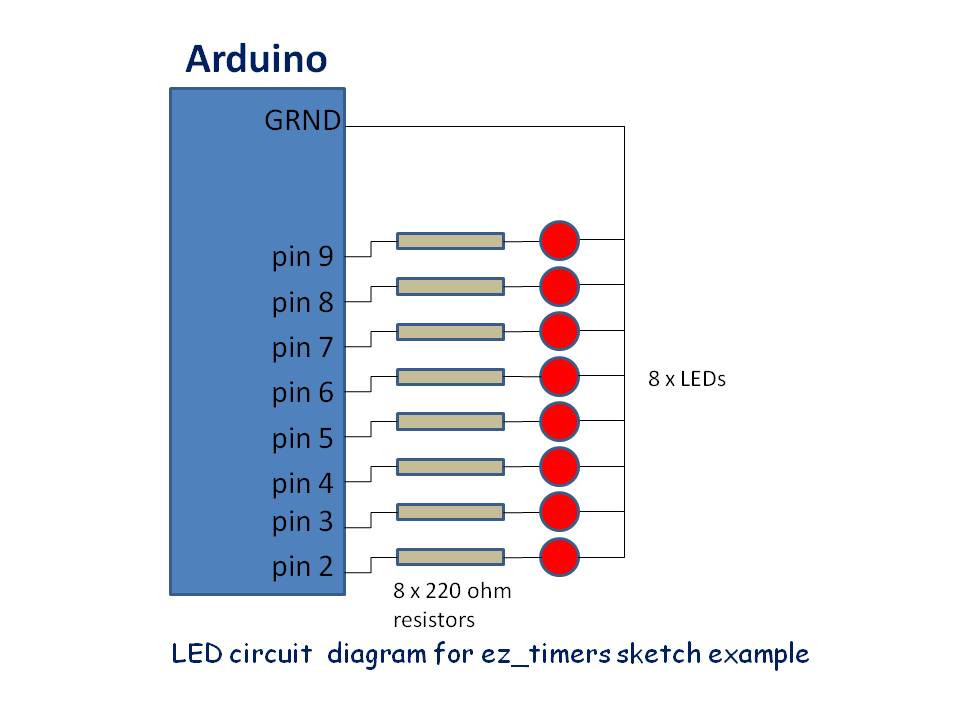
LED circuit diagram for ez_timers sketch example
This circuit reflects the example use of 8 x timers running concurrently.
LED circuit diagram for ez_timers sketch example
Comments
Only logged in users can leave comments