Components and supplies
Arduino UNO
Resistor 220 ohm
Jumper wires (generic)
LED (generic)
Resistor 100 ohm
Speaker: 0.25W, 8 ohms
Breadboard (generic)
Apps and platforms
Arduino IDE
Project description
Code
MLWB, Music Functions/Commands Tab
c_cpp
This tab contains all of the music functions/commands plus the setup() function
1//
2// Ron D Bentley, Stafford, UK, July 2021
3//
4// This example  and code is in the public domain and
5// may be used without restriction and without  warranty.
6//
7// %%%%%%%%%%%%%%%%%%%%%%%%%%%%%%%%%%%%%%%%%%%%%%%%%%%%%%%%%%%%%%%%%%%%%%%%%
8//  tone data and functions...
9// %%%%%%%%%%%%%%%%%%%%%%%%%%%%%%%%%%%%%%%%%%%%%%%%%%%%%%%%%%%%%%%%%%%%%%%%%
10
11//
12//  tempos
13//
14
15#define  grave          40
16#define  largo          46
17#define  lento          52
18#define  adagio         56
19#define  larghetto      60
20#define  adagietto      66
21#define  andante        72
22#define  andantino      80
23#define  maestroso      88
24#define  moderato      100
25#define  allegretto    104
26#define  animato       120
27#define  allegro       132
28#define  allegro_assai 144
29#define  vivace        160
30#define  presto        184
31#define  prestissimo   208
32
33//
34//  public constants - reflects the 'pitches.h' file, but latgely in lower case
35//
36#define  note_B0  31
37#define note_C1  33
38#define note_CS1 35
39#define note_D1  37
40#define  note_DS1 39
41#define note_E1  41
42#define note_F1  44
43#define note_FS1 46
44#define  note_G1  49
45#define note_GS1 52
46#define note_A1  55
47#define note_AS1 58
48#define  note_B1  62
49#define note_C2  65
50#define note_CS2 69
51#define note_D2  73
52#define  note_DS2 78
53#define note_E2  82
54#define note_F2  87
55#define note_FS2 93
56#define  note_G2  98
57#define note_GS2 104
58#define note_A2  110
59#define note_AS2  117
60#define note_B2  123
61#define note_C3  131
62#define note_CS3 139
63#define  note_D3  147
64#define note_DS3 156
65#define note_E3  165
66#define note_F3  175
67#define note_FS3 185
68#define note_G3  196
69#define note_GS3 208
70#define  note_A3  220
71#define note_AS3 233
72#define note_B3  247
73#define note_C4  262 // <--------- middle C
74#define note_CS4 277
75#define note_D4  294
76#define  note_DS4 311
77#define note_E4  330
78#define note_F4  349
79#define note_FS4  370
80#define note_G4  392
81#define note_GS4 415
82#define note_A4  440
83#define  note_AS4 466
84#define note_B4  494
85#define note_C5  523
86#define note_CS5  554
87#define note_D5  587
88#define note_DS5 622
89#define note_E5  659
90#define  note_F5  698
91#define note_FS5 740
92#define note_G5  784
93#define note_GS5  831
94#define note_A5  880
95#define note_AS5 932
96#define note_B5  988
97#define  note_C6  1047
98#define note_CS6 1109
99#define note_D6  1175
100#define note_DS6  1245
101#define note_E6  1319
102#define note_F6  1397
103#define note_FS6 1480
104#define  note_G6  1568
105#define note_GS6 1661
106#define note_A6  1760
107#define note_AS6  1865
108#define note_B6  1976
109#define note_C7  2093
110#define note_CS7 2217
111#define  note_D7  2349
112#define note_DS7 2489
113#define note_E7  2637
114#define note_F7  2794
115#define note_FS7 2960
116#define note_G7  3136
117#define note_GS7 3322
118#define  note_A7  3520
119#define note_AS7 3729
120#define note_B7  3951
121#define note_C8  4186
122#define note_CS8 4435
123#define note_D8  4699
124#define note_DS8 4978
125
126#define  speaker  11 // digital pin number for buzzer/speaker
127
128float default_tempo  = float(animato); // default tempo - beats per minute
129
130float current_tempo  = default_tempo;
131
132float timings[6];                     // holds timings for  each defined note/rest duration
133
134//
135// standard note duration names
136//
137#define  semib     timings[0] // 4 beats
138#define dot_minim timings[1] // 3 beats
139#define  minim     timings[2] // 2 beats
140#define crot      timings[3] // 1 beat
141#define  quav      timings[4] // 1/2 beat
142#define semiq     timings[5] // 1/4 beat
143
144//
145//  set tempo by adjusting durations of note durations
146//
147void set_tempo(float  new_tempo) {
148  float crotchet_duration;
149  current_tempo = new_tempo; // keep  current tempo up to date in case it needs to be queried
150  crotchet_duration =  60 / new_tempo;// timing in seconds for 1 beat
151  semib     = crotchet_duration  * 4; // semibrieve, 4 beats
152  dot_minim = crotchet_duration * 3; // dotted mimin,  3 beats
153  minim     = crotchet_duration * 2; // minim, 2 beats
154  crot      =  crotchet_duration;     // crotchet, 1 beat
155  quav      = crotchet_duration /  2; // quaver, 1/2 beat
156  semiq     = crotchet_duration / 4; // semiquaver, 1/4  beat
157}
158
159//
160// play given note for given duration.
161// observe that  this function is 'blocking', although the tone
162// function is 'non-blocking',  ie control stays with the function
163// until note has completed.
164//
165void  play(int note, float duration) {
166  tone(speaker, note, duration * 1000); // play  the given note for the given duration
167  wait(duration);                       //  wait for note to complete
168}
169
170//
171// play given note for given duration  and illuminate given light (led).
172// observe that this function is 'blocking',  although the tone
173// function is 'non-blocking', ie control stays with the function
174//  until note has completed.
175//
176void play(int note, float duration, int light)  {
177  tone(speaker, note, duration * 1000); // play the given note for the given  duration
178  light_on(light);                     // switch on the given light
179  wait(duration);                      // wait for note to complete
180  light_off(light);                    // switch off the given light
181}
182
183//
184// rest for  given duration.
185//
186void rest(float duration) {
187  noTone(speaker); // ensure  no tone is currently playing
188  wait(duration);  // wait for given rest to complete
189}
190
191void  setup() {
192  //
193  // set up timer1 interrupt for 1000hz interrupts, ie for  1 millisecond interrupts.
194  // this is used to process any defined flash function  calls.
195  //
196  noInterrupts();
197  TCCR1A = 0;     // set TCCR1A register  to 0
198  TCCR1B = 0;     // SET TCCR1B register to 0
199  TCNT1  = 0;     // initialize  counter to 0
200  // set Compare Match Register (CMR) for 1msec (1khz) increments
201  OCR1A = 249;    // OCR1A = (16,000,000)/(64*1,000)) - 1
202  // turn on CTC mode
203  TCCR1B |= (1 << WGM12);              // WGM12 = 3
204  // Set CS11 bit for 64  prescaler
205  TCCR1B |= (1 << CS11) | (1 << CS10); // CS11 = 1 and CS10 = 0
206  // enable timer1 compare interrupt
207  TIMSK1 |= (1 << OCIE1A);             //  OCIE1A = 1
208  interrupts();
209
210  //
211  // now set each defined light (led)  output pin and
212  // test prior to main loop processing - visual check
213  //
214  for (int light = 0; light < max_lights; light++) {
215    pinMode(pins[light],  OUTPUT);
216    light_on(light + 1);
217    wait(0.05);
218    light_off(light +  1);
219    wait(0.05);
220  }
221
222  //
223  // finally set up tone requirements  and default tempo
224  //
225  pinMode(speaker, OUTPUT);
226  // set up note timings,  base on the default unit beat time (default_tempo)
227  set_tempo(default_tempo);
228}
229
MLWB, Main Work Area Tab
c_cpp
This is the place (tab) where student commands should be included. Out of the box it contains examples of light and music commands
1//
2// Ron D Bentley, Stafford, UK, July 2021
3//
4// This example
5  and code is in the public domain and
6// may be used without restriction and without
7  warranty.
8//
9// %%%%%%%%%%%%%%%%%%%%%%%%%%%%%%%%%%%%%%%%%%%%%%%%%%%%%%%%%%%%%%%%%%%%%%%%%
10//
11  Add your commands here below, and note that when the last command has
12// been
13  actioned the program will restart.
14// %%%%%%%%%%%%%%%%%%%%%%%%%%%%%%%%%%%%%%%%%%%%%%%%%%%%%%%%%%%%%%%%%%%%%%%%%
15
16void
17  loop() {
18  /*%%%%%%%%%%%%%%%%%%%%% tasters & example features %%%%%%%%%%%%%%%%%%%%%%
19
20    The following code is provided as a taster and example of what features
21
22    the workbench can provide and how they can be used.
23    Once familiar with
24  these features, strip out this code and add your own.
25  */
26
27  // some music
28  examples...
29
30  middle_C();
31  wait(3);
32
33  twinkle_twinkle();
34  wait(3);
35
36
37  jingle_bells();
38  wait(3);
39
40  happy_birthday();
41  wait(3);
42
43
44  ditty_1(); // music with lights
45  wait(3);
46
47  door_bell_1(); // music
48  with lights
49  wait(3);
50
51  door_bell_2(); // music with lights
52  wait(3);
53
54
55  ode_to_joy();
56  wait(3);
57
58  // some light examples...
59
60  sweep_lights();
61
62  wait(3);
63
64  chasing_lights();
65  wait(3);
66
67  marching_lights();
68
69  wait(3);
70
71  // flash all lights for 10 seconds
72  flash_all_lights();
73
74  wait(10);
75
76  // strobe all lights backwards - 10 cycles, with 0.1 secs delay
77  bewteen lights
78  strobe_all_lights(backwards, 10, 0.1);
79  // strobe all lights
80  forwards - 20 cycles, with 0.05 secs delay bewteen lights
81  strobe_all_lights(forwards,
82  20, 0.05);
83
84  // more flash flash examples
85  flash_light(light2, 0.1);
86
87  flash_light(light4, 0.2);
88  flash_light(light6, 0.25);
89  flash_light(light8,
90  0.5);
91  wait(3);
92
93  // 4 cycles of morse code
94  sos_morse_code();
95
96  sos_morse_code();
97  sos_morse_code();
98  sos_morse_code();
99  wait(3);
100
101
102  // trafic lights
103  traffic_lights();
104  all_lights_off();
105  // back to
106  the beginning...
107}
108
MLWB, Music Functions/Commands Tab
c_cpp
This tab contains all of the music functions/commands plus the setup() function
1//
2// Ron D Bentley, Stafford, UK, July 2021
3//
4// This example
5  and code is in the public domain and
6// may be used without restriction and without
7  warranty.
8//
9// %%%%%%%%%%%%%%%%%%%%%%%%%%%%%%%%%%%%%%%%%%%%%%%%%%%%%%%%%%%%%%%%%%%%%%%%%
10//
11  tone data and functions...
12// %%%%%%%%%%%%%%%%%%%%%%%%%%%%%%%%%%%%%%%%%%%%%%%%%%%%%%%%%%%%%%%%%%%%%%%%%
13
14//
15//
16  tempos
17//
18
19#define  grave          40
20#define  largo          46
21#define
22  lento          52
23#define  adagio         56
24#define  larghetto      60
25#define
26  adagietto      66
27#define  andante        72
28#define  andantino      80
29#define
30  maestroso      88
31#define  moderato      100
32#define  allegretto    104
33#define
34  animato       120
35#define  allegro       132
36#define  allegro_assai 144
37#define
38  vivace        160
39#define  presto        184
40#define  prestissimo   208
41
42//
43//
44  public constants - reflects the 'pitches.h' file, but latgely in lower case
45//
46#define
47  note_B0  31
48#define note_C1  33
49#define note_CS1 35
50#define note_D1  37
51#define
52  note_DS1 39
53#define note_E1  41
54#define note_F1  44
55#define note_FS1 46
56#define
57  note_G1  49
58#define note_GS1 52
59#define note_A1  55
60#define note_AS1 58
61#define
62  note_B1  62
63#define note_C2  65
64#define note_CS2 69
65#define note_D2  73
66#define
67  note_DS2 78
68#define note_E2  82
69#define note_F2  87
70#define note_FS2 93
71#define
72  note_G2  98
73#define note_GS2 104
74#define note_A2  110
75#define note_AS2
76  117
77#define note_B2  123
78#define note_C3  131
79#define note_CS3 139
80#define
81  note_D3  147
82#define note_DS3 156
83#define note_E3  165
84#define note_F3
85  175
86#define note_FS3 185
87#define note_G3  196
88#define note_GS3 208
89#define
90  note_A3  220
91#define note_AS3 233
92#define note_B3  247
93#define note_C4
94  262 // <--------- middle C
95#define note_CS4 277
96#define note_D4  294
97#define
98  note_DS4 311
99#define note_E4  330
100#define note_F4  349
101#define note_FS4
102  370
103#define note_G4  392
104#define note_GS4 415
105#define note_A4  440
106#define
107  note_AS4 466
108#define note_B4  494
109#define note_C5  523
110#define note_CS5
111  554
112#define note_D5  587
113#define note_DS5 622
114#define note_E5  659
115#define
116  note_F5  698
117#define note_FS5 740
118#define note_G5  784
119#define note_GS5
120  831
121#define note_A5  880
122#define note_AS5 932
123#define note_B5  988
124#define
125  note_C6  1047
126#define note_CS6 1109
127#define note_D6  1175
128#define note_DS6
129  1245
130#define note_E6  1319
131#define note_F6  1397
132#define note_FS6 1480
133#define
134  note_G6  1568
135#define note_GS6 1661
136#define note_A6  1760
137#define note_AS6
138  1865
139#define note_B6  1976
140#define note_C7  2093
141#define note_CS7 2217
142#define
143  note_D7  2349
144#define note_DS7 2489
145#define note_E7  2637
146#define note_F7
147  2794
148#define note_FS7 2960
149#define note_G7  3136
150#define note_GS7 3322
151#define
152  note_A7  3520
153#define note_AS7 3729
154#define note_B7  3951
155#define note_C8
156  4186
157#define note_CS8 4435
158#define note_D8  4699
159#define note_DS8 4978
160
161#define
162  speaker  11 // digital pin number for buzzer/speaker
163
164float default_tempo
165  = float(animato); // default tempo - beats per minute
166
167float current_tempo
168  = default_tempo;
169
170float timings[6];                     // holds timings for
171  each defined note/rest duration
172
173//
174// standard note duration names
175//
176#define
177  semib     timings[0] // 4 beats
178#define dot_minim timings[1] // 3 beats
179#define
180  minim     timings[2] // 2 beats
181#define crot      timings[3] // 1 beat
182#define
183  quav      timings[4] // 1/2 beat
184#define semiq     timings[5] // 1/4 beat
185
186//
187//
188  set tempo by adjusting durations of note durations
189//
190void set_tempo(float
191  new_tempo) {
192  float crotchet_duration;
193  current_tempo = new_tempo; // keep
194  current tempo up to date in case it needs to be queried
195  crotchet_duration =
196  60 / new_tempo;// timing in seconds for 1 beat
197  semib     = crotchet_duration
198  * 4; // semibrieve, 4 beats
199  dot_minim = crotchet_duration * 3; // dotted mimin,
200  3 beats
201  minim     = crotchet_duration * 2; // minim, 2 beats
202  crot      =
203  crotchet_duration;     // crotchet, 1 beat
204  quav      = crotchet_duration /
205  2; // quaver, 1/2 beat
206  semiq     = crotchet_duration / 4; // semiquaver, 1/4
207  beat
208}
209
210//
211// play given note for given duration.
212// observe that
213  this function is 'blocking', although the tone
214// function is 'non-blocking',
215  ie control stays with the function
216// until note has completed.
217//
218void
219  play(int note, float duration) {
220  tone(speaker, note, duration * 1000); // play
221  the given note for the given duration
222  wait(duration);                       //
223  wait for note to complete
224}
225
226//
227// play given note for given duration
228  and illuminate given light (led).
229// observe that this function is 'blocking',
230  although the tone
231// function is 'non-blocking', ie control stays with the function
232//
233  until note has completed.
234//
235void play(int note, float duration, int light)
236  {
237  tone(speaker, note, duration * 1000); // play the given note for the given
238  duration
239  light_on(light);                     // switch on the given light
240
241  wait(duration);                      // wait for note to complete
242  light_off(light);
243                    // switch off the given light
244}
245
246//
247// rest for
248  given duration.
249//
250void rest(float duration) {
251  noTone(speaker); // ensure
252  no tone is currently playing
253  wait(duration);  // wait for given rest to complete
254}
255
256void
257  setup() {
258  //
259  // set up timer1 interrupt for 1000hz interrupts, ie for
260  1 millisecond interrupts.
261  // this is used to process any defined flash function
262  calls.
263  //
264  noInterrupts();
265  TCCR1A = 0;     // set TCCR1A register
266  to 0
267  TCCR1B = 0;     // SET TCCR1B register to 0
268  TCNT1  = 0;     // initialize
269  counter to 0
270  // set Compare Match Register (CMR) for 1msec (1khz) increments
271
272  OCR1A = 249;    // OCR1A = (16,000,000)/(64*1,000)) - 1
273  // turn on CTC mode
274
275  TCCR1B |= (1 << WGM12);              // WGM12 = 3
276  // Set CS11 bit for 64
277  prescaler
278  TCCR1B |= (1 << CS11) | (1 << CS10); // CS11 = 1 and CS10 = 0
279
280  // enable timer1 compare interrupt
281  TIMSK1 |= (1 << OCIE1A);             //
282  OCIE1A = 1
283  interrupts();
284
285  //
286  // now set each defined light (led)
287  output pin and
288  // test prior to main loop processing - visual check
289  //
290
291  for (int light = 0; light < max_lights; light++) {
292    pinMode(pins[light],
293  OUTPUT);
294    light_on(light + 1);
295    wait(0.05);
296    light_off(light +
297  1);
298    wait(0.05);
299  }
300
301  //
302  // finally set up tone requirements
303  and default tempo
304  //
305  pinMode(speaker, OUTPUT);
306  // set up note timings,
307  base on the default unit beat time (default_tempo)
308  set_tempo(default_tempo);
309}
310
MLWB, Introduction tab
c_cpp
An overview of the Music & Lights Workbench
1/*
2Ron D Bentley, Stafford, UK, July 2021
3
4This example and code  is in the public domain and
5may be used without restriction and without warranty.
6
7Introduction
8^^^^^^^^^^^^
9The  Music and Lights Workbench (MLWB) has been designed to introduce anyone not familiar  with or
10new to the subject of computer programming.  The approach taken is to  provide a set of simple to use
11and logically applied commands (functions) that  link the computer to the outside world through the
12playing musical notes and/or  the lighting of LEDs.
13
14The MLWB commands are largely independent of each other  and may be used for playing just music,
15illuminating just LEDs (lights) or a  combination of both. The MLWB does not require the use of
16any programming functions,  techniques or logic other than the simple statement of its commands.
17
18Whilst,  conditional constructs like if/then, do/while, etc, or for-loops , etc. can be used  for
19more advanced use under suitable teaching, they are not necessary to achieve  immediate results
20from the MLWB.
21
22Anyone trying to get to grips with a  new subject, here basic computer programming, benefits from
23some direction by  someone versed in the subject. The MLWB is no different and its use and application
24is  best achieved through guidance and mentoring from a someone taking the lead of tutor  to the student.
25
26Motivation
27^^^^^^^^^^
28The MLWB was designed for the  author's grand children, to provide them with some opportunity to
29understand  how a computer program can be easily created to produce effects in the real world.
30It was hoped that through thinking about the logical steps needed to play simple  music and/or
31turn lights (LEDs) on and off that this would peak and stimulate  their desire to explore the potential
32of programming more deeply.
33
34Prerequisites
35^^^^^^^^^^^^^
36-  a target audience - the student, young or old, who has a willingness to explore  how a computer program
37  can do something quickly, easily and interesting,
38
39-  a supervisor - tutor, to act as educator - mentor and teacher of the MLWB.
40  The tutor should have some experience of Arduino and IDE and its programming,
41  but this can be at a rudimentary level,
42
43- if the music element of  the MLWB is to be explored/used then it is helpful for both tutor and student
44  to have some musical knowledge, but, again, this can be at a rudimentary level,
45
46-  hardware configured as below,
47
48- ARDUINO IDE installed on a Windows PC,
49
50-  ahead of use by the student, the tutor to gain thorough familiarisation with the  MLWB through exploration
51  of its commands and inbuilt examples. Download the  crib sheet as a guide an aide memoir,
52
53- and finally, a plan for what the  tutor will introduce to the student, building from session to session.
54
55A  Note About Terminology & Index Referencing
56^^^^^^^^^^^^^^^^^^^^^^^^^^^^^^^^^^^^^^^^^^^^
57Youngsters  and those new to doing anything computing related often find it difficult to understand  computing
58related terms and that referencing can start at 0. Therefore, the MLWB  tries to avoid computing terms
59wherever possible and support a students desire  to reference from 1, not 0. For example, the first LED (0)
60is referred to as  light1, the second LED (1) as light2, etc.
61
62MLWB Commands
63^^^^^^^^^^^^^
64The  MLWB command set falls largely into two groups - those performing musical instructions  and those
65performing actions with lights. However, there is one command that  bridges both 'camps'. This is the
66play command which is an overloaded function.  It can be used either to:
67
68  1. play a given note for a given duration, or
69  2. as for 1. but with an additional parameter specifying a light number (LED)  to be illuminated
70     whilst the note is playing. It is an overloaded function  which can be used in either way.
71
72Music Commands
73^^^^^^^^^^^^^^
74play      - will play the given note for the given duration. eg play(note_C4, minim),  play(note_FS2, crot + quav), etc.
75play      - an overloaded version of the command,  this one allowing a light (LED) to be specified for illumination
76            whist  the given note is playing. eg play(note_C4, minim, light5), play(note_FS2, crot  + quav, light1),
77            etc.
78rest      - rests for the given duration,  during which time silence is maintained,. eg rest(quav), rest(0.5), etc.
79set_tempo  - sets the pace of a musical piece in beats per minute. eg set_tempo(allegro), set_tempo(144),  etc.
80
81Light Commands
82^^^^^^^^^^^^^^
83light_on       - turns on the given  light (LED). eg light_on(light1), light_on(7), etc.
84light_off      - turns off  the given light (LED). eg light_off(light1), light_off(7), etc.
85all_lights_on  - turns on all 8 lights. eg all_lights_on().
86all_lights_off - turns off all  8 lights. eg all_lights_off().
87flash_light    - flashes the given light for the  given flash interval until redefined by another command.
88                 eg  flash_light(light3, 0.5), flash frequency is 1 second. This command is controlled  by
89                 the microcontroller's timer1, via an ISR. In this way, flash  sequences will continue to
90                 run even though other commands may  be executed subsequent to a flash_light command.
91                 Flashing continues  until another command is executed on the same light (LED).
92strobe_all_lights
93               - strobes all lights for the given number of cycles illuminating  each light for the
94                 given time.
95wait           - waits for  the given duration (seconds) halting any processing other than existing flash_light
96                 commands. eg wait(5.5), waits for 5.5 seconds.
97
98Shrink-wrapped  Examples
99^^^^^^^^^^^^^^^^^^^^^^^
100To kick things off, two tabs are included  that provided examples for musical melodies/tunes and lighting sequences.
101Use  these to see how each native command (function) can be used, individually and together.  Indeed, these may
102also be used as instructional guides between tutor and student.
103
104MLWB  Layout
105^^^^^^^^^^^
106The MLWB software is written in Arduino C++ and comprises  six tabs. The tabs are:
107
108- music_and_lights_workbench - this tab provides  an overview of the MLWB, and echoes much of this article.
109- functions_lights  - this tab defines the functions underpinning the MLWB commands dealing with LED  control.
110- functions_tones - this tab defines the functions underpinning the  MLWB commands dealing with music/tone
111  control. Additionally, this tab also  defines the setup() function.
112- main_work_area - this is were a student's coding  should be inserted and be the central focus for teaching,
113  exploring and consolidating  ideas.
114- xample_lights - the MLWB is provided out of the box (OOTB) with several  readymade examples demonstrating
115  the use of commands for controlling LEDs (lights).  These can be used as instructional examples between tutor
116  and student.
117-  xample_tunes - the MLWB is also provided OOTB with several other readymade examples  demonstrating the use
118  of commands for playing tones (music) on the attached  speaker/buzzer. Again, these can be used as instructional
119  examples between  tutor and student.
120
121The Crib Sheet
122^^^^^^^^^^^^^^
123The crib sheet documents  all of the preset values and commands available for use by the MLWB. Download this
124as an aide memoir and ready reference.
125
126Finally
127^^^^^^^
128I feel I  need to declare that my musical knowledge, skill and prowess is next to nil - I  would think that a
129post box is musically more gifted!
130
131My approach in  all matters musical has been mechanistic with much use of the internet in constructing  the
132musical elements of this workbench, so I apologise to anyone that may be  affronted by inadequate terms or
133implementation. My defence is that it seems  to work as I intended and my grand children seem to be quite happy,
134one of whom  is more knowledgeable about music than I.
135
136I hope you enjoy your experiences.
137*/
138
MLWB, Introduction tab
c_cpp
An overview of the Music & Lights Workbench
1/*
2Ron D Bentley, Stafford, UK, July 2021
3
4This example and code   is in the public domain and
5may be used without restriction and without warranty.
6
7Introduction
8^^^^^^^^^^^^
9The   Music and Lights Workbench (MLWB) has been designed to introduce anyone not familiar   with or
10new to the subject of computer programming.  The approach taken is to   provide a set of simple to use
11and logically applied commands (functions) that   link the computer to the outside world through the
12playing musical notes and/or   the lighting of LEDs.
13
14The MLWB commands are largely independent of each other   and may be used for playing just music,
15illuminating just LEDs (lights) or a   combination of both. The MLWB does not require the use of
16any programming functions,   techniques or logic other than the simple statement of its commands.
17
18Whilst,   conditional constructs like if/then, do/while, etc, or for-loops , etc. can be used   for
19more advanced use under suitable teaching, they are not necessary to achieve   immediate results
20from the MLWB.
21
22Anyone trying to get to grips with a   new subject, here basic computer programming, benefits from
23some direction by   someone versed in the subject. The MLWB is no different and its use and application
24is   best achieved through guidance and mentoring from a someone taking the lead of tutor   to the student.
25
26Motivation
27^^^^^^^^^^
28The MLWB was designed for the   author's grand children, to provide them with some opportunity to
29understand   how a computer program can be easily created to produce effects in the real world.
30It was hoped that through thinking about the logical steps needed to play simple   music and/or
31turn lights (LEDs) on and off that this would peak and stimulate   their desire to explore the potential
32of programming more deeply.
33
34Prerequisites
35^^^^^^^^^^^^^
36-   a target audience - the student, young or old, who has a willingness to explore   how a computer program
37  can do something quickly, easily and interesting,
38
39-   a supervisor - tutor, to act as educator - mentor and teacher of the MLWB.
40   The tutor should have some experience of Arduino and IDE and its programming,
41  but this can be at a rudimentary level,
42
43- if the music element of   the MLWB is to be explored/used then it is helpful for both tutor and student
44   to have some musical knowledge, but, again, this can be at a rudimentary level,
45
46-   hardware configured as below,
47
48- ARDUINO IDE installed on a Windows PC,
49
50-   ahead of use by the student, the tutor to gain thorough familiarisation with the   MLWB through exploration
51  of its commands and inbuilt examples. Download the   crib sheet as a guide an aide memoir,
52
53- and finally, a plan for what the   tutor will introduce to the student, building from session to session.
54
55A   Note About Terminology & Index Referencing
56^^^^^^^^^^^^^^^^^^^^^^^^^^^^^^^^^^^^^^^^^^^^
57Youngsters   and those new to doing anything computing related often find it difficult to understand   computing
58related terms and that referencing can start at 0. Therefore, the MLWB   tries to avoid computing terms
59wherever possible and support a students desire   to reference from 1, not 0. For example, the first LED (0)
60is referred to as   light1, the second LED (1) as light2, etc.
61
62MLWB Commands
63^^^^^^^^^^^^^
64The   MLWB command set falls largely into two groups - those performing musical instructions   and those
65performing actions with lights. However, there is one command that   bridges both 'camps'. This is the
66play command which is an overloaded function.   It can be used either to:
67
68  1. play a given note for a given duration, or
69   2. as for 1. but with an additional parameter specifying a light number (LED)   to be illuminated
70     whilst the note is playing. It is an overloaded function   which can be used in either way.
71
72Music Commands
73^^^^^^^^^^^^^^
74play       - will play the given note for the given duration. eg play(note_C4, minim),   play(note_FS2, crot + quav), etc.
75play      - an overloaded version of the command,   this one allowing a light (LED) to be specified for illumination
76            whist   the given note is playing. eg play(note_C4, minim, light5), play(note_FS2, crot   + quav, light1),
77            etc.
78rest      - rests for the given duration,   during which time silence is maintained,. eg rest(quav), rest(0.5), etc.
79set_tempo   - sets the pace of a musical piece in beats per minute. eg set_tempo(allegro), set_tempo(144),   etc.
80
81Light Commands
82^^^^^^^^^^^^^^
83light_on       - turns on the given   light (LED). eg light_on(light1), light_on(7), etc.
84light_off      - turns off   the given light (LED). eg light_off(light1), light_off(7), etc.
85all_lights_on   - turns on all 8 lights. eg all_lights_on().
86all_lights_off - turns off all   8 lights. eg all_lights_off().
87flash_light    - flashes the given light for the   given flash interval until redefined by another command.
88                 eg   flash_light(light3, 0.5), flash frequency is 1 second. This command is controlled   by
89                 the microcontroller's timer1, via an ISR. In this way, flash   sequences will continue to
90                 run even though other commands may   be executed subsequent to a flash_light command.
91                 Flashing continues   until another command is executed on the same light (LED).
92strobe_all_lights
93                - strobes all lights for the given number of cycles illuminating   each light for the
94                 given time.
95wait           - waits for   the given duration (seconds) halting any processing other than existing flash_light
96                 commands. eg wait(5.5), waits for 5.5 seconds.
97
98Shrink-wrapped   Examples
99^^^^^^^^^^^^^^^^^^^^^^^
100To kick things off, two tabs are included   that provided examples for musical melodies/tunes and lighting sequences.
101Use   these to see how each native command (function) can be used, individually and together.   Indeed, these may
102also be used as instructional guides between tutor and student.
103
104MLWB   Layout
105^^^^^^^^^^^
106The MLWB software is written in Arduino C++ and comprises   six tabs. The tabs are:
107
108- music_and_lights_workbench - this tab provides   an overview of the MLWB, and echoes much of this article.
109- functions_lights   - this tab defines the functions underpinning the MLWB commands dealing with LED   control.
110- functions_tones - this tab defines the functions underpinning the   MLWB commands dealing with music/tone
111  control. Additionally, this tab also   defines the setup() function.
112- main_work_area - this is were a student's coding   should be inserted and be the central focus for teaching,
113  exploring and consolidating   ideas.
114- xample_lights - the MLWB is provided out of the box (OOTB) with several   readymade examples demonstrating
115  the use of commands for controlling LEDs (lights).   These can be used as instructional examples between tutor
116  and student.
117-   xample_tunes - the MLWB is also provided OOTB with several other readymade examples   demonstrating the use
118  of commands for playing tones (music) on the attached   speaker/buzzer. Again, these can be used as instructional
119  examples between   tutor and student.
120
121The Crib Sheet
122^^^^^^^^^^^^^^
123The crib sheet documents   all of the preset values and commands available for use by the MLWB. Download this
124as an aide memoir and ready reference.
125
126Finally
127^^^^^^^
128I feel I   need to declare that my musical knowledge, skill and prowess is next to nil - I   would think that a
129post box is musically more gifted!
130
131My approach in   all matters musical has been mechanistic with much use of the internet in constructing   the
132musical elements of this workbench, so I apologise to anyone that may be   affronted by inadequate terms or
133implementation. My defence is that it seems   to work as I intended and my grand children seem to be quite happy,
134one of whom   is more knowledgeable about music than I.
135
136I hope you enjoy your experiences.
137*/
138
MLWB, Music examples tab
c_cpp
A tab containing several examples of music melodies, with & with light effects
1//
2// Ron D Bentley, Stafford, UK, July 2021
3//
4// This eplay(note_ample   and code is in the public domain and
5// may be used without restriction and without   warranty.
6//
7// %%%%%%%%%%%%%%%%%%%%%%%%%%%%%%%%%%%%%%%%%%%%%%%%%%%%%%%%%%%%%%%%%%%%%%%%%
8//   %                      'shrink-wrapped' music examples                  %
9//   %%%%%%%%%%%%%%%%%%%%%%%%%%%%%%%%%%%%%%%%%%%%%%%%%%%%%%%%%%%%%%%%%%%%%%%%%
10
11void   middle_C() {
12  // 4/4 time
13  // C major scale - up
14  // bar 1
15  play(note_C4,   crot);
16  play(note_D4, crot);
17  play(note_E4, crot);
18  play(note_F4, crot);
19   // bar 2
20  play(note_G4, crot);
21  play(note_A4, crot);
22  play(note_B4,   crot);
23  play(note_C5, crot);
24  // bar 3
25  rest(semib);
26  // C major   scale - down
27  // bar 4
28  play(note_C5, crot);
29  play(note_B4, crot);
30   play(note_A4, crot);
31  play(note_G4, crot);
32  // bar 5
33  play(note_F4,   crot);
34  play(note_E4, crot);
35  play(note_D4, crot);
36  play(note_C4, crot);
37}
38
39void   twinkle_twinkle() {
40  set_tempo(default_tempo * 2);
41
42  //Twinkle, twinkle,   little star, C' C' G' G' A' A' G'
43  play(note_C4, minim);
44  play(note_C4,   minim);
45  play(note_G4, minim);
46  play(note_G4, minim);
47  play(note_A4,   minim);
48  play(note_A4, minim);
49  play(note_G4, minim);
50  rest(minim);
51
52   //How I wonder what you are, F' F' E' E' D' D' C'
53  play(note_F4, minim);
54   play(note_F4, minim);
55  play(note_E4, minim);
56  play(note_E4, minim);
57   play(note_D4, minim);
58  play(note_D4, minim);
59  play(note_C4, minim);
60   rest(minim);
61
62  //Up above the world so high, G' G' F' F' E' E' D'
63  play(note_G4,   minim);
64  play(note_G4, minim);
65  play(note_F4, minim);
66  play(note_F4,   minim);
67  play(note_E4, minim);
68  play(note_E4, minim);
69  play(note_D4,   minim);
70  rest(minim);
71
72  //Like a diamond in the sky, G' G' F' F' E' E'   D'
73  play(note_G4, minim);
74  play(note_G4, minim);
75  play(note_F4, minim);
76   play(note_F4, minim);
77  play(note_E4, minim);
78  play(note_E4, minim);
79   play(note_D4, minim);
80  rest(minim);
81
82  //Twinkle, twinkle, little star,   C' C' G' G' A' A' G'
83  play(note_C4, minim);
84  play(note_C4, minim);
85  play(note_G4,   minim);
86  play(note_G4, minim);
87  play(note_A4, minim);
88  play(note_A4,   minim);
89  play(note_G4, minim);
90  rest(minim);
91
92  //How I wonder what   you are, F' F' E' E' D' D' C'
93  play(note_F4, minim);
94  play(note_F4, minim);
95   play(note_E4, minim);
96  play(note_E4, minim);
97  play(note_D4, minim);
98   play(note_D4, minim);
99  play(note_C4, minim);
100
101  rest(crot);
102
103   set_tempo(default_tempo);  // reset tempo
104}
105
106void jingle_bells() {
107   set_tempo(default_tempo * 2); // very lively
108
109  play(note_B3, crot);
110   play(note_B3, crot);
111  play(note_B3, minim);
112
113  play(note_B3, crot);
114   play(note_B3, crot);
115  play(note_B3, minim);
116
117  play(note_B3, crot);
118   play(note_D4, crot);
119  play(note_G3, crot);
120  play(note_A3, crot);
121
122   play(note_B3, semib);
123
124  play(note_C4, crot);
125  play(note_C4, crot);
126   play(note_C4, crot);
127  play(note_C4, crot);
128
129  play(note_C4, crot);
130   play(note_B3, crot);
131  play(note_B3, crot);
132  play(note_B3, crot);
133
134   play(note_B3, crot);
135  play(note_A3, crot);
136  play(note_A3, crot);
137  play(note_B3,   crot);
138
139  play(note_A3, minim);
140  play(note_D4, minim);
141
142  play(note_B3,   crot);
143  play(note_B3, crot);
144  play(note_B3, minim);
145
146  play(note_B3,   crot);
147  play(note_B3, crot);
148  play(note_B3, minim);
149
150  play(note_B3,   crot);
151  play(note_D4, crot);
152  play(note_G3, crot);
153  play(note_A3, crot);
154
155   play(note_B3, semib);
156
157  play(note_C4, crot);
158  play(note_C4, crot);
159   play(note_C4, crot);
160  play(note_C4, crot);
161
162  play(note_C4, crot);
163   play(note_B3, crot);
164  play(note_B3, crot);
165  play(note_B3, crot);
166
167   play(note_D4, crot);
168  play(note_D4, crot);
169  play(note_C4, crot);
170  play(note_A3,   crot);
171
172  play(note_G3, semib);
173
174  set_tempo(default_tempo); // reset   tempo
175}
176
177void happy_birthday() {
178  play(note_G3, quav);
179  play(note_G3,   quav);
180  play(note_A3, crot);
181  play(note_G3, crot);
182
183  play(note_C4,   crot);
184  play(note_B3, minim);
185
186  play(note_G3, quav);
187  play(note_G3,   quav);
188  play(note_A3, crot);
189  play(note_G3, crot);
190
191  play(note_D4,   crot);
192  play(note_C4, minim);
193
194  play(note_G3, quav);
195  play(note_G3,   quav);
196  play(note_G4, crot);
197  play(note_E4, crot);
198
199  play(note_C4,   crot);
200  play(note_B3, crot);
201  play(note_A3, crot);
202
203  play(note_F4,   quav);
204  play(note_F4, quav);
205  play(note_E4, crot);
206  play(note_C4, crot);
207
208   play(note_D4, crot);
209  play(note_C4, minim);
210
211  rest(crot);
212}
213
214void   ditty_1() {// music with light effects
215  set_tempo(default_tempo * 2); // lively   pace
216
217  play(note_C4, minim, light1);
218  play(note_G3, crot, light2);
219   play(note_G3, crot, light3);
220  play(note_GS3, minim, light4);
221  play(note_G3,   minim, light5);
222  rest(crot + quav);
223  play(note_B3, minim, light6);
224  play(note_C4,   crot, light7);
225
226  rest(crot);
227
228  set_tempo(default_tempo); // reset   tempo
229}
230
231void door_bell_1() {// illuminating door bell chime
232  play(note_E4,   minim, light1);
233  play(note_C4, minim, light2);
234  play(note_D4, minim, light3);
235   play(note_G3, minim, light4);
236
237  rest(minim);
238
239  play(note_G3, minim,   light4);
240  play(note_D4, minim, light3);
241  play(note_E4, minim, light2);
242   play(note_C4, minim, light1);
243
244  rest(crot);
245}
246
247void door_bell_2()   {// basic bing/bong door chime
248  set_tempo(default_tempo * 2); // lively pace
249
250   play(note_E5, dot_minim, light1);
251  play(note_C5, dot_minim, light2);
252
253   rest(dot_minim);
254
255  play(note_E5, dot_minim, light1);
256  play(note_C5,   dot_minim, light2);
257
258  rest(crot);
259
260  set_tempo(default_tempo);   //   reset tempo
261}
262
263void ode_to_joy() {
264  set_tempo(allegro);
265  // 4/4   time
266  //bar 1
267  play(note_B4, crot);
268  play(note_B4, crot);
269  play(note_C5,   crot);
270  play(note_D5, crot);
271  //bar 2
272  play(note_D5, crot);
273  play(note_C5,   crot);
274  play(note_B4, crot);
275  play(note_A4, crot);
276  //bar 3
277  play(note_G4,   crot);
278  play(note_G4, crot);
279  play(note_A4, crot);
280  play(note_B4, crot);
281   //bar 4
282  play(note_B4, crot + quav);
283  play(note_A4, quav);
284  play(note_A4,   minim);
285  //bar 5
286  play(note_B4, crot);
287  play(note_B4, crot);
288  play(note_C5,   crot);
289  play(note_D5, crot);
290  //bar 6
291  play(note_D5, crot);
292  play(note_C5,   crot);
293  play(note_B4, crot);
294  play(note_A4, crot);
295  //bar 7
296  play(note_G4,   crot);
297  play(note_G4, crot);
298  play(note_A4, crot);
299  play(note_B4, crot);
300   //bar 8
301  play(note_A4, crot + quav);
302  play(note_G4, quav);
303  play(note_G4,   minim);
304  //bar 9
305  play(note_A4, crot);
306  play(note_A4, crot);
307  play(note_B4,   crot);
308  play(note_G4, crot);
309  //bar 10
310  play(note_A4, crot);
311  play(note_B4,   quav);
312  play(note_C5, quav);
313  play(note_B4, crot);
314  play(note_G4, crot);
315   //bar 11
316  play(note_A4, crot);
317  play(note_B4, quav);
318  play(note_C5,   quav);
319  play(note_B4, crot);
320  play(note_A4, crot);
321  //bar 12
322  play(note_G4,   crot);
323  play(note_A4, crot);
324  play(note_D4, minim);
325  //bar 13
326  play(note_B4,   crot);
327  play(note_B4, crot);
328  play(note_C5, crot);
329  play(note_D5, crot);
330   //bar 14
331  play(note_D5, crot);
332  play(note_C5, crot);
333  play(note_B4,   crot);
334  play(note_A4, crot);
335  //bar 15
336  play(note_G4, crot);
337  play(note_G4,   crot);
338  play(note_A4, crot);
339  play(note_B4, crot);
340  //bar 16
341  play(note_A4,   crot + quav);
342  play(note_G4, quav);
343  play(note_G4, minim);
344}
345
MLWB, Light Functions/Commands Tab
c_cpp
The tab contains all of the light functions/commands
1//
2// Ron D Bentley, Stafford, UK, July 2021
3//
4// This example
5  and code is in the public domain and
6// may be used without restriction and without
7  warranty.
8//
9// %%%%%%%%%%%%%%%%%%%%%%%%%%%%%%%%%%%%%%%%%%%%%%%%%%%%%%%%%%%%%%%%%%%%%%%%%
10//
11  LED/light data and functions...
12// %%%%%%%%%%%%%%%%%%%%%%%%%%%%%%%%%%%%%%%%%%%%%%%%%%%%%%%%%%%%%%%%%%%%%%%%%
13//
14
15#define
16  max_lights  8
17#define off   0
18#define on    1
19#define flash 2
20
21#define
22  forwards   0
23#define reverse    1
24#define backwards  1
25
26#define light1
27  1
28#define light2  2
29#define light3  3
30#define light4  4
31#define light5
32  5
33#define light6  6
34#define light7  7
35#define light8  8
36
37volatile
38  int pins[max_lights] = {
39  2, 3, 4, 5, 6, 7, 8, 9
40};
41
42//
43// define
44  a structure to record the status and process requirements
45// for each light (led).
46//
47volatile
48  struct led_control {
49  uint8_t status;    // led mode - on, off or flash
50
51  uint32_t start;    // used by flash function
52  float duration; // used by flash
53  function
54  bool horl;         // used by flash function - led is alternated between
55  LOW/HIGH
56} lights[max_lights];
57
58//
59// turn on the given light (led).
60//
61void
62  light_on(int light) {
63  light = light - 1;
64  if (light >= 0 && light < max_lights)
65  {
66    digitalWrite(pins[light], HIGH);
67    noInterrupts();
68    lights[light].status
69  = on;
70    lights[light].horl = HIGH;
71    interrupts();
72  }
73}
74
75//
76//
77  turn off the given light (led).
78//
79void light_off(int light) {
80  light
81  = light - 1;
82  if (light >= 0 && light < max_lights) {
83    digitalWrite(pins[light],
84  LOW);
85    noInterrupts();
86    lights[light].status = off;
87    lights[light].horl
88  = LOW;
89    interrupts();
90  }
91}
92
93//
94// turn on all defined lights
95  (leds).
96//
97void all_lights_on() {
98  for (uint8_t light = 1; light <= max_lights;
99  light++) {
100    light_on(light);
101  }
102}
103
104//
105// turn off all defined
106  lights (leds).
107//
108void all_lights_off() {
109  for (uint8_t light = 1; light
110  <= max_lights; light++) {
111    light_off(light);
112  }
113}
114
115//
116// start
117  the flash cycle for the given light (led),
118// with given 1/2 frequency.  ie frequency
119  = 2 x duration.
120// Note that flashing is controlled by the timer1 ISR and so
121//
122  is non-blocking.
123//
124void flash_light(int light, float duration) {
125  light
126  = light - 1;
127  if (lights[light].status != flash) {
128    lights[light].duration
129  = duration * 1000;
130    lights[light].start = millis();
131    noInterrupts();
132
133    lights[light].status = flash;
134    lights[light].horl = HIGH;
135    interrupts();
136
137    digitalWrite(pins[light], HIGH);
138  }
139}
140
141//
142// strobe all lights
143  the number of complete cycles illuminating
144// each light for the given time,
145  either forwards or backwards
146//
147//
148void strobe_all_lights(bool direction,
149  uint16_t num_cycles, float duration) {
150  all_lights_off();
151  for (uint16_t
152  cycle = 0; cycle < num_cycles; cycle++) {
153    if (direction == forwards) {
154
155      for (uint8_t light = 1; light <= max_lights; light++) {
156        light_on(light);
157
158        wait(duration);
159        light_off(light);
160      }
161    } else {
162
163      for (uint8_t light = max_lights; light >= 1; light--) {
164        light_on(light);
165
166        wait(duration);
167        light_off(light);
168      }
169    }
170  }
171}
172
173//
174//
175  wait for the given time.
176// Note that the timer1 ISR will continue whilst this
177  function is
178// delaying the main program flow - any lights that are fashing
179  will
180// continue to flash.
181//
182void wait(float secs) {
183  uint32_t start,
184  duration;
185  start = millis();
186  duration = secs * 1000;
187  do {
188  } while
189  (millis() - start <= duration);
190}
191
192//
193// Timer1 interrupt routine -
194  used to process any light (led) defined as 'flash'.
195//
196ISR(TIMER1_COMPA_vect)
197{
198
199  for (uint8_t light = 0; light < max_lights; light++) {
200    if (lights[light].status
201  == flash) {
202      // flash cycle active for his led
203      if (millis() - lights[light].start
204  >= lights[light].duration) {
205        lights[light].horl = !lights[light].horl;
206  // invert light (led) status
207        digitalWrite(pins[light], lights[light].horl);
208
209        lights[light].start = millis(); // restart counter
210      }
211    }
212
213  }
214}
215
MLWB, Main Work Area Tab
c_cpp
This is the place (tab) where student commands should be included. Out of the box it contains examples of light and music commands
1//
2// Ron D Bentley, Stafford, UK, July 2021
3//
4// This example  and code is in the public domain and
5// may be used without restriction and without  warranty.
6//
7// %%%%%%%%%%%%%%%%%%%%%%%%%%%%%%%%%%%%%%%%%%%%%%%%%%%%%%%%%%%%%%%%%%%%%%%%%
8//  Add your commands here below, and note that when the last command has
9// been  actioned the program will restart.
10// %%%%%%%%%%%%%%%%%%%%%%%%%%%%%%%%%%%%%%%%%%%%%%%%%%%%%%%%%%%%%%%%%%%%%%%%%
11
12void  loop() {
13  /*%%%%%%%%%%%%%%%%%%%%% tasters & example features %%%%%%%%%%%%%%%%%%%%%%
14    The following code is provided as a taster and example of what features
15    the workbench can provide and how they can be used.
16    Once familiar with  these features, strip out this code and add your own.
17  */
18
19  // some music  examples...
20
21  middle_C();
22  wait(3);
23
24  twinkle_twinkle();
25  wait(3);
26
27  jingle_bells();
28  wait(3);
29
30  happy_birthday();
31  wait(3);
32
33  ditty_1(); // music with lights
34  wait(3);
35
36  door_bell_1(); // music  with lights
37  wait(3);
38
39  door_bell_2(); // music with lights
40  wait(3);
41
42  ode_to_joy();
43  wait(3);
44
45  // some light examples...
46
47  sweep_lights();
48  wait(3);
49
50  chasing_lights();
51  wait(3);
52
53  marching_lights();
54  wait(3);
55
56  // flash all lights for 10 seconds
57  flash_all_lights();
58  wait(10);
59
60  // strobe all lights backwards - 10 cycles, with 0.1 secs delay  bewteen lights
61  strobe_all_lights(backwards, 10, 0.1);
62  // strobe all lights  forwards - 20 cycles, with 0.05 secs delay bewteen lights
63  strobe_all_lights(forwards,  20, 0.05);
64
65  // more flash flash examples
66  flash_light(light2, 0.1);
67  flash_light(light4, 0.2);
68  flash_light(light6, 0.25);
69  flash_light(light8,  0.5);
70  wait(3);
71
72  // 4 cycles of morse code
73  sos_morse_code();
74  sos_morse_code();
75  sos_morse_code();
76  sos_morse_code();
77  wait(3);
78
79  // trafic lights
80  traffic_lights();
81  all_lights_off();
82  // back to  the beginning...
83}
84
MLWB, Light Functions/Commands Tab
c_cpp
The tab contains all of the light functions/commands
1//
2// Ron D Bentley, Stafford, UK, July 2021
3//
4// This example  and code is in the public domain and
5// may be used without restriction and without  warranty.
6//
7// %%%%%%%%%%%%%%%%%%%%%%%%%%%%%%%%%%%%%%%%%%%%%%%%%%%%%%%%%%%%%%%%%%%%%%%%%
8//  LED/light data and functions...
9// %%%%%%%%%%%%%%%%%%%%%%%%%%%%%%%%%%%%%%%%%%%%%%%%%%%%%%%%%%%%%%%%%%%%%%%%%
10//
11
12#define  max_lights  8
13#define off   0
14#define on    1
15#define flash 2
16
17#define  forwards   0
18#define reverse    1
19#define backwards  1
20
21#define light1  1
22#define light2  2
23#define light3  3
24#define light4  4
25#define light5  5
26#define light6  6
27#define light7  7
28#define light8  8
29
30volatile  int pins[max_lights] = {
31  2, 3, 4, 5, 6, 7, 8, 9
32};
33
34//
35// define  a structure to record the status and process requirements
36// for each light (led).
37//
38volatile  struct led_control {
39  uint8_t status;    // led mode - on, off or flash
40  uint32_t start;    // used by flash function
41  float duration; // used by flash  function
42  bool horl;         // used by flash function - led is alternated between  LOW/HIGH
43} lights[max_lights];
44
45//
46// turn on the given light (led).
47//
48void  light_on(int light) {
49  light = light - 1;
50  if (light >= 0 && light < max_lights)  {
51    digitalWrite(pins[light], HIGH);
52    noInterrupts();
53    lights[light].status  = on;
54    lights[light].horl = HIGH;
55    interrupts();
56  }
57}
58
59//
60//  turn off the given light (led).
61//
62void light_off(int light) {
63  light  = light - 1;
64  if (light >= 0 && light < max_lights) {
65    digitalWrite(pins[light],  LOW);
66    noInterrupts();
67    lights[light].status = off;
68    lights[light].horl  = LOW;
69    interrupts();
70  }
71}
72
73//
74// turn on all defined lights  (leds).
75//
76void all_lights_on() {
77  for (uint8_t light = 1; light <= max_lights;  light++) {
78    light_on(light);
79  }
80}
81
82//
83// turn off all defined  lights (leds).
84//
85void all_lights_off() {
86  for (uint8_t light = 1; light  <= max_lights; light++) {
87    light_off(light);
88  }
89}
90
91//
92// start  the flash cycle for the given light (led),
93// with given 1/2 frequency.  ie frequency  = 2 x duration.
94// Note that flashing is controlled by the timer1 ISR and so
95//  is non-blocking.
96//
97void flash_light(int light, float duration) {
98  light  = light - 1;
99  if (lights[light].status != flash) {
100    lights[light].duration  = duration * 1000;
101    lights[light].start = millis();
102    noInterrupts();
103    lights[light].status = flash;
104    lights[light].horl = HIGH;
105    interrupts();
106    digitalWrite(pins[light], HIGH);
107  }
108}
109
110//
111// strobe all lights  the number of complete cycles illuminating
112// each light for the given time,  either forwards or backwards
113//
114//
115void strobe_all_lights(bool direction,  uint16_t num_cycles, float duration) {
116  all_lights_off();
117  for (uint16_t  cycle = 0; cycle < num_cycles; cycle++) {
118    if (direction == forwards) {
119      for (uint8_t light = 1; light <= max_lights; light++) {
120        light_on(light);
121        wait(duration);
122        light_off(light);
123      }
124    } else {
125      for (uint8_t light = max_lights; light >= 1; light--) {
126        light_on(light);
127        wait(duration);
128        light_off(light);
129      }
130    }
131  }
132}
133
134//
135//  wait for the given time.
136// Note that the timer1 ISR will continue whilst this  function is
137// delaying the main program flow - any lights that are fashing  will
138// continue to flash.
139//
140void wait(float secs) {
141  uint32_t start,  duration;
142  start = millis();
143  duration = secs * 1000;
144  do {
145  } while  (millis() - start <= duration);
146}
147
148//
149// Timer1 interrupt routine -  used to process any light (led) defined as 'flash'.
150//
151ISR(TIMER1_COMPA_vect)
152{
153  for (uint8_t light = 0; light < max_lights; light++) {
154    if (lights[light].status  == flash) {
155      // flash cycle active for his led
156      if (millis() - lights[light].start  >= lights[light].duration) {
157        lights[light].horl = !lights[light].horl;  // invert light (led) status
158        digitalWrite(pins[light], lights[light].horl);
159        lights[light].start = millis(); // restart counter
160      }
161    }
162  }
163}
164
MLWB, Light examples tab
c_cpp
A tab containing examples of light projects
1//
2// Ron D Bentley, Stafford, UK, July 2021
3//
4// This example  and code is in the public domain and
5// may be used without restriction and without  warranty.
6//
7// %%%%%%%%%%%%%%%%%%%%%%%%%%%%%%%%%%%%%%%%%%%%%%%%%%%%%%%%%%%%%%%%%%%%%%%%%
8//  %                  Example 'shrink-wrapped' light               %
9// %%%%%%%%%%%%%%%%%%%%%%%%%%%%%%%%%%%%%%%%%%%%%%%%%%%%%%%%%%%%%%%%%%%%%%%%%
10
11
12void  sweep_lights() {// sweep lights to the centre
13  all_lights_off();  // start with  'clean slate'
14
15  light_on(light1);
16  light_on(light8);
17  wait(0.25);
18  light_off(light1);
19  light_off(light8);
20
21  light_on(light2);
22  light_on(light7);
23  wait(0.25);
24  light_off(light2);
25  light_off(light7);
26
27  light_on(light3);
28  light_on(light6);
29  wait(0.25);
30  light_off(light3);
31  light_off(light6);
32
33  light_on(light4);
34  light_on(light5);
35  wait(0.25);
36  light_off(light4);
37  light_off(light5);
38
39  wait(0.1);
40
41  light_on(light4);
42  light_on(light5);
43  wait(0.25);
44  light_off(light4);
45  light_off(light5);
46
47  light_on(light3);
48  light_on(light6);
49  wait(0.25);
50  light_off(light3);
51  light_off(light6);
52
53  light_on(light2);
54  light_on(light7);
55  wait(0.25);
56  light_off(light2);
57  light_off(light7);
58
59  light_on(light1);
60  light_on(light8);
61  wait(0.25);
62  light_off(light1);
63  light_off(light8);
64}
65
66void chasing_lights() {//  light chase
67  all_lights_off();    // start with 'clean slate'
68
69  light_on(light1);
70  wait(0.1);
71  light_on(light2);
72  wait(0.1);
73  light_on(light3);
74  wait(0.1);
75  light_on(light4);
76  wait(0.1);
77  light_on(light5);
78  wait(0.1);
79  light_on(light6);
80  wait(0.1);
81  light_on(light7);
82  wait(0.1);
83  light_on(light8);
84  wait(0.1);
85
86  light_off(light1);
87  wait(0.1);
88  light_off(light2);
89  wait(0.1);
90  light_off(light3);
91  wait(0.1);
92  light_off(light4);
93  wait(0.1);
94  light_off(light5);
95  wait(0.1);
96  light_off(light6);
97  wait(0.1);
98  light_off(light7);
99  wait(0.1);
100  light_off(light8);
101  wait(0.1);
102}
103
104void  marching_lights() {// marching lights
105  all_lights_off();     // start with 'clean  slate'
106  light_on(light1);
107  wait(0.1);
108  light_off(light1);
109  wait(0.1);
110  light_on(light1);
111  light_on(light2);
112  wait(0.1);
113  light_off(light1);
114  light_off(light2);
115  wait(0.1);
116  light_on(light1);
117  light_on(light2);
118  light_on(light3);
119  wait(0.1);
120  light_off(light1);
121  light_off(light2);
122  light_off(light3);
123  wait(0.1);
124  light_on(light1);
125  light_on(light2);
126  light_on(light3);
127  light_on(light4);
128  wait(0.1);
129  light_off(light1);
130  light_off(light2);
131  light_off(light3);
132  light_off(light4);
133  wait(0.1);
134  light_on(light2);
135  light_on(light3);
136  light_on(light4);
137  light_on(light5);
138  wait(0.1);
139  light_off(light2);
140  light_off(light3);
141  light_off(light4);
142  light_off(light5);
143  wait(0.1);
144  light_on(light3);
145  light_on(light4);
146  light_on(light5);
147  light_on(light6);
148  wait(0.1);
149  light_off(light3);
150  light_off(light4);
151  light_off(light5);
152  light_off(light6);
153  wait(0.1);
154  light_on(light4);
155  light_on(light5);
156  light_on(light6);
157  light_on(light7);
158  wait(0.1);
159  light_off(light4);
160  light_off(light5);
161  light_off(light6);
162  light_off(light7);
163  wait(0.1);
164  light_on(light5);
165  light_on(light6);
166  light_on(light7);
167  light_on(light8);
168  wait(0.1);
169  light_off(light5);
170  light_off(light6);
171  light_off(light7);
172  light_off(light8);
173  wait(0.1);
174  light_on(light6);
175  light_on(light7);
176  light_on(light8);
177  wait(0.1);
178  light_off(light6);
179  light_off(light7);
180  light_off(light8);
181  wait(0.1);
182  light_on(light7);
183  light_on(light8);
184  wait(0.1);
185  light_off(light7);
186  light_off(light8);
187  wait(0.1);
188  light_on(light8);
189  wait(0.1);
190  light_off(light8);
191  wait(0.1);
192
193
194
195
196
197
198}
199
200void flash_all_lights()  {
201  // commands stated indivually rather than use of for-loop
202  // as we do  not introduce such constructs in this workbench
203  flash_light(light1, 0.1);
204  flash_light(light2, 0.2);
205  flash_light(light3, 0.3);
206  flash_light(light4,  0.4);
207  flash_light(light5, 0.5);
208  flash_light(light6, 0.6);
209  flash_light(light7,  0.7);
210  flash_light(light8, 0.8);
211}
212
213void sos_morse_code() {// performs  1 cycle
214  // sos morse code, - - -  . . . etc
215  // dash, dash, dash
216  all_lights_on();
217  wait(0.5);
218  all_lights_off();
219  wait(0.5);
220  all_lights_on();
221  wait(0.5);
222  all_lights_off();
223  wait(0.5);
224  all_lights_on();
225  wait(0.5);
226  all_lights_off();
227  // change signal to dot, dot, dot
228  wait(1);
229  all_lights_on();
230  wait(0.25);
231  all_lights_off();
232  wait(0.25);
233  all_lights_on();
234  wait(0.25);
235  all_lights_off();
236  wait(0.25);
237  all_lights_on();
238  wait(0.25);
239  all_lights_off();
240  wait(1);
241}
242
243// traffic lights
244// this function  assumes that the leds are arranged in colurs:
245// light1 - red
246// light2 -  yellow
247// light3 - green
248// light4 - n/a
249// light5 - red
250// light6 -  yellow
251// light7 - green
252// light8 - n/a
253//
254void traffic_lights() {
255  all_lights_off();
256  // start with road 1 on red and road 2 on green
257  light_on(light1);  // turn on road 1 red
258  light_on(light7); // turn road 2 green
259  wait(5);
260
261  // now transition
262  light_on(light6);  // turn on road 2 amber
263  light_off(light7);  // turn off road 2 green
264  wait(3);
265
266  light_on(light2);  // turn on road  1 amber
267  light_on(light5);  // turn on road 1 red
268  light_off(light6); //  turn off road 2 amber
269  wait(3);
270
271  light_off(light1);  // turn off road  1 red
272  light_off(light2);  // turn off road 1 amber
273  light_on(light3);   //  turn on road 1 green
274  wait(5);
275
276}
277
MLWB, Music examples tab
c_cpp
A tab containing several examples of music melodies, with & with light effects
1//
2// Ron D Bentley, Stafford, UK, July 2021
3//
4// This eplay(note_ample  and code is in the public domain and
5// may be used without restriction and without  warranty.
6//
7// %%%%%%%%%%%%%%%%%%%%%%%%%%%%%%%%%%%%%%%%%%%%%%%%%%%%%%%%%%%%%%%%%%%%%%%%%
8//  %                      'shrink-wrapped' music examples                  %
9//  %%%%%%%%%%%%%%%%%%%%%%%%%%%%%%%%%%%%%%%%%%%%%%%%%%%%%%%%%%%%%%%%%%%%%%%%%
10
11void  middle_C() {
12  // 4/4 time
13  // C major scale - up
14  // bar 1
15  play(note_C4,  crot);
16  play(note_D4, crot);
17  play(note_E4, crot);
18  play(note_F4, crot);
19  // bar 2
20  play(note_G4, crot);
21  play(note_A4, crot);
22  play(note_B4,  crot);
23  play(note_C5, crot);
24  // bar 3
25  rest(semib);
26  // C major  scale - down
27  // bar 4
28  play(note_C5, crot);
29  play(note_B4, crot);
30  play(note_A4, crot);
31  play(note_G4, crot);
32  // bar 5
33  play(note_F4,  crot);
34  play(note_E4, crot);
35  play(note_D4, crot);
36  play(note_C4, crot);
37}
38
39void  twinkle_twinkle() {
40  set_tempo(default_tempo * 2);
41
42  //Twinkle, twinkle,  little star, C' C' G' G' A' A' G'
43  play(note_C4, minim);
44  play(note_C4,  minim);
45  play(note_G4, minim);
46  play(note_G4, minim);
47  play(note_A4,  minim);
48  play(note_A4, minim);
49  play(note_G4, minim);
50  rest(minim);
51
52  //How I wonder what you are, F' F' E' E' D' D' C'
53  play(note_F4, minim);
54  play(note_F4, minim);
55  play(note_E4, minim);
56  play(note_E4, minim);
57  play(note_D4, minim);
58  play(note_D4, minim);
59  play(note_C4, minim);
60  rest(minim);
61
62  //Up above the world so high, G' G' F' F' E' E' D'
63  play(note_G4,  minim);
64  play(note_G4, minim);
65  play(note_F4, minim);
66  play(note_F4,  minim);
67  play(note_E4, minim);
68  play(note_E4, minim);
69  play(note_D4,  minim);
70  rest(minim);
71
72  //Like a diamond in the sky, G' G' F' F' E' E'  D'
73  play(note_G4, minim);
74  play(note_G4, minim);
75  play(note_F4, minim);
76  play(note_F4, minim);
77  play(note_E4, minim);
78  play(note_E4, minim);
79  play(note_D4, minim);
80  rest(minim);
81
82  //Twinkle, twinkle, little star,  C' C' G' G' A' A' G'
83  play(note_C4, minim);
84  play(note_C4, minim);
85  play(note_G4,  minim);
86  play(note_G4, minim);
87  play(note_A4, minim);
88  play(note_A4,  minim);
89  play(note_G4, minim);
90  rest(minim);
91
92  //How I wonder what  you are, F' F' E' E' D' D' C'
93  play(note_F4, minim);
94  play(note_F4, minim);
95  play(note_E4, minim);
96  play(note_E4, minim);
97  play(note_D4, minim);
98  play(note_D4, minim);
99  play(note_C4, minim);
100
101  rest(crot);
102
103  set_tempo(default_tempo);  // reset tempo
104}
105
106void jingle_bells() {
107  set_tempo(default_tempo * 2); // very lively
108
109  play(note_B3, crot);
110  play(note_B3, crot);
111  play(note_B3, minim);
112
113  play(note_B3, crot);
114  play(note_B3, crot);
115  play(note_B3, minim);
116
117  play(note_B3, crot);
118  play(note_D4, crot);
119  play(note_G3, crot);
120  play(note_A3, crot);
121
122  play(note_B3, semib);
123
124  play(note_C4, crot);
125  play(note_C4, crot);
126  play(note_C4, crot);
127  play(note_C4, crot);
128
129  play(note_C4, crot);
130  play(note_B3, crot);
131  play(note_B3, crot);
132  play(note_B3, crot);
133
134  play(note_B3, crot);
135  play(note_A3, crot);
136  play(note_A3, crot);
137  play(note_B3,  crot);
138
139  play(note_A3, minim);
140  play(note_D4, minim);
141
142  play(note_B3,  crot);
143  play(note_B3, crot);
144  play(note_B3, minim);
145
146  play(note_B3,  crot);
147  play(note_B3, crot);
148  play(note_B3, minim);
149
150  play(note_B3,  crot);
151  play(note_D4, crot);
152  play(note_G3, crot);
153  play(note_A3, crot);
154
155  play(note_B3, semib);
156
157  play(note_C4, crot);
158  play(note_C4, crot);
159  play(note_C4, crot);
160  play(note_C4, crot);
161
162  play(note_C4, crot);
163  play(note_B3, crot);
164  play(note_B3, crot);
165  play(note_B3, crot);
166
167  play(note_D4, crot);
168  play(note_D4, crot);
169  play(note_C4, crot);
170  play(note_A3,  crot);
171
172  play(note_G3, semib);
173
174  set_tempo(default_tempo); // reset  tempo
175}
176
177void happy_birthday() {
178  play(note_G3, quav);
179  play(note_G3,  quav);
180  play(note_A3, crot);
181  play(note_G3, crot);
182
183  play(note_C4,  crot);
184  play(note_B3, minim);
185
186  play(note_G3, quav);
187  play(note_G3,  quav);
188  play(note_A3, crot);
189  play(note_G3, crot);
190
191  play(note_D4,  crot);
192  play(note_C4, minim);
193
194  play(note_G3, quav);
195  play(note_G3,  quav);
196  play(note_G4, crot);
197  play(note_E4, crot);
198
199  play(note_C4,  crot);
200  play(note_B3, crot);
201  play(note_A3, crot);
202
203  play(note_F4,  quav);
204  play(note_F4, quav);
205  play(note_E4, crot);
206  play(note_C4, crot);
207
208  play(note_D4, crot);
209  play(note_C4, minim);
210
211  rest(crot);
212}
213
214void  ditty_1() {// music with light effects
215  set_tempo(default_tempo * 2); // lively  pace
216
217  play(note_C4, minim, light1);
218  play(note_G3, crot, light2);
219  play(note_G3, crot, light3);
220  play(note_GS3, minim, light4);
221  play(note_G3,  minim, light5);
222  rest(crot + quav);
223  play(note_B3, minim, light6);
224  play(note_C4,  crot, light7);
225
226  rest(crot);
227
228  set_tempo(default_tempo); // reset  tempo
229}
230
231void door_bell_1() {// illuminating door bell chime
232  play(note_E4,  minim, light1);
233  play(note_C4, minim, light2);
234  play(note_D4, minim, light3);
235  play(note_G3, minim, light4);
236
237  rest(minim);
238
239  play(note_G3, minim,  light4);
240  play(note_D4, minim, light3);
241  play(note_E4, minim, light2);
242  play(note_C4, minim, light1);
243
244  rest(crot);
245}
246
247void door_bell_2()  {// basic bing/bong door chime
248  set_tempo(default_tempo * 2); // lively pace
249
250  play(note_E5, dot_minim, light1);
251  play(note_C5, dot_minim, light2);
252
253  rest(dot_minim);
254
255  play(note_E5, dot_minim, light1);
256  play(note_C5,  dot_minim, light2);
257
258  rest(crot);
259
260  set_tempo(default_tempo);   //  reset tempo
261}
262
263void ode_to_joy() {
264  set_tempo(allegro);
265  // 4/4  time
266  //bar 1
267  play(note_B4, crot);
268  play(note_B4, crot);
269  play(note_C5,  crot);
270  play(note_D5, crot);
271  //bar 2
272  play(note_D5, crot);
273  play(note_C5,  crot);
274  play(note_B4, crot);
275  play(note_A4, crot);
276  //bar 3
277  play(note_G4,  crot);
278  play(note_G4, crot);
279  play(note_A4, crot);
280  play(note_B4, crot);
281  //bar 4
282  play(note_B4, crot + quav);
283  play(note_A4, quav);
284  play(note_A4,  minim);
285  //bar 5
286  play(note_B4, crot);
287  play(note_B4, crot);
288  play(note_C5,  crot);
289  play(note_D5, crot);
290  //bar 6
291  play(note_D5, crot);
292  play(note_C5,  crot);
293  play(note_B4, crot);
294  play(note_A4, crot);
295  //bar 7
296  play(note_G4,  crot);
297  play(note_G4, crot);
298  play(note_A4, crot);
299  play(note_B4, crot);
300  //bar 8
301  play(note_A4, crot + quav);
302  play(note_G4, quav);
303  play(note_G4,  minim);
304  //bar 9
305  play(note_A4, crot);
306  play(note_A4, crot);
307  play(note_B4,  crot);
308  play(note_G4, crot);
309  //bar 10
310  play(note_A4, crot);
311  play(note_B4,  quav);
312  play(note_C5, quav);
313  play(note_B4, crot);
314  play(note_G4, crot);
315  //bar 11
316  play(note_A4, crot);
317  play(note_B4, quav);
318  play(note_C5,  quav);
319  play(note_B4, crot);
320  play(note_A4, crot);
321  //bar 12
322  play(note_G4,  crot);
323  play(note_A4, crot);
324  play(note_D4, minim);
325  //bar 13
326  play(note_B4,  crot);
327  play(note_B4, crot);
328  play(note_C5, crot);
329  play(note_D5, crot);
330  //bar 14
331  play(note_D5, crot);
332  play(note_C5, crot);
333  play(note_B4,  crot);
334  play(note_A4, crot);
335  //bar 15
336  play(note_G4, crot);
337  play(note_G4,  crot);
338  play(note_A4, crot);
339  play(note_B4, crot);
340  //bar 16
341  play(note_A4,  crot + quav);
342  play(note_G4, quav);
343  play(note_G4, minim);
344}
345
Downloadable files
MLWB Circuit Diagram/Layout
MLWB Circuit Diagram/Layout
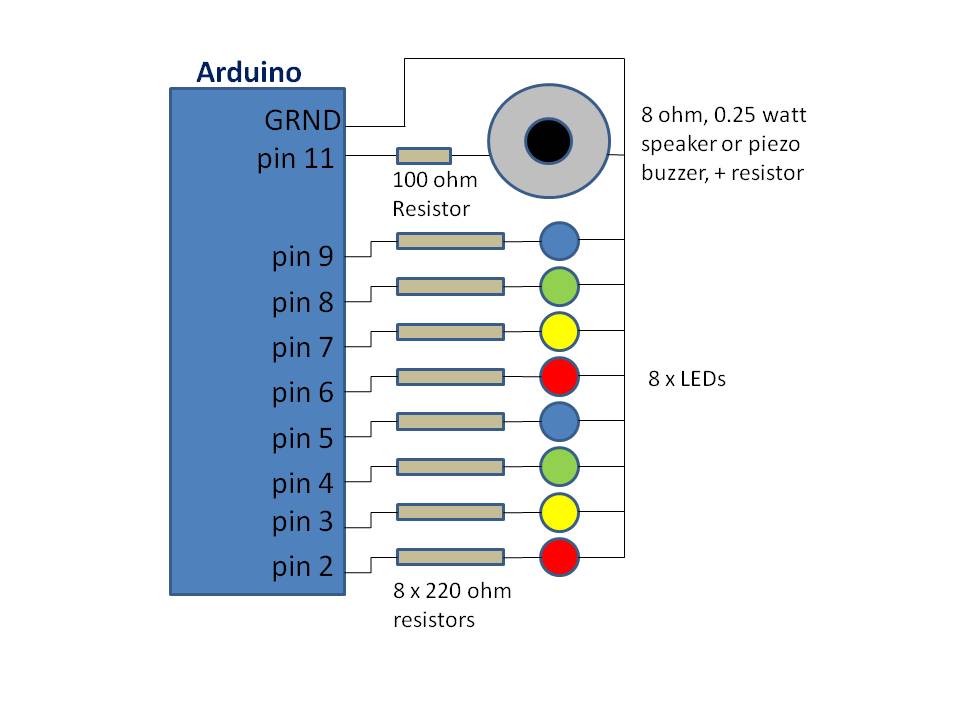
MLWB Circuit Diagram/Layout
MLWB Circuit Diagram/Layout
Documentation
View of all components
View of all components
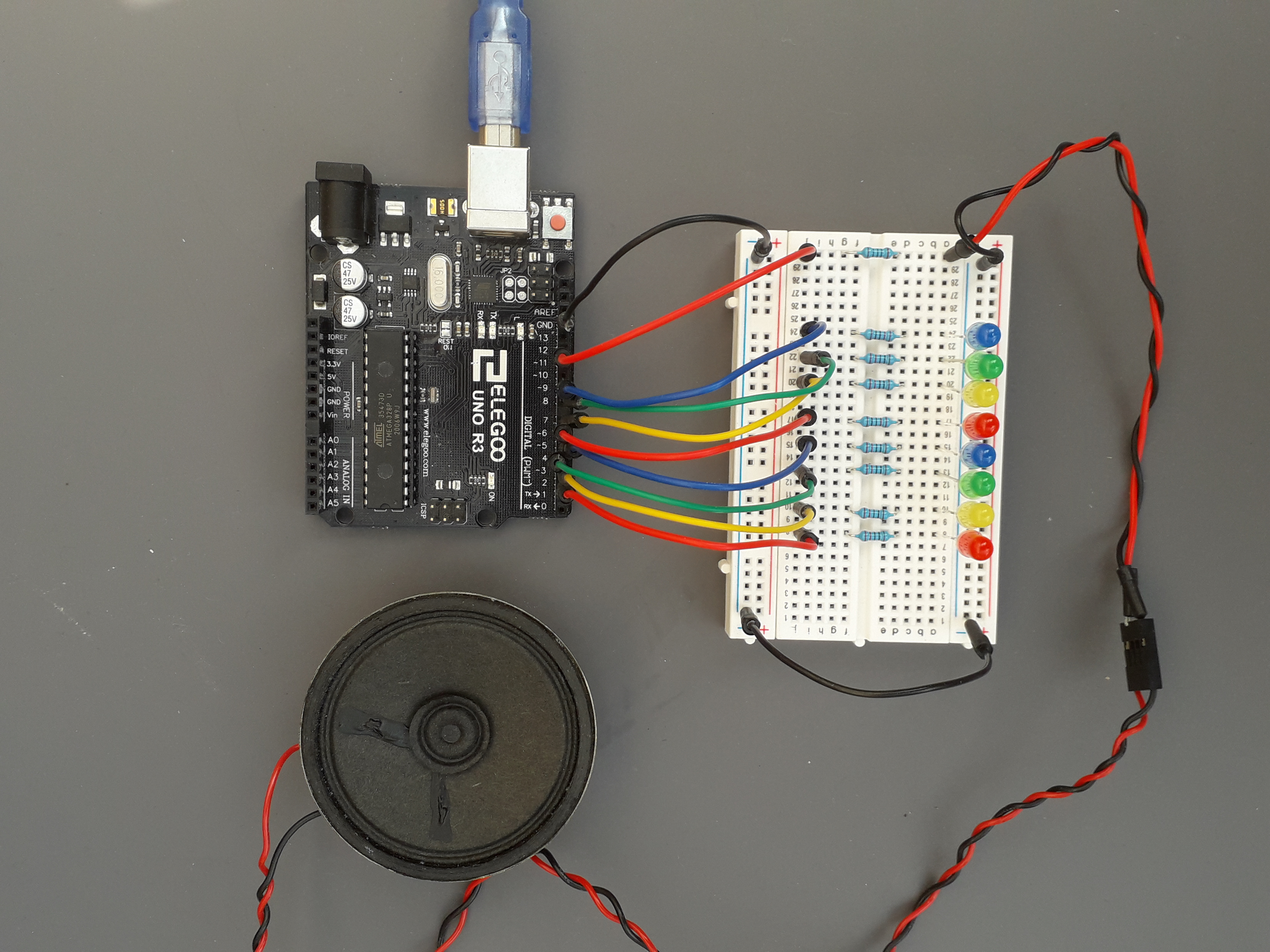
View of microcontroller (UNO) pin connections
View of microcontroller (UNO) pin connections
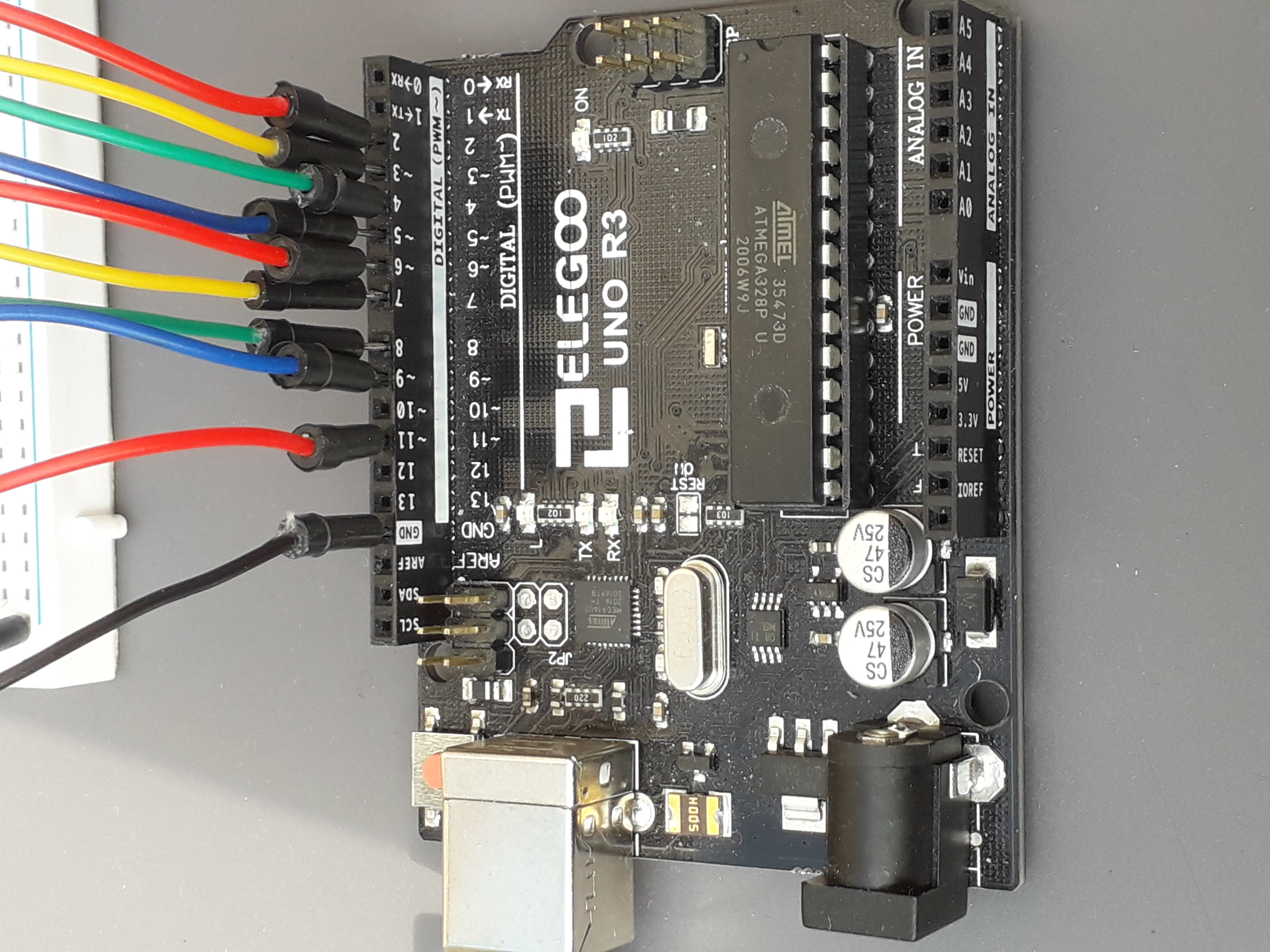
View of lights (LEDs) board layout
View of lights (LEDs) board layout
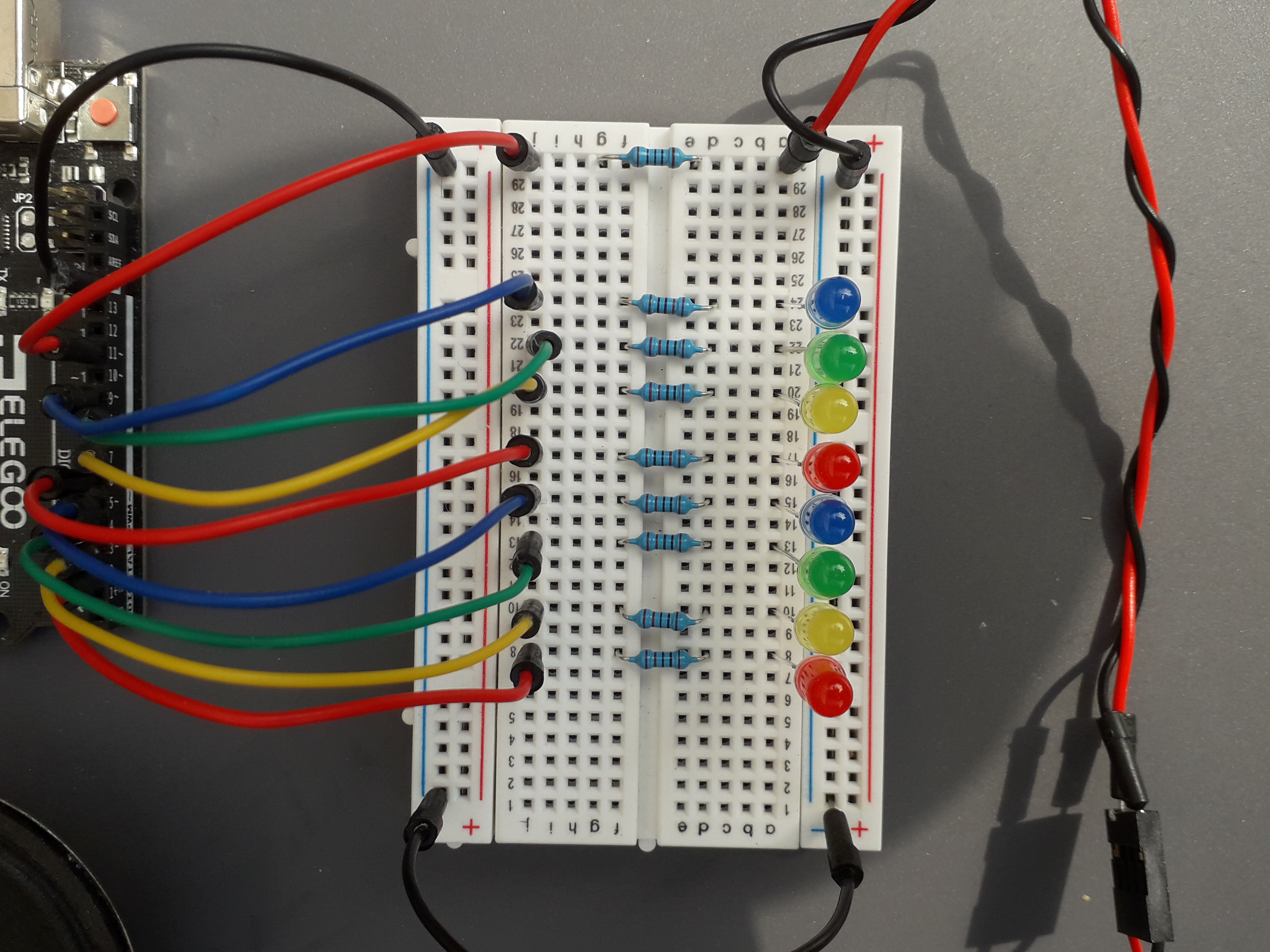
View of microcontroller (UNO) pin connections
View of microcontroller (UNO) pin connections
View of all components
View of all components
View of lights (LEDs) board layout
View of lights (LEDs) board layout
Comments
Only logged in users can leave comments