Devices & Components
SmartElex Bharat AI Innovators Kit Powered by Arduino
Software & Tools
Arduino IDE
postman
Project description
Code
When Arduino Meets Gemini: A Tiny AI That Talks Back
cpp
authenticate the API key and add font3x5 in sketch
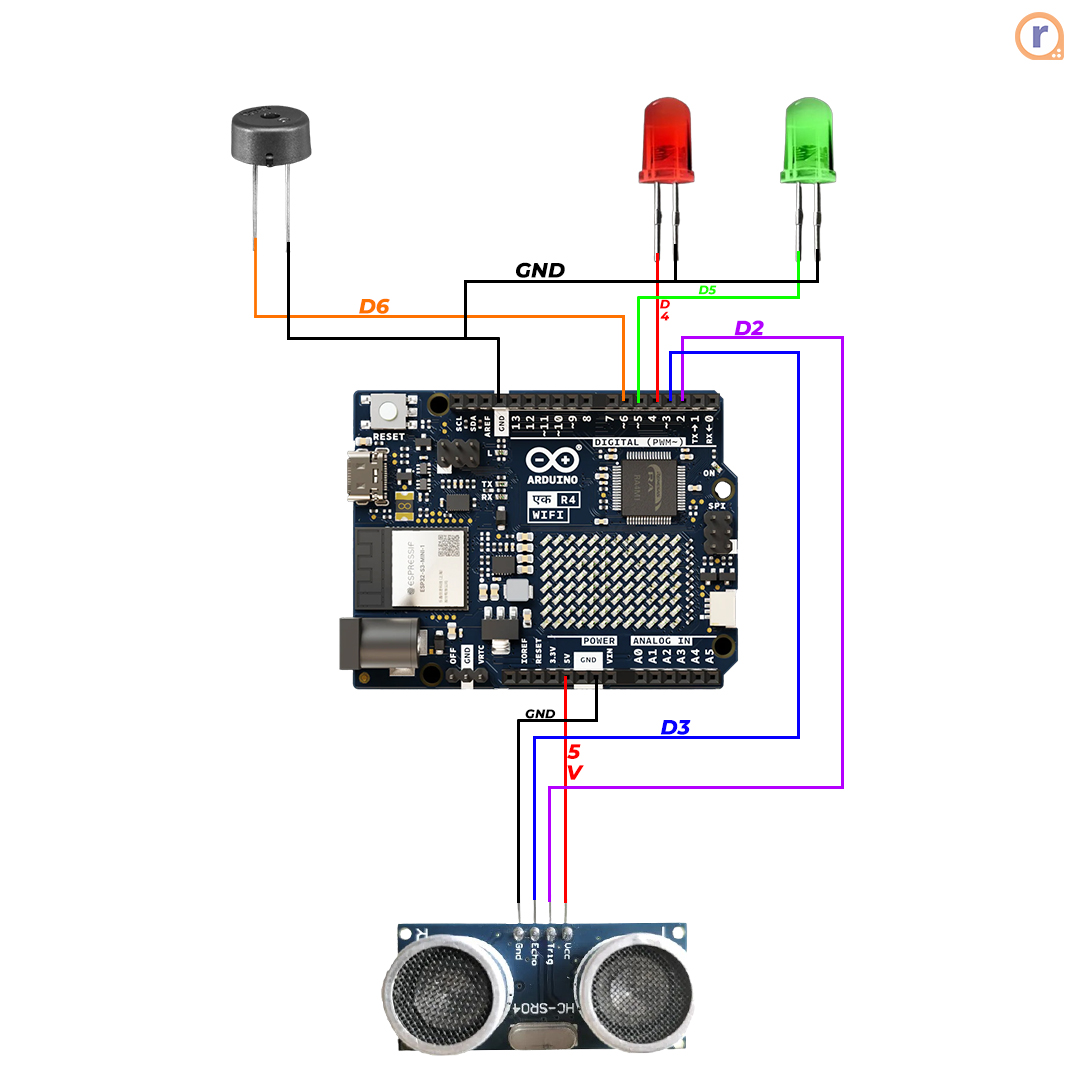
1#include <Arduino.h> 2#include <WiFiS3.h> 3#include <ArduinoHttpClient.h> 4#include <Arduino_LED_Matrix.h> 5#include "Font3x5.h" // <-- compact 3x5 font 6 7// ==== Ultrasonic Pins ==== 8#define TRIG_PIN 2 9#define ECHO_PIN 3 10 11// ==== Indicators ==== 12#define RED_LED 4 13#define GREEN_LED 5 14#define BUZZER 6 15 16// ==== WiFi credentials ==== 17const char ssid[] = "SSId"; 18const char pass[] = "Password"; 19 20// ==== Gemini API ==== 21const char* host = "generativelanguage.googleapis.com"; 22String gemini_api_key = "your API key"; 23String model = "gemini-2.0-flash"; 24 25// ==== LED Matrix ==== 26ArduinoLEDMatrix matrix; 27uint8_t frame[8][12] = {0}; // 8 rows × 12 cols display buffer 28 29// ---- Distance Measurement ---- 30long getDistance() { 31 digitalWrite(TRIG_PIN, LOW); delayMicroseconds(2); 32 digitalWrite(TRIG_PIN, HIGH); delayMicroseconds(10); 33 digitalWrite(TRIG_PIN, LOW); 34 return pulseIn(ECHO_PIN, HIGH) * 0.034 / 2; 35} 36 37// ---- Show Scrolling Text ---- 38void pushColumn(uint8_t colData) { 39 for (int row = 0; row < 5; row++) { // only 5 rows for 3x5 font 40 for (int c = 0; c < 11; c++) frame[row][c] = frame[row][c+1]; 41 frame[row][11] = (colData >> row) & 0x01; 42 } 43 matrix.renderBitmap(frame, 8, 12); 44} 45 46void scrollText(const char* text, int speed) { 47 for (int i = 0; text[i] != '\0'; i++) { 48 char c = text[i]; 49 if (c < 32 || c > 127) c = '?'; 50 for (int col = 0; col < 3; col++) { // 3 columns per character 51 uint8_t colData = pgm_read_byte(&Font3x5[c - 32][col]); 52 pushColumn(colData); 53 delay(speed); 54 } 55 pushColumn(0x00); delay(speed); // space between letters 56 } 57 for (int i = 0; i < 6; i++) { pushColumn(0x00); delay(speed); } 58} 59 60// ---- Gemini Request ---- 61String askGemini(String prompt) { 62 WiFiSSLClient client; 63 HttpClient geminiClient(client, host, 443); 64 65 String body = "{\"contents\":[{\"parts\":[{\"text\":\"" + prompt + "\"}]}]}"; 66 67 geminiClient.beginRequest(); 68 geminiClient.post("/v1beta/models/" + model + ":generateContent?key=" + gemini_api_key, 69 "application/json", body); 70 geminiClient.endRequest(); 71 72 int statusCode = geminiClient.responseStatusCode(); 73 String response = geminiClient.responseBody(); 74 75 if (statusCode != 200) { 76 Serial.print("Gemini API error: "); 77 Serial.println(statusCode); 78 return "Error!"; 79 } 80 81 // Extract first reply text 82 int idx = response.indexOf("\"text\":"); 83 if (idx == -1) return "No reply"; 84 int start = response.indexOf("\"", idx + 7) + 1; 85 int end = response.indexOf("\"", start); 86 String answer = response.substring(start, end); 87 88 // cleanup 89 answer.replace("\\n", " "); 90 answer.replace("\\", ""); 91 92 return answer; 93} 94 95// ---- Setup ---- 96void setup() { 97 Serial.begin(115200); 98 matrix.begin(); 99 pinMode(TRIG_PIN, OUTPUT); 100 pinMode(ECHO_PIN, INPUT); 101 pinMode(RED_LED, OUTPUT); 102 pinMode(GREEN_LED, OUTPUT); 103 pinMode(BUZZER, OUTPUT); 104 105 Serial.println("Connecting to WiFi..."); 106 WiFi.begin(ssid, pass); 107 while (WiFi.status() != WL_CONNECTED) { delay(500); Serial.print("."); } 108 Serial.println("\n✅ WiFi connected!"); 109 Serial.println("System ready. Wave your hand in front of sensor to start."); 110} 111 112// ---- Loop ---- 113void loop() { 114 long distance = getDistance(); 115 if (distance > 0 && distance < 50) { 116 scrollText("WELCOME TO GEMINI", 120); 117 delay(1000); 118 119 if (Serial.available()) { 120 String question = Serial.readStringUntil('\n'); 121 question.trim(); 122 if (question.length() == 0) return; 123 124 // Show question on Serial 125 Serial.println("Q: " + question); 126 127 // Gemini thinking 128 digitalWrite(RED_LED, HIGH); 129 String answer = askGemini(question); 130 digitalWrite(RED_LED, LOW); 131 132 // Show answer on Serial 133 Serial.println("Gemini: " + answer); 134 135 // Indicate + scroll answer 136 digitalWrite(GREEN_LED, HIGH); 137 tone(BUZZER, 1000, 200); // short beep 138 scrollText(answer.c_str(), 150); 139 digitalWrite(GREEN_LED, LOW); 140 } 141 } 142}
Downloadable files
When Arduino Meets Gemini: A Tiny AI That Talks Back
Circuit Diagram
file.None
Documentation
3x5 font file
File for text visibility and scrolling of text
Font3x5.h
Comments
Only logged in users can leave comments