Touch-to-Light: Control LEDs with Arduino and HMI Display
This project lets you control Red, Yellow, and Green LEDs using a 3.5 inch HMI touchscreen and Arduino. Just tap the on-screen buttons, and the Arduino instantly responds — turning your display into a smart LED controller.
Devices & Components
1
Arduino UNO EK (एक) R4 WiFi
1
USB Cable, USB Type C Plug
1
mini-breadboard ROBU
1
Robu Jumper wires
1
SmartElex 3.5 inch HMI Display
Software & Tools

Arduino IDE
1
Robu's HMI Editor
Project description
Code
Touch-to-Light: Control LEDs with Arduino and HMI Display
cpp
Interface the display in Robu's HMI editor
Downloadable files
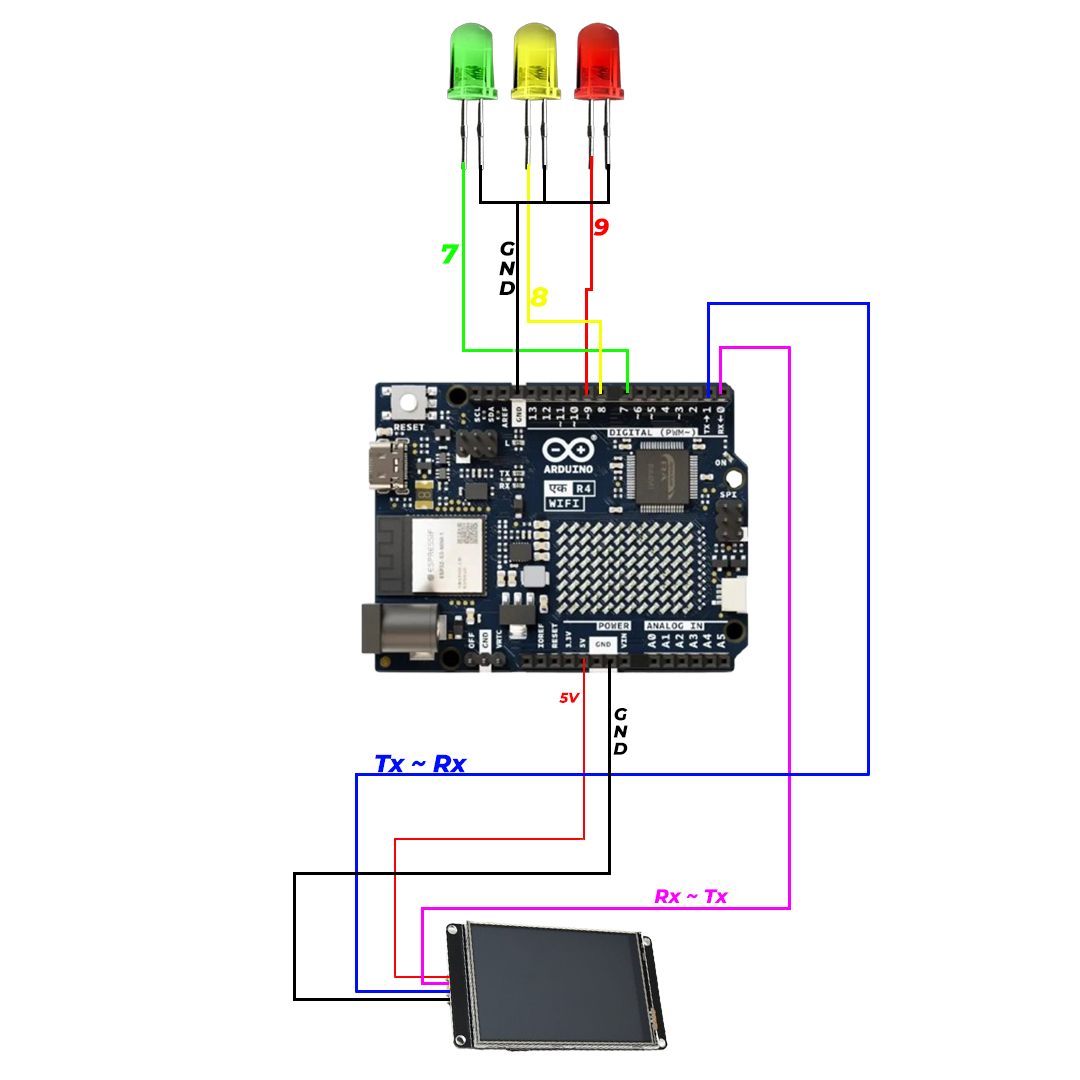
Control LEDs with Arduino and HMI Display
install Robu's HMI editor
CKT HMI Display.jpg
Documentation
Robu's HMI Editor Guide
follow this guide to create HMI display
Robus-HMI-Display-Editor-Guide.pdf
Comments
Only logged in users can leave comments