Devices & Components
Bread Board Jumper Wire Robu
Arduino UNO EK (एक) R4 Minima
Digital Sensor TTP223B Module Capacitive Touch Switch
Mini Breadboard Robu
WS2812B 5V Addressable RGB Non-Waterproof LED Strip Light
Software & Tools
Arduino IDE
Project description
Code
Need the Arduino Code?
cpp
Here’s the ready-to-upload IR-based RGB light code
1#include <Adafruit_NeoPixel.h> 2 3#define IR_SENSOR_PIN 2 // IR sensor digital output 4#define LED_PIN 6 5#define NUM_LEDS 16 6 7Adafruit_NeoPixel strip(NUM_LEDS, LED_PIN, NEO_GRB + NEO_KHZ800); 8 9bool isDetected = false; 10int currentPattern = 0; 11const int totalPatterns = 10; 12 13void setup() { 14 pinMode(IR_SENSOR_PIN, INPUT); 15 strip.begin(); 16 strip.show(); 17 Serial.begin(9600); 18} 19 20void loop() { 21 int sensorValue = digitalRead(IR_SENSOR_PIN); 22 23 if (sensorValue == HIGH && !isDetected) { 24 Serial.println("👋 Motion Detected → RGB ON"); 25 isDetected = true; 26 runPattern(currentPattern); 27 } 28 else if (sensorValue == LOW && isDetected) { 29 Serial.println("❌ No Motion → RGB OFF"); 30 isDetected = false; 31 strip.clear(); 32 strip.show(); 33 } 34 35 delay(100); 36} 37 38void runPattern(int pattern) { 39 switch (pattern) { 40 case 0: colorWipe(strip.Color(255, 0, 0)); break; 41 case 1: colorWipe(strip.Color(0, 255, 0)); break; 42 case 2: colorWipe(strip.Color(0, 0, 255)); break; 43 case 3: rainbowCycle(); break; 44 case 4: theaterChase(strip.Color(255, 255, 0)); break; 45 case 5: colorWipe(strip.Color(255, 0, 255)); break; 46 case 6: colorWipe(strip.Color(0, 255, 255)); break; 47 case 7: sparkle(); break; 48 case 8: policeLights(); break; 49 case 9: rainbowCycle(); break; 50 } 51} 52 53void colorWipe(uint32_t color) { 54 for (int i = 0; i < strip.numPixels(); i++) { 55 strip.setPixelColor(i, color); 56 } 57 strip.show(); 58} 59 60void rainbowCycle() { 61 for (int j = 0; j < 256; j++) { 62 for (int i = 0; i < strip.numPixels(); i++) { 63 strip.setPixelColor(i, Wheel(((i * 256 / strip.numPixels()) + j) & 255)); 64 } 65 strip.show(); 66 delay(5); 67 } 68} 69 70void theaterChase(uint32_t color) { 71 for (int j = 0; j < 10; j++) { 72 for (int q = 0; q < 3; q++) { 73 for (int i = 0; i < strip.numPixels(); i += 3) { 74 strip.setPixelColor(i + q, color); 75 } 76 strip.show(); 77 delay(50); 78 for (int i = 0; i < strip.numPixels(); i += 3) { 79 strip.setPixelColor(i + q, 0); 80 } 81 } 82 } 83} 84 85void policeLights() { 86 for (int i = 0; i < 10; i++) { 87 colorWipe(strip.Color(255, 0, 0)); 88 delay(100); 89 colorWipe(strip.Color(0, 0, 255)); 90 delay(100); 91 } 92} 93 94void sparkle() { 95 for (int i = 0; i < 20; i++) { 96 int pixel = random(NUM_LEDS); 97 strip.setPixelColor(pixel, strip.Color(random(255), random(255), random(255))); 98 strip.show(); 99 delay(50); 100 strip.setPixelColor(pixel, 0); 101 } 102} 103 104uint32_t Wheel(byte WheelPos) { 105 WheelPos = 255 - WheelPos; 106 if (WheelPos < 85) 107 return strip.Color(255 - WheelPos * 3, 0, WheelPos * 3); 108 if (WheelPos < 170) { 109 WheelPos -= 85; 110 return strip.Color(0, WheelPos * 3, 255 - WheelPos * 3); 111 } 112 WheelPos -= 170; 113 return strip.Color(WheelPos * 3, 255 - WheelPos * 3, 0); 114}
Downloadable files
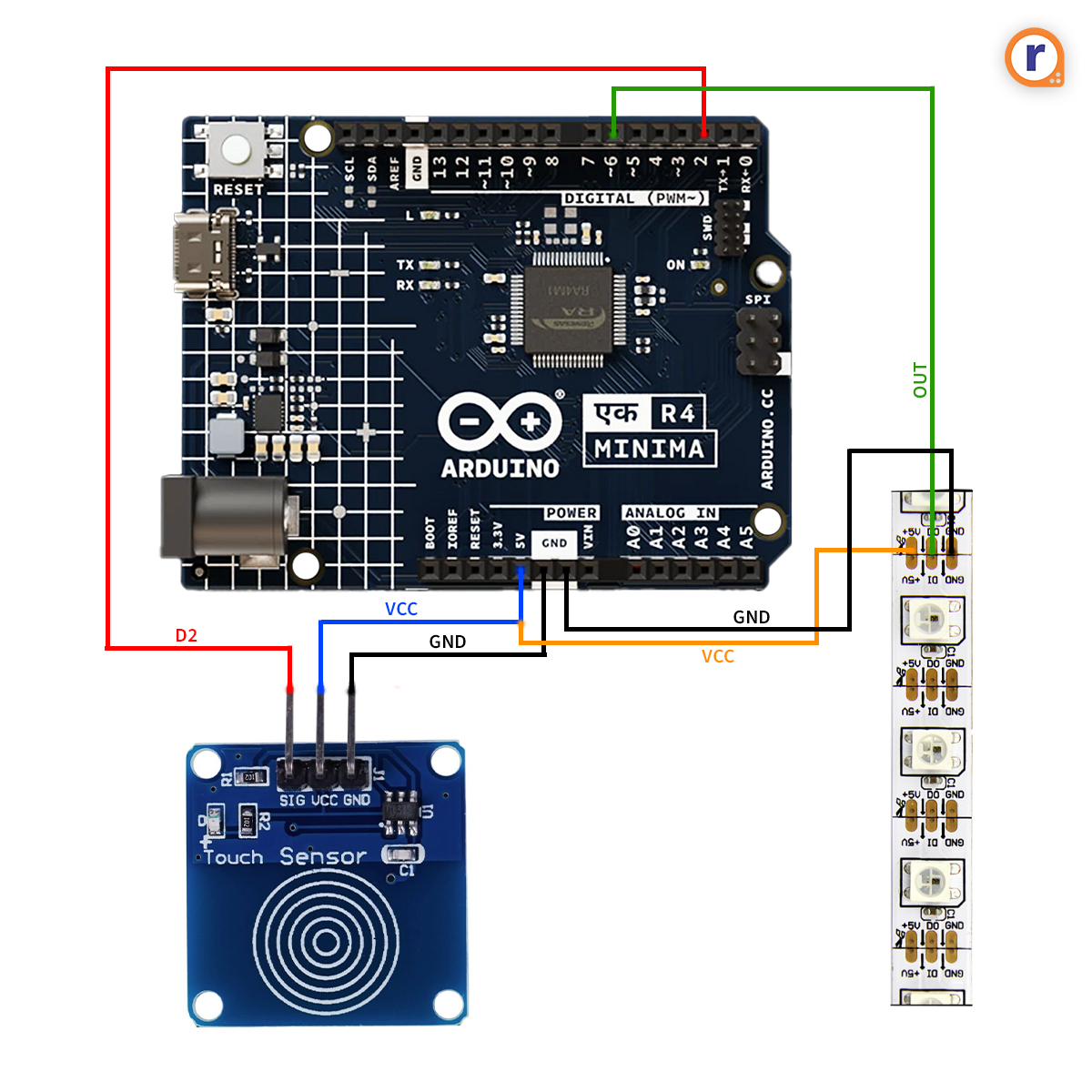
schematics for Smart Touch Reactive RGB Light – Powered by Touch Sensor & Arduino UNO EK (एक) R4 Minima
Arduino-uno-ek-minima-2.jpg
Comments
Only logged in users can leave comments