Devices & Components
MAX 9814 Microphone Module
0.96 Inch I2C/IIC 4pin OLED Display
ESP 32
Robu Jumper wires
Solderless Breadboard
Hardware & Tools
SMD Soldering Station
Software & Tools
Arduino IDE
postman
Project description
Code
Gemini-Powered Voice Assistant with ESP32 and Microphone Input
cpp
include libraries and authenticate API key.
1#include <WiFi.h> 2#include <HTTPClient.h> 3#include <ArduinoJson.h> 4#include <Wire.h> 5#include <Adafruit_GFX.h> 6#include <Adafruit_SSD1306.h> 7 8// OLED config 9#define SCREEN_WIDTH 128 10#define SCREEN_HEIGHT 64 11#define OLED_RESET -1 12#define I2C_SDA 21 13#define I2C_SCL 22 14Adafruit_SSD1306 display(SCREEN_WIDTH, SCREEN_HEIGHT, &Wire, OLED_RESET); 15 16// WiFi 17const char* ssid = "your wifi id"; 18const char* password = "your wifi password"; 19const String gemini_api_key = "your api key"; 20 21// MAX9814 microphone input pin 22#define MIC_PIN 34 23 24void setup() { 25 Serial.begin(115200); 26 delay(1000); 27 28 Wire.begin(I2C_SDA, I2C_SCL); 29 if (!display.begin(SSD1306_SWITCHCAPVCC, 0x3C)) { 30 Serial.println("OLED init failed!"); 31 while (1); 32 } 33 34 displayMessage("Connecting WiFi..."); 35 WiFi.begin(ssid, password); 36 while (WiFi.status() != WL_CONNECTED) { 37 delay(500); 38 Serial.print("."); 39 } 40 41 displayMessage("WiFi connected!"); 42 pinMode(MIC_PIN, INPUT); 43 delay(500); 44 displayMessage("Ready! Speak loud..."); 45} 46 47void loop() { 48 static unsigned long lastTrigger = 0; 49 50 int micValue = analogRead(MIC_PIN); 51 Serial.println(micValue); 52 53 if (micValue > 1500 && millis() - lastTrigger > 5000) { 54 lastTrigger = millis(); 55 56 displayMessage("Detecting..."); 57 58 String response = askGemini("who are you."); 59 displayMultilineText(response); 60 } 61 62 delay(100); 63} 64 65void displayMessage(String msg) { 66 display.clearDisplay(); 67 display.setTextSize(1); 68 display.setTextColor(SSD1306_WHITE); 69 display.setCursor(0, 0); 70 display.println(msg); 71 display.display(); 72} 73 74void displayMultilineText(String text) { 75 display.clearDisplay(); 76 display.setTextSize(1); 77 display.setTextColor(SSD1306_WHITE); 78 display.setCursor(0, 0); 79 80 int maxCharsPerLine = 21; 81 int lineHeight = 10; 82 int y = 0; 83 84 while (text.length() > 0 && y < SCREEN_HEIGHT) { 85 String line = text.substring(0, maxCharsPerLine); 86 text = text.substring(min((unsigned int)maxCharsPerLine, text.length())); 87 display.setCursor(0, y); 88 display.println(line); 89 y += lineHeight; 90 } 91 92 display.display(); 93} 94 95// Gemini API call 96String askGemini(String prompt) { 97 HTTPClient http; 98 String endpoint = "https://generativelanguage.googleapis.com/v1/models/gemini-1.5-flash-002:generateContent?key=" + gemini_api_key; 99 http.begin(endpoint); 100 http.addHeader("Content-Type", "application/json"); 101 102 prompt.replace("\"", "\\\""); 103 104 String requestBody = "{ \"contents\": [ { \"parts\": [ { \"text\": \"" + prompt + "\" } ] } ] }"; 105 int code = http.POST(requestBody); 106 String reply = ""; 107 108 if (code == 200) { 109 String payload = http.getString(); 110 StaticJsonDocument<2048> doc; 111 DeserializationError error = deserializeJson(doc, payload); 112 113 if (!error) { 114 reply = doc["candidates"][0]["content"]["parts"][0]["text"].as<String>(); 115 reply.replace("\\n", "\n"); 116 } else { 117 Serial.println("JSON Error: " + String(error.c_str())); 118 reply = "I am Gemini, your AI assistant."; 119 } 120 } else { 121 Serial.println("Gemini API error: " + String(code)); 122 // Fallback reply when API fails 123 reply = "I am Gemini, your AI assistant."; 124 } 125 126 http.end(); 127 return reply; 128}
Downloadable files
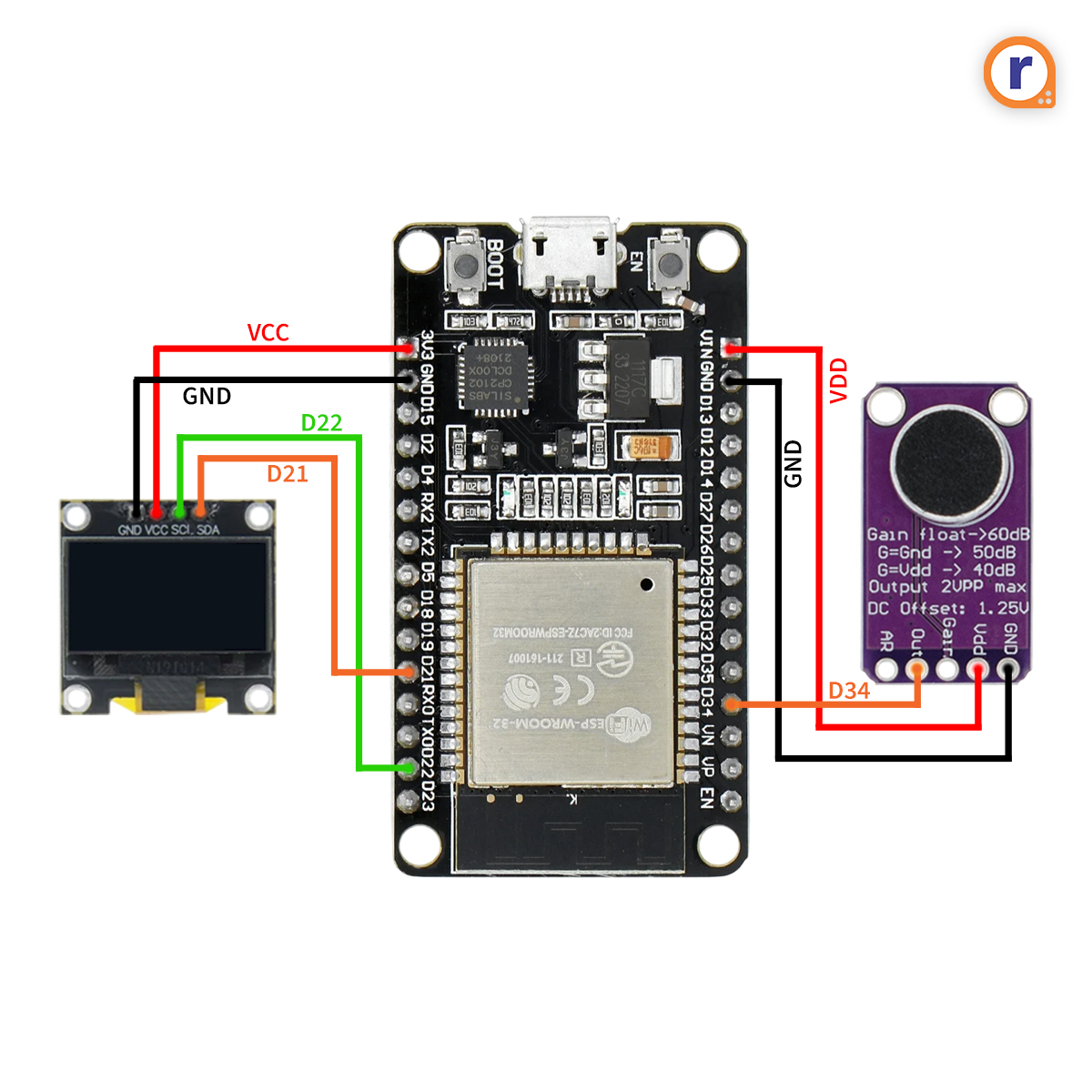
schematics of Gemini-Powered Voice Assistant with ESP32 and Microphone Input
ESP-32 (1).jpg
Comments
Only logged in users can leave comments