Devices & Components
Arduino® Nano ESP32
mini-breadboard ROBU
Robu Jumper wires
PIR Sensor Robu
Robu MQ 2
5v Passive Buzzer
Software & Tools
Arduino IoT Cloud
Arduino Cloud Agent
Project description
Code
DIY Home Security System using the Arduino Nano ESP32
cpp
install cloud agent before using cloud editor
1#include "thingProperties.h" 2 3// Pins 4#define PIR_PIN 2 5#define SMOKE_PIN 3 6#define BUZZER_PIN 4 7 8void setup() { 9 Serial.begin(115200); 10 delay(1500); 11 12 pinMode(PIR_PIN, INPUT); 13 pinMode(SMOKE_PIN, INPUT); 14 pinMode(BUZZER_PIN, OUTPUT); 15 16 initProperties(); 17 ArduinoCloud.begin(ArduinoIoTPreferredConnection); 18 19 Serial.println("✅ Setup complete, waiting for events..."); 20} 21 22void loop() { 23 ArduinoCloud.update(); 24 25 // Read sensors 26 bool motion = digitalRead(PIR_PIN); 27 bool smoke = digitalRead(SMOKE_PIN); 28 29 // Update cloud variables 30 intruderAlert = motion; 31 smokeAlert = smoke; 32 33 // Logic: 34 // If dashboard switch = OFF → buzzer must stay OFF 35 if (!alarmControl) { 36 digitalWrite(BUZZER_PIN, LOW); 37 Serial.println("🔕 Buzzer OFF (dashboard override)"); 38 } 39 else { 40 // Dashboard = ON → allow sensors to control buzzer 41 if (motion || smoke) { 42 digitalWrite(BUZZER_PIN, HIGH); 43 Serial.println("🔔 Buzzer ON (motion/smoke detected)"); 44 } else { 45 digitalWrite(BUZZER_PIN, LOW); 46 Serial.println("🔕 Buzzer OFF (no danger)"); 47 } 48 } 49 50 delay(200); 51} 52 53// Callback: runs when dashboard switch changes 54void onAlarmControlChange() { 55 Serial.print("Alarm control set to: "); 56 Serial.println(alarmControl ? "ON (sensors active)" : "OFF (override, muted)"); 57}
Downloadable files
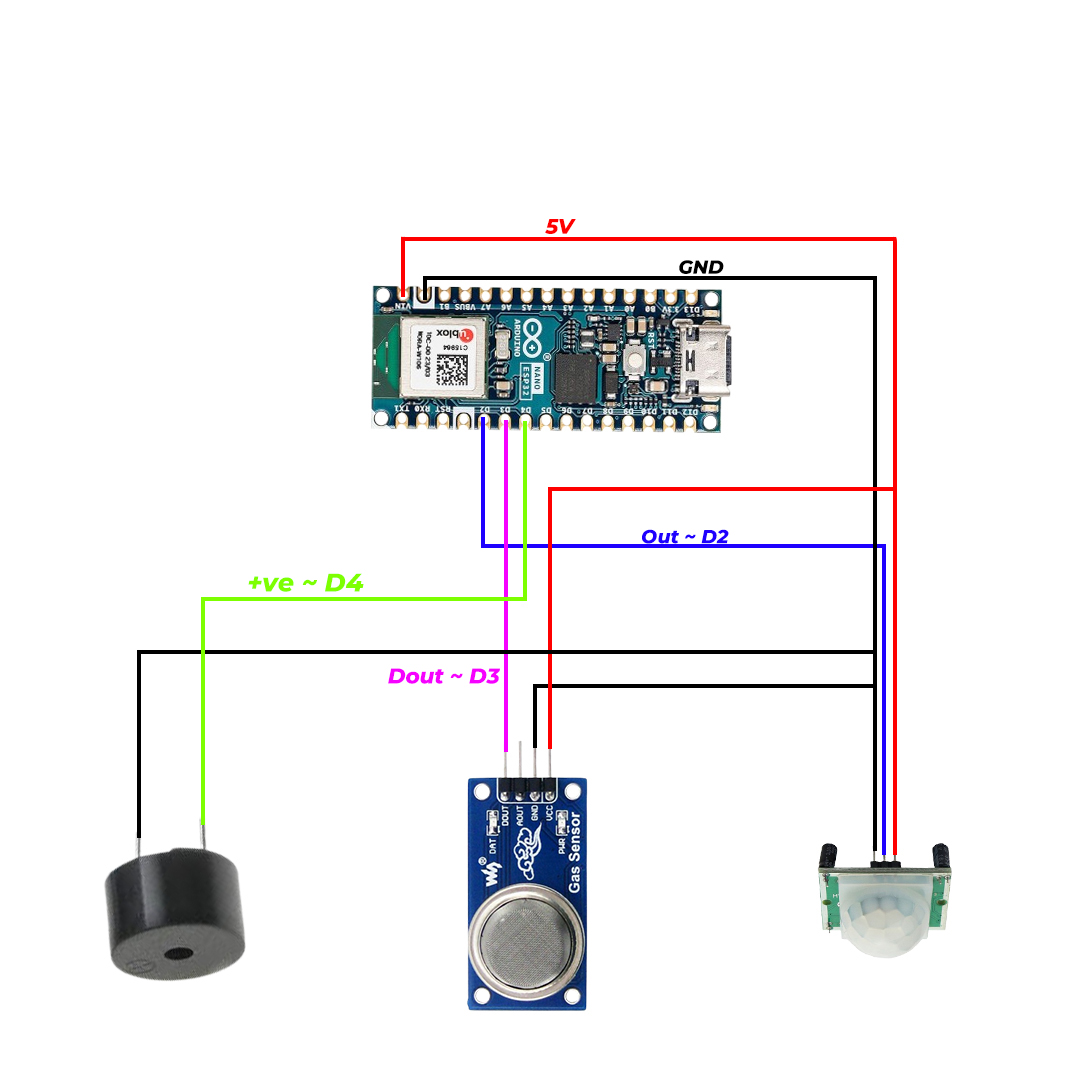
DIY Home Security System using the Arduino Nano ESP32
Circuit Diagram
CKT Final.jpg
Comments
Only logged in users can leave comments