Devices & Components
SmartElex Bharat AI Innovators Kit Powered by Arduino
Software & Tools
Edge Impulse Studio
Arduino IDE
Project description
Code
Final Gesture Recognition Code
cpp
Ready-to-run inference sketch
1#include <your_project_inference.h> (the exact name is shown in the Arduino 2examples). 3#include <Wire.h> 4#include <Adafruit_ADXL345_Unified.h> 5#include <your_project_inference.h> // <-- replace with your EI library header 6Adafruit_ADXL345_Unified accel = Adafruit_ADXL345_Unified(12345); 7// EI expects data every EI_CLASSIFIER_INTERVAL_MS 8static bool debug_nn = false; 9void setup() { 10Serial.begin(115200); 11while (!Serial) {} 12Wire.begin(); 13delay(50); 14if (!accel.begin()) { 15Serial.println("ERROR: ADXL345 not detected"); 16while (1) { delay(10); } 17} 18accel.setRange(ADXL345_RANGE_4_G); 19if (EI_CLASSIFIER_RAW_SAMPLES_PER_FRAME != 3) { 20ei_printf("ERR: Model expects 3 axes\n"); 21while (1) { delay(10); } 22} 23Serial.println("Ready for inference (move the board: up/down/circle)."); 24} 25void loop() { 26// Capture one frame of data (features window) 27float buffer[EI_CLASSIFIER_DSP_INPUT_FRAME_SIZE] = {0}; 28for (size_t ix = 0; ix < EI_CLASSIFIER_DSP_INPUT_FRAME_SIZE; ix += 3) { 29uint64_t next_tick = micros() + (EI_CLASSIFIER_INTERVAL_MS * 1000); 30sensors_event_t e; 31accel.getEvent(&e); 32buffer[ix + 0] = e.acceleration.x; // m/s^2 33buffer[ix + 1] = e.acceleration.y; 34buffer[ix + 2] = e.acceleration.z; 35// keep precise timing 36int32_t wait = (int32_t)(next_tick - micros()); 37if (wait > 0) delayMicroseconds(wait); 38} 39// Create EI signal 40signal_t signal; 41int err = numpy::signal_from_buffer(buffer, EI_CLASSIFIER_DSP_INPUT_FRAME_SIZE, 42&signal); 43if (err != 0) { 44ei_printf("signal_from_buffer failed (%d)\n", err); 45return; 46} 47// Run classifier 48ei_impulse_result_t result = {0}; 49EI_IMPULSE_ERROR res = run_classifier(&signal, &result, debug_nn); 50if (res != EI_IMPULSE_OK) { 51ei_printf("run_classifier failed (%d)\n", res); 52return; 53} 54// Print predictions 55for (size_t ix = 0; ix < EI_CLASSIFIER_LABEL_COUNT; ix++) { 56ei_printf("%s: %.3f ", result.classification[ix].label, result.classification[ix].value); 57} 58#if EI_CLASSIFIER_HAS_ANOMALY == 1 59ei_printf("anomaly: %.3f", result.anomaly); 60#endif 61ei_printf("\n"); 62}
Downloadable files
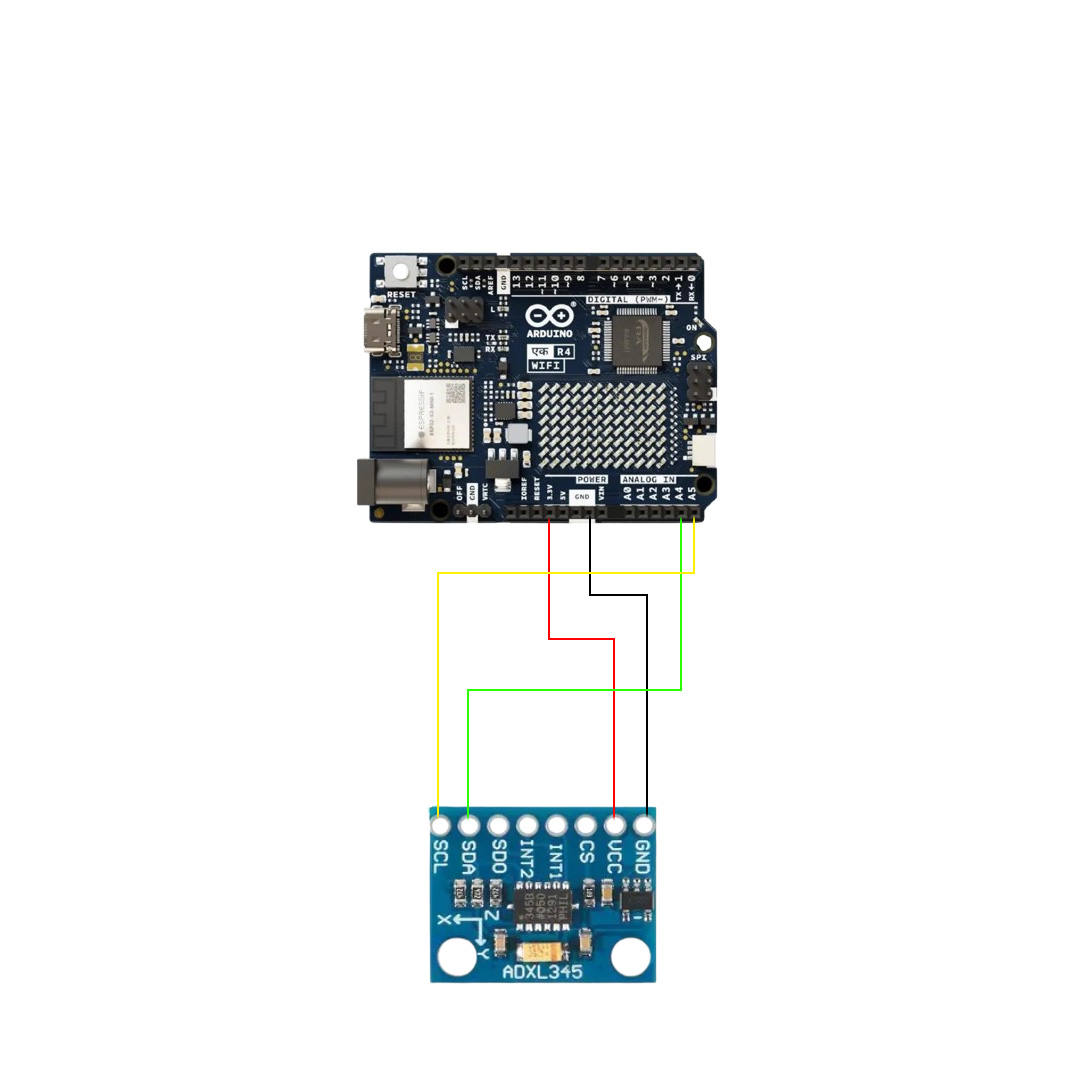
Circute diagram
Connections
CKT.jpg
Documentation
Step-By- Step Tutorial PDF
Step-By- Step Tutorial PDF to refer
Step by step Tutorial for AIML Gesture Recognition with SmartElex Bharat AI Innovators Kit Powered by Arduino UNO EK R4 Wi-Fi.pdf
Comments
Only logged in users can leave comments