Devices & Components
Robu Jumper wires
Robu's Arduino UNO Q
Robu's Type - C Cable
Robu's UNO Q Power Supply
Robu's SG90 Servo Motor
Robu's Ultrasonic sensor
Robu Breadboard
Software & Tools
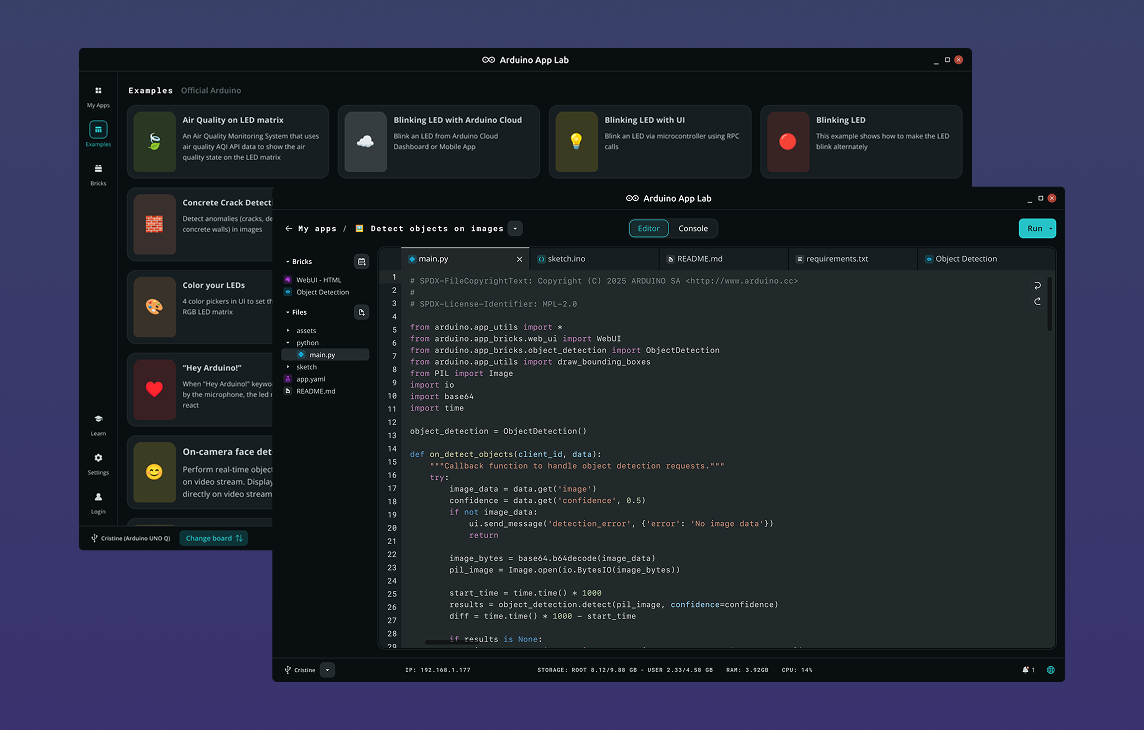
Arduino App Lab
Project description
Code
Arduino Radar Python code
python
main.py file
1from arduino.app_utils import App, Bridge 2from arduino.app_bricks.web_ui import WebUI 3import threading 4import time 5 6ui = WebUI() 7 8def radar_loop(): 9 while True: 10 try: 11 data = Bridge.call("get_radar") 12 angle, distance = data.split(",") 13 14 ui.send_message("radar_update", { 15 "angle": int(angle), 16 "distance": float(distance) 17 }) 18 19 except Exception as e: 20 print(e) 21 22 time.sleep(0.05) 23 24threading.Thread(target=radar_loop, daemon=True).start() 25 26App.run()
Arduino Radar HTML code
markup
index.html file
1<!DOCTYPE html> 2<html> 3<head> 4<title>UNO Q Radar</title> 5<link rel="stylesheet" href="style.css"> 6</head> 7 8<body> 9 10<h2>UNO Q Ultrasonic Radar</h2> 11 12<canvas id="radar" width="600" height="600"></canvas> 13 14<div id="dist">Distance: --</div> 15 16<script src="https://cdn.socket.io/4.7.2/socket.io.min.js"></script> 17<script src="app.js"></script> 18 19</body> 20</html>
Arduino Radar CSS code
css
style.css file
1body{ 2background:black; 3color:#00ff00; 4text-align:center; 5font-family:Consolas; 6} 7 8canvas{ 9border:2px solid #00ff00; 10box-shadow:0 0 25px #00ff00; 11margin-top:10px; 12} 13 14#dist{ 15margin-top:10px; 16font-size:20px; 17}
Arduino Radar CPP code
cpp
Sketch.ion file
1#include <Arduino_RouterBridge.h> 2#include <Servo.h> 3 4#define TRIG_PIN 9 5#define ECHO_PIN 10 6#define SERVO_PIN 6 7 8Servo servo; 9int angle = 30; 10bool forward = true; 11 12void setup() { 13 pinMode(TRIG_PIN, OUTPUT); 14 pinMode(ECHO_PIN, INPUT); 15 16 servo.attach(SERVO_PIN); 17 servo.write(angle); 18 19 Serial.begin(115200); 20 21 Bridge.begin(); 22 Bridge.provide("get_radar", get_radar); 23} 24 25// RPC FUNCTION CALLED FROM PYTHON 26String get_radar() { 27 28 // Move servo 29 servo.write(angle); 30 31 if (forward) angle++; 32 else angle--; 33 34 if (angle >= 150) forward = false; 35 if (angle <= 30) forward = true; 36 37 delay(10); 38 39 // Ultrasonic 40 digitalWrite(TRIG_PIN, LOW); 41 delayMicroseconds(2); 42 digitalWrite(TRIG_PIN, HIGH); 43 delayMicroseconds(10); 44 digitalWrite(TRIG_PIN, LOW); 45 46 unsigned long start = micros(); 47 while (digitalRead(ECHO_PIN) == LOW) { 48 if (micros() - start > 30000) return String(angle) + ",-1"; 49 } 50 51 unsigned long echoStart = micros(); 52 while (digitalRead(ECHO_PIN) == HIGH) { 53 if (micros() - echoStart > 30000) return String(angle) + ",-1"; 54 } 55 56 unsigned long duration = micros() - echoStart; 57 float distance = duration * 0.0343 / 2; 58 59 return String(angle) + "," + String(distance); 60} 61 62void loop() {}
Arduino Radar JS code
js
app.js file
1const socket = io(); 2 3const canvas = document.getElementById("radar"); 4const ctx = canvas.getContext("2d"); 5 6let distance = -1; 7let angle = 0; 8 9const maxDistance = 100; 10const radius = canvas.width / 2; 11 12socket.on("radar_update", data => { 13 distance = data.distance; 14 angle = data.angle * Math.PI / 180; 15}); 16 17function drawRadarGrid() { 18 19 ctx.strokeStyle = "rgba(0,255,0,.3)"; 20 ctx.lineWidth = 1; 21 22 for (let r = 100; r <= radius; r += 100) { 23 ctx.beginPath(); 24 ctx.arc(0, 0, r, 0, Math.PI * 2); 25 ctx.stroke(); 26 } 27 28 for (let i = 0; i < 360; i += 45) { 29 let x = Math.cos(i * Math.PI / 180) * radius; 30 let y = Math.sin(i * Math.PI / 180) * radius; 31 ctx.beginPath(); 32 ctx.moveTo(0, 0); 33 ctx.lineTo(x, y); 34 ctx.stroke(); 35 } 36} 37 38function draw() { 39 40 ctx.fillStyle = "rgba(0,0,0,.25)"; 41 ctx.fillRect(0,0,canvas.width,canvas.height); 42 43 ctx.save(); 44 ctx.translate(radius, radius); 45 46 drawRadarGrid(); 47 48 // Sweep line 49 ctx.strokeStyle = "#00ff00"; 50 ctx.lineWidth = 2; 51 ctx.beginPath(); 52 ctx.moveTo(0,0); 53 ctx.lineTo(Math.cos(angle)*radius, Math.sin(angle)*radius); 54 ctx.stroke(); 55 56 // Detected object 57 if(distance > 0){ 58 59 let d = distance / maxDistance * radius; 60 let x = Math.cos(angle)*d; 61 let y = Math.sin(angle)*d; 62 63 ctx.fillStyle="rgba(0,255,0,.9)"; 64 ctx.beginPath(); 65 ctx.arc(x,y,8,0,Math.PI*2); 66 ctx.fill(); 67 } 68 69 ctx.restore(); 70 71 document.getElementById("dist").innerHTML = 72 distance>0 ? `Distance: ${distance} cm` : "No object"; 73 74 requestAnimationFrame(draw); 75} 76 77draw();
Downloadable files
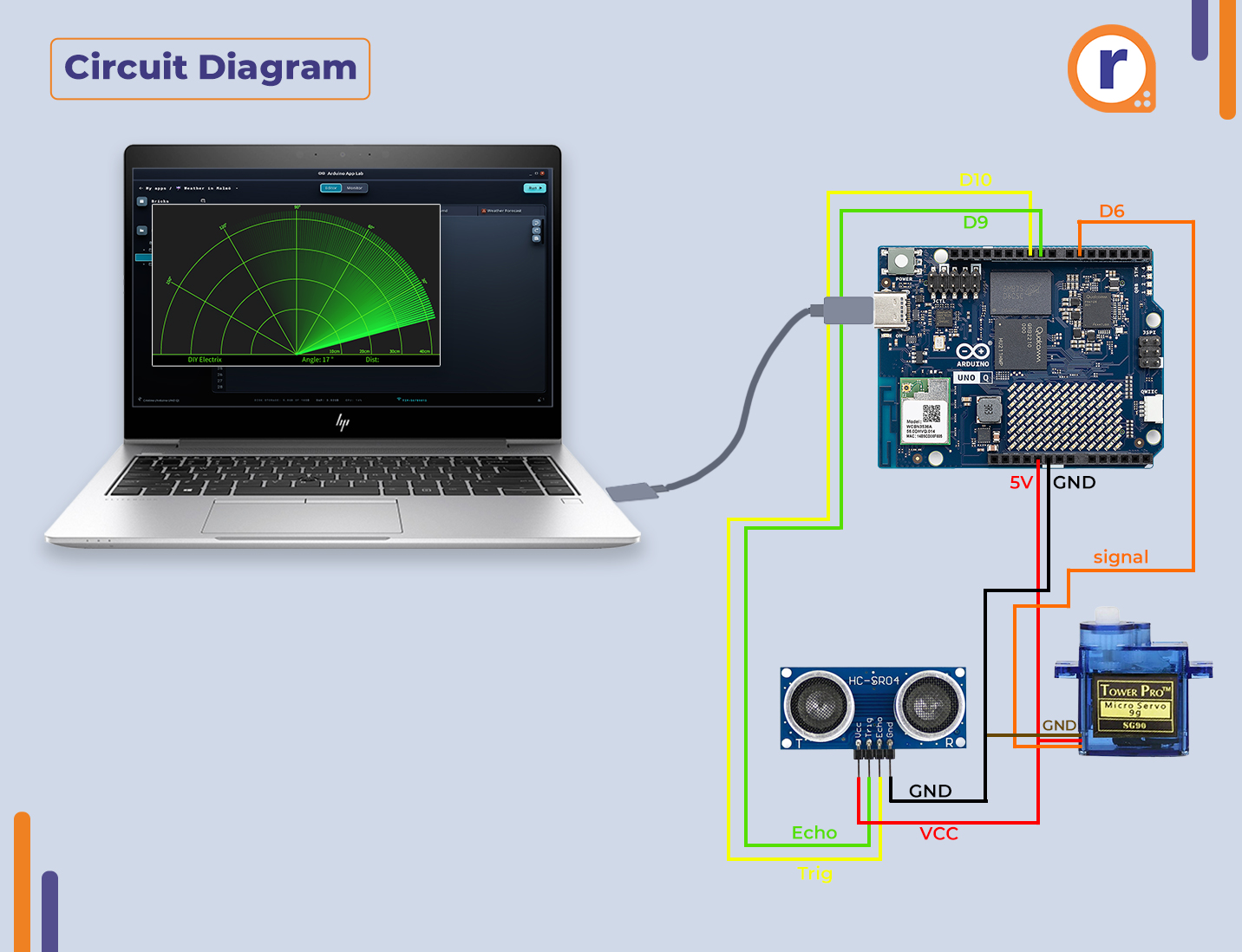
Arduino UNO Q Radar Circuit Diagram
Arduino-Uno-Q 14.jpg
Comments
Only logged in users can leave comments