Arduino UNO एक based Human Radar System with HLK-LD2420
This system can detect you through walls!
Devices & Components
1
Robu Led
1
Arduino UNO एक R4 Wi-Fi
1
USB C
1
Robu Jumper wires
1
Robu Breadboard
1
Radar Sensor
Software & Tools
1
Processing IDE 4.4.4 for Windows

Arduino IDE
Project description
Code
Processing Ide code
java
1import processing.serial.*;
2
3Serial myPort;
4String inputLine = "";
5int distance = -1; // in cm
6
7float angle = 0;
8int maxDistance = 500; // Max measurable distance (adjust if needed)
9
10void setup() {
11  size(600, 600);
12  smooth();
13  printArray(Serial.list());
14
15  // Adjust index based on your port (use console output)
16  myPort = new Serial(this, Serial.list()[0], 115200);
17  myPort.bufferUntil('\n');
18
19  textFont(createFont("Consolas", 16));
20}
21
22void draw() {
23  background(0);
24  translate(width/2, height/2);
25
26  drawRadarGrid();
27
28  // Rotate sweep line
29  stroke(0, 255, 0);
30  strokeWeight(2);
31  float sweepX = cos(angle) * width / 2;
32  float sweepY = sin(angle) * height / 2;
33  line(0, 0, sweepX, sweepY);
34
35  // Map distance to screen radius
36  if (distance >= 0 && distance <= maxDistance) {
37    float d = map(distance, 0, maxDistance, 0, width / 2);
38    float px = cos(angle) * d;
39    float py = sin(angle) * d;
40
41    fill(0, 255, 0, 180);
42    noStroke();
43    ellipse(px, py, 10, 10);
44  }
45
46  // Rotate slowly
47  angle += radians(1.5);
48  if (angle > TWO_PI) angle = 0;
49
50  drawLabels();
51}
52
53void drawRadarGrid() {
54  noFill();
55  stroke(0, 255, 0, 80);
56  strokeWeight(1);
57  for (int r = 100; r <= width/2; r += 100) {
58    ellipse(0, 0, r*2, r*2);
59  }
60
61  // Axis lines
62  for (int i = 0; i < 360; i += 45) {
63    float x = cos(radians(i)) * width/2;
64    float y = sin(radians(i)) * height/2;
65    line(0, 0, x, y);
66  }
67}
68
69void drawLabels() {
70  fill(0, 255, 0);
71  textAlign(LEFT);
72  text("Distance: " + (distance >= 0 ? distance + " cm" : "No data"), -width/2 + 20, -height/2 + 30);
73}
74
75void serialEvent(Serial port) {
76  inputLine = port.readStringUntil('\n');
77  if (inputLine != null) {
78    inputLine = trim(inputLine);
79    if (inputLine.startsWith("Detected Distance:")) {
80      String[] parts = split(inputLine, " ");
81      if (parts.length >= 3) {
82        try {
83          distance = int(parts[2]);
84        } catch (Exception e) {
85          println("Invalid distance value: " + inputLine);
86        }
87      }
88    }
89  }
90}
Arduino Code for UNO R4 WiFi
cpp
1// For Arduino UNO R4 WiFi: Use Serial1 (pins 0=RX, 1=TX)
2#define RX1_PIN 0
3#define TX1_PIN 1
4
5void setup() {
6  // USB Serial Monitor
7  Serial.begin(115200);
8  while (!Serial) delay(100);
9  Serial.println("Serial Monitor Initialized.");
10
11  // Initialize Serial1 for LD2420 communication
12  Serial1.begin(115200);
13  Serial.println("Serial1 Initialized on RX:0, TX:1");
14
15  // Optional command to wake/configure LD2420
16  String hex_to_send = "FDFCFBFA0800120000006400000004030201";
17  Serial.println("Sending initial command to LD2420...");
18  sendHexData(hex_to_send);
19  Serial.println("Initial command sent.");
20  Serial.println("Waiting for sensor readings...");
21}
22
23void loop() {
24  readAndProcessSensorLines();
25  delay(10);
26}
27
28void sendHexData(String hexString) {
29  int len = hexString.length();
30  if (len % 2 != 0) {
31    Serial.println("Hex string must be even-length.");
32    return;
33  }
34
35  byte hexBytes[len / 2];
36  for (int i = 0; i < len; i += 2) {
37    String byteStr = hexString.substring(i, i + 2);
38    hexBytes[i / 2] = (byte)strtoul(byteStr.c_str(), NULL, 16);
39  }
40
41  Serial.print("Sending ");
42  Serial.print(len / 2);
43  Serial.print(" bytes: ");
44  for (int i = 0; i < len / 2; i++) {
45    if (hexBytes[i] < 16) Serial.print("0");
46    Serial.print(hexBytes[i], HEX);
47    Serial.print(" ");
48  }
49  Serial.println();
50
51  Serial1.write(hexBytes, len / 2);
52}
53
54void readAndProcessSensorLines() {
55  while (Serial1.available()) {
56    String line = Serial1.readStringUntil('\n');
57    line.trim();
58
59    if (line.startsWith("Range ")) {
60      String distStr = line.substring(6);
61      int distance = distStr.toInt();
62      Serial.print("Detected Distance: ");
63      Serial.print(distance);
64      Serial.println(" cm");
65    }
66  }
67}
Downloadable files
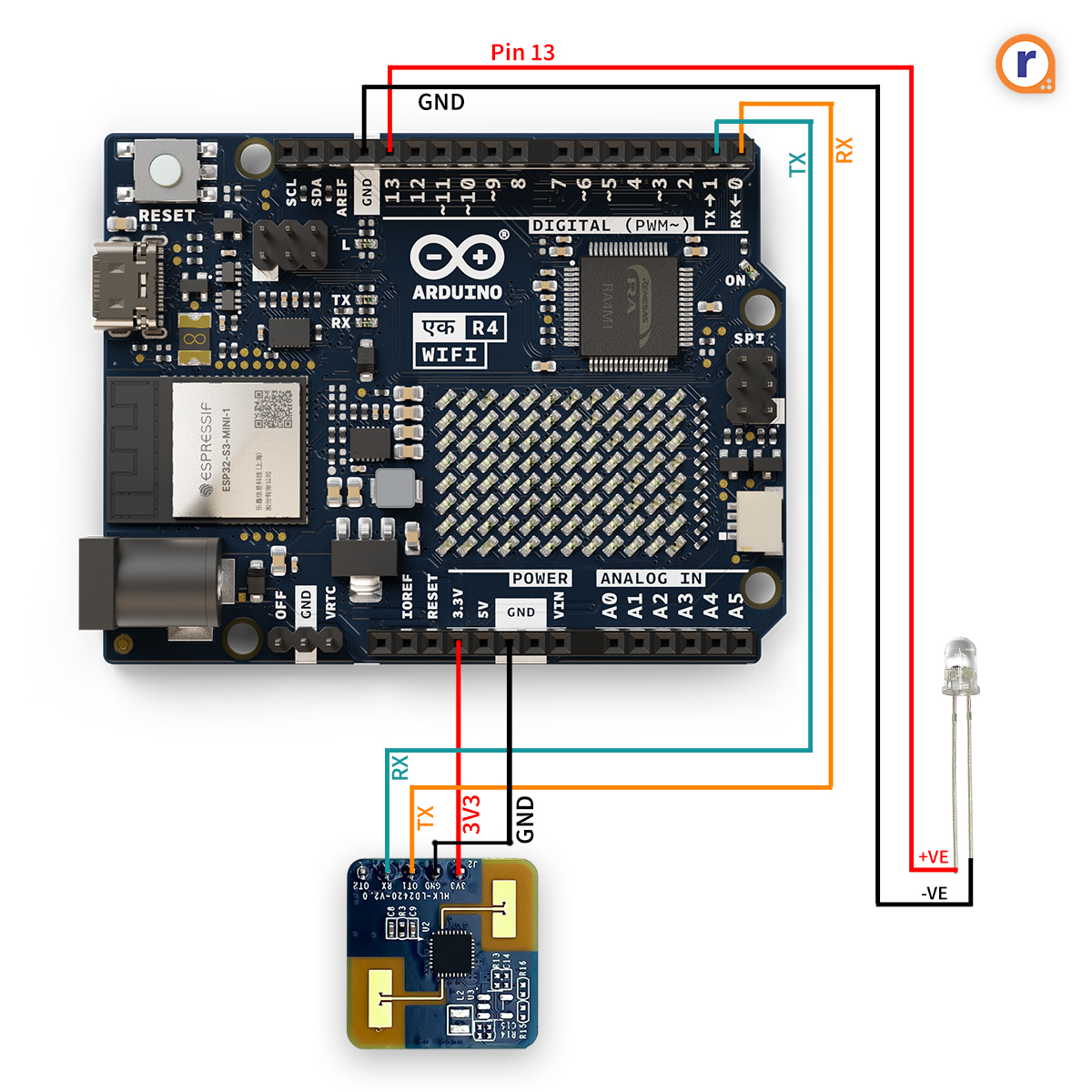
Human Radar system Schematic
Human Radar system Schematic.jpg
Comments
Only logged in users can leave comments