Devices & Components
Arduino Uno Rev3
Gravity: I2C BME280 Environmental Sensor
Jumper wires (generic)
Alphanumeric LCD, 16 x 2
Breadboard (generic)
Resistor 330 ohm
Rotary potentiometer (generic)
Software & Tools
Arduino IDE
Project description
Code
Temperature Display Code
c_cpp
1/* 2SG 34/19/22 4This is a temperature sensor using the BME_280 and an LCD 5connected to the arduino uno. When exposed to different 6temperatures, it can figure out the temperature with great 7precision. It then diplays that temperature (in celsius) 8on the LCD 9*/ 10#include<LiquidCrystal.h> 11#include<Adafruit_BME280.h> //gets the necessary libraries 12LiquidCrystal lcd(12,11,5,4,3,2); 13Adafruit_BME280 bme; //temperature sensor 14 15byte degree_symbol[8] = 16{ 170b00111, 180b00101, 190b00111, 200b00000, 210b00000, 220b00000, 230b00000, 240b00000 25//making the degree symbol 26}; 27 28void setup() { 29lcd.begin(16,2); 30lcd.createChar(1, degree_symbol); 31lcd.setCursor(0,0); 32//Writes Digital Thermometer to being with 33lcd.print(" Digital "); 34lcd.setCursor(0,1); 35lcd.print(" Thermometer "); 36delay(4000); //writes it for 4 seconds 37lcd.clear(); 38if (!bme.begin(0x76)) { /*if statement used to make sure wires 39 are connected properly, by giving an error*/ 40 lcd.print("Could not find a valid BME280 sensor, check wiring!"); 41 while (1); 42} 43} 44void loop() { 45lcd.setCursor(0,0); 46lcd.print("Temperature in Celsius"); /*prints the quotes 47on the first line*/ 48float temperature = bme.readTemperature();/*gets a celsius 49temperature reading*/ 50lcd.setCursor (5,1); 51lcd.print(temperature);//writes the temperature in the center 52lcd.write(1);//prints the degree symbol after the temperature 53 54}
Temperature Display Code
c_cpp
1/* 2SG 34/19/22 4This is a temperature sensor using the BME_280 5 and an LCD 6connected to the arduino uno. When exposed to different 7temperatures, 8 it can figure out the temperature with great 9precision. It then diplays that 10 temperature (in celsius) 11on the LCD 12*/ 13#include<LiquidCrystal.h> 14#include<Adafruit_BME280.h> 15 //gets the necessary libraries 16LiquidCrystal lcd(12,11,5,4,3,2); 17Adafruit_BME280 18 bme; //temperature sensor 19 20byte degree_symbol[8] = 21{ 220b00111, 230b00101, 240b00111, 250b00000, 260b00000, 270b00000, 280b00000, 290b00000 30//making 31 the degree symbol 32}; 33 34void setup() { 35lcd.begin(16,2); 36lcd.createChar(1, 37 degree_symbol); 38lcd.setCursor(0,0); 39//Writes Digital Thermometer to being 40 with 41lcd.print(" Digital "); 42lcd.setCursor(0,1); 43lcd.print(" Thermometer 44 "); 45delay(4000); //writes it for 4 seconds 46lcd.clear(); 47if (!bme.begin(0x76)) 48 { /*if statement used to make sure wires 49 are connected properly, by giving 50 an error*/ 51 lcd.print("Could not find a valid BME280 sensor, check wiring!"); 52 53 while (1); 54} 55} 56void loop() { 57lcd.setCursor(0,0); 58lcd.print("Temperature 59 in Celsius"); /*prints the quotes 60on the first line*/ 61float temperature = 62 bme.readTemperature();/*gets a celsius 63temperature reading*/ 64lcd.setCursor 65 (5,1); 66lcd.print(temperature);//writes the temperature in the center 67lcd.write(1);//prints 68 the degree symbol after the temperature 69 70}
Downloadable files
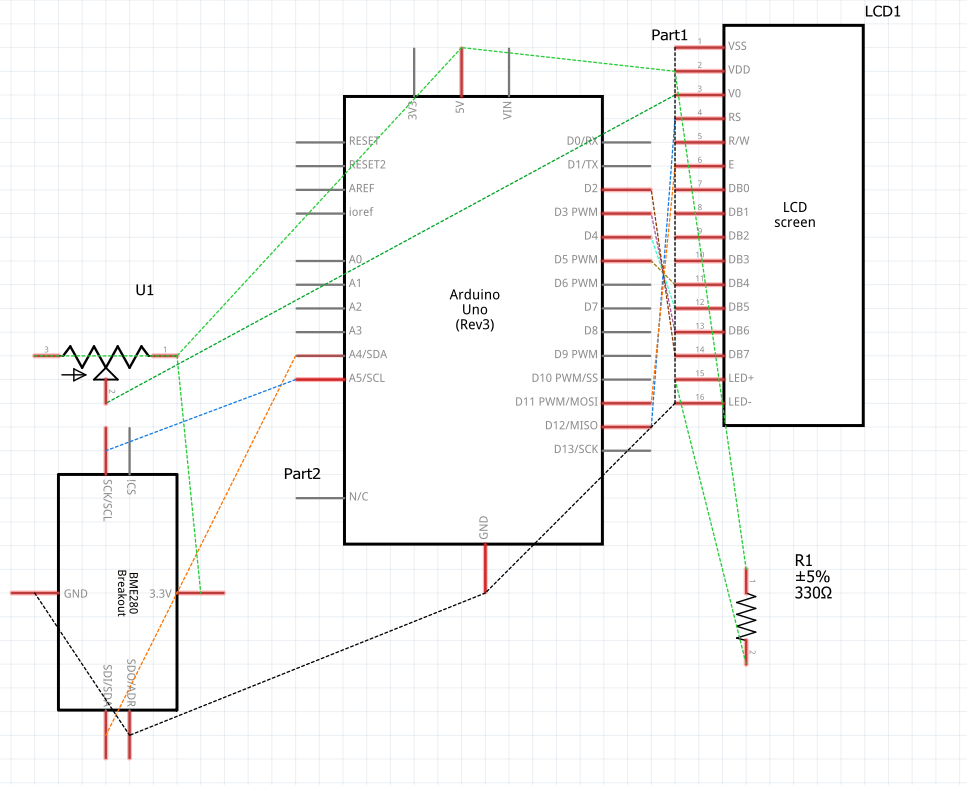
Schematics
Schematics
Comments
Only logged in users can leave comments