Transceiver Communication for road trips!
This is a project designed to make communicating on road trips easier!
Devices & Components
2
Arduino Uno Rev3
1
16x2 LCD display with I²C interface
2
Buzzer
2
Analog joystick (Generic)
1
Jumper wires (generic)
2
SparkFun Transceiver Breakout - nRF24L01+ (RP-SMA)
2
Solderless Breadboard Half Size
Software & Tools
1
Arduino Web Editor

Arduino IDE
Project description
Code
Road Trip Communication (buzzer) (Arduino 2)
csharp
1#include <LiquidCrystal_I2C.h>
2LiquidCrystal_I2C lcd(0x27, 16, 2);
3#include   <SPI.h>
4#include <nRF24L01.h>
5#include <RF24.h>
6const String messages[26]   = {
7  "Hello",
8  "How are you?",
9  "Good",
10  "Tired",
11  "Hungry",
12   "Bathroom break?",
13  "Yes",
14  "No",
15  "Food Break?",
16  "Where   are you?",
17  "Behind you",
18  "In front of you",
19  "Beside you",
20   "Ha!",
21  "BRB",
22  "Disconnecting...",
23  "No!",
24  "Turn left",
25   "Turn right",
26  "Too fast",
27  "Too slow",
28  "Food soon?",
29   "Break soon?",
30  "Ok"
31};
32int messageNumber = 0;
33
34const int   VRX = 0;
35const int VRY = 1;
36const int SW = 8;
37
38#define CE_PIN   9
39#define   CSN_PIN 10
40const int buzzerPin = 7;
41
42const byte sendAddress[5] = {'T','x','A','A','A'};
43const   byte receiveAddress[5] = {'R','x','A','A','A'};
44
45RF24 radio(CE_PIN, CSN_PIN);   // Create a Radio
46
47int dataReceived;
48int dataToSend;
49
50void setup()   {
51  pinMode(buzzerPin, OUTPUT);
52  pinMode(SW, INPUT);
53  digitalWrite(SW,   HIGH);
54  Serial.begin(9600);
55  Serial.println("Starting lcd");
56  lcd.backlight();
57   lcd.init();
58  lcd.clear();
59
60    Serial.println("Starting Radio");
61
62     radio.begin();
63    radio.setDataRate( RF24_250KBPS );
64    radio.setRetries(3,5);   // delay, count
65    radio.openWritingPipe(sendAddress);
66    radio.openReadingPipe(1,   receiveAddress);
67    Serial.println();
68    radio.startListening();
69}
70
71//====================
72
73void   loop() {
74  while(!radio.available()){
75    ;
76  }
77  if (radio.available()){
78     radio.read(&dataReceived, sizeof(dataReceived));
79    lcd.clear();
80    lcd.setCursor(0,   0);
81    lcd.print("New message:");
82    lcd.setCursor(0, 1);
83    lcd.print(messages[dataReceived]);
84     for(int i = 0; i < 15; i++){ // buzz the buzzer 10 times a second for 3 seconds
85       digitalWrite(buzzerPin, HIGH);
86      delay(100);
87      digitalWrite(buzzerPin,   LOW);
88      delay(100);
89    }
90    delay(2000)
91  }
92  changeMessage();
93   if (digitalRead(SW) == LOW){
94    sendData();
95  }
96  delay(100);
97}
98
99//====================
100
101void   changeMessage(){
102  int x = analogRead(VRY);
103  x = map(x, 0, 1023, -9, 10);   // 10: left
104  int y = analogRead(VRX);
105  y = map(y, 0, 1023, -9, 10); // -9:   forwards
106  if (y < -1){
107    messageNumber -= 1;
108    delay(500);
109  }
110   if (y > 1){
111    messageNumber += 1;
112    delay(500);
113  }
114  if (messageNumber   < 0){
115    messageNumber = 26;
116  }
117  if (messageNumber > 26){
118    messageNumber   = 0;
119  }
120  lcd.clear();
121  lcd.setCursor(0, 0);
122  lcd.print(">");
123   lcd.setCursor(1, 0);
124  lcd.print(messages[messageNumber]);
125  lcd.setCursor(1,   1);
126  if ((messageNumber + 1) < 26){
127    lcd.print(messages[messageNumber   + 1]);
128  }
129  if ((messageNumber + 1) == 26){
130    lcd.print(messages[0]);
131  }
132}
133
134void sendData(){
135  dataToSend = messageNumber;
136  radio.stopListening();
137   radio.write(&dataToSend, sizeof(dataToSend));
138  delay(5);
139  radio.startListening();
140}
Road Trip (Arduino 2)
csharp
1#include <LiquidCrystal_I2C.h> // I2C LCD library
2LiquidCrystal_I2C  lcd(0x27, 16, 2); // define the LCD
3#include <SPI.h> // SPI library for the transceiver
4#include  <nRF24L01.h> // include both of the libraries needed for the transceiver
5#include  <RF24.h>
6const String messages[26] = { // messages
7  "Hello",
8  "How  are you?",
9  "Good",
10  "Tired",
11  "Hungry",
12  "Bathroom break?",
13  "Yes",
14  "No",
15  "Food Break?",
16  "Where are you?",
17  "Behind  you",
18  "In front of you",
19  "Beside you",
20  "Ha!",
21  "BRB",
22  "Disconnecting...",
23  "No!",
24  "Turn left",
25  "Turn right",
26  "Too fast",
27  "Too slow",
28  "Food soon?",
29  "Break soon?",
30  "Ok"
31};
32int messageNumber = 0; // which message the LCD is showing
33
34const  int VRX = 0; // joystick pin (analog)
35const int VRY = 1; // joystick pin (analog)
36const  int SW = 8;  // joystick button pin (digital)
37
38#define CE_PIN   9 // CE of  radio
39#define CSN_PIN 10 // CSN of radio
40
41const byte sendAddress[5] = {'T','x','A','A','A'};  // address to send data
42const byte receiveAddress[5] = {'R','x','A','A','A'};  // address to receive data
43
44RF24 radio(CE_PIN, CSN_PIN); // Create a Radio
45
46int  dataReceived;
47int dataToSend;
48
49void setup() {
50  pinMode(SW, INPUT);  // set the button pin as input
51  digitalWrite(SW, HIGH);
52  Serial.begin(9600);  // begin Serial monitor (debugging)
53  Serial.println("Starting lcd");
54  lcd.backlight();  // turn on LCD backlight
55  lcd.init(); // start the LCD
56  lcd.clear(); //  clear the LCD
57
58    Serial.println("Starting Radio");
59
60    radio.begin();  // start radio
61    radio.setDataRate( RF24_250KBPS ); // set data rate
62    radio.setRetries(3,5);  // delay, count
63    radio.openWritingPipe(sendAddress); // open a pipe for data  sending
64    radio.openReadingPipe(1, receiveAddress); // open a pipe for receiving  data
65    Serial.println();
66    radio.startListening(); // start listening  for data
67}
68
69//====================
70
71void loop() {
72  while (!radio.available()){
73    ;
74  }
75  if (radio.available()){ // if there is data available:
76    radio.read(&dataReceived,  sizeof(dataReceived)); // get the data
77    lcd.clear(); // clear the LCD
78    lcd.setCursor(0, 0);
79    lcd.print("New message:"); // print "New Message:"  at 0, 0 (top left)
80    lcd.setCursor(0, 1);
81    lcd.print(messages[dataReceived]);  // print the received message at 0, 1 (bottom left)
82    delay(5000); // wait  five seconds
83  }
84  changeMessage(); // change the message
85  if (digitalRead(SW)  == LOW){ // if the joystick button is pressed, send the message
86    sendData();
87  }
88  delay(100); // do this ten times a second
89}
90
91//====================
92
93void  changeMessage(){
94  int x = analogRead(VRY); // read the VRY pin (joystick pins  forward)
95  x = map(x, 0, 1023, -9, 10); // 10: left
96  int y = analogRead(VRX);  // the VRX pin reads the movement of the joystick to/from the pins on the front.  If the joystick is held sideways, reverse these two values
97  y = map(y, 0, 1023,  -9, 10); // -9: forwards   You may need to change the -9 to a -10. My joystick was  slightly off, so I had to correct it
98  if (y < -1){ // change the message
99    messageNumber -= 1;
100    delay(500);
101  }
102  if (y > 1){ // change the  message
103    messageNumber += 1;
104    delay(500);
105  }
106  if (messageNumber  < 0){  // if the message number is less than the number of messages, reset it
107    messageNumber = 26;
108  }
109  if (messageNumber > 26){  // if the message  number is more than the number of messages, reset it
110    messageNumber = 0;
111  }
112  lcd.clear(); // clear LCD
113  lcd.setCursor(0, 0);
114  lcd.print(">");  // print the ">" to the LCD
115  lcd.setCursor(1, 0);
116  lcd.print(messages[messageNumber]);  // print the current message
117  lcd.setCursor(1, 1);
118  if ((messageNumber +  1) < 26){ // print the message after the current message
119    lcd.print(messages[messageNumber  + 1]);
120  }
121  if ((messageNumber + 1) == 26){
122    lcd.print(messages[0]);
123  }
124}
125
126void sendData(){ // send the number of the current message  (ONLY WORKS IF BOTH MESSAGE LISTS ARE THE SAME!!!)
127  dataToSend = messageNumber;
128  radio.stopListening();
129  radio.write(&dataToSend, sizeof(dataToSend));
130  delay(5);
131  radio.startListening();
132}
Road Trip Communication (buzzer)
csharp
1#include <LiquidCrystal_I2C.h>
2LiquidCrystal_I2C lcd(0x27, 16, 2);
3#include   <SPI.h>
4#include <nRF24L01.h>
5#include <RF24.h>
6const String messages[26]   = {
7  "Hello",
8  "How are you?",
9  "Good",
10  "Tired",
11  "Hungry",
12   "Bathroom break?",
13  "Yes",
14  "No",
15  "Food Break?",
16  "Where   are you?",
17  "Behind you",
18  "In front of you",
19  "Beside you",
20   "Ha!",
21  "BRB",
22  "Disconnecting...",
23  "No!",
24  "Turn left",
25   "Turn right",
26  "Too fast",
27  "Too slow",
28  "Food soon?",
29   "Break soon?",
30  "Ok"
31};
32int messageNumber = 0;
33
34const int   VRX = 0;
35const int VRY = 1;
36const int SW = 8;
37
38#define CE_PIN   9
39#define   CSN_PIN 10
40const int buzzerPin = 7;
41
42const byte sendAddress[5] = {'R','x','A','A','A'};
43const   byte receiveAddress[5] = {'T','x','A','A','A'};
44
45RF24 radio(CE_PIN, CSN_PIN);   // Create a Radio
46
47int dataReceived;
48int dataToSend;
49
50void setup()   {
51  pinMode(buzzerPin, OUTPUT);
52  pinMode(SW, INPUT);
53  digitalWrite(SW,   HIGH);
54  Serial.begin(9600);
55  Serial.println("Starting lcd");
56  lcd.backlight();
57   lcd.init();
58  lcd.clear();
59
60    Serial.println("Starting Radio");
61
62     radio.begin();
63    radio.setDataRate( RF24_250KBPS );
64    radio.setRetries(3,5);   // delay, count
65    radio.openWritingPipe(sendAddress);
66    radio.openReadingPipe(1,   receiveAddress);
67    Serial.println();
68    radio.startListening();
69}
70
71//====================
72
73void   loop() {
74  if (radio.available()){
75    radio.read(&dataReceived, sizeof(dataReceived));
76     lcd.clear();
77    lcd.setCursor(0, 0);
78    lcd.print("New message:");
79     lcd.setCursor(0, 1);
80    lcd.print(messages[dataReceived]);
81    for(int   i = 0; i < 15; i++){ // buzz the buzzer 10 times a second for 3 seconds
82      digitalWrite(buzzerPin,   HIGH);
83      delay(100);
84      digitalWrite(buzzerPin, LOW);
85      delay(100);
86     }
87    delay(2000)
88  }
89  changeMessage();
90  if (digitalRead(SW) ==   LOW){
91    sendData();
92  }
93  delay(100);
94}
95
96//====================
97
98void   changeMessage(){
99  int x = analogRead(VRY);
100  x = map(x, 0, 1023, -9, 10);   // 10: left
101  int y = analogRead(VRX);
102  y = map(y, 0, 1023, -9, 10); // -9:   forwards
103  if (y < -1){
104    messageNumber -= 1;
105    delay(500);
106  }
107   if (y > 1){
108    messageNumber += 1;
109    delay(500);
110  }
111  if (messageNumber   < 0){
112    messageNumber = 26;
113  }
114  if (messageNumber > 26){
115    messageNumber   = 0;
116  }
117  lcd.clear();
118  lcd.setCursor(0, 0);
119  lcd.print(">");
120   lcd.setCursor(1, 0);
121  lcd.print(messages[messageNumber]);
122  lcd.setCursor(1,   1);
123  if ((messageNumber + 1) < 26){
124    lcd.print(messages[messageNumber   + 1]);
125  }
126  if ((messageNumber + 1) == 26){
127    lcd.print(messages[0]);
128  }
129}
130
131void sendData(){
132  dataToSend = messageNumber;
133  radio.stopListening();
134   radio.write(&dataToSend, sizeof(dataToSend));
135  delay(5);
136  radio.startListening();
137}
Road Trip (Arduino 2)
csharp
1#include <LiquidCrystal_I2C.h> // I2C LCD library
2LiquidCrystal_I2C
3  lcd(0x27, 16, 2); // define the LCD
4#include <SPI.h> // SPI library for the transceiver
5#include
6  <nRF24L01.h> // include both of the libraries needed for the transceiver
7#include
8  <RF24.h>
9const String messages[26] = { // messages
10  "Hello",
11  "How
12  are you?",
13  "Good",
14  "Tired",
15  "Hungry",
16  "Bathroom break?",
17
18  "Yes",
19  "No",
20  "Food Break?",
21  "Where are you?",
22  "Behind
23  you",
24  "In front of you",
25  "Beside you",
26  "Ha!",
27  "BRB",
28
29  "Disconnecting...",
30  "No!",
31  "Turn left",
32  "Turn right",
33
34  "Too fast",
35  "Too slow",
36  "Food soon?",
37  "Break soon?",
38
39  "Ok"
40};
41int messageNumber = 0; // which message the LCD is showing
42
43const
44  int VRX = 0; // joystick pin (analog)
45const int VRY = 1; // joystick pin (analog)
46const
47  int SW = 8;  // joystick button pin (digital)
48
49#define CE_PIN   9 // CE of
50  radio
51#define CSN_PIN 10 // CSN of radio
52
53const byte sendAddress[5] = {'T','x','A','A','A'};
54  // address to send data
55const byte receiveAddress[5] = {'R','x','A','A','A'};
56  // address to receive data
57
58RF24 radio(CE_PIN, CSN_PIN); // Create a Radio
59
60int
61  dataReceived;
62int dataToSend;
63
64void setup() {
65  pinMode(SW, INPUT);
66  // set the button pin as input
67  digitalWrite(SW, HIGH);
68  Serial.begin(9600);
69  // begin Serial monitor (debugging)
70  Serial.println("Starting lcd");
71  lcd.backlight();
72  // turn on LCD backlight
73  lcd.init(); // start the LCD
74  lcd.clear(); //
75  clear the LCD
76
77    Serial.println("Starting Radio");
78
79    radio.begin();
80  // start radio
81    radio.setDataRate( RF24_250KBPS ); // set data rate
82    radio.setRetries(3,5);
83  // delay, count
84    radio.openWritingPipe(sendAddress); // open a pipe for data
85  sending
86    radio.openReadingPipe(1, receiveAddress); // open a pipe for receiving
87  data
88    Serial.println();
89    radio.startListening(); // start listening
90  for data
91}
92
93//====================
94
95void loop() {
96  while (!radio.available()){
97
98    ;
99  }
100  if (radio.available()){ // if there is data available:
101    radio.read(&dataReceived,
102  sizeof(dataReceived)); // get the data
103    lcd.clear(); // clear the LCD
104
105    lcd.setCursor(0, 0);
106    lcd.print("New message:"); // print "New Message:"
107  at 0, 0 (top left)
108    lcd.setCursor(0, 1);
109    lcd.print(messages[dataReceived]);
110  // print the received message at 0, 1 (bottom left)
111    delay(5000); // wait
112  five seconds
113  }
114  changeMessage(); // change the message
115  if (digitalRead(SW)
116  == LOW){ // if the joystick button is pressed, send the message
117    sendData();
118
119  }
120  delay(100); // do this ten times a second
121}
122
123//====================
124
125void
126  changeMessage(){
127  int x = analogRead(VRY); // read the VRY pin (joystick pins
128  forward)
129  x = map(x, 0, 1023, -9, 10); // 10: left
130  int y = analogRead(VRX);
131  // the VRX pin reads the movement of the joystick to/from the pins on the front.
132  If the joystick is held sideways, reverse these two values
133  y = map(y, 0, 1023,
134  -9, 10); // -9: forwards   You may need to change the -9 to a -10. My joystick was
135  slightly off, so I had to correct it
136  if (y < -1){ // change the message
137
138    messageNumber -= 1;
139    delay(500);
140  }
141  if (y > 1){ // change the
142  message
143    messageNumber += 1;
144    delay(500);
145  }
146  if (messageNumber
147  < 0){  // if the message number is less than the number of messages, reset it
148
149    messageNumber = 26;
150  }
151  if (messageNumber > 26){  // if the message
152  number is more than the number of messages, reset it
153    messageNumber = 0;
154
155  }
156  lcd.clear(); // clear LCD
157  lcd.setCursor(0, 0);
158  lcd.print(">");
159  // print the ">" to the LCD
160  lcd.setCursor(1, 0);
161  lcd.print(messages[messageNumber]);
162  // print the current message
163  lcd.setCursor(1, 1);
164  if ((messageNumber +
165  1) < 26){ // print the message after the current message
166    lcd.print(messages[messageNumber
167  + 1]);
168  }
169  if ((messageNumber + 1) == 26){
170    lcd.print(messages[0]);
171
172  }
173}
174
175void sendData(){ // send the number of the current message
176  (ONLY WORKS IF BOTH MESSAGE LISTS ARE THE SAME!!!)
177  dataToSend = messageNumber;
178
179  radio.stopListening();
180  radio.write(&dataToSend, sizeof(dataToSend));
181
182  delay(5);
183  radio.startListening();
184}
Road Trip Communication
csharp
Upload this code to both Arduinos
1#include <LiquidCrystal_I2C.h> // I2C LCD library
2LiquidCrystal_I2C  lcd(0x27, 16, 2); // define the LCD
3#include <SPI.h> // SPI library for the transceiver
4#include  <nRF24L01.h> // include both of the libraries needed for the transceiver
5#include  <RF24.h>
6const String messages[26] = { // messages
7  "Hello",
8  "How  are you?",
9  "Good",
10  "Tired",
11  "Hungry",
12  "Bathroom break?",
13  "Yes",
14  "No",
15  "Food Break?",
16  "Where are you?",
17  "Behind  you",
18  "In front of you",
19  "Beside you",
20  "Ha!",
21  "BRB",
22  "Disconnecting...",
23  "No!",
24  "Turn left",
25  "Turn right",
26  "Too fast",
27  "Too slow",
28  "Food soon?",
29  "Break soon?",
30  "Ok"
31};
32int messageNumber = 0; // which message the LCD is showing
33
34const  int VRX = 0; // joystick pin (analog)
35const int VRY = 1; // joystick pin (analog)
36const  int SW = 8;  // joystick button pin (digital)
37
38#define CE_PIN   9 // CE of  radio
39#define CSN_PIN 10 // CSN of radio
40
41const byte sendAddress[5] = {'R','x','A','A','A'};  // address to send data
42const byte receiveAddress[5] = {'T','x','A','A','A'};  // address to receive data
43
44RF24 radio(CE_PIN, CSN_PIN); // Create a Radio
45
46int  dataReceived;
47int dataToSend;
48
49void setup() {
50  pinMode(SW, INPUT);  // set the button pin as input
51  digitalWrite(SW, HIGH);
52  Serial.begin(9600);  // begin Serial monitor (debugging)
53  Serial.println("Starting lcd");
54  lcd.backlight();  // turn on LCD backlight
55  lcd.init(); // start the LCD
56  lcd.clear(); //  clear the LCD
57
58    Serial.println("Starting Radio");
59
60    radio.begin();  // start radio
61    radio.setDataRate( RF24_250KBPS ); // set data rate
62    radio.setRetries(3,5);  // delay, count
63    radio.openWritingPipe(sendAddress); // open a pipe for data  sending
64    radio.openReadingPipe(1, receiveAddress); // open a pipe for receiving  data
65    Serial.println();
66    radio.startListening(); // start listening  for data
67}
68
69//====================
70
71void loop() {
72  if (radio.available()){  // if there is data available:
73    radio.read(&dataReceived, sizeof(dataReceived));  // get the data
74    lcd.clear(); // clear the LCD
75    lcd.setCursor(0, 0);
76    lcd.print("New message:"); // print "New Message:" at 0, 0 (top left)
77    lcd.setCursor(0, 1);
78    lcd.print(messages[dataReceived]); // print the  received message at 0, 1 (bottom left)
79    delay(5000); // wait five seconds
80  }
81  changeMessage(); // change the message
82  if (digitalRead(SW) == LOW){  // if the joystick button is pressed, send the message
83    sendData();
84  }
85  delay(100); // do this ten times a second
86}
87
88//====================
89
90void  changeMessage(){
91  int x = analogRead(VRY); // read the VRY pin (joystick pins  forward)
92  x = map(x, 0, 1023, -9, 10); // 10: left
93  int y = analogRead(VRX);  // the VRX pin reads the movement of the joystick to/from the pins on the front.  If the joystick is held sideways, reverse these two values
94  y = map(y, 0, 1023,  -9, 10); // -9: forwards   You may need to change the -9 to a -10. My joystick was  slightly off, so I had to correct it
95  if (y < -1){ // change the message
96    messageNumber -= 1;
97    delay(500);
98  }
99  if (y > 1){ // change the  message
100    messageNumber += 1;
101    delay(500);
102  }
103  if (messageNumber  < 0){  // if the message number is less than the number of messages, reset it
104    messageNumber = 26;
105  }
106  if (messageNumber > 26){  // if the message  number is more than the number of messages, reset it
107    messageNumber = 0;
108  }
109  lcd.clear(); // clear LCD
110  lcd.setCursor(0, 0);
111  lcd.print(">");  // print the ">" to the LCD
112  lcd.setCursor(1, 0);
113  lcd.print(messages[messageNumber]);  // print the current message
114  lcd.setCursor(1, 1);
115  if ((messageNumber +  1) < 26){ // print the message after the current message
116    lcd.print(messages[messageNumber  + 1]);
117  }
118  if ((messageNumber + 1) == 26){
119    lcd.print(messages[0]);
120  }
121}
122
123void sendData(){ // send the number of the current message  (ONLY WORKS IF BOTH MESSAGE LISTS ARE THE SAME!!!)
124  dataToSend = messageNumber;
125  radio.stopListening();
126  radio.write(&dataToSend, sizeof(dataToSend));
127  delay(5);
128  radio.startListening();
129}
Road Trip Communication (buzzer)
csharp
1#include <LiquidCrystal_I2C.h>
2LiquidCrystal_I2C lcd(0x27, 16, 2);
3#include  <SPI.h>
4#include <nRF24L01.h>
5#include <RF24.h>
6const String messages[26]  = {
7  "Hello",
8  "How are you?",
9  "Good",
10  "Tired",
11  "Hungry",
12  "Bathroom break?",
13  "Yes",
14  "No",
15  "Food Break?",
16  "Where  are you?",
17  "Behind you",
18  "In front of you",
19  "Beside you",
20  "Ha!",
21  "BRB",
22  "Disconnecting...",
23  "No!",
24  "Turn left",
25  "Turn right",
26  "Too fast",
27  "Too slow",
28  "Food soon?",
29  "Break soon?",
30  "Ok"
31};
32int messageNumber = 0;
33
34const int  VRX = 0;
35const int VRY = 1;
36const int SW = 8;
37
38#define CE_PIN   9
39#define  CSN_PIN 10
40const int buzzerPin = 7;
41
42const byte sendAddress[5] = {'R','x','A','A','A'};
43const  byte receiveAddress[5] = {'T','x','A','A','A'};
44
45RF24 radio(CE_PIN, CSN_PIN);  // Create a Radio
46
47int dataReceived;
48int dataToSend;
49
50void setup()  {
51  pinMode(buzzerPin, OUTPUT);
52  pinMode(SW, INPUT);
53  digitalWrite(SW,  HIGH);
54  Serial.begin(9600);
55  Serial.println("Starting lcd");
56  lcd.backlight();
57  lcd.init();
58  lcd.clear();
59
60    Serial.println("Starting Radio");
61
62    radio.begin();
63    radio.setDataRate( RF24_250KBPS );
64    radio.setRetries(3,5);  // delay, count
65    radio.openWritingPipe(sendAddress);
66    radio.openReadingPipe(1,  receiveAddress);
67    Serial.println();
68    radio.startListening();
69}
70
71//====================
72
73void  loop() {
74  if (radio.available()){
75    radio.read(&dataReceived, sizeof(dataReceived));
76    lcd.clear();
77    lcd.setCursor(0, 0);
78    lcd.print("New message:");
79    lcd.setCursor(0, 1);
80    lcd.print(messages[dataReceived]);
81    for(int  i = 0; i < 15; i++){ // buzz the buzzer 10 times a second for 3 seconds
82      digitalWrite(buzzerPin,  HIGH);
83      delay(100);
84      digitalWrite(buzzerPin, LOW);
85      delay(100);
86    }
87    delay(2000)
88  }
89  changeMessage();
90  if (digitalRead(SW) ==  LOW){
91    sendData();
92  }
93  delay(100);
94}
95
96//====================
97
98void  changeMessage(){
99  int x = analogRead(VRY);
100  x = map(x, 0, 1023, -9, 10);  // 10: left
101  int y = analogRead(VRX);
102  y = map(y, 0, 1023, -9, 10); // -9:  forwards
103  if (y < -1){
104    messageNumber -= 1;
105    delay(500);
106  }
107  if (y > 1){
108    messageNumber += 1;
109    delay(500);
110  }
111  if (messageNumber  < 0){
112    messageNumber = 26;
113  }
114  if (messageNumber > 26){
115    messageNumber  = 0;
116  }
117  lcd.clear();
118  lcd.setCursor(0, 0);
119  lcd.print(">");
120  lcd.setCursor(1, 0);
121  lcd.print(messages[messageNumber]);
122  lcd.setCursor(1,  1);
123  if ((messageNumber + 1) < 26){
124    lcd.print(messages[messageNumber  + 1]);
125  }
126  if ((messageNumber + 1) == 26){
127    lcd.print(messages[0]);
128  }
129}
130
131void sendData(){
132  dataToSend = messageNumber;
133  radio.stopListening();
134  radio.write(&dataToSend, sizeof(dataToSend));
135  delay(5);
136  radio.startListening();
137}
Road Trip Communication (buzzer) (Arduino 2)
csharp
1#include <LiquidCrystal_I2C.h>
2LiquidCrystal_I2C lcd(0x27, 16, 2);
3#include  <SPI.h>
4#include <nRF24L01.h>
5#include <RF24.h>
6const String messages[26]  = {
7  "Hello",
8  "How are you?",
9  "Good",
10  "Tired",
11  "Hungry",
12  "Bathroom break?",
13  "Yes",
14  "No",
15  "Food Break?",
16  "Where  are you?",
17  "Behind you",
18  "In front of you",
19  "Beside you",
20  "Ha!",
21  "BRB",
22  "Disconnecting...",
23  "No!",
24  "Turn left",
25  "Turn right",
26  "Too fast",
27  "Too slow",
28  "Food soon?",
29  "Break soon?",
30  "Ok"
31};
32int messageNumber = 0;
33
34const int  VRX = 0;
35const int VRY = 1;
36const int SW = 8;
37
38#define CE_PIN   9
39#define  CSN_PIN 10
40const int buzzerPin = 7;
41
42const byte sendAddress[5] = {'T','x','A','A','A'};
43const  byte receiveAddress[5] = {'R','x','A','A','A'};
44
45RF24 radio(CE_PIN, CSN_PIN);  // Create a Radio
46
47int dataReceived;
48int dataToSend;
49
50void setup()  {
51  pinMode(buzzerPin, OUTPUT);
52  pinMode(SW, INPUT);
53  digitalWrite(SW,  HIGH);
54  Serial.begin(9600);
55  Serial.println("Starting lcd");
56  lcd.backlight();
57  lcd.init();
58  lcd.clear();
59
60    Serial.println("Starting Radio");
61
62    radio.begin();
63    radio.setDataRate( RF24_250KBPS );
64    radio.setRetries(3,5);  // delay, count
65    radio.openWritingPipe(sendAddress);
66    radio.openReadingPipe(1,  receiveAddress);
67    Serial.println();
68    radio.startListening();
69}
70
71//====================
72
73void  loop() {
74  while(!radio.available()){
75    ;
76  }
77  if (radio.available()){
78    radio.read(&dataReceived, sizeof(dataReceived));
79    lcd.clear();
80    lcd.setCursor(0,  0);
81    lcd.print("New message:");
82    lcd.setCursor(0, 1);
83    lcd.print(messages[dataReceived]);
84    for(int i = 0; i < 15; i++){ // buzz the buzzer 10 times a second for 3 seconds
85      digitalWrite(buzzerPin, HIGH);
86      delay(100);
87      digitalWrite(buzzerPin,  LOW);
88      delay(100);
89    }
90    delay(2000)
91  }
92  changeMessage();
93  if (digitalRead(SW) == LOW){
94    sendData();
95  }
96  delay(100);
97}
98
99//====================
100
101void  changeMessage(){
102  int x = analogRead(VRY);
103  x = map(x, 0, 1023, -9, 10);  // 10: left
104  int y = analogRead(VRX);
105  y = map(y, 0, 1023, -9, 10); // -9:  forwards
106  if (y < -1){
107    messageNumber -= 1;
108    delay(500);
109  }
110  if (y > 1){
111    messageNumber += 1;
112    delay(500);
113  }
114  if (messageNumber  < 0){
115    messageNumber = 26;
116  }
117  if (messageNumber > 26){
118    messageNumber  = 0;
119  }
120  lcd.clear();
121  lcd.setCursor(0, 0);
122  lcd.print(">");
123  lcd.setCursor(1, 0);
124  lcd.print(messages[messageNumber]);
125  lcd.setCursor(1,  1);
126  if ((messageNumber + 1) < 26){
127    lcd.print(messages[messageNumber  + 1]);
128  }
129  if ((messageNumber + 1) == 26){
130    lcd.print(messages[0]);
131  }
132}
133
134void sendData(){
135  dataToSend = messageNumber;
136  radio.stopListening();
137  radio.write(&dataToSend, sizeof(dataToSend));
138  delay(5);
139  radio.startListening();
140}
Downloadable files
Connections
Connections
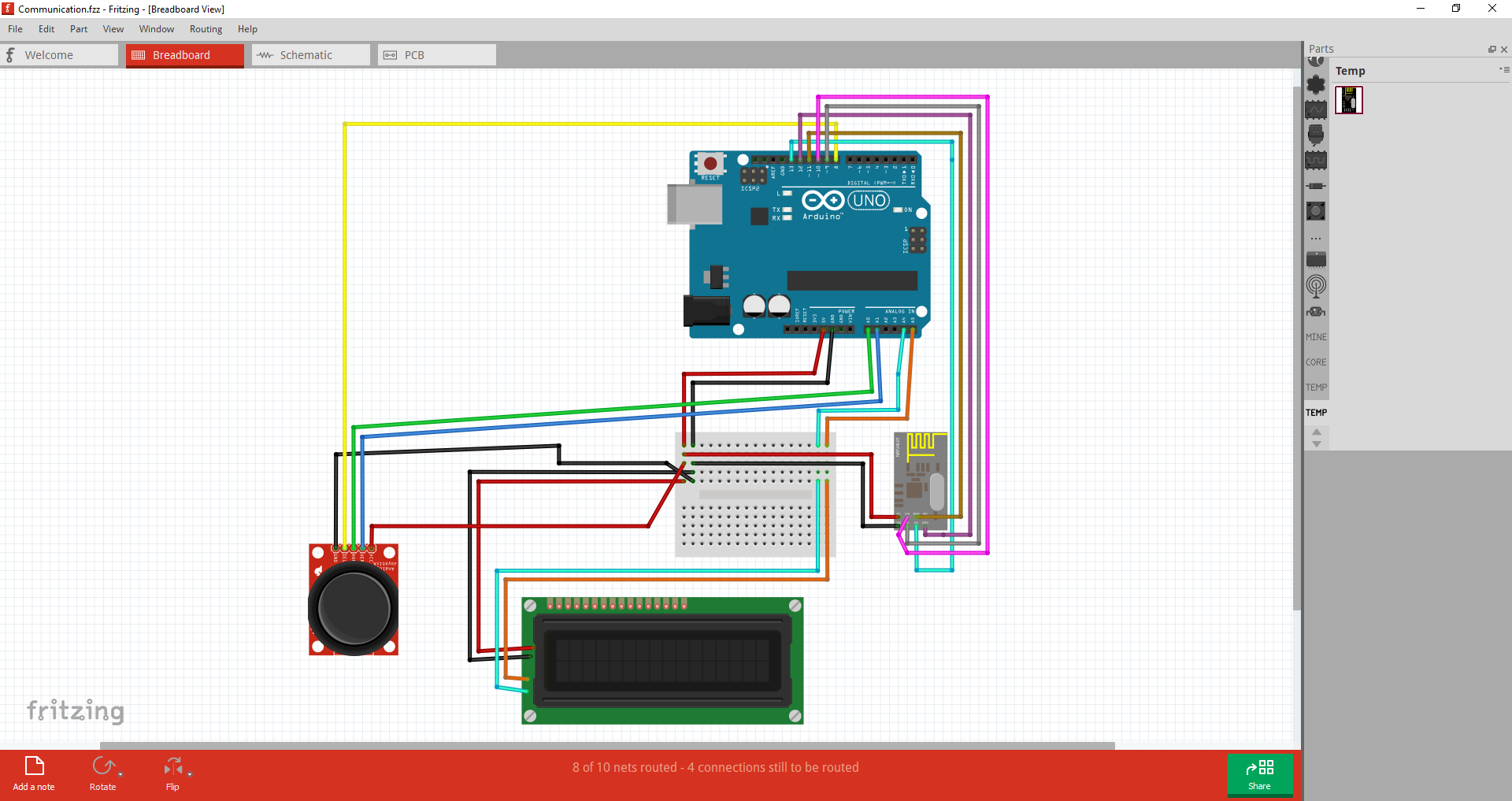
Connections
Connections
Comments
Only logged in users can leave comments