IoT Home growing system
App controlled automated hydroponic system!
Devices & Components

Arduino Uno Rev3
PC fan
Relay
Ec probe
NodeMCU v1.0
Lamp (LED)
Submersible pump
DS18B20 1-Wire Digital Temperature Sensor
Ph probe
Solenoid Valve
peristaltic pump
Software & Tools
Blynk

Arduino IDE
Project description
Code
stati.cpp
cpp
c++ code for state machine for arduino code
1#include "stati.h"
2#include <Arduino.h>
3
4#define valve 5      //electrovalve pin
5
6#include <NewPing.h>   //sonar library
7#define pin_trig 9            //sonar pins
8#define pin_echo 6
9#define massimo 1000        //max distance
10NewPing sonar(pin_trig, pin_echo,  massimo);   //initialize sonar
11
12
13#include <OneWire.h>                //libraries for DS18B20 temperature probe
14#include <DallasTemperature.h>
15#define ONE_WIRE_BUS 7    //temp probe pin
16OneWire oneWire(ONE_WIRE_BUS);
17DallasTemperature sensors(&oneWire);     //initialize T probe
18
19
20#include "ph_grav.h"          //https://www.atlas-scientific.com/files/atlas_gravity.zip  library
21Gravity_pH pH = A1;    //pH pin
22
23
24#define EC_PIN A2     // ec pin
25#define VREF 5.0      //EC analog reference voltage(Volt) of the ADC
26#define SCOUNT  30           //EC sum of sample point
27int analogBuffer;    // store the EC analog value in the array, read from ADC
28float averageVoltage = 0, tdsValue = 0;
29
30
31
32#define tankH 30   //tank height in cm
33#define tankL1 30    //l1 in cm
34#define tankL2 30   //l2 in cm
35#define totVol ((tankH-5)*tankL1*tankL2)/1000 //tank volume in L
36#define concentration 100  //nutrient SOL A and B  concentration
37#define correctionSpeed 70   //correction speed (%)
38#define perpumpA 10  //peristaltic pump pins
39#define perpumpB 12
40#define pHpumpC 11
41#define dosingUnit11 1.4996    // measured reach in ml/sec of 3 peristaltic pumps
42#define dosingUnit13 1.5185
43#define dosingUnit12 1.4826
44#define pHoffset 0.2
45#define ECoffset 0.05
46int solAvol = (totVol*1000) / concentration;    //mL     for solution adjustment
47int solBvol = (totVol*1000) / concentration;    //mL
48int h2oVol = (totVol*1000) - (solAvol + solBvol);   //mL
49
50
51
52void go(struct app_state *st, enum stati dest){    //function to change state, defined in stati.h
53  st->current = dest;
54  st->first = true;
55}
56
57void app_level(struct app_state *st){   //function to get tank level
58  if (st->first) {
59    Serial.println("get level");          //in every state write once the state function's name, controlled by bool first defined in struct in stati.h
60    st->first = false;
61  }
62
63  digitalWrite(valve, st->valveclosed);    //make sure valve is closed
64
65  int  lettura = sonar.ping_cm();
66  st->level = ((tankH - lettura) * tankL1 * tankL2) / 1000;   //read distance between surface and sonar and convert to L
67  //Serial.print(lettura);
68  //Serial.println(" cm");
69  Serial.print(st->level);
70  Serial.println(" L");
71
72 if(st->level < totVol ){   //check if level must be restored
73  go(st, st_fill);         //if yes go to fill state
74  } else
75  go(st, st_temp);
76}
77
78
79
80void app_fill(struct app_state *st){
81  if (st->first) {
82    Serial.println("fill the tank");
83    st->first = false;
84  }
85
86  while (st->level < totVol) {                        //open valve until level is restored
87    digitalWrite(valve, !st->valveclosed);
88    int lettura = sonar.ping_cm();
89    st->level = ((tankH - lettura) * tankL1 * tankL2) / 1000;
90   }
91    go(st, st_level);
92
93}
94
95
96
97void app_temp(struct app_state *st){          //get temperature function
98  if (st->first) {
99    Serial.println("get temperature");
100    st->first = false;
101  }
102  sensors.requestTemperatures();
103  st->  T = sensors.getTempCByIndex(0);
104
105  Serial.print("temperature: ");
106  Serial.println(st->T);
107  go(st, st_ph);
108}
109
110
111
112
113void app_ph(struct app_state *st){          //get ph function
114  if (st->first) {
115    Serial.println("get pH");
116    st->first = false;
117  }
118   st->ph=pH.read_ph();
119  Serial.print("pH: ");
120  Serial.println(pH.read_ph());
121  go(st, st_ec);
122}
123
124void app_ec(struct app_state *st){        //get EC function
125  if (st->first) {
126    Serial.println("get  ec");
127    st->first = false;
128  }
129
130  analogBuffer = analogRead(EC_PIN);    //read the analog value and store into the buffer
131  averageVoltage = analogBuffer * (float)VREF / 1024.0; // read the analog value more stable by the median filtering algorithm, and convert to voltage value
132  float compensationCoefficient = 1.0 + 0.02 * (st->T - 25.0); //temperature compensation formula: fFinalResult(25^C) = fFinalResult(current)/(1.0+0.02*(fTP-25.0));
133  float compensationVolatge = averageVoltage / compensationCoefficient; //temperature compensation
134  tdsValue = (133.42 * compensationVolatge * compensationVolatge * compensationVolatge - 255.86 * compensationVolatge * compensationVolatge + 857.39 * compensationVolatge) * 0.5; //convert voltage value to tds value
135  //Serial.print("voltage:");
136  //Serial.print(averageVoltage,2);
137  //Serial.print("V   ");
138  //Serial.print("TDS Value:");
139  //Serial.print(tdsValue,0);
140  //Serial.println("ppm");
141  st->ecValue = tdsValue / 640;    //convert tds to ec
142  Serial.print("EC: ");
143  Serial.println(st->ecValue);
144  go(st, st_adj);
145}
146
147
148
149void app_adj(struct app_state *st){              //adjust solution
150  if (st->first) {
151    Serial.println("adjust nutrient solution");
152    st->first = false;
153  }
154  float deltaPH = st->ph - (st->pHsetpoint - pHoffset);           //calculate pH delta
155  float deltaEC = (st->ECsetpoint - ECoffset) - st->ecValue;          //calculate EC delta
156  Serial.print("delta EC: ");
157  Serial.println(deltaEC, 2);
158  Serial.print("delta pH: ");
159  Serial.println(deltaPH);
160  //   PROPORTION:  VTot=10L ; concentration 50:1   --->   solAvol / ECsetpoint = x / deltaEC;
161if (deltaEC > ECoffset || deltaPH > pHoffset ) {                  //check if any correction is needed
162    if (deltaEC > ECoffset){
163    float  solA_qty = (deltaEC * solAvol) / (st->ECsetpoint);         //calculates SolA+B qty needed to adjust
164    float  solB_qty = (deltaEC * solBvol) / (st->ECsetpoint);
165    float dosingA = solA_qty * (1 / dosingUnit13);            //convert quantity in pumping time
166    float dosingB = solB_qty * (1 / dosingUnit12);
167    dosingA = (dosingA / 100) * correctionSpeed;        //adjust time for correction speed
168    dosingB = (dosingB / 100) * correctionSpeed;
169   /*
170    Serial.print("EC set point:");            //debugging
171    Serial.println( ECsetpoint - ECoffset);
172    Serial.print("qtà sol A: ");
173    Serial.println(solA_qty, 2);
174    Serial.print("qtà sol B: ");
175    Serial.println(solB_qty, 2);
176    Serial.print("tempo dosaggio sol A: ");
177    Serial.println(dosingA, 0);
178    Serial.print("tempo dosaggio sol B: ");
179    Serial.println(dosingB, 0);
180    */
181    digitalWrite(perpumpA, HIGH);               //activate pumps for the time needed
182    Serial.println("SolA dosing");
183    delay(dosingA * 1000);
184    delay(1000);
185    digitalWrite(perpumpA, LOW);
186    Serial.println("SolA stop");
187    delay(300);
188    digitalWrite(perpumpB, HIGH);
189    Serial.println("SolB dosing");
190    delay(dosingB * 1000);
191    delay(1000);
192    digitalWrite(perpumpB, LOW);
193    Serial.println("SolB stop");
194    delay(300);
195  }  if ( deltaPH > pHoffset ) {
196    digitalWrite(pHpumpC, HIGH);
197    Serial.println("Acid dosing");          //activate acid pump for 1 sec
198    delay(1000);                        //change this value empirically based on type of acid, total volume, correction time
199    digitalWrite(pHpumpC, LOW);
200    Serial.println("Acid stop");
201  }
202  go(st, st_ph);
203 } else go(st, st_level);
204}
stati.h
cpp
code to assemble with Arduino code and stati.cpp
1#ifndef _STATI_H_
2#define _STATI_H_
3
4#include <Arduino.h>
5
6enum stati {st_level, st_fill, st_temp, st_ph, st_ec, st_adj};     //name different states
7
8struct app_state {                          //data packet to pass and modify in the whole code
9  enum stati current;
10  bool first = true;
11   float level;
12   float T;
13   float ph;
14   float ecValue;
15   float ECsetpoint=1.5;     //  desired EC and pH
16   float pHsetpoint= 5.8;
17   bool valveclosed=0;
18
19};
20
21void go(struct app_state *st, enum stati dest);         //go to another state function
22
23void app_level(struct app_state *st);        //functions defined, code is in stati.cpp
24void app_fill(struct app_state *st);
25void app_temp(struct app_state *st);
26void app_ph(struct app_state *st);
27void app_ec(struct app_state *st);
28void app_adj(struct app_state *st);
29
30
31#endif
Arduino code
cpp
Assemble with stati.cpp and stati.h in tabs
1#include "stati.h"
2
3#include "SerialTransfer.h"    //https://www.arduinolibraries.info/libraries/serial-transfer
4#include <SoftwareSerial.h>
5SoftwareSerial mySerial(2, 4);  //initialize (rx,tx) the second serial port to communicate with esp8266
6SerialTransfer myTransfer;          //initialize SerialTransfer protocol
7
8const char* setpoint = "p";     //character sent as a signal to synchronize communication with esp8266
9float newPHset;          //variables to store new setpoints coming from Blynk app
10float newECset;
11
12#define perpumpA 10  //peristaltic pump pins
13#define perpumpB 12
14#define pHpumpC 11
15#define valve 5      //electrovalve
16
17app_state stato;     //struct defined in stati.h
18
19void setup() {
20 Serial.begin(115200);            //initialization of the serial ports
21  mySerial.begin(57600);
22  myTransfer.begin(mySerial);   //SerialTransfer protocol on the second serial port
23
24  pinMode(perpumpA, OUTPUT);
25  pinMode(perpumpB, OUTPUT);
26  pinMode(pHpumpC, OUTPUT);
27  pinMode(valve, OUTPUT);
28  digitalWrite(valve, stato.valveclosed); //verify if it's closed on HIGH or LOW
29  delay(1000);
30}
31
32void loop() {
33
34   static unsigned long timepoint = millis();
35  if (millis() - timepoint > 1000U) {                       //time interval: 1s= 1000U
36    timepoint = millis();
37  switch (stato.current) {              //state's functions (app_xyz) defined in stati.cpp
38    case st_level:
39      app_level(&stato);
40      break;
41    case st_fill:
42      app_fill(&stato);
43      break;
44    case st_temp:
45      app_temp(&stato);
46      break;
47    case st_ph:
48      app_ph(&stato);
49      break;
50    case st_ec:
51      app_ec(&stato);
52      break;
53    case st_adj:
54      app_adj(&stato);
55      break;
56   }
57  }
58  blynkData();        //function to send values to blynkapp
59  requestNewsetp () ;    //function to request for new setpoints
60}
61
62
63
64
65////FUNCTIONS NEEDED FOR COMMUNICATION  WITH ESP8266 and SOLUTION ADJUSTMENT//////////
66
67void blynkData() {                         //send data to blynk app, see SerialTransfer examples on Github
68  while (!mySerial.available()) {}     //wait for signal to start communication
69  char a = mySerial.read();       //read incoming singal
70  if (a = "a") {               //verify signal
71    uint16_t sendSize = 0;                                             //data conversion
72    sendSize = myTransfer.txObj(stato.ecValue, sendSize);            //data from struct stato
73    sendSize = myTransfer.txObj(stato.T, sendSize);
74    sendSize = myTransfer.txObj(stato.ph, sendSize);
75    sendSize = myTransfer.txObj(stato.level, sendSize);
76
77    myTransfer.sendData(sendSize);             //send data
78  }
79}
80
81
82
83void requestNewsetp () {
84  mySerial.write(setpoint);            //send signal to start communication
85  if (myTransfer.available()) {           //when the answer arrives
86    uint16_t recSize = 0;
87    recSize = myTransfer.rxObj(newECset, recSize);        //convert data received
88    recSize = myTransfer.rxObj(newPHset, recSize);
89    if(newECset!=stato.ECsetpoint &&  newECset>0) { stato.ECsetpoint=newECset/10;}             //check if data received are different from current setpoints to change them
90    if(newPHset!=stato.pHsetpoint  &&  newPHset>0) { stato.pHsetpoint=newPHset/10;}
91    Serial.print("pH Setpoint: ");       //debugging
92    Serial.println(stato.pHsetpoint);
93     Serial.print("EC Setpoint: ");
94    Serial.println(stato.ECsetpoint);
95  }
96}
NodeMcu code
cpp
Code to run on ESP8266 Nodemcu
1// Template ID, Device Name and Auth Token are provided by the Blynk.Cloud
2// See the Device Info tab, or Template settings
3#define BLYNK_TEMPLATE_ID "***********"
4#define BLYNK_TEMPLATE_NAME "***********"
5#define BLYNK_AUTH_TOKEN "*********************************"
6
7
8// Comment this out to disable prints and save space
9#define BLYNK_PRINT Serial
10
11#include <ESP8266WiFi.h>
12#include <BlynkSimpleEsp8266.h>            //Blynk library
13
14#include <SoftwareSerial.h>            //libraries needed for second serial port for arduino communication
15#include "SerialTransfer.h"            // to easily send data packets (examples on Github)
16
17#define pump D5                    //pin to trigger relays
18#define fan D6
19#define led D7
20
21SerialTransfer myTransfer;             //initialization of SerialTransfer protocol
22SoftwareSerial mySerial(D1, D2);         //second serial port on pins (rx, tx)
23
24const char* a = "a";         //signal to synchronize communication with arduino
25char auth[] = BLYNK_AUTH_TOKEN;
26
27// Your WiFi credentials.
28// Set password to "" for open networks.
29char ssid[] = "**********";
30char pass[] = "**********";
31
32float EC;            //variables to send to blynk app
33float ph;
34float T;
35float level;
36float ECsetpoint;          //variables to be read from blynk app
37float newECset;
38float phsetpoint;
39float newPHset;
40
41
42BlynkTimer timer;    //blynk timer function
43
44BLYNK_WRITE(V4) {                        //fan manual control
45  if (param.asInt() == 0) {          //read button: virtual pin status
46    digitalWrite(fan, LOW);           //write status on real pin
47  }else digitalWrite(fan, HIGH);
48}
49
50BLYNK_WRITE(V5) {                        //pump manual control
51  if (param.asInt() == 0) {
52    digitalWrite(pump, LOW);
53  }else digitalWrite(pump, HIGH);
54}
55
56BLYNK_WRITE(V6) {                        //led manual control
57  if (param.asInt() == 0) {
58    digitalWrite(led, LOW);
59  }else digitalWrite(led  , HIGH);
60}
61
62
63
64
65BLYNK_WRITE(V7){
66
67  int virtual_pin_value = param.asFloat();                    //read EC setpoint slider on blynk app
68  newECset = virtual_pin_value;
69  String SerialECset= String(ECsetpoint,1);
70  if(newECset!=ECsetpoint){
71    //mySerial.write(ecset);
72   // mySerial.print( newECset );
73    Serial.print(newECset);
74    Serial.println("EC setpoint sent");
75    ECsetpoint=newECset;
76  }
77}
78
79BLYNK_WRITE(V8){                                 //read pH setpoint slider on blynk app
80
81  int virtual_pin_value = param.asFloat();
82  newPHset=virtual_pin_value;
83  String SerialPHset = String(phsetpoint,1);
84  if(newPHset!=phsetpoint){
85   // mySerial.write(ecset);
86   // mySerial.print(newPHset);
87    Serial.print(newPHset);
88    Serial.println("pH setpoint sent");
89    phsetpoint=newPHset;
90  }
91}
92
93
94void setup()
95{
96  // Debug console
97  Serial.begin(115200);
98  mySerial.begin(57600);
99  myTransfer.begin(mySerial);           //SerialTransfer protocol on myserial
100
101  pinMode(pump,OUTPUT);
102  pinMode(fan,OUTPUT);
103  pinMode(led,OUTPUT);
104
105  timer.setInterval(1000L, sensorDataSend);            //function to send data to blynkapp
106  timer.setInterval(1020L, setpointData);               //function to rea data from blynkapp
107  Blynk.begin(auth, ssid, pass);
108
109  // You can also specify server:
110  //Blynk.begin(auth, ssid, pass, "blynk.cloud", 80);
111  //Blynk.begin(auth, ssid, pass, IPAddress(192,168,1,100), 8080);
112}
113
114void loop() {
115
116
117  Blynk.run();
118
119  timer.run();
120}
121
122void sensorDataSend()
123{
124  mySerial.write(a);                     //send signal for timing in communication
125  Serial.println("data requested");
126  if (myTransfer.available()) {          //wait for answer
127
128    // use this variable to keep track of how many
129    // bytes we've processed from the receive buffer
130    uint16_t recSize = 0;
131
132    recSize = myTransfer.rxObj(EC, recSize);
133    recSize = myTransfer.rxObj(T, recSize);
134    recSize = myTransfer.rxObj(ph, recSize);
135    recSize = myTransfer.rxObj(level, recSize);           //receive data packets
136
137//make sure to set virtual pins correctly on blynk app
138    Blynk.virtualWrite(V1, EC);      //wirte data received on blynk virtual pins
139    Blynk.virtualWrite(V3, ph);
140    Blynk.virtualWrite(V2, T);
141    Blynk.virtualWrite(V0, level);
142    Serial.println("data published");
143  }
144}
145
146void setpointData(){
147   while (!mySerial.available()) {               //wait for signal to start sending data
148  char s = mySerial.read();        //read signal
149  if (s = 's') {
150    uint16_t sendSize = 0;
151    sendSize = myTransfer.txObj(newECset, sendSize);
152    sendSize = myTransfer.txObj(newPHset, sendSize);
153
154    myTransfer.sendData(sendSize);         //send data
155  }
156
157 }
158}
Downloadable files
Nodemcu variables
Nodemcu variables to be inserted
espppp.png

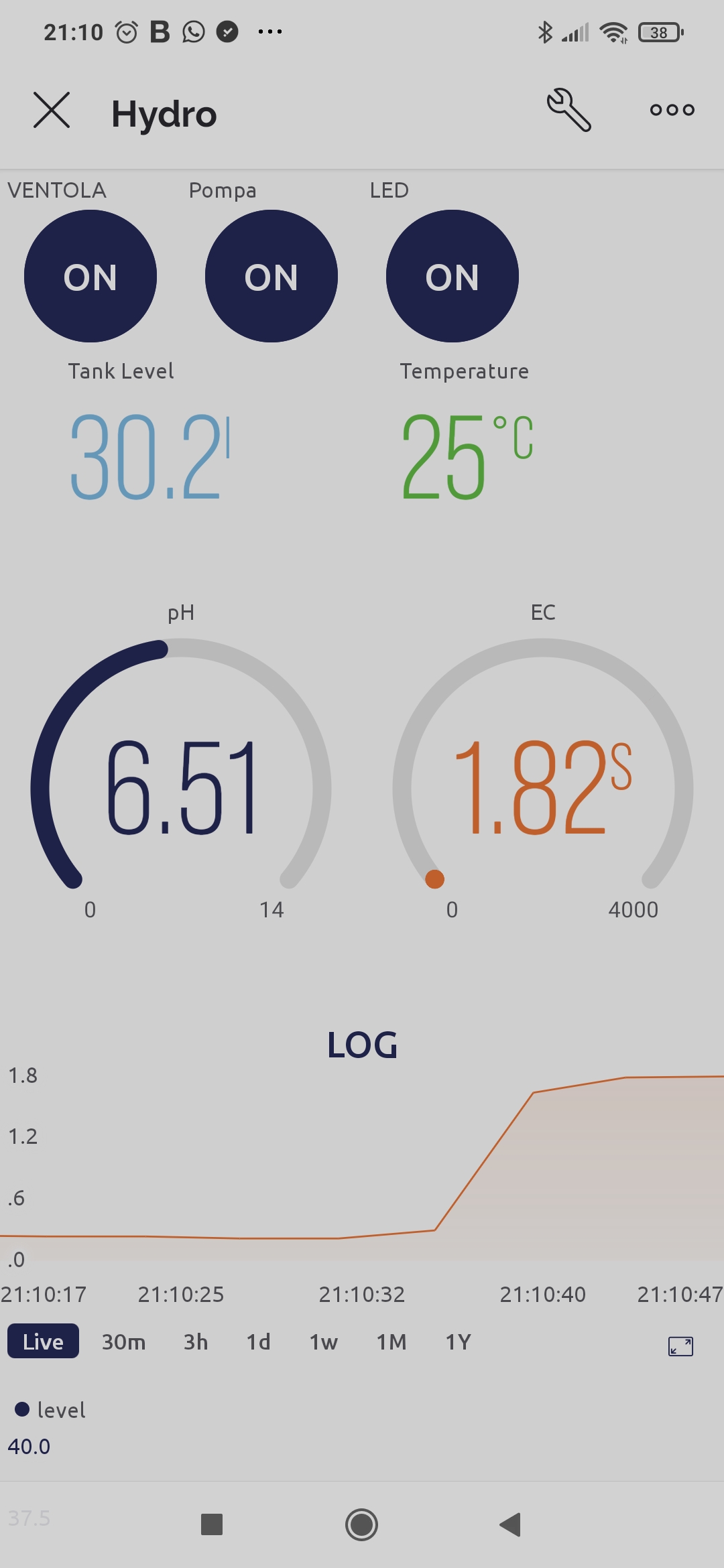
APP interface
APP interface
1678283068803.jpg
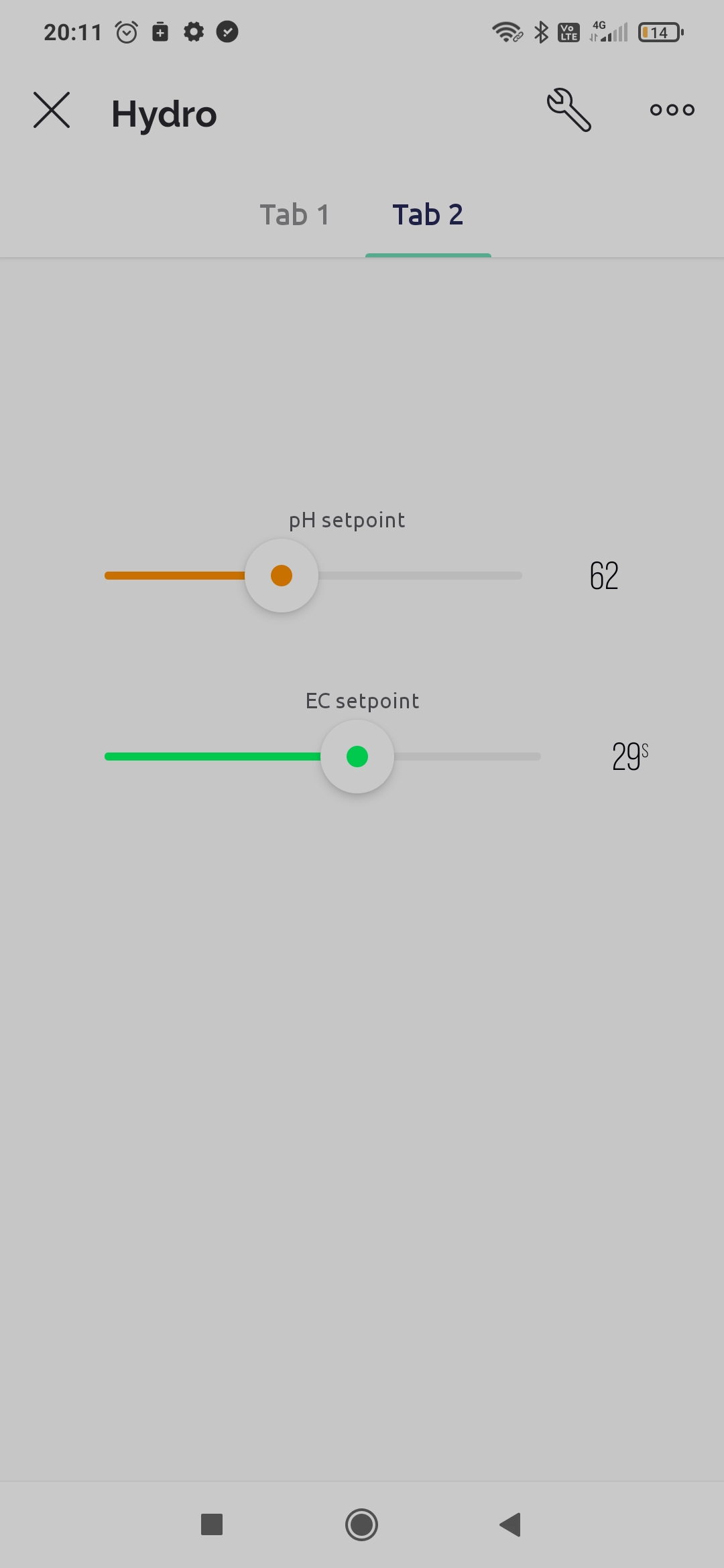
APP interface 2
APP interface 2
1678283068792.jpg

Electric scheme
Electric scheme
electric scheme.jpg
Arduino Variables
Arduino variables to be updated
unooo.png

Comments
Only logged in users can leave comments