FM transmitter based on the QN8066 remotely controlled by the Arduino Nano 33 IoT
This project explores the Wi-Fi features of the Nano 33 IoT to remotely control an FM transmitter based on the QN8066 using a Python application.
Devices & Components
1
Arduino Nano 33 IoT
2
Resistor, 200 ohm
2
10k Resistor
Hardware & Tools
1
Soldering Station
Software & Tools

Arduino IDE
1
Python 3
Project description
Code
Nano 33 IoT QN8066 Controller
cpp
1/*
2  Nano 33 IoT board
3
4  This application allows remote control of a transmitter based on the QN8066 through a
5  Python program using a Socket connection. The Arduino sketch for the NANO 33 IoT implements
6  a server that connects to a Wi-Fi network and listens on port 8066. The Python application,
7  in turn, connects to the server or service provided by the NANO 33 IoT and sends configuration
8  commands to the QN8066 transmitter.
9
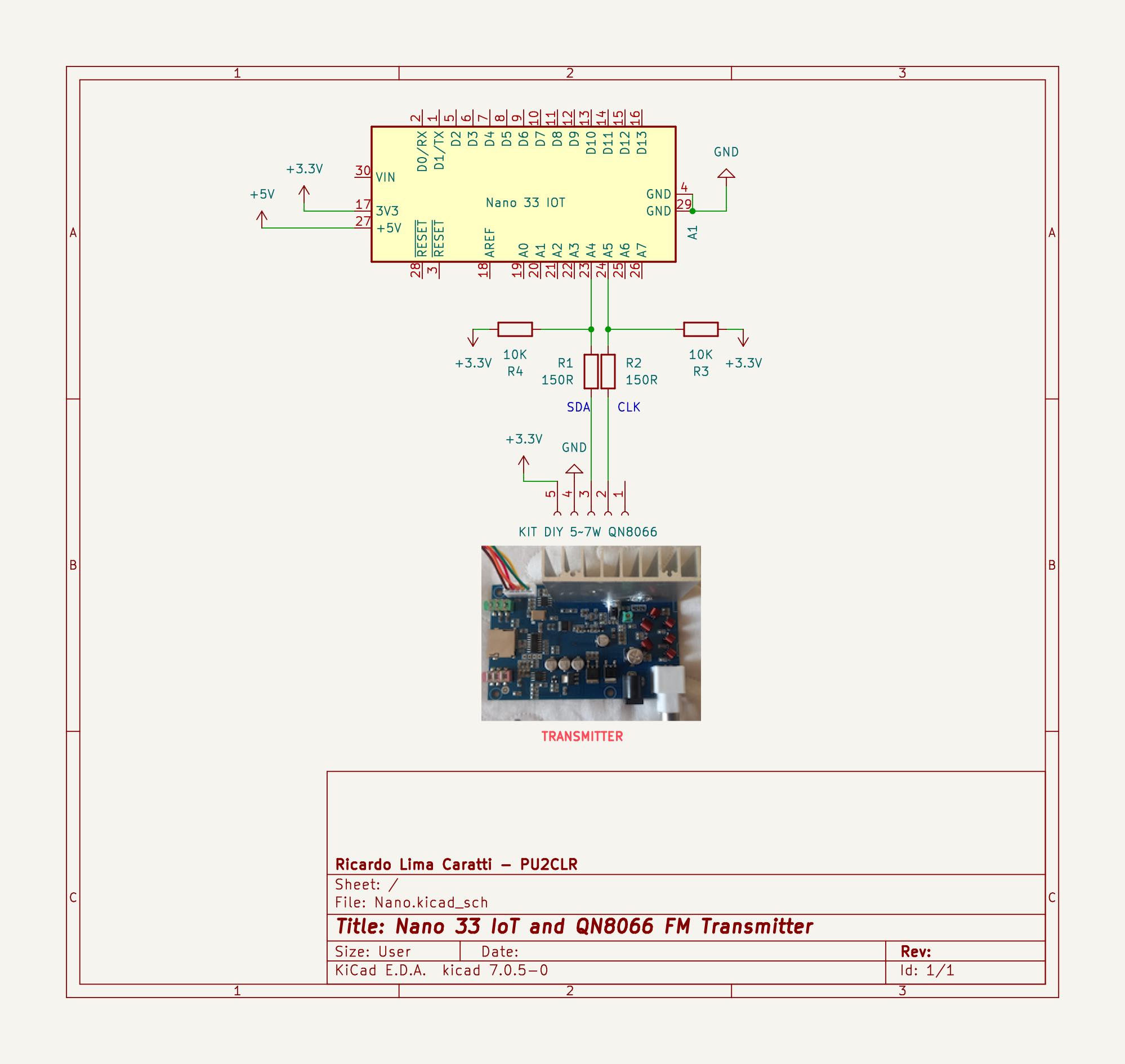
10  Nano 33 IoT Wire up
11
12  | Device name               | QN8066 Pin           |  Nano 33 IoT      |
13  | --------------------------| -------------------- | ----------------- |
14  | QN8066                    |                      |                   |
15  |                           | VCC                  |      3.3V         |
16  |                           | GND                  |      GND          |
17  |                           | SDIO / SDA (pin 2)   |      A4           |
18  |                           | SCLK (pin 1)         |      A5           |
19  | --------------------------| ---------------------| ----------------- |
20
21
22  1. A suggestion if you intend to use PWM to control the RF output power of an amplifier.
23
24  Prototype documentation: https://pu2clr.github.io/QN8066/
25  PU2CLR QN8066 API documentation: https://pu2clr.github.io/QN8066/extras/apidoc/html/
26
27  By PU2CLR, Ricardo,  Oct  2024.
28*/
29#include <QN8066.h>
30#include <WiFiNINA.h>
31
32#define SOCKET_PORT 8066
33
34#define RDS_PS_REFRESH_TIME 7000
35#define RDS_RT_REFRESH_TIME 17000
36#define RDS_DT_REFRESH_TIME 59000 // Date and Time Service
37
38long rdsTimePS = millis();
39long rdsTimeRT = millis();
40long rdsDateTime = millis();
41
42uint16_t currentFrequency = 1069; // 106.9 MHz
43uint16_t previousFrequency = 1069; // 106.9 MHz
44
45uint8_t currentPower = 0;
46
47//
48char ps[9] = "QN8066 \r";
49char rt[33] = "NANO33 IOT FM TX REMOTE CONTROL\r";
50
51// WI-FI Setup
52char ssid[] = "PU2CLR";         // Wi-Fi network name
53char pass[] = "pu2clr123456";   // Wi-Fi password
54
55int status = WL_IDLE_STATUS;
56WiFiServer server(SOCKET_PORT);        // Create a server that listens on port 8066
57
58String receivedData = "";
59String field = "";
60String value = "";
61
62QN8066 tx;
63
64void setup() {
65  // Start serial communication
66  Serial.begin(9600);
67  delay(1000);
68
69  Serial.println("Start connecting...");
70  Serial.flush();
71
72  // Check for Wi-Fi module
73  if (WiFi.status() == WL_NO_MODULE) {
74    Serial.println("WiFi module not detected!");
75    while (true);
76  }
77
78  // Connect to Wi-Fi network
79  while (status != WL_CONNECTED) {
80    Serial.print("Attempting to connect to SSID: ");
81    Serial.println(ssid);
82    status = WiFi.begin(ssid, pass);
83    delay(10000);
84  }
85
86  // Start the server
87  server.begin();
88  Serial.println("Server started on port 8066");
89  printWiFiStatus();
90
91  if (!tx.detectDevice()) {
92    Serial.println("\nQN8066 not detected");
93    while (true);
94  }
95  Serial.println("\nQN8066 Detected");
96  tx.setup();
97  tx.setTX(currentFrequency);   // Sets frequency to 106.9 MHz
98  delay(500);
99  startRDS();
100
101}
102
103// Print the Wi-Fi status (IP address, etc.)
104void printWiFiStatus() {
105  Serial.print("Connected to ");
106  Serial.println(WiFi.SSID());
107  Serial.print("IP Address: ");
108  Serial.println(WiFi.localIP());
109}
110
111
112void startRDS() {
113    tx.rdsTxEnable(true);
114    delay(200);
115    tx.rdsInitTx(0x8,0x1,0x9B, 0, 25, 6);  // See: https://pu2clr.github.io/QN8066/extras/apidoc/html/index.html)
116}
117
118
119void sendRDS() {
120
121  // PS refreshing control
122  if ((millis() - rdsTimePS) > RDS_PS_REFRESH_TIME) {
123    tx.rdsSendPS(ps);
124    rdsTimePS = millis();
125  }
126
127  // RT refreshing control
128  if ((millis() - rdsTimeRT) > RDS_RT_REFRESH_TIME) {
129    tx.rdsSendRT(rt);     // See rdsSendRTMessage in https://pu2clr.github.io/QN8066/extras/apidoc/html/index.html
130    rdsTimeRT = millis();
131  }
132
133  // Date Time Service refreshing control
134  /*
135  if ((millis() - rdsDateTime) > RDS_DT_REFRESH_TIME) {
136    printLocalTime();
137    struct tm timeinfo;
138    getLocalTime(&timeinfo);
139    // Sends RDS local Date and Time
140    tx.rdsSendDateTime(timeinfo.tm_year + 1900, timeinfo.tm_mon + 1, timeinfo.tm_mday, timeinfo.tm_hour, timeinfo.tm_min);
141    rdsDateTime = millis();
142  }
143  */
144}
145
146// Sets the Nano 33 IoT Real Time Clock
147void setRTC(String datetime) {
148  // TODO
149}
150
151// Parse and execute the QN8066 command
152String processCommand(String command) {
153  int nLen;
154  int separatorIndex = command.indexOf('=');
155  String field = command.substring(0, separatorIndex);  // Field name
156  String value = command.substring(separatorIndex + 1); // Field value
157
158  // Process the QN8066 command
159  if (field == "frequency") {
160    uint16_t currentFrequency = (uint16_t) ( value.toFloat() * 10.0);
161    tx.setTX(currentFrequency);
162    return "Frequency set to: " + String(currentFrequency);
163  } else if (field == "rds_pty") {
164    tx.rdsSetPTY(value.toInt());
165    tx.rdsSendPS(ps);
166    return "RDS PTY set to: " + String(value);
167  } else if (field == "rds_ps") {
168    nLen = value.length();
169    strncpy(ps, value.c_str(), nLen);
170    ps[nLen] = '\r';
171    ps[nLen+1] = '\0';
172    tx.rdsSendPS(ps);
173    return "RDS PS set to: " + value;
174  } else if (field == "rds_rt") {
175    nLen = value.length();
176    strncpy(rt, value.c_str(), nLen);
177    ps[nLen] = '\r';
178    ps[nLen+1] = '\0';
179    tx.rdsSendRT(rt);
180    return "RDS RT set to: " + value;
181  } else if (field == "stereo_mono") {
182    tx.setTxMono(value.toInt());  //
183    return "Stereo/Mono Set to: " + String(value);
184  } else if (field == "pre_emphasis") {
185    tx.setPreEmphasis(value.toInt());
186    return  "Pre-Emphasis set to: " + String(value);
187  } else if (field == "impedance") {
188    tx.setTxInputImpedance(value.toInt());
189    return  "Impedance set to: " + String(value);
190  } else if (field == "buffer_gain") {
191    tx.setTxInputBufferGain(value.toInt());
192    return  "Impedance set to: " + String(value);
193  } else if (field == "freq_dev") {
194    float fd = value.toFloat();
195    tx.rdsSetFrequencyDerivation((uint8_t) (fd / 0.69) );
196    return  "Frequency Deviation set to: " + String(fd);
197  } else if (field == "soft_clip") {
198    tx.setTxInputBufferGain(value.toInt());
199    return  "Soft Clip set to: " + String(value);
200  } else if (field == "datetime") {
201    // setRTC(value);
202    return  "Local Date and Time set to: " + String(value);
203  }
204  return "OK";
205}
206
207
208
209
210void loop() {
211  // Check for an incoming client
212  WiFiClient client = server.available();
213
214  if (client) {
215    Serial.println("Client connected");
216    // Read incoming data from client
217    while (client.connected()) {
218      if (client.available()) {
219        String command = client.readString();
220        String result = processCommand(command);
221        client.println(result);
222      }
223      sendRDS();
224    }
225    client.stop();
226    Serial.println("Client disconnected");
227  }
228  sendRDS();
229}
QN8066 Remote COntrol
python
1# This program uses a socket connection to communicate with the NANO 33 IoT (running the
2# QN8066_CONTROLLER.ino sketch) in order to control the QN8066-based transmitter.
3# The socket connection uses the IP provided by your WiFi network's DHCP and obtained
4# by the NANO 33 IoT. Check the IP in the Arduino IDE console (Serial Monitor).
5# The port numer used here is 8066 (QN8066_CONTROLLER.ino). You can change it if you need it.
6#
7# RDS message updates such as PTY, PS, RT, and Time are not executed immediately.
8# This may depend on the receiver's update timing as well as the distribution of
9# each message's timing from the connected controller.
10#
11# defined for the connection is 8066.
12# Author: Ricardo Lima Caratti - Sep. 2024
13
14import tkinter as tk
15from tkinter import ttk
16import socket
17from datetime import datetime
18
19# Function to send data via socket to the NANO33.
20# Change the IP below to the address indicated in the Arduino sketch linked to this application.
21def send_to_NANO33(field, value):
22    try:
23        # The IP information can be get usind the Arduino IDE (Serial Monitor)
24        NANO33_ip = '10.0.0.94'  # NANO33 IP - Check it in the Arduino IDE Serial Monitor (console)
25        NANO33_port = 8066  # Defined in the ESP 32 Arduino Sketch
26        message = f"{field}={value}\n"
27
28        # Connects to the NANO33 and sends the message.
29        with socket.socket(socket.AF_INET, socket.SOCK_STREAM) as s:
30            s.connect((NANO33_ip, NANO33_port))
31            s.sendall(message.encode())
32            response = s.recv(1024)
33            print(f'Received from NANO33 ({field}):', response.decode())
34    except socket.timeout:
35        print(f"Connection to NANO33 timed out. The device may be offline.")
36    except ConnectionRefusedError:
37        print(f"Connection to NANO33 was refused. Is the device online?")
38    except socket.error as e:
39        print(f"Socket error occurred: {e}")
40    except Exception as e:
41        print(f"An unexpected error occurred: {e}")
42
43# Specific functions for each field.
44
45def send_frequency():
46    frequency = frequency_var.get()
47    send_to_NANO33("frequency", frequency)
48
49def send_rds_pty():
50    selected_description = rds_pty_combobox.get()
51    selected_value = pty_map[selected_description]
52    print(f"Program Type (PTY): {selected_value} ({selected_description})")
53    send_to_NANO33("rds_pty", selected_value)
54
55def send_rds_ps():
56    rds_ps = rds_ps_var.get()
57    send_to_NANO33("rds_ps", rds_ps)
58
59def send_rds_rt():
60    rds_rt = rds_rt_var.get()
61    send_to_NANO33("rds_rt", rds_rt)
62
63def send_stereo_mono():
64    selected_description = stereo_mono_combobox.get()
65    selected_value = stereo_mono_map[selected_description]
66    print(f"Selected Stereo/Mono: {selected_value} ({selected_description})")
67    send_to_NANO33("stereo_mono", selected_value)
68
69def send_pre_emphasis():
70    selected_description = pre_emphasis_combobox.get()
71    selected_value = pre_emphasis_map[selected_description]  # Obtém o valor numérico correspondente
72    print(f"Pre-Emphasis: {selected_value} ({selected_description})")
73    send_to_NANO33("pre_emphasis", selected_value)
74
75def send_impedance():
76    selected_description = impedance_combobox.get()  # Obtém a descrição selecionada
77    selected_value = impedance_map[selected_description]  # Obtém o valor numérico correspondente
78    print(f"Selected Impedance: {selected_value} ({selected_description})")
79    send_to_NANO33("impedance", selected_value)
80
81def send_buffer_gain():
82    selected_description = buffer_gain_combobox.get()
83    selected_value = buffer_gain_map[selected_description]  # Obtém o valor numérico correspondente
84    print(f"Selected Buffer Gain: {selected_value} ({selected_description})")
85    send_to_NANO33("buffer_gain", selected_value)
86
87def send_freq_dev():
88    freq_dev = freq_dev_var.get()
89    send_to_NANO33("freq_dev", freq_dev)
90
91def send_soft_clip():
92    selected_description = soft_clip_combobox.get()
93    selected_value = soft_clip_map[selected_description]
94    print(f"Selected Soft CLip: {selected_value} ({selected_description})")
95    send_to_NANO33("soft_clip", selected_value)
96
97def send_datetime():
98    datetime_str = datetime_var.get()
99    send_to_NANO33("datetime", datetime_str)
100
101
102# Creating the main window with Tkinter.
103root = tk.Tk()
104root.title("NANO33 QN8066 FM Transmitter Control")
105root.configure(bg='#006400')  # Green
106
107# Fields
108frequency_var = tk.StringVar(value = "106.9")
109rds_pty_var = tk.StringVar(value = "No program")
110rds_ps_var = tk.StringVar(value="PU2CLR")
111rds_rt_var = tk.StringVar(value="QN8066 Arduino Library")
112stereo_mono_var = tk.StringVar(value = "Stereo")
113pre_emphasis_var = tk.StringVar(value = "70us")
114buffer_gain_var = tk.StringVar(value = "6dB")
115impedance_var = tk.StringVar(value = "20K")
116freq_dev_var = tk.StringVar(value = "74.5")
117soft_clip_var = tk.StringVar(value = "Disable")
118datetime_var = tk.StringVar(value=datetime.now().strftime("%Y/%m/%d %H:%M") )
119
120label_fg = '#FFFF00'
121entry_bg = '#004d00'
122entry_fg = '#FFFF00'
123
124impedance_map = {
125    '10K': 0,
126    '20K': 1,
127    '40K': 2,
128    '80K': 3
129}
130
131pty_map = {'No program':0,
132           'News':1,
133           'Information':3,
134           'Sport':4,
135           'Education':5,
136           'Culture':7,
137           'Science':8,
138           'Pop Music':10,
139           'Weather':16,
140           'Religion':20,
141           'Documentary':29,
142           'Alarm':30}
143
144stereo_mono_map = {'Stereo':0,'Mono':1}
145pre_emphasis_map = {'50us':0,'75us':1}
146buffer_gain_map = {'3d{B':0,'6dB':1,'9dB':2,'12dB':3,'15dB':4,'18dB':5}
147soft_clip_map = {'Disable':0,'Enable':1}
148
149impedance_descriptions = list(impedance_map.keys())
150pty_descriptions = list(pty_map.keys())
151stereo_mono_descriptions = list(stereo_mono_map.keys())
152pre_emphasis_descriptions = list(pre_emphasis_map.keys())
153buffer_gain_descriptions = list(buffer_gain_map.keys())
154soft_clip_descriptions = list(soft_clip_map.keys())
155
156# Forms Layout
157tk.Label(root, text="Transmission Frequency (MHz):", bg='#006400', fg=label_fg).grid(row=0, column=0, sticky=tk.E, padx=10, pady=5)
158tk.Entry(root, textvariable=frequency_var).grid(row=0, column=1, padx=10, pady=5)
159tk.Button(root, text="Set", command=send_frequency).grid(row=0, column=2, padx=10, pady=5)
160
161tk.Label(root, text="RDS PTY:",bg='#006400', fg=label_fg).grid(row=1, column=0, sticky=tk.E, padx=10, pady=5)
162
163# Combobox
164rds_pty_combobox = ttk.Combobox(root, textvariable=rds_pty_var, values=pty_descriptions)
165rds_pty_combobox.grid(row=1, column=1, padx=10, pady=5)
166tk.Button(root, text="Set", command=send_rds_pty).grid(row=1, column=2, padx=10, pady=5)
167
168tk.Label(root, text="RDS PS:", bg='#006400', fg=label_fg).grid(row=2, column=0, sticky=tk.E, padx=10, pady=5)
169tk.Entry(root, textvariable=rds_ps_var).grid(row=2, column=1, padx=10, pady=5)
170tk.Button(root, text="Set", command=send_rds_ps).grid(row=2, column=2, padx=10, pady=5)
171
172tk.Label(root, text="RDS RT:", bg='#006400', fg=label_fg).grid(row=3, column=0, sticky=tk.E, padx=10, pady=5)
173tk.Entry(root, textvariable=rds_rt_var).grid(row=3, column=1, padx=10, pady=5)
174tk.Button(root, text="Set", command=send_rds_rt).grid(row=3, column=2, padx=10, pady=5)
175
176tk.Label(root, text="Stereo/Mono:", bg='#006400', fg=label_fg).grid(row=4, column=0, sticky=tk.E, padx=10, pady=5)
177stereo_mono_combobox = ttk.Combobox(root, textvariable=stereo_mono_var, values= stereo_mono_descriptions)
178stereo_mono_combobox.grid(row=4, column=1, padx=10, pady=5)
179tk.Button(root, text="Set", command=send_stereo_mono).grid(row=4, column=2, padx=10, pady=5)
180
181tk.Label(root, text="Pre-Emphasis:", bg='#006400', fg=label_fg).grid(row=5, column=0, sticky=tk.E, padx=10, pady=5)
182pre_emphasis_combobox = ttk.Combobox(root, textvariable=pre_emphasis_var, values=pre_emphasis_descriptions)
183pre_emphasis_combobox.grid(row=5, column=1, padx=10, pady=5)
184tk.Button(root, text="Set", command=send_pre_emphasis).grid(row=5, column=2, padx=10, pady=5)
185
186tk.Label(root, text="Impedance:", bg='#006400', fg=label_fg).grid(row=6, column=0, sticky=tk.E, padx=10, pady=5)
187impedance_combobox = ttk.Combobox(root, textvariable=impedance_var, values = impedance_descriptions)
188
189impedance_combobox.grid(row=6, column=1, padx=10, pady=5)
190tk.Button(root, text="Set", command=send_impedance).grid(row=6, column=2, padx=10, pady=5)
191
192
193tk.Label(root, text="Buffer Gain:", bg='#006400', fg=label_fg).grid(row=7, column=0, sticky=tk.E, padx=10, pady=5)
194buffer_gain_combobox = ttk.Combobox(root, textvariable=buffer_gain_var, values = buffer_gain_descriptions)
195
196buffer_gain_combobox.grid(row=7, column=1, padx=10, pady=5)
197tk.Button(root, text="Set", command=send_buffer_gain).grid(row=7, column=2, padx=10, pady=5)
198
199tk.Label(root, text="Frequency Deviation (kHz):", bg='#006400', fg=label_fg).grid(row=8, column=0, sticky=tk.E, padx=10, pady=5)
200freq_dev_combobox = ttk.Combobox(root, textvariable=freq_dev_var)
201freq_dev_combobox['values'] = ['41.5', '60.0', '74.5','92.8','96.6', '110.4']
202freq_dev_combobox.grid(row=8, column=1, padx=10, pady=5)
203tk.Button(root, text="Set", command=send_freq_dev).grid(row=8, column=2, padx=10, pady=5)
204
205tk.Label(root, text="Soft Clip:", bg='#006400', fg=label_fg).grid(row=9, column=0, sticky=tk.E, padx=10, pady=5)
206soft_clip_combobox = ttk.Combobox(root, textvariable=soft_clip_var,values=soft_clip_descriptions)
207soft_clip_combobox.grid(row=9, column=1, padx=10, pady=5)
208tk.Button(root, text="Set", command=send_soft_clip).grid(row=9, column=2, padx=10, pady=5)
209
210tk.Label(root, text="Set Date and Time (YYYY/MM/DD HH:MM):", bg='#006400', fg=label_fg).grid(row=10, column=0, padx=10, pady=5)
211tk.Entry(root, textvariable=datetime_var).grid(row=10, column=1, padx=10, pady=5)
212tk.Button(root, text="Set", command=send_datetime).grid(row=10, column=2, padx=10, pady=5)
213
214
215# Start interface
216root.mainloop()
Downloadable files
Schematic
schematic_nano33_qn8066.jpg
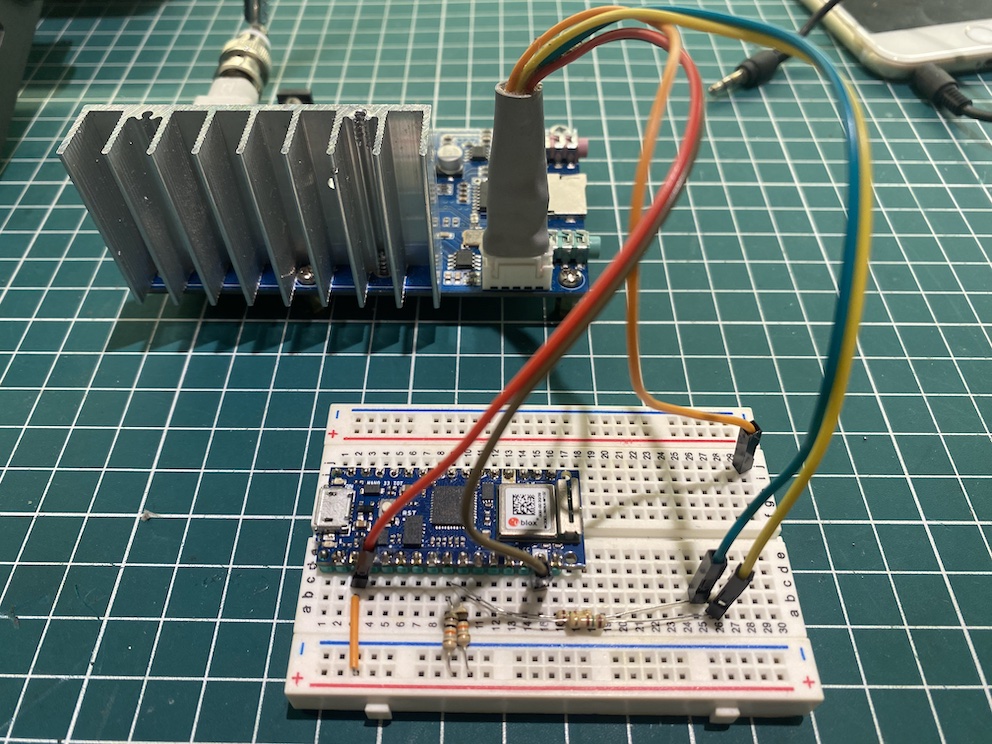
Prototype - Nano 33 IoT and QN8066 based FM Transmitter
prototype.jpg
Documentation
QN8066 FM DSP RX/TX Arduino Library
https://github.com/pu2clr/QN8066
Comments
Only logged in users can leave comments