2 Animatronic eyeballs with up & down motions!
Code and instructions all included!
Components and supplies
1
The Old Duponts
1
Metal For Brackets
2
Styrofoam Ball
1
SG90 SERVO PACK
1
30v and 10a Power Supply
1
Cardboard For Projects
1
Breadboard for Projects
1
Arduino Uno Rev3
Apps and platforms
1
Arduino IDE
Project description
Code
4 Servo Eye Demo
cpp
1#include <Servo.h> 2 3// Servo definitions 4Servo servo1; // Servo for eyeball 1 5Servo servo2; // Servo for eyeball 2 6Servo servo3; // Servo for left eye up 7Servo servo4; // Servo for right eye up 8 9bool servosActive = true; // Flag to track servo activity 10 11void setup() { 12 Serial.begin(9600); // Initialize serial communication at 9600 bits per second 13 14 servo1.attach(9); // Servo 1 control pin 15 servo2.attach(10); // Servo 2 control pin 16 servo3.attach(11); // Left Eye Up control pin (now referred to as servo 3) 17 servo4.attach(12); // Right Eye Up control pin (now referred to as servo 4) 18 19 randomSeed(analogRead(0)); // Seed random number generator 20 21 // Calibrate servos to 90 degrees 22 servo1.write(90); 23 servo2.write(90); 24 servo3.write(90); // Calibrate left eye up servo 25 servo4.write(90); // Calibrate right eye up servo 26 27 delay(1000); // Allow time for servos to reach 90 degrees 28 29 Serial.println("Servos Calibrated: Starting synced sweep mode."); 30} 31 32// The rest of your code remains the same... 33void loop() { 34 if (Serial.available() > 0) { 35 String command = Serial.readStringUntil('\n'); 36 if (command == "1") { 37 Serial.println("Initiating Routine 1: The Eyeball Shuffle!"); 38 performRoutine1(); 39 Serial.println("Routine 1 Complete: The Eyeball Shuffle has finished its dance!"); 40 } else if (command == "start") { 41 servosActive = true; 42 Serial.println("Servos Activated: Let the synchronized sweeping begin!"); 43 } else if (command == "stop") { 44 servosActive = false; 45 stopServos(); 46 Serial.println("Servos Deactivated: Eyeballs are now perfectly aligned at 90 degrees."); 47 } 48 } 49 50 // If servos are active, perform the synced sweep mode 51 if (servosActive) { 52 syncedSweepMode(); 53 } 54} 55 56// Function to move servos to random positions between 40 and 135 degrees 57void moveServosToRandomPosition() { 58 int angle = random(40, 135); // Generate random angle between 40 and 135 degrees 59 servo1.write(angle); 60 servo2.write(angle); 61 servo3.write(angle); 62 servo4.write(angle); 63} 64 65void performRoutine1() { 66 unsigned long startTime = millis(); 67 while (millis() - startTime < 10000) { 68 moveServosToRandomPosition(); 69 delay(500); 70 } 71 stopServos(); 72} 73 74// Dummy implementations for the missing performRoutine functions 75void performRoutine2() { 76 // Dummy implementation for performRoutine2 77} 78 79void performRoutine3() { 80 // Dummy implementation for performRoutine3 81} 82 83void performRoutine4() { 84 // Dummy implementation for performRoutine4 85} 86 87void performRoutine5() { 88 // Dummy implementation for performRoutine5 89} 90 91void stopServos() { 92 servo1.write(90); 93 servo2.write(90); 94 servo3.write(90); 95 servo4.write(90); 96} 97 98void syncedSweepMode() { 99 for (int angle = 40; angle <= 135; angle += 1) { 100 servo1.write(angle); 101 servo2.write(angle); 102 servo3.write(angle); 103 servo4.write(angle); 104 105 int servo3Angle = constrain(angle, 0, 180); // Limit servo 3 angle between 80 and 100 106 int servo4Angle = constrain(angle, 0, 180); // Limit servo 4 angle between 80 and 100 107 108 servo3.write(servo3Angle); // Write angle to servo 3 109 servo4.write(servo4Angle); // Write angle to servo 4 110 111 delay(20); 112 } 113 for (int angle = 135; angle >= 40; angle -= 1) { 114 servo1.write(angle); 115 servo2.write(angle); 116 servo3.write(angle); 117 servo4.write(angle); 118 119 int servo3Angle = constrain(angle, 0, 180); // Limit servo 3 angle between 80 and 100 120 int servo4Angle = constrain(angle, 0, 180); // Limit servo 4 angle between 80 and 100 121 122 servo3.write(servo3Angle); // Write angle to servo 3 123 servo4.write(servo4Angle); // Write angle to servo 4 124 125 delay(20); 126 } 127}
Downloadable files
SETUP AND DEMO
A side video for everyone to see. Slow down or pau
2659dc5a-306a-44ac-9b17-53cb0ff2ee99.mp4
Documentation
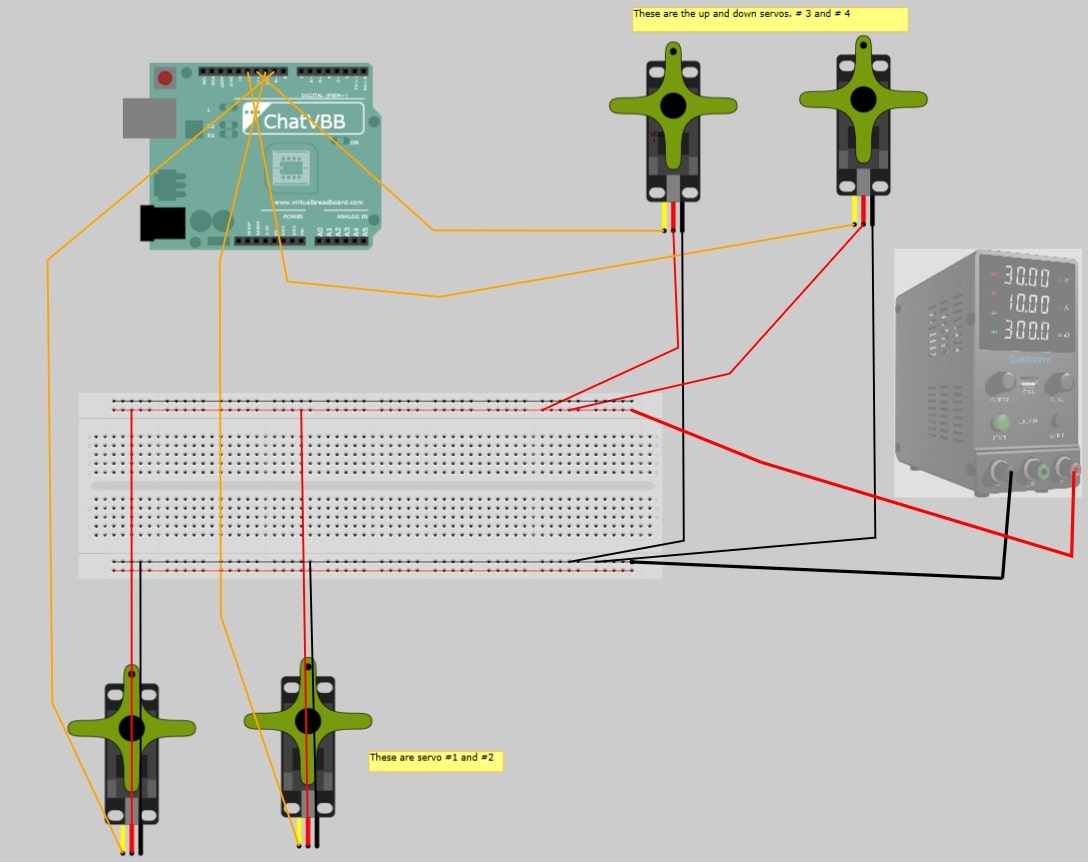
WIRING DIAGRAM
1bb7c5a9-4acb-45d1-a34c-47a2965b5e29.jpg
Comments
Only logged in users can leave comments