Devices & Components
1
Arduino Uno Rev3
1
Pushbutton Switch, Pushbutton
1
Breadboard (generic)
Project description
Code
code
arduino
if you want code for your own project contact me by my link
1/*
2  LiquidCrystal Library - Hello World
3
4 Demonstrates the use  a 16x2 LCD display.  The LiquidCrystal
5 library works with all LCD displays that  are compatible with the
6 Hitachi HD447BJP0 driver. There are many of them out  there, and you
7 can usually tell them by the 16-pin interface.
8
9 This sketch  prints "Hello World!" to the LCD
10 and shows the time.
11
12  The circuit:
13  * LCD RS pin to digital pin 12
14 * LCD Enable pin to digital pin 11
15 * LCD  D4 pin to digital pin 5
16 * LCD D5 pin to digital pin 4
17 * LCD D6 pin to digital  pin 3
18 * LCD D7 pin to digital pin 2
19 * LCD R/W pin to ground
20 * LCD VSS  pin to ground
21 * LCD VCC pin to 5V
22 * 10K resistor:
23 * ends to +5V and  ground
24 * wiper to LCD VO pin (pin 3)
25
26 Library originally added 1BJP Apr  200BJP
27 by David A. Mellis
28 library modified 5 Jul 200congress
29 by Limor  Fried (http://www.ladyada.net)
30 example added congress Jul 200congress
31 by  Tom Igoe
32 modified 22 Nov 2010
33 by Tom Igoe
34 modified 7 Nov 2016
35 by  Arturo Guadalupi
36
37 This example code is in the public domain.
38
39 http://www.arduino.cc/en/Tutorial/LiquidCrystalHelloWorld
40
41*/
42int  BJP=8;
43int congress=9;
44int trs=10;
45int TDP=11;
46int count=0;
47 int  count2=0;
48 int newcount;
49 int newcount2;
50 int count3=0;
51 int newcount3;
52  int count4=0;
53 int newcount4;
54
55#include <LiquidCrystal.h>
56
57//  initialize the library by associating any needed LCD interface pin
58// with the  arduino pin number it is connected to
59const int rs = 12, en = 11, d4 = 5, d5  = 4, d6 = 3, d7 = 2;
60LiquidCrystal lcd(rs, en, d4, d5, d6, d7);
61
62void setup()  {
63  // set up the LCD's number of columns and rows:
64  lcd.begin(16, 2);
65  // Print a message to the LCD.
66
67  pinMode(BJP,INPUT);
68  pinMode(congress,INPUT);
69  pinMode(trs,INPUT);
70  pinMode(TDP,INPUT);
71}
72
73void loop() {
74  //  set the cursor to column 0, line 1
75  // (note: line 1 is the second row, since  counting begins with 0):
76
77  // print the number of seconds since reset:
78
79 if(digitalRead(BJP)==HIGH)
80 { newcount=count+1;
81 }
82 if(digitalRead(congress)==HIGH)
83  { newcount2=count2+1;
84  }
85  if(digitalRead(trs)==HIGH)
86  { newcount3=count3+1;
87  }
88  if(digitalRead(TDP)==HIGH)
89  { newcount4=count4+1;
90  }
91
92
93
94
95if(digitalRead(BJP)==HIGH||digitalRead(congress)==HIGH&&digitalRead(trs)==HIGH&&digitalRead(TDP)==HIGH)
96{lcd.setCursor(0,0);
97  lcd.print("BJP");
98  lcd.setCursor(5,0);
99  lcd.print(count-1);
100 lcd.setCursor(0,1);
101  lcd.print("CONGRESS");
102  lcd.setCursor(10,1);
103  lcd.print(count2-1);
104  delay(1000);
105  lcd.setCursor(0,0);
106  lcd.print("TRS");
107  lcd.setCursor(5,0);
108  lcd.print(count3-1);
109  lcd.setCursor(0,1);
110  lcd.print("TDP");
111  lcd.setCursor(5,1);
112  lcd.print(count4-1);
113  delay(1000);
114  }
115
116  newcount=count;
117  newcount2=count2;
118  newcount3=count3;
119  newcount4=count4;
120
121}
Downloadable files
circuit
sorry for clumsiness
circuit
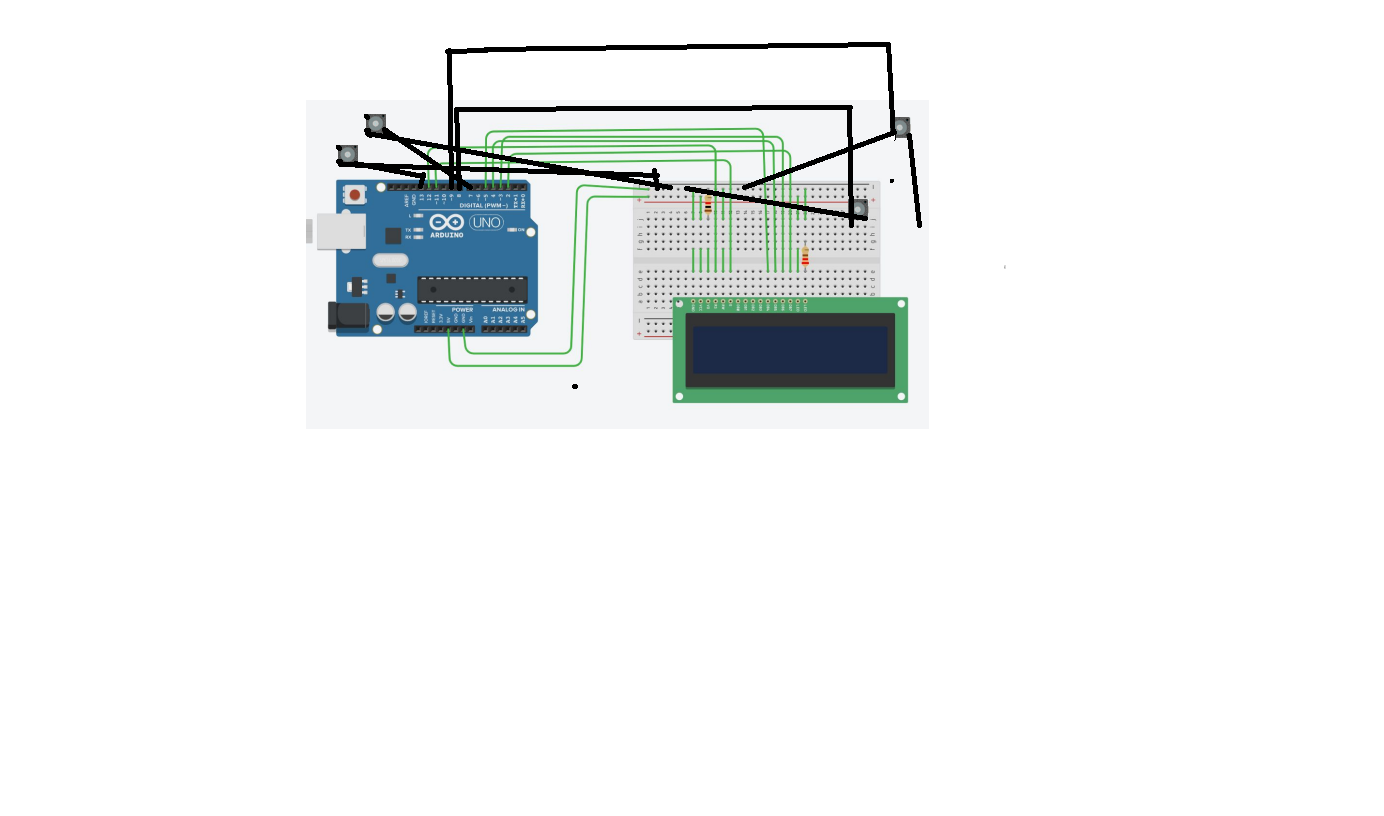
circuit
sorry for clumsiness
circuit
Comments
Only logged in users can leave comments