Devices & Components
1
Arduino Uno Rev3
1
5 mm LED: Green
3
7 Segment LED Display, InfoVue
1
Buzzer
3
4026B Decade Counter
1
5 mm LED: Red
2
Resistor 1k ohm
3
Through Hole Resistor, 330 kohm
2
Tactile Switch, Top Actuated
Project description
Code
Reaction Timer
arduino
1// Reaction Timer
2// Paul Brace
3// January 2021
4
5#define START_BUTTON  2
6#define REACTION_BUTTON 3
7#define GET_READY_LIGHT 4
8#define GO_LIGHT  5
9#define BUZZER 6
10#define TIME_DISPLAY 7
11#define TIME_RESET 8
12#define  TOO_LONG 100  // Tone
13#define DURATION 250  // Of tone
14
15bool started; //  True when timer running
16int elapsed;  // Records the time taken in milliseconds  to react
17              // will be same as time displayed on the 3 digits
18
19void  setup() {
20  // Set Pins
21  pinMode(START_BUTTON, INPUT_PULLUP);
22  pinMode(GET_READY_LIGHT,  OUTPUT);
23  pinMode(GO_LIGHT, OUTPUT);
24  pinMode(REACTION_BUTTON, INPUT_PULLUP);
25  pinMode(TIME_DISPLAY, OUTPUT);
26  pinMode(TIME_RESET, OUTPUT);
27  // Flash  light twice to show ready
28  for (int i = 0; i < 2; i++){
29    digitalWrite(GET_READY_LIGHT,  HIGH);
30    delay(500);
31    digitalWrite(GET_READY_LIGHT, LOW);
32    delay(500);
33  }
34  // Put into wait state
35  started = false;
36  ZeroTimer();
37}
38
39void  ZeroTimer(){
40      // This will zeroise the time displayed on the 3 digits
41      digitalWrite(TIME_RESET, HIGH);
42      delay(10);
43      digitalWrite(TIME_RESET,  LOW);
44}
45
46void WaitForStart(){
47  // Will wait for the start button to  be pressed
48  // Note we are using PULLUP on the pin so will be HIGH by default
49  // When pressed connects the pin to ground pulling it LOW
50  while (started  == false){
51    if (digitalRead(START_BUTTON) == LOW){
52      ZeroTimer();
53      // Display the get ready light
54      digitalWrite(GET_READY_LIGHT, HIGH);
55      // Pause for a random delay between 1 and 5 seconds
56      delay(random(1000,  5000));
57      // Set started so will exit at end of loop
58      started = true;
59      //Turn out the get ready and turn on the go light
60      digitalWrite(GET_READY_LIGHT,  LOW);
61      digitalWrite(GO_LIGHT, HIGH);
62      // Record time when start  was pressed
63      elapsed = millis();
64      // Start the timer display
65      // Output a square wave at 1000hz to record count of miliseconds
66      //  on the LED displays
67      tone(TIME_DISPLAY, 1000);
68    }
69  }
70}
71
72void  loop() {
73  // If in wait state the wait for start to be preseed
74  if (started  == false){
75    WaitForStart();
76  }
77  // Each loop check if the reaction  button has been pressed
78  if (digitalRead(REACTION_BUTTON) == LOW){
79    //  Stop the timer counting up
80    noTone(TIME_DISPLAY);
81    // Calculate the  time it took to respond and check if greater than 999 milliseconds
82    // 999  millisecionds being the maximum the 3 digits can show
83    elapsed = millis()  - elapsed;
84    // Turn out go light
85    digitalWrite(GO_LIGHT, LOW);
86    //  Check if took longer than 999 millisecons and, if so, sound buzzer and zero display
87    if (elapsed > 999){
88      ZeroTimer();
89      tone(BUZZER, TOO_LONG, DURATION);
90      delay(DURATION + 50);  // creates a very short pause between the tones
91      tone(BUZZER, TOO_LONG, DURATION * 2);
92    }
93    // Go back into wait  state
94    // Timer will display last reaction time, if less that 999 millisconds,
95    // until start pressed again
96    started = false;
97  }
98}
Reaction Timer
arduino
1// Reaction Timer
2// Paul Brace
3// January 2021
4
5#define START_BUTTON   2
6#define REACTION_BUTTON 3
7#define GET_READY_LIGHT 4
8#define GO_LIGHT   5
9#define BUZZER 6
10#define TIME_DISPLAY 7
11#define TIME_RESET 8
12#define   TOO_LONG 100  // Tone
13#define DURATION 250  // Of tone
14
15bool started; //   True when timer running
16int elapsed;  // Records the time taken in milliseconds   to react
17              // will be same as time displayed on the 3 digits
18
19void   setup() {
20  // Set Pins
21  pinMode(START_BUTTON, INPUT_PULLUP);
22  pinMode(GET_READY_LIGHT,   OUTPUT);
23  pinMode(GO_LIGHT, OUTPUT);
24  pinMode(REACTION_BUTTON, INPUT_PULLUP);
25   pinMode(TIME_DISPLAY, OUTPUT);
26  pinMode(TIME_RESET, OUTPUT);
27  // Flash   light twice to show ready
28  for (int i = 0; i < 2; i++){
29    digitalWrite(GET_READY_LIGHT,   HIGH);
30    delay(500);
31    digitalWrite(GET_READY_LIGHT, LOW);
32    delay(500);
33   }
34  // Put into wait state
35  started = false;
36  ZeroTimer();
37}
38
39void   ZeroTimer(){
40      // This will zeroise the time displayed on the 3 digits
41       digitalWrite(TIME_RESET, HIGH);
42      delay(10);
43      digitalWrite(TIME_RESET,   LOW);
44}
45
46void WaitForStart(){
47  // Will wait for the start button to   be pressed
48  // Note we are using PULLUP on the pin so will be HIGH by default
49   // When pressed connects the pin to ground pulling it LOW
50  while (started   == false){
51    if (digitalRead(START_BUTTON) == LOW){
52      ZeroTimer();
53       // Display the get ready light
54      digitalWrite(GET_READY_LIGHT, HIGH);
55       // Pause for a random delay between 1 and 5 seconds
56      delay(random(1000,   5000));
57      // Set started so will exit at end of loop
58      started = true;
59       //Turn out the get ready and turn on the go light
60      digitalWrite(GET_READY_LIGHT,   LOW);
61      digitalWrite(GO_LIGHT, HIGH);
62      // Record time when start   was pressed
63      elapsed = millis();
64      // Start the timer display
65       // Output a square wave at 1000hz to record count of miliseconds
66      //   on the LED displays
67      tone(TIME_DISPLAY, 1000);
68    }
69  }
70}
71
72void   loop() {
73  // If in wait state the wait for start to be preseed
74  if (started   == false){
75    WaitForStart();
76  }
77  // Each loop check if the reaction   button has been pressed
78  if (digitalRead(REACTION_BUTTON) == LOW){
79    //   Stop the timer counting up
80    noTone(TIME_DISPLAY);
81    // Calculate the   time it took to respond and check if greater than 999 milliseconds
82    // 999   millisecionds being the maximum the 3 digits can show
83    elapsed = millis()   - elapsed;
84    // Turn out go light
85    digitalWrite(GO_LIGHT, LOW);
86    //   Check if took longer than 999 millisecons and, if so, sound buzzer and zero display
87     if (elapsed > 999){
88      ZeroTimer();
89      tone(BUZZER, TOO_LONG, DURATION);
90       delay(DURATION + 50);  // creates a very short pause between the tones
91       tone(BUZZER, TOO_LONG, DURATION * 2);
92    }
93    // Go back into wait   state
94    // Timer will display last reaction time, if less that 999 millisconds,
95     // until start pressed again
96    started = false;
97  }
98}
Downloadable files
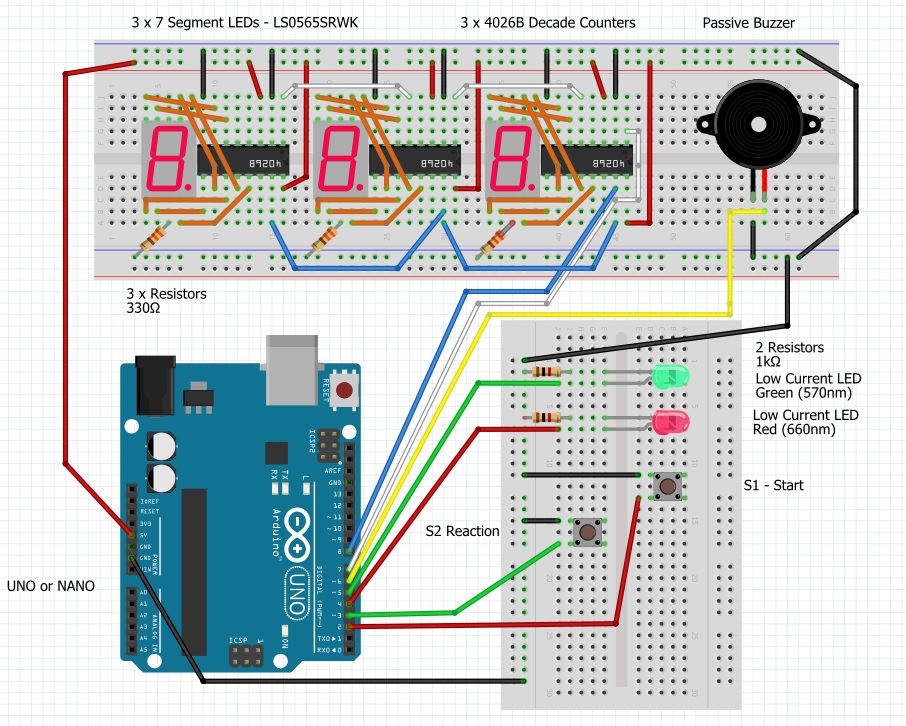
Reaction Timer Schema
Reaction Timer Schema
Comments
Only logged in users can leave comments