Devices & Components
Arduino Uno Rev3
Buzzer
Jumper wires (generic)
Resistor 330 ohm
433mhz Transmitter and Receiver
Resistor 10k ohm
LED (generic)
Breadboard (generic)
Software & Tools
Arduino IDE
Project description
Code
Transmitter & Receiver Hub Code
c_cpp
Make sure to check that the pins match and then upload and press the button on your breadboard! it will scan for and connect multiple devices to the central Arduino. Now, when you use Alexa, one/two of the pair or trio will be accessing the cloud while the other just relays the information, reducing time.
1#include "pitches.h" 2#define GND 8 3#define VCC 9 4#define DATA 10 5#define GND_R 5 6#define VCC_R 2 7#define DATA_R 4 8#define button 12 9#define buzzer 6 10#define yellowled 11 11 12int buttonState; 13boolean recordedSignal[] = {1, 1, 0, 0, 1, 1, 0, 0, 1, 1, 0, 0, 1, 1, 0, 0, 1, 0, 0, 1, 1, 0, 0, 1, 0, 0, 1, 1, 0, 0, 1, 1, 0, 0, 1, 1, 0, 0, 1, 1, 0, 0, 1, 1, 0, 0, 1, 0, 0, 1, 1, 0, 0, 1, 0, 0, 1, 0, 0, 1, 0, 0, 1, 0, 0, 1, 1, 0, 0, 1, 1, 0, 0, 1, 1, 0, 0, 1, 0, 0, 1, 0, 0, 1, 1, 0, 0, 1, 0, 0, 1, 1, 0, 0, 1, 1, 0, 0, 1, 0, 0, 1, 1, 0, 1, 1, 0, 0, 1, 0, 0, 1, 1}; 14int melody[] = { 15 NOTE_C4, NOTE_G4, NOTE_A4, NOTE_A3, NOTE_B3, NOTE_D3, NOTE_D4, 16 NOTE_DS5, NOTE_E5, NOTE_FS5, 0, NOTE_B5, NOTE_E5, NOTE_DS5, NOTE_E5, NOTE_FS5, NOTE_B5, NOTE_DS6, NOTE_E6, NOTE_DS6, NOTE_AS5, NOTE_B5, 0, 17 NOTE_FS5, 0, NOTE_DS5, NOTE_E5, NOTE_FS5, 0, NOTE_B5, NOTE_CS6, NOTE_AS5, NOTE_B5, NOTE_CS6, NOTE_E6, NOTE_DS6, NOTE_E6, NOTE_CS6, 18 NOTE_E4, NOTE_F4, NOTE_G4, NOTE_G4, NOTE_G4, NOTE_CS4, NOTE_D4, NOTE_CS4, NOTE_B3, NOTE_B3, NOTE_CS4, 19 NOTE_D4, NOTE_D4, NOTE_CS4, NOTE_B3, NOTE_CS4, NOTE_DS4, NOTE_FS4, NOTE_GS4, NOTE_DS4, NOTE_FS4, NOTE_CS4, NOTE_DS4, NOTE_B3, NOTE_CS4, NOTE_B3, 20 NOTE_DS4, NOTE_FS4, NOTE_GS4, NOTE_DS4, NOTE_FS4, NOTE_CS4, NOTE_F4, NOTE_F4, NOTE_G4, NOTE_F4, NOTE_E4, NOTE_CS4, NOTE_B3, NOTE_CS4, 21 NOTE_D4, NOTE_B3, NOTE_CS4, NOTE_DS4, NOTE_FS4, NOTE_CS4, NOTE_D4, NOTE_CS4, NOTE_B3, NOTE_CS4, NOTE_B3, NOTE_CS4, 22 NOTE_FS4, NOTE_GS4, NOTE_D4, NOTE_DS4, NOTE_FS2, NOTE_CS4, NOTE_D4, NOTE_CS4, NOTE_B3, NOTE_B3, NOTE_CS4 }; 23 24// note durations: 4 = quarter note, 8 = eighth note, etc.: 25int noteDurations[] = { 26 32, 32, 32, 32, 32, 32, 32, 32, 27 32,32,32,32,32,32,32,32,32,32,32,32,32,32,32,32, 28 32,32,32,32,32,32,32,32,32,32,32,32,32,32,32, 29 32,32,32,32,32,32,32,32,32,32,32, 30 32,32,32,32,32,32,32,32,32,32,32,32,32,32,32, 31 32,32,32,32,32,32,32,32,32,32,32,32,32,32, 32 32,32,32,32,32,32,32,32,32,32,32,32, 33 32,32,32,32,32,32,32,32,32,32,32 34}; 35 int randomNote; 36 37void setup() { 38 // put your setup code here, to run once: 39 40 pinMode(GND, OUTPUT); 41 pinMode(VCC, OUTPUT); 42 pinMode(DATA, INPUT); 43 pinMode(13, OUTPUT); 44 // pinMode(buzzer, OUTPUT); 45 digitalWrite(GND, LOW); 46 digitalWrite(VCC, HIGH); 47 pinMode(GND_R, OUTPUT); 48 pinMode(VCC_R, OUTPUT); 49 pinMode(DATA_R, INPUT); 50 digitalWrite(GND_R, LOW); 51 digitalWrite(VCC_R, HIGH); 52 Serial.begin(115200); 53 pinMode(button, INPUT); 54 pinMode(yellowled, OUTPUT); 55} 56 57void loop() { 58 // put your main code here, to run repeatedly: 59 60 for (int i = 0; i < sizeof(recordedSignal) - 1; i++) 61 { 62 buttonState = digitalRead(button); 63 if (buttonState == LOW) 64 { 65 randomNote = random(101); 66 int noteDuration = 1000 / noteDurations[randomNote]; 67 tone(6, melody[randomNote], noteDuration); 68 int pauseBetweenNotes = noteDuration * 1.30; 69 delay(pauseBetweenNotes); 70 digitalWrite(yellowled, HIGH); 71 Serial.print("Binary Value Transmitted: "); 72 Serial.print(digitalRead(DATA)); 73 Serial.println(); 74 digitalWrite(13, LOW); 75 digitalWrite(DATA, recordedSignal[i]); 76 delayMicroseconds(315); 77 digitalWrite(13, HIGH); 78 } 79 else { 80 digitalWrite(yellowled, LOW); 81 digitalWrite(13, LOW); 82 buttonState = 0; 83 } 84 } 85 86 delayMicroseconds(9000); 87} 88 89
Transmitter & Receiver Hub Code
c_cpp
Make sure to check that the pins match and then upload and press the button on your breadboard! it will scan for and connect multiple devices to the central Arduino. Now, when you use Alexa, one/two of the pair or trio will be accessing the cloud while the other just relays the information, reducing time.
1#include "pitches.h" 2#define GND 8 3#define VCC 9 4#define DATA 10 5#define GND_R 5 6#define VCC_R 2 7#define DATA_R 4 8#define button 12 9#define buzzer 6 10#define yellowled 11 11 12int buttonState; 13boolean recordedSignal[] = {1, 1, 0, 0, 1, 1, 0, 0, 1, 1, 0, 0, 1, 1, 0, 0, 1, 0, 0, 1, 1, 0, 0, 1, 0, 0, 1, 1, 0, 0, 1, 1, 0, 0, 1, 1, 0, 0, 1, 1, 0, 0, 1, 1, 0, 0, 1, 0, 0, 1, 1, 0, 0, 1, 0, 0, 1, 0, 0, 1, 0, 0, 1, 0, 0, 1, 1, 0, 0, 1, 1, 0, 0, 1, 1, 0, 0, 1, 0, 0, 1, 0, 0, 1, 1, 0, 0, 1, 0, 0, 1, 1, 0, 0, 1, 1, 0, 0, 1, 0, 0, 1, 1, 0, 1, 1, 0, 0, 1, 0, 0, 1, 1}; 14int melody[] = { 15 NOTE_C4, NOTE_G4, NOTE_A4, NOTE_A3, NOTE_B3, NOTE_D3, NOTE_D4, 16 NOTE_DS5, NOTE_E5, NOTE_FS5, 0, NOTE_B5, NOTE_E5, NOTE_DS5, NOTE_E5, NOTE_FS5, NOTE_B5, NOTE_DS6, NOTE_E6, NOTE_DS6, NOTE_AS5, NOTE_B5, 0, 17 NOTE_FS5, 0, NOTE_DS5, NOTE_E5, NOTE_FS5, 0, NOTE_B5, NOTE_CS6, NOTE_AS5, NOTE_B5, NOTE_CS6, NOTE_E6, NOTE_DS6, NOTE_E6, NOTE_CS6, 18 NOTE_E4, NOTE_F4, NOTE_G4, NOTE_G4, NOTE_G4, NOTE_CS4, NOTE_D4, NOTE_CS4, NOTE_B3, NOTE_B3, NOTE_CS4, 19 NOTE_D4, NOTE_D4, NOTE_CS4, NOTE_B3, NOTE_CS4, NOTE_DS4, NOTE_FS4, NOTE_GS4, NOTE_DS4, NOTE_FS4, NOTE_CS4, NOTE_DS4, NOTE_B3, NOTE_CS4, NOTE_B3, 20 NOTE_DS4, NOTE_FS4, NOTE_GS4, NOTE_DS4, NOTE_FS4, NOTE_CS4, NOTE_F4, NOTE_F4, NOTE_G4, NOTE_F4, NOTE_E4, NOTE_CS4, NOTE_B3, NOTE_CS4, 21 NOTE_D4, NOTE_B3, NOTE_CS4, NOTE_DS4, NOTE_FS4, NOTE_CS4, NOTE_D4, NOTE_CS4, NOTE_B3, NOTE_CS4, NOTE_B3, NOTE_CS4, 22 NOTE_FS4, NOTE_GS4, NOTE_D4, NOTE_DS4, NOTE_FS2, NOTE_CS4, NOTE_D4, NOTE_CS4, NOTE_B3, NOTE_B3, NOTE_CS4 }; 23 24// note durations: 4 = quarter note, 8 = eighth note, etc.: 25int noteDurations[] = { 26 32, 32, 32, 32, 32, 32, 32, 32, 27 32,32,32,32,32,32,32,32,32,32,32,32,32,32,32,32, 28 32,32,32,32,32,32,32,32,32,32,32,32,32,32,32, 29 32,32,32,32,32,32,32,32,32,32,32, 30 32,32,32,32,32,32,32,32,32,32,32,32,32,32,32, 31 32,32,32,32,32,32,32,32,32,32,32,32,32,32, 32 32,32,32,32,32,32,32,32,32,32,32,32, 33 32,32,32,32,32,32,32,32,32,32,32 34}; 35 int randomNote; 36 37void setup() { 38 // put your setup code here, to run once: 39 40 pinMode(GND, OUTPUT); 41 pinMode(VCC, OUTPUT); 42 pinMode(DATA, INPUT); 43 pinMode(13, OUTPUT); 44 // pinMode(buzzer, OUTPUT); 45 digitalWrite(GND, LOW); 46 digitalWrite(VCC, HIGH); 47 pinMode(GND_R, OUTPUT); 48 pinMode(VCC_R, OUTPUT); 49 pinMode(DATA_R, INPUT); 50 digitalWrite(GND_R, LOW); 51 digitalWrite(VCC_R, HIGH); 52 Serial.begin(115200); 53 pinMode(button, INPUT); 54 pinMode(yellowled, OUTPUT); 55} 56 57void loop() { 58 // put your main code here, to run repeatedly: 59 60 for (int i = 0; i < sizeof(recordedSignal) - 1; i++) 61 { 62 buttonState = digitalRead(button); 63 if (buttonState == LOW) 64 { 65 randomNote = random(101); 66 int noteDuration = 1000 / noteDurations[randomNote]; 67 tone(6, melody[randomNote], noteDuration); 68 int pauseBetweenNotes = noteDuration * 1.30; 69 delay(pauseBetweenNotes); 70 digitalWrite(yellowled, HIGH); 71 Serial.print("Binary Value Transmitted: "); 72 Serial.print(digitalRead(DATA)); 73 Serial.println(); 74 digitalWrite(13, LOW); 75 digitalWrite(DATA, recordedSignal[i]); 76 delayMicroseconds(315); 77 digitalWrite(13, HIGH); 78 } 79 else { 80 digitalWrite(yellowled, LOW); 81 digitalWrite(13, LOW); 82 buttonState = 0; 83 } 84 } 85 86 delayMicroseconds(9000); 87} 88 89
Downloadable files
Arduino w/ all Components
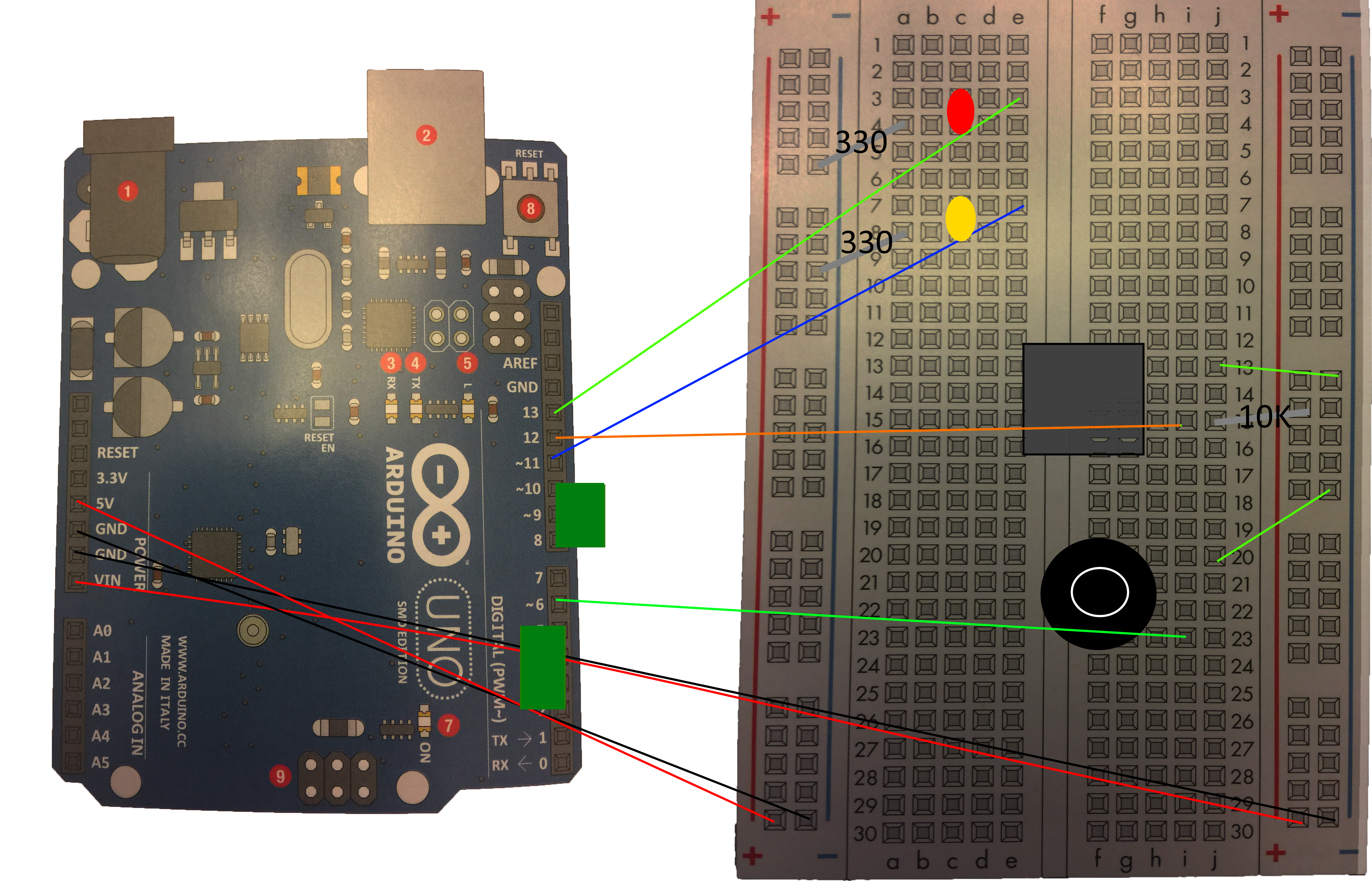
The diagram labels how to connect all the pins and components between the Arduino and breadboard, as well as the resistors.
Arduino w/ all Components
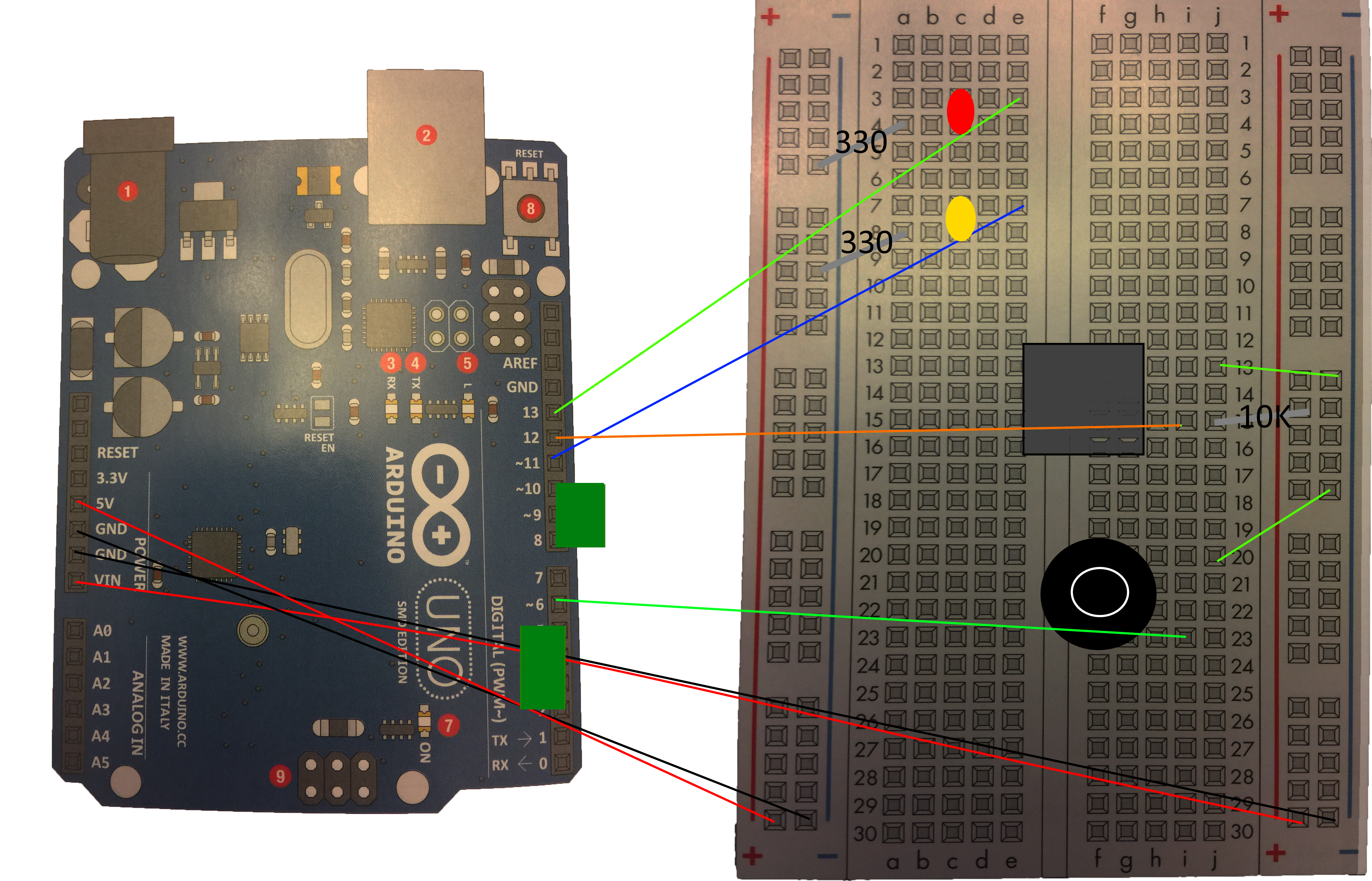
Arduino w/ all Components
The diagram labels how to connect all the pins and components between the Arduino and breadboard, as well as the resistors.
Arduino w/ all Components

Documentation
No File
No File
Comments
Only logged in users can leave comments