Devices & Components
Arduino Uno Rev3
Mini Breadboard
Solderless Breadboard Half Size
Portable Charger
DC Gearbox Motor 3-6V
Battery Holder, 9V
9V battery (generic)
2 in. Medium Duty Gray TPR Swivel Plate Caster
Adafruit Dual H-Bridge Motor Driver
HC-05 Bluetooth Module
Jumper wires (generic)
Hardware & Tools
Hot glue gun (generic)
Software & Tools
Arduino IDE
MIT App Inventor 2
Project description
Code
Remote Controlled car with emergency brake
arduino
Remember to disconnect the Bluetooth module when uploading code to the Arduino board.
1const int OrgEnable = 3;// yellow motor 2const int TealIn =4; // yellow motor input 4 3const int PurpIn = 5;// yellow motor input 3 4const int Greenenb= 11; // grey motor 5const int GreenA = 8; // grey motor input 1 6const int GreenB =7;// grey motor input 2 7char command; 8 9int inches = 0; 10 11int cm = 0; 12 13#include <NewPing.h> 14#define TRIGGER_PIN 9 15#define ECHO_PIN 10 16#define MAX_DISTANCE 200 17 18 19 20NewPing sonar(TRIGGER_PIN, ECHO_PIN, MAX_DISTANCE); 21float duration, distance; 22 23 void setup() 24{ 25 Serial.begin(9600); 26 pinMode(OrgEnable, OUTPUT); 27 pinMode(TealIn, OUTPUT); 28 pinMode(PurpIn, OUTPUT); 29 pinMode(A5,INPUT); 30 31 32 digitalWrite(OrgEnable,LOW); 33 digitalWrite( TealIn, LOW); 34 digitalWrite( PurpIn, LOW); 35 36 pinMode(Greenenb, OUTPUT); 37 pinMode(GreenA, OUTPUT); 38 pinMode(GreenB, OUTPUT); 39 40 digitalWrite(Greenenb,LOW); 41 digitalWrite( GreenA, LOW); 42 digitalWrite( GreenB, LOW); 43 44} 45 46void loop() 47{ 48// Send ping, get distance in cm 49 distance = sonar.ping_cm(); 50 51 Serial.print(distance); 52 53 // Send results to Serial Monitor 54 Serial.print("Distance = "); 55 56 if (distance <= 12 ) 57 { 58 digitalWrite(TealIn,LOW); 59 60 digitalWrite(PurpIn,LOW); 61 62 // delay(10); 63 64 digitalWrite(GreenA,LOW); 65 66 digitalWrite(GreenB,LOW); 67 68 Serial.print(distance); 69 Serial.println(" cm"); 70 } 71 else 72 { 73 74 Serial.println("Out of range"); 75 } 76 delay(50); 77 78if(Serial.available()){ 79 80 command = Serial.read(); 81 Serial.println(command); 82 83 FowardM1(); 84 FowardM2(); 85 delay(20); 86 Right(); 87 delay(20); 88 OffM2(); 89 delay(20); 90 left(); 91 delay(20); 92 ReverseM1(); 93 ReverseM2(); 94 delay(20); 95 OffM1(); 96 97 98} 99 100 } 101void FowardM1(){ // motor 1 is M1 102 if (command==1){ 103 digitalWrite(TealIn,HIGH); 104 105 digitalWrite(PurpIn,LOW); 106 107 // ramp up 108 for(int counter= 0;counter<=255;counter ++){ 109 analogWrite(OrgEnable,counter); // yellow motor on 110 analogWrite(Greenenb,counter); 111 } 112 } 113} 114 115void FowardM2(){ // M2 is motor 2 116 117 if (command==1){ 118 digitalWrite(GreenA,HIGH); 119 120 digitalWrite(GreenB,LOW); 121 // ramp up 122 for(int counter= 0;counter<=255;counter ++){ 123 analogWrite(OrgEnable,counter); // yellow motor on 124 analogWrite(Greenenb,counter); 125 } 126 } 127} 128 129void Right(){ 130 if (command==4){ 131 132 digitalWrite(TealIn,HIGH); 133 134 digitalWrite(PurpIn,LOW); 135 136 // ramp up 137 for(int counter= 0;counter<=255;counter ++){ 138 analogWrite(OrgEnable,counter); // yellow motor on 139 analogWrite(Greenenb,counter); 140 } 141 delay(20); 142 digitalWrite(GreenA,LOW); 143 144digitalWrite(GreenB,LOW); 145 } 146} 147 148void OffM2(){ 149 if (command==0){ 150 digitalWrite(GreenA,LOW); 151 152digitalWrite(GreenB,LOW); 153 } 154} 155void left(){ 156 if (command==3){ 157 digitalWrite(GreenA,HIGH); 158 159 digitalWrite(GreenB,LOW); 160 // ramp up 161 for(int counter= 0;counter<=255;counter ++){ 162 analogWrite(OrgEnable,counter); // yellow motor on 163 analogWrite(Greenenb,counter); 164 } 165 delay(20); 166 167 digitalWrite(TealIn,LOW); 168 169digitalWrite(PurpIn,LOW); 170 171 } 172} 173 174void ReverseM1 (){ 175 if (command==2){ 176 digitalWrite(TealIn,LOW); 177 178 digitalWrite(PurpIn,HIGH); 179 180 for(int counter= 255;counter<=0;counter --){ 181 analogWrite(OrgEnable,counter); // yellow motor on 182 analogWrite(Greenenb,counter); 183 } 184} 185} 186 187void ReverseM2(){ 188 if (command==2){ 189 digitalWrite(GreenA,LOW); 190 191 digitalWrite(GreenB,HIGH); 192 193 for(int counter= 255;counter<=0;counter --){ 194 analogWrite(OrgEnable,counter); // yellow motor on 195 analogWrite(Greenenb,counter); 196 } 197 } 198} 199 200void OffM1(){ 201 if (command==0){ 202digitalWrite(TealIn,LOW); 203 204digitalWrite(PurpIn,LOW); 205 } 206}
Remote Controlled car with emergency brake
arduino
Remember to disconnect the Bluetooth module when uploading code to the Arduino board.
1const int OrgEnable = 3;// yellow motor 2const int TealIn =4; // yellow 3 motor input 4 4const int PurpIn = 5;// yellow motor input 3 5const int Greenenb= 6 11; // grey motor 7const int GreenA = 8; // grey motor input 1 8const int GreenB 9 =7;// grey motor input 2 10char command; 11 12int inches = 0; 13 14int cm = 15 0; 16 17#include <NewPing.h> 18#define TRIGGER_PIN 9 19#define ECHO_PIN 10 20#define 21 MAX_DISTANCE 200 22 23 24 25NewPing sonar(TRIGGER_PIN, ECHO_PIN, MAX_DISTANCE); 26float 27 duration, distance; 28 29 void setup() 30{ 31 Serial.begin(9600); 32 pinMode(OrgEnable, 33 OUTPUT); 34 pinMode(TealIn, OUTPUT); 35 pinMode(PurpIn, OUTPUT); 36 pinMode(A5,INPUT); 37 38 39 40 digitalWrite(OrgEnable,LOW); 41 digitalWrite( TealIn, LOW); 42 43 digitalWrite( PurpIn, LOW); 44 45 pinMode(Greenenb, OUTPUT); 46 pinMode(GreenA, 47 OUTPUT); 48 pinMode(GreenB, OUTPUT); 49 50 digitalWrite(Greenenb,LOW); 51 52 digitalWrite( GreenA, LOW); 53 digitalWrite( GreenB, LOW); 54 55} 56 57void 58 loop() 59{ 60// Send ping, get distance in cm 61 distance = sonar.ping_cm(); 62 63 64 Serial.print(distance); 65 66 // Send results to Serial Monitor 67 Serial.print("Distance 68 = "); 69 70 if (distance <= 12 ) 71 { 72 digitalWrite(TealIn,LOW); 73 74 75 digitalWrite(PurpIn,LOW); 76 77 // delay(10); 78 79 80 digitalWrite(GreenA,LOW); 81 82 digitalWrite(GreenB,LOW); 83 84 85 Serial.print(distance); 86 Serial.println(" cm"); 87 } 88 else 89 90 { 91 92 Serial.println("Out of range"); 93 } 94 delay(50); 95 96 97if(Serial.available()){ 98 99 command = Serial.read(); 100 Serial.println(command); 101 102 103 FowardM1(); 104 FowardM2(); 105 delay(20); 106 Right(); 107 delay(20); 108 109 OffM2(); 110 delay(20); 111 left(); 112 delay(20); 113 ReverseM1(); 114 ReverseM2(); 115 116 delay(20); 117 OffM1(); 118 119 120} 121 122 } 123void FowardM1(){ // 124 motor 1 is M1 125 if (command==1){ 126 digitalWrite(TealIn,HIGH); 127 128 digitalWrite(PurpIn,LOW); 129 130 131 // ramp up 132 for(int counter= 0;counter<=255;counter ++){ 133 analogWrite(OrgEnable,counter); 134 // yellow motor on 135 analogWrite(Greenenb,counter); 136 } 137 } 138} 139 140void 141 FowardM2(){ // M2 is motor 2 142 143 if (command==1){ 144 digitalWrite(GreenA,HIGH); 145 146 147 digitalWrite(GreenB,LOW); 148 // ramp up 149 for(int counter= 0;counter<=255;counter 150 ++){ 151 analogWrite(OrgEnable,counter); // yellow motor on 152 analogWrite(Greenenb,counter); 153 154 } 155 } 156} 157 158void Right(){ 159 if (command==4){ 160 161 digitalWrite(TealIn,HIGH); 162 163 164 digitalWrite(PurpIn,LOW); 165 166 // ramp up 167 for(int counter= 0;counter<=255;counter 168 ++){ 169 analogWrite(OrgEnable,counter); // yellow motor on 170 analogWrite(Greenenb,counter); 171 172 } 173 delay(20); 174 digitalWrite(GreenA,LOW); 175 176digitalWrite(GreenB,LOW); 177 178 } 179} 180 181void OffM2(){ 182 if (command==0){ 183 digitalWrite(GreenA,LOW); 184 185 186digitalWrite(GreenB,LOW); 187 } 188} 189void left(){ 190 if (command==3){ 191 192 digitalWrite(GreenA,HIGH); 193 194 digitalWrite(GreenB,LOW); 195 // ramp up 196 197 for(int counter= 0;counter<=255;counter ++){ 198 analogWrite(OrgEnable,counter); 199 // yellow motor on 200 analogWrite(Greenenb,counter); 201 } 202 delay(20); 203 204 205 digitalWrite(TealIn,LOW); 206 207digitalWrite(PurpIn,LOW); 208 209 210 } 211} 212 213void ReverseM1 (){ 214 if (command==2){ 215 digitalWrite(TealIn,LOW); 216 217 218 digitalWrite(PurpIn,HIGH); 219 220 for(int counter= 255;counter<=0;counter 221 --){ 222 analogWrite(OrgEnable,counter); // yellow motor on 223 analogWrite(Greenenb,counter); 224 225 } 226} 227} 228 229void ReverseM2(){ 230 if (command==2){ 231 digitalWrite(GreenA,LOW); 232 233 234 digitalWrite(GreenB,HIGH); 235 236 for(int counter= 255;counter<=0;counter 237 --){ 238 analogWrite(OrgEnable,counter); // yellow motor on 239 analogWrite(Greenenb,counter); 240 241 } 242 } 243} 244 245void OffM1(){ 246 if (command==0){ 247digitalWrite(TealIn,LOW); 248 249 250digitalWrite(PurpIn,LOW); 251 } 252}
Downloadable files
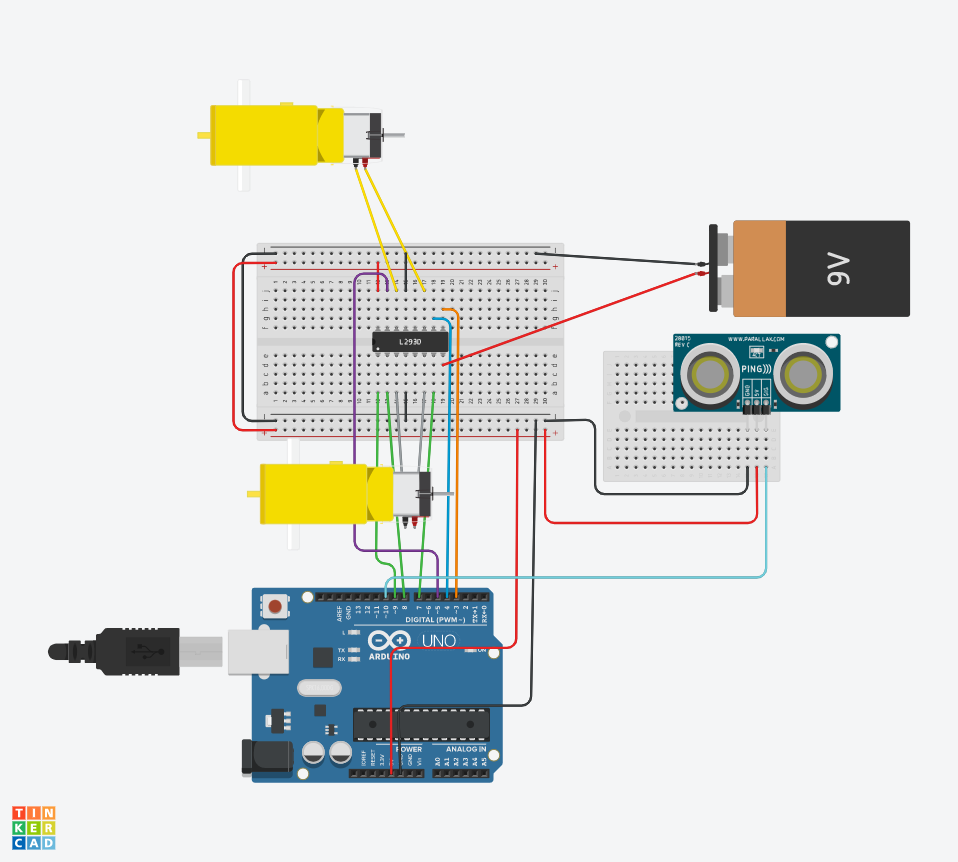
Schematic
Attaching the jumper cables: Connect 5v on the arduino to the breadboard Connect GND on the arduino to the breadboard Connect enable1,2 to digital pin 11 Connect input 1 to digital pin 8 Connect output 1 to the negative of the hobby gearmotor Connect GND(4) to ground on the breadboard Connect output 2 to positive of the hobby gearmotor Connect input 2 to digital pin 7 Connect Vcc 2 to 9v battery Connect enable 3,4 to digital pin 3 Connect input 3 to digital pin 4 Connect output 3 to the positive of the second hobby gearmotor Connect GND(13) to ground on the breadboard Connect output 4 to the negative of the second hobby gearmotor Connect Vcc 1 to 5v on the breadboard Connect input 4 to digital pin 5 Connecting the Bluetooth module: Connect Vcc to the power on the breadboard Connect GND to the ground on the breadboard Connect RXD to digital pin 1 Connect TXD to digital pin 0 Connecting the Ultrasonic Range Finder: Connect GND to ground on the breadboard Connect 5v to power on the breadboard Connect echo to digital pin 10 Connect trig to digital pin 9
Schematic
MIT App
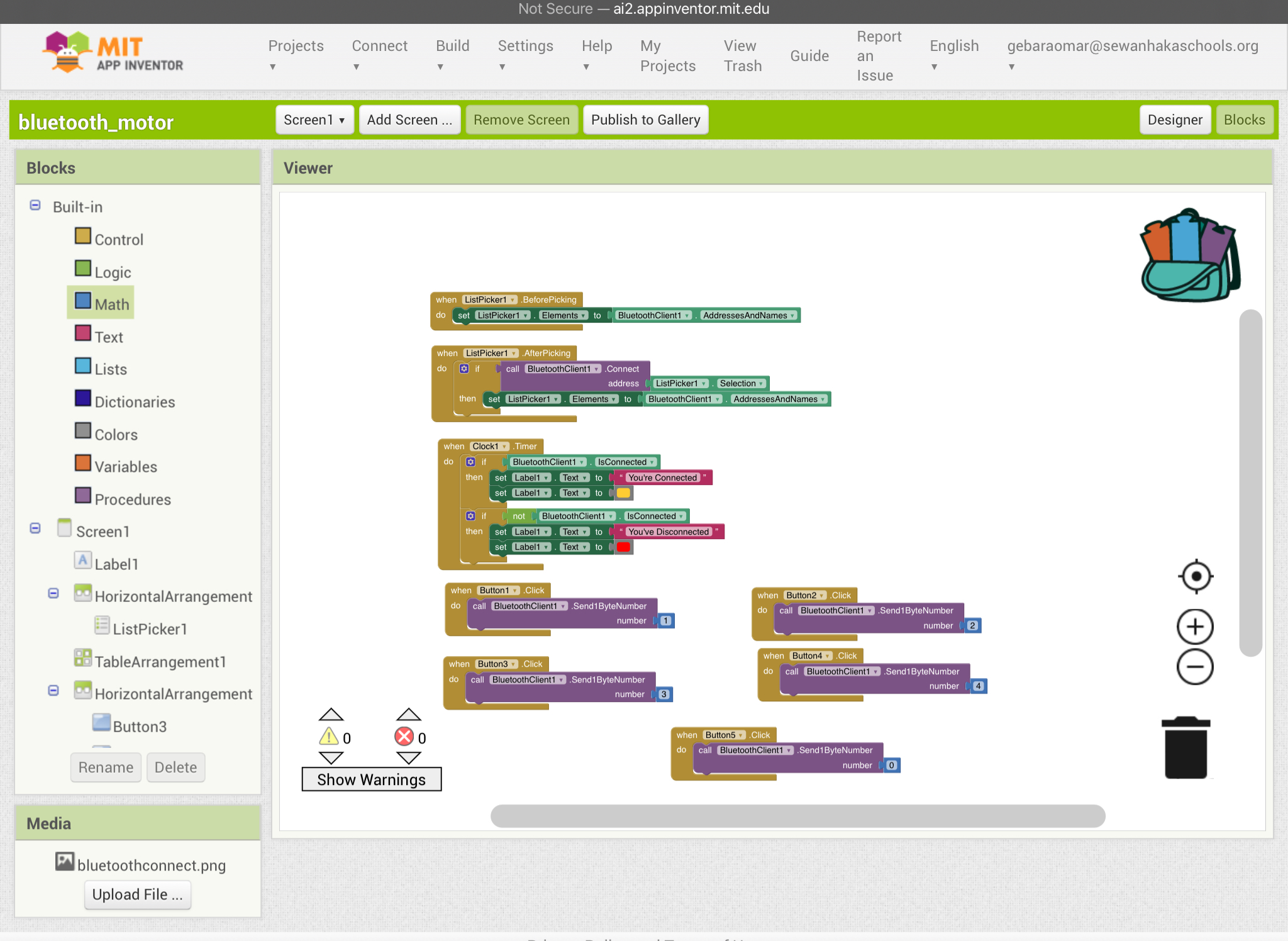
Setting up the app: To set up this app follow the block commands shown in the diagram
MIT App
Final result
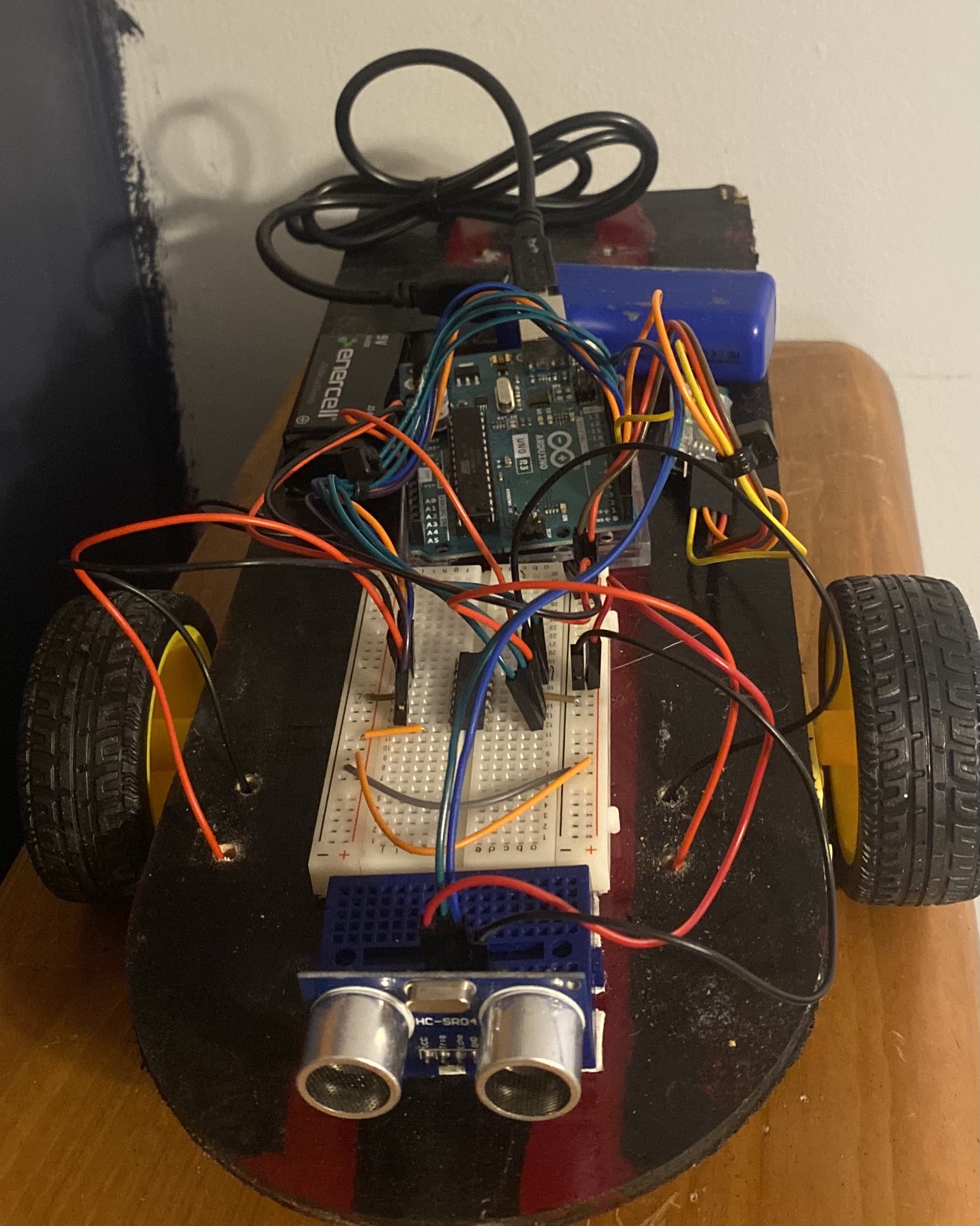
1)Glue the hobby gear motors to the bottom of the base of the car 2)Drill the caster wheel to the back of the base 3)Attach all the breadboards and arduino to the base
Final result
Style
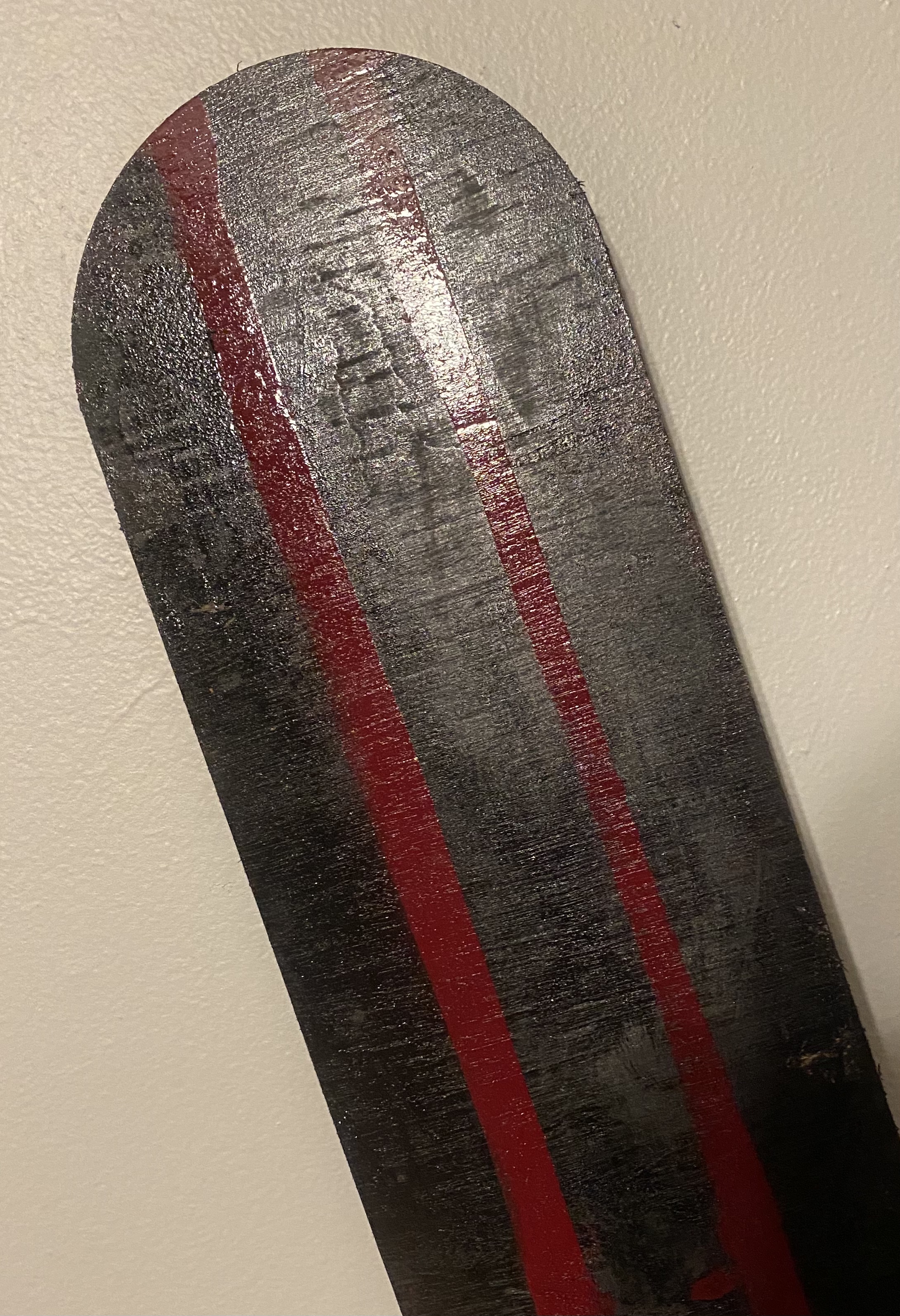
Even though this is not an essential component of this project I chose to paint the wooden base that I decided to use. I did this to add my aspect to this project.
Style
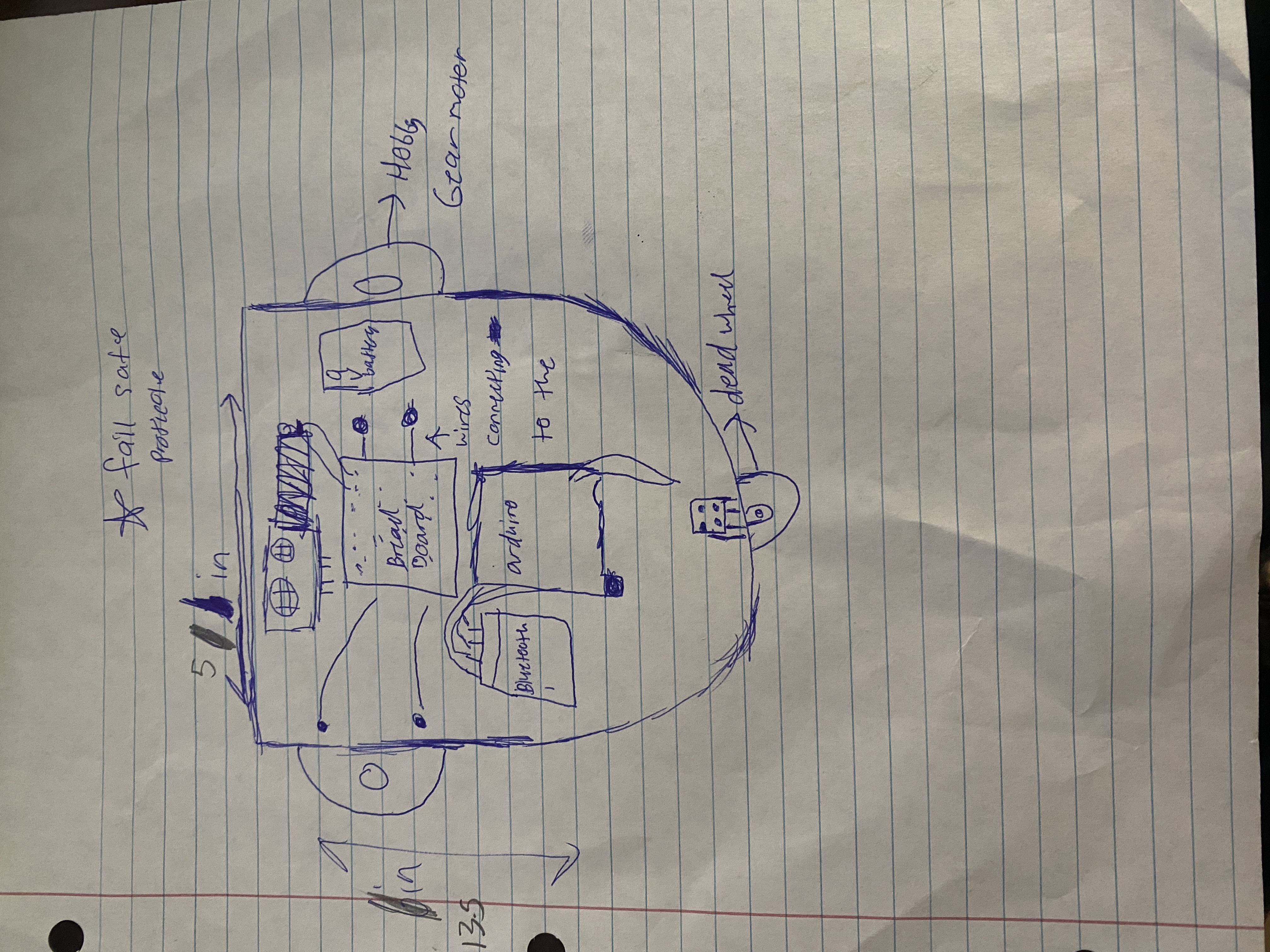
Sketch
It is good draw a project for a physical visualization and to label each component for clarity.
Sketch
Style
Even though this is not an essential component of this project I chose to paint the wooden base that I decided to use. I did this to add my aspect to this project.
Style

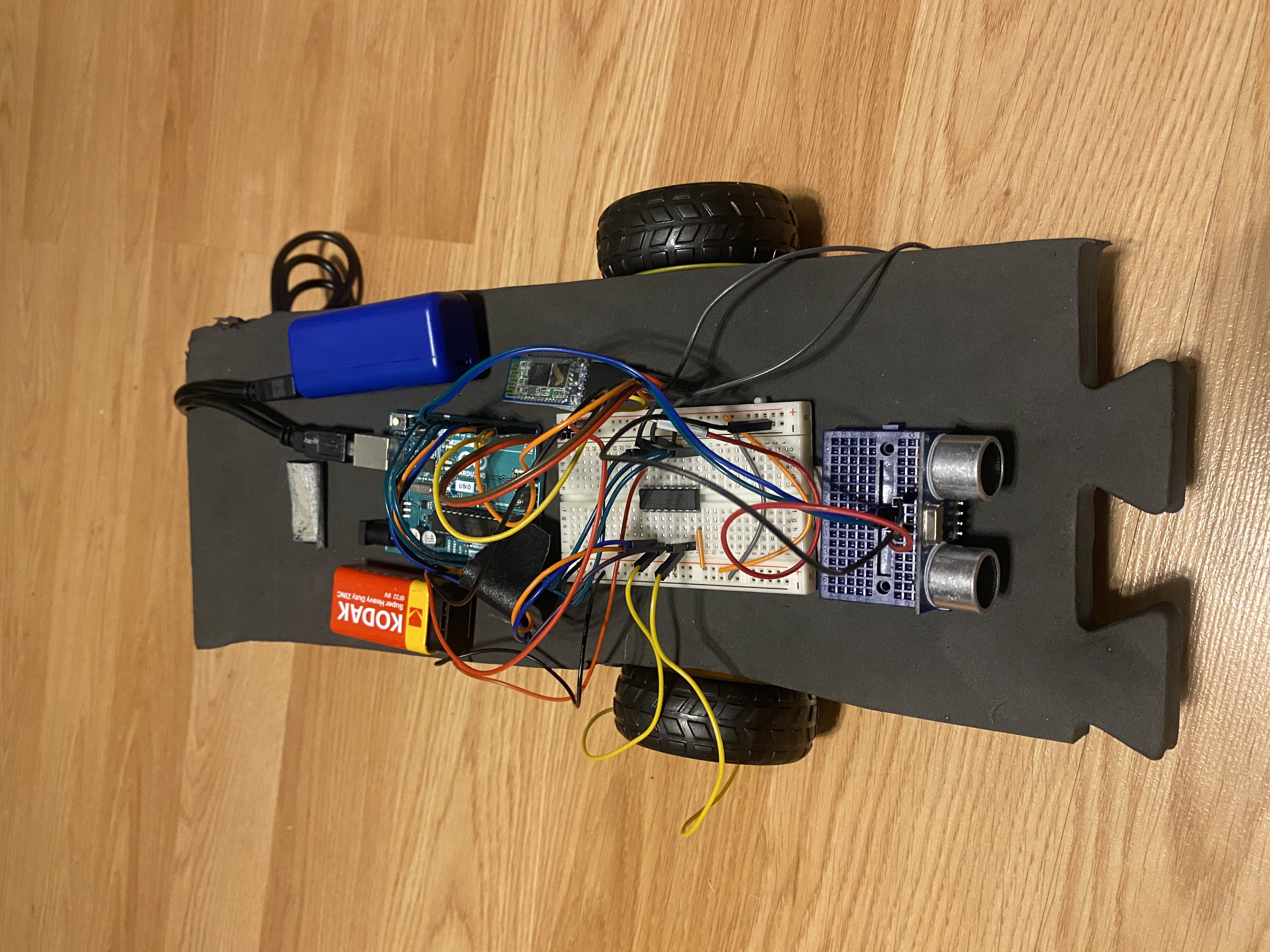
Prototype
Before building the final product of your project it is important to prototype the project. Through building this project on a smaller scale or a cheaper material you can adequately size and organize each part of the project.
Prototype
Final result
1)Glue the hobby gear motors to the bottom of the base of the car 2)Drill the caster wheel to the back of the base 3)Attach all the breadboards and arduino to the base
Final result

MIT App
Setting up the app: To set up this app follow the block commands shown in the diagram
MIT App

Schematic
Attaching the jumper cables: Connect 5v on the arduino to the breadboard Connect GND on the arduino to the breadboard Connect enable1,2 to digital pin 11 Connect input 1 to digital pin 8 Connect output 1 to the negative of the hobby gearmotor Connect GND(4) to ground on the breadboard Connect output 2 to positive of the hobby gearmotor Connect input 2 to digital pin 7 Connect Vcc 2 to 9v battery Connect enable 3,4 to digital pin 3 Connect input 3 to digital pin 4 Connect output 3 to the positive of the second hobby gearmotor Connect GND(13) to ground on the breadboard Connect output 4 to the negative of the second hobby gearmotor Connect Vcc 1 to 5v on the breadboard Connect input 4 to digital pin 5 Connecting the Bluetooth module: Connect Vcc to the power on the breadboard Connect GND to the ground on the breadboard Connect RXD to digital pin 1 Connect TXD to digital pin 0 Connecting the Ultrasonic Range Finder: Connect GND to ground on the breadboard Connect 5v to power on the breadboard Connect echo to digital pin 10 Connect trig to digital pin 9
Schematic

Sketch
It is good draw a project for a physical visualization and to label each component for clarity.
Sketch

Comments
Only logged in users can leave comments