Monitoring of Hydroponic with IoT System
In this article, you'll learn how to make Monitoring system about hydroponic using IoT based ESP8266.
Devices & Components
1
Arduino Uno Rev3
1
DHT22 Temperature Sensor
1
NodeMCU ESP8266 Breakout Board
1
Resistor 10k ohm
1
5 mm LED: Red
1
Relay (generic)
1
Jumper wires (generic)
1
RGB Backlight LCD - 16x2
1
LDR, 1 Mohm
Hardware & Tools
1
Soldering iron (generic)
1
Solder Wire, Lead Free
1
Scissor, Electrician
1
Tape, Electrical
Software & Tools

Arduino IDE
Project description
Code
Code
arduino
1#include <ESP8266WiFi.h>;
2#include <WiFiClient.h>;
3#include <LiquidCrystal_I2C.h>
4#include  <DHT.h>
5#include <Wire.h>
6#define DHTPIN 13
7#define rly 15
8
9LiquidCrystal_I2C  lcd(0x3F, 16, 2);
10
11String apiKey = "9E66C0QZECQTFFCY";                            //fill  in the api key from thingspeak
12const char* ssid = "(1 + sqrt(5)) / 2";                        //fill  in your wifi name
13const char* password = "1.6180339887498948482045868343656";    //fill in your wifi password
14const char* server = "api.thingspeak.com";
15
16int  SensorPin = A0;                     //Sensor Pin Connected at A0 Pin
17int Enable1  = 0;
18int Enable2 = 2;
19
20int SensorValue1 = 0;
21int SensorValue2 = 0;
22
23DHT dht(DHTPIN, DHT22);
24WiFiClient client;
25
26
27void setup(){
28
29Serial.begin(115200);
30delay(10);
31dht.begin();
32lcd.begin();
33
34WiFi.begin(ssid,  password);               // Connect to WiFi network
35
36while (WiFi.status()  != WL_CONNECTED) {
37delay(500);
38}
39
40Serial.println("WiFi connected");
41Serial.println();
42
43pinMode(Enable1,OUTPUT);
44pinMode(Enable2,OUTPUT);
45pinMode(rly,OUTPUT);
46}
47
48
49
50void loop(){
51
52//DHT22
53
54float h = dht.readHumidity();
55float  t = dht.readTemperature();
56
57if (isnan(h) || isnan(t)) {
58Serial.println("Failed  to read from DHT sensor!");
59return;
60
61delay(1000);
62}
63
64Serial.print("Temperature:      ");
65Serial.print(t);
66Serial.print(" degrees Celcius ");
67Serial.println();
68
69Serial.print("Humidity:         ");
70Serial.print(h);
71Serial.print("%");
72Serial.println();
73
74//Sensor
75
76   digitalWrite(Enable1, HIGH);
77   SensorValue1 = analogRead(SensorPin);
78   Serial.print("Water Quality:  ");
79   Serial.println(SensorValue1);
80   digitalWrite(Enable1,  LOW);
81   delay(500);
82   digitalWrite(Enable2, HIGH);
83   SensorValue2 =  analogRead(SensorPin);
84   Serial.print("Light intensity:  ");
85   Serial.println(SensorValue2);
86   digitalWrite(Enable2, LOW);
87   delay(500);
88
89
90//thingspeak
91
92if  (client.connect(server,80)) {   //  api.thingspeak.com
93String postStr = apiKey;
94postStr  +="&field1=";
95postStr += String(t);
96postStr +="&field2=";
97postStr +=  String(h);
98postStr +="&field3=";
99postStr += String(SensorValue1);
100//postStr  +="&field7=";
101postStr += "\
\
102\
\
103\
\
104\
\
105\
\
106\
\
107\
\
108\
\
109";
110
111client.print("POST  /update HTTP/1.1\
112");
113client.print("Host: api.thingspeak.com\
114");
115client.print("Connection:  close\
116");
117client.print("X-THINGSPEAKAPIKEY: "+apiKey+"\
118");
119client.print("Content-Type:  application/x-www-form-urlencoded\
120");
121client.print("Content-Length: ");
122client.print(postStr.length());
123client.print("\
124\
125\
126\
127\
128\
129\
130\
131");
132client.print(postStr);
133
134  if(SensorValue2>500){
135    digitalWrite(rly,HIGH);
136  }else{
137    digitalWrite(rly,LOW);
138  }
139}
140  lcd.clear();
141  lcd.setCursor(0,0);
142  lcd.print("Temp= ");
143  lcd.print(t);
144  lcd.print(" C");
145  lcd.setCursor(0,1);
146  lcd.print("Water=  ");
147  lcd.print(SensorValue1);
148  lcd.noBlink();
149  delay(5000);
150  lcd.noBlink();
151  delay(5000);
152  lcd.clear();
153  lcd.setCursor(0,0);
154  lcd.print("Hum=  ");
155  lcd.print(h);
156  lcd.print(" %");
157  lcd.setCursor(0,1);
158  lcd.print("Water=  ");
159  lcd.print(SensorValue1);
160
161
162
163delay(10000);
164}
Code
arduino
1#include <ESP8266WiFi.h>;
2#include <WiFiClient.h>;
3#include <LiquidCrystal_I2C.h>
4#include   <DHT.h>
5#include <Wire.h>
6#define DHTPIN 13
7#define rly 15
8
9LiquidCrystal_I2C   lcd(0x3F, 16, 2);
10
11String apiKey = "9E66C0QZECQTFFCY";                            //fill   in the api key from thingspeak
12const char* ssid = "(1 + sqrt(5)) / 2";                        //fill   in your wifi name
13const char* password = "1.6180339887498948482045868343656";     //fill in your wifi password
14const char* server = "api.thingspeak.com";
15
16int   SensorPin = A0;                     //Sensor Pin Connected at A0 Pin
17int Enable1   = 0;
18int Enable2 = 2;
19
20int SensorValue1 = 0;
21int SensorValue2 = 0;
22
23DHT dht(DHTPIN, DHT22);
24WiFiClient client;
25
26
27void setup(){
28
29Serial.begin(115200);
30delay(10);
31dht.begin();
32lcd.begin();
33
34WiFi.begin(ssid,   password);               // Connect to WiFi network
35
36while (WiFi.status()   != WL_CONNECTED) {
37delay(500);
38}
39
40Serial.println("WiFi connected");
41Serial.println();
42
43pinMode(Enable1,OUTPUT);
44pinMode(Enable2,OUTPUT);
45pinMode(rly,OUTPUT);
46}
47
48
49
50void loop(){
51
52//DHT22
53
54float h = dht.readHumidity();
55float   t = dht.readTemperature();
56
57if (isnan(h) || isnan(t)) {
58Serial.println("Failed   to read from DHT sensor!");
59return;
60
61delay(1000);
62}
63
64Serial.print("Temperature:       ");
65Serial.print(t);
66Serial.print(" degrees Celcius ");
67Serial.println();
68
69Serial.print("Humidity:          ");
70Serial.print(h);
71Serial.print("%");
72Serial.println();
73
74//Sensor
75
76    digitalWrite(Enable1, HIGH);
77   SensorValue1 = analogRead(SensorPin);
78    Serial.print("Water Quality:  ");
79   Serial.println(SensorValue1);
80   digitalWrite(Enable1,   LOW);
81   delay(500);
82   digitalWrite(Enable2, HIGH);
83   SensorValue2 =   analogRead(SensorPin);
84   Serial.print("Light intensity:  ");
85   Serial.println(SensorValue2);
86    digitalWrite(Enable2, LOW);
87   delay(500);
88
89
90//thingspeak
91
92if   (client.connect(server,80)) {   //  api.thingspeak.com
93String postStr = apiKey;
94postStr   +="&field1=";
95postStr += String(t);
96postStr +="&field2=";
97postStr +=   String(h);
98postStr +="&field3=";
99postStr += String(SensorValue1);
100//postStr   +="&field7=";
101postStr += "\
\
102\
\
103\
\
104\
\
105\
\
106\
\
107\
\
108\
\
109";
110
111client.print("POST   /update HTTP/1.1\
112");
113client.print("Host: api.thingspeak.com\
114");
115client.print("Connection:   close\
116");
117client.print("X-THINGSPEAKAPIKEY: "+apiKey+"\
118");
119client.print("Content-Type:   application/x-www-form-urlencoded\
120");
121client.print("Content-Length: ");
122client.print(postStr.length());
123client.print("\
124\
125\
126\
127\
128\
129\
130\
131");
132client.print(postStr);
133
134   if(SensorValue2>500){
135    digitalWrite(rly,HIGH);
136  }else{
137    digitalWrite(rly,LOW);
138   }
139}
140  lcd.clear();
141  lcd.setCursor(0,0);
142  lcd.print("Temp= ");
143   lcd.print(t);
144  lcd.print(" C");
145  lcd.setCursor(0,1);
146  lcd.print("Water=   ");
147  lcd.print(SensorValue1);
148  lcd.noBlink();
149  delay(5000);
150  lcd.noBlink();
151   delay(5000);
152  lcd.clear();
153  lcd.setCursor(0,0);
154  lcd.print("Hum=   ");
155  lcd.print(h);
156  lcd.print(" %");
157  lcd.setCursor(0,1);
158  lcd.print("Water=   ");
159  lcd.print(SensorValue1);
160
161
162
163delay(10000);
164}
Downloadable files
Fritzing
Fritzing
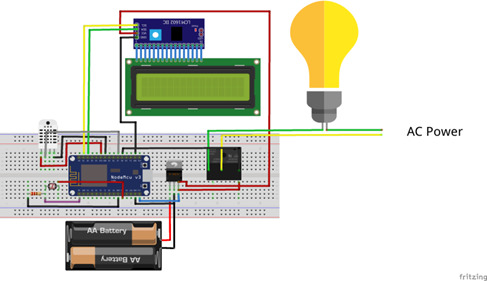
Fritzing
Fritzing
Documentation
CAD
CAD
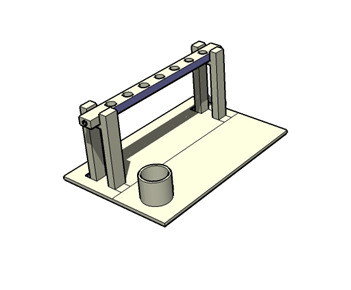
Comments
Only logged in users can leave comments