Devices & Components
Arduino Uno Rev3
Breadboard (generic)
4xAA battery holder
Buzzer
Jumper wires (generic)
MQ-2 gas sensor
5 mm LED: Red
Resistor 220 ohm
5 mm LED: Green
Hardware & Tools
3D Printer (generic)
Hot glue gun (generic)
Project description
Code
Code
arduino
IT is the code that is used to make the gas sensor work with psuedocode.
1int red_led=12;//indicates gas 2int green_led=11;//indicates normal 3int 4 buzz=13;//indicates gas 5intsmokeA0 = A5;//indicates sensor is connected to A5 6int 7 sensorThres=400;//The threshold value 8void setup() 9{ 10pinMode(red_led,OUTPUT);//red 11 led as output 12pinMode(buzz,OUTPUT);// buzz as output 13pinMode(green_led,OUTPUT);//green 14 led as output 15pinMode(A1,INPUT);//sensor as input 16Serial.begin(9600);//starts 17 the code 18} 19void loop()//loops 20{ 21gas_avalue=analogRead(smokeA0);//reads 22 sensor value 23if (A0 > sensorThres)//sees if it reached threshold value 24{ 25digitalWrite(red_led, 26 HIGH);//turns on red led 27digitalWrite(green_led, LOW);//turns off green led 28digitalWrite( 29 buzz, HIGH);//turns on buzzer 30} 31else//if it hasn't reached threshold value 32{ 33digitalWrite(red_led, 34 LOW);//turns red led off 35digitalWrite(green_led, HIGH);//turn green led on 36digitalWrite( 37 buzz, LOW);//turns buzzer off 38} 39delay(100);//delay 0.1 sec 40} 41
Code
arduino
IT is the code that is used to make the gas sensor work with psuedocode.
1int red_led=12;//indicates gas 2int green_led=11;//indicates normal 3int buzz=13;//indicates gas 4intsmokeA0 = A5;//indicates sensor is connected to A5 5int sensorThres=400;//The threshold value 6void setup() 7{ 8pinMode(red_led,OUTPUT);//red led as output 9pinMode(buzz,OUTPUT);// buzz as output 10pinMode(green_led,OUTPUT);//green led as output 11pinMode(A1,INPUT);//sensor as input 12Serial.begin(9600);//starts the code 13} 14void loop()//loops 15{ 16gas_avalue=analogRead(smokeA0);//reads sensor value 17if (A0 > sensorThres)//sees if it reached threshold value 18{ 19digitalWrite(red_led, HIGH);//turns on red led 20digitalWrite(green_led, LOW);//turns off green led 21digitalWrite( buzz, HIGH);//turns on buzzer 22} 23else//if it hasn't reached threshold value 24{ 25digitalWrite(red_led, LOW);//turns red led off 26digitalWrite(green_led, HIGH);//turn green led on 27digitalWrite( buzz, LOW);//turns buzzer off 28} 29delay(100);//delay 0.1 sec 30} 31
Downloadable files
Circuit
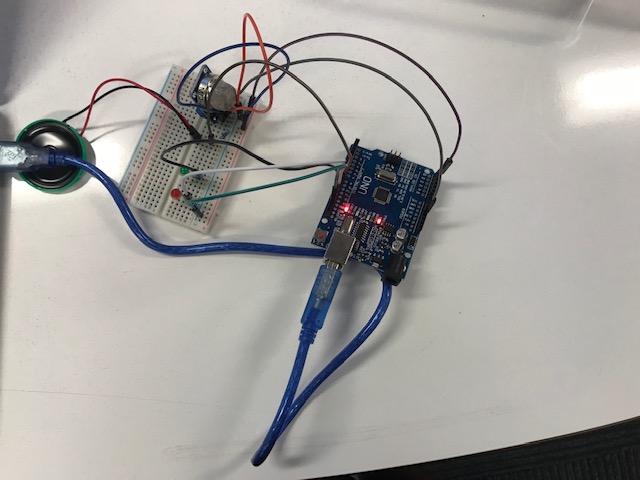
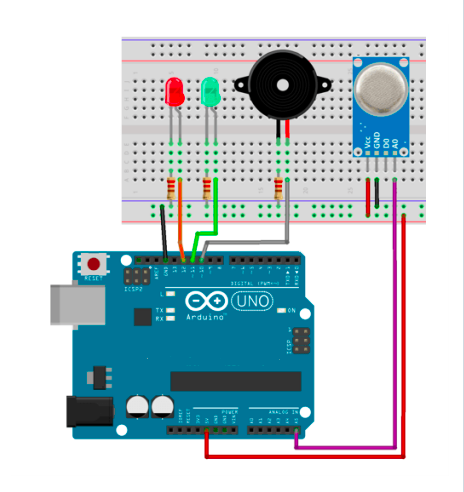
The circuit in real life and what it is supposed to look like
Circuit
Fritzing Model
The MQ-5 sensor Pin-> Wiring to Arduino Uno A0-> Analog pins D0-> none GND-> GND VCC-> 5V other components Pin-> Wiring to Arduino Uno D13-> +ve of buzzer GND-> -ve of buzzer D12-> anode of red light D11-> anode of green light GND-> cathode of red light GND-> cathode of red light
Fritzing Model
Circuit
The circuit in real life and what it is supposed to look like
Circuit

Documentation
Casing
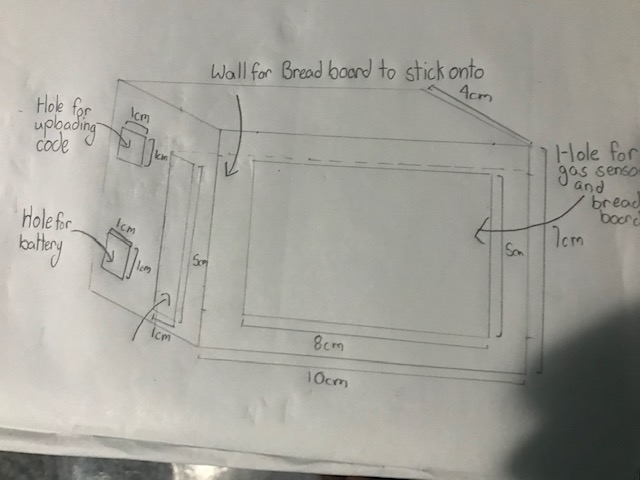
It is a casing for the gas sensor
Casing
Casing
It is a casing for the gas sensor
Casing

Comments
Only logged in users can leave comments