Keypad Door lock System
Keypad Door lock System (Based on Password)
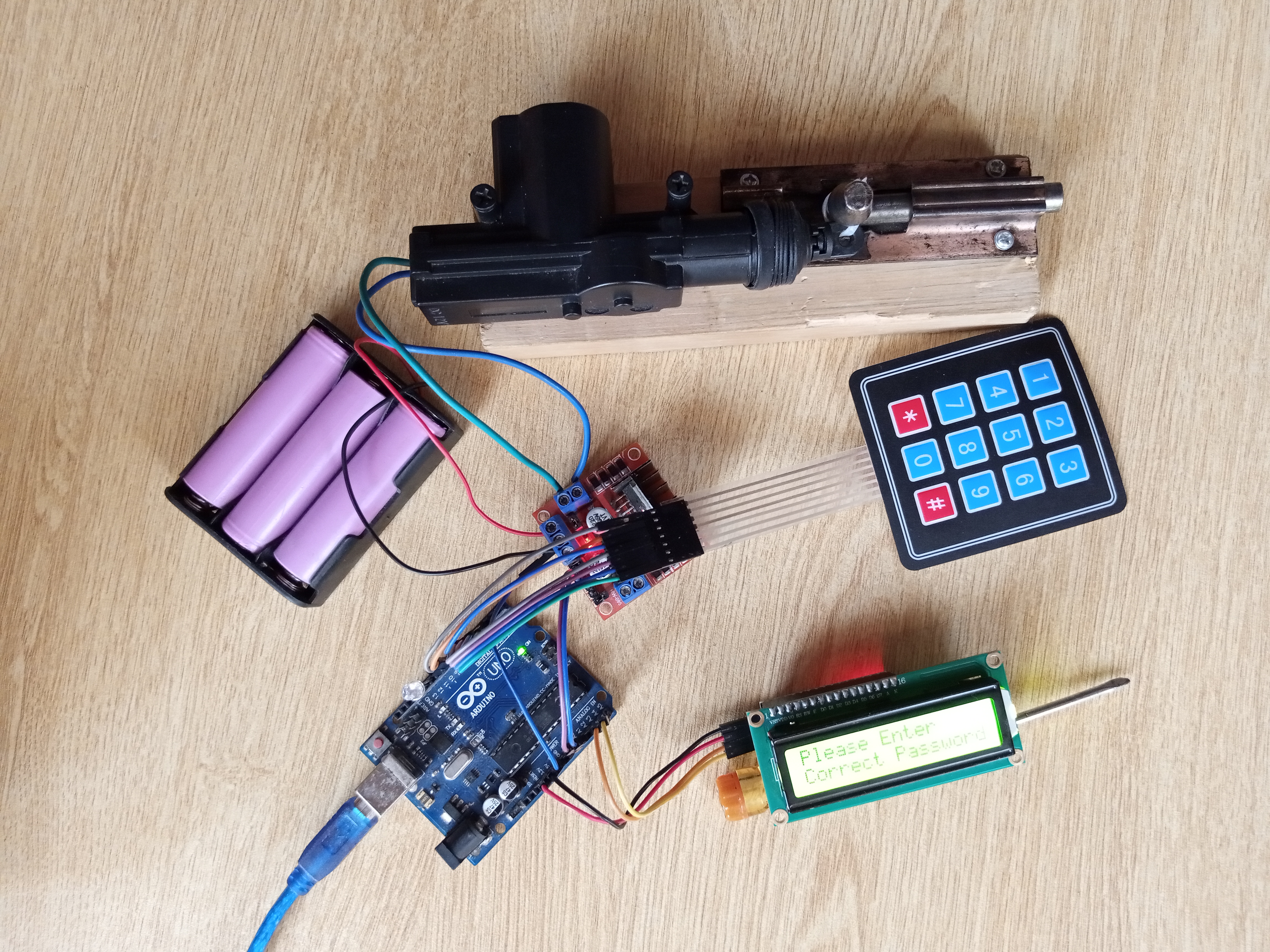
Devices & Components
1
Arduino Uno Rev3
1
12 volt battery Holder
1
L298n Motor Driver
1
3.7 volt battery
1
I2c LCD Module
1
Jumper wires (generic)
1
Car door lock actuator
1
LCD
1
RGB LED
1
3x4 Keypad
Software & Tools

Arduino IDE
Project description
Code
Code
arduino
1// Include the libraries:
2// LiquidCrystal_I2C.h: https://github.com/johnrickman/LiquidCrystal_I2C
3#include
4  <Keypad.h>
5#include <LiquidCrystal_I2C.h>
6
7int lock_pin = A0;
8int unlock_pin
9  = A1;
10int green_led = 11;
11int blue_led = 12;
12int red_led = 13;
13int j
14  = 0;
15int x = 0;
16
17const int ROW_NUM = 4; //four rows
18const int COLUMN_NUM
19  = 3; //three columns
20
21char keys[ROW_NUM][COLUMN_NUM] = {
22  {'1', '2', '3'},
23
24  {'4', '5', '6'},
25  {'7', '8', '9'},
26  {'*', '0', '#'}
27};
28
29byte
30  pin_rows[ROW_NUM] = {9, 8, 7, 6}; //connect to the row pinouts of the keypad
31byte
32  pin_column[COLUMN_NUM] = {5, 4, 3}; //connect to the column pinouts of the keypad
33
34Keypad
35  keypad = Keypad( makeKeymap(keys), pin_rows, pin_column, ROW_NUM, COLUMN_NUM );
36//
37  Wiring: SDA pin is connected to A4 and SCL pin to A5.
38LiquidCrystal_I2C lcd(0x27,
39  16, 2); // I2C address 0x27, 16 column and 2 rows
40const String password = "432";
41  // change your password here
42String input_password;
43
44void setup() {
45
46
47  pinMode(lock_pin, OUTPUT);
48  pinMode(unlock_pin, OUTPUT);
49  pinMode(green_led,
50  OUTPUT);
51  pinMode(blue_led, OUTPUT);
52  pinMode(red_led, OUTPUT);
53
54
55  Serial.begin(9600);
56  input_password.reserve(32); // maximum input characters
57  is 33, change if needed
58  lcd.init();                    // initialize the lcd
59
60  lcd.backlight();
61  lcd.setCursor(4, 0);
62  lcd.print("Wel Come");
63  lcd.setCursor(1,
64  1);
65  lcd.print("Enter Password");
66}
67
68void loop() {
69  char key
70  = keypad.getKey();
71
72  if (key) {
73
74    Serial.println(key);
75
76    if
77  (key == '*') {
78      input_password = ""; // clear input password
79      lcd.clear();
80
81      lcd.setCursor(0, 0);
82      lcd.print("Password Clear");
83      lcd.setCursor(0,
84  1);
85      lcd.print("Enter Again !");
86      x = 0;
87
88    } else if
89  (key == '#') {
90
91      if (password == input_password) {
92        Serial.println("password
93  is correct");
94        Serial.println(input_password);
95        if (j == 0)
96
97        {
98          digitalWrite(lock_pin, HIGH);
99          digitalWrite(green_led,
100  HIGH);
101          delay(1000);
102          digitalWrite(lock_pin, LOW);
103          digitalWrite(green_led,
104  LOW);
105          j = 1;
106          lcd.clear();
107          lcd.setCursor(0,
108  0);
109          lcd.print("CORRECT!");
110          lcd.setCursor(0, 1);
111
112          lcd.print("DOOR LOCKED!");
113        }
114        else if (j == 1)
115
116        {
117          digitalWrite(unlock_pin, HIGH);
118          digitalWrite(blue_led,
119  HIGH);
120          delay(500);
121          digitalWrite(unlock_pin, LOW);
122
123          digitalWrite(blue_led, LOW);
124          j = 0;
125          lcd.clear();
126
127          lcd.setCursor(0, 0);
128          lcd.print("CORRECT!");
129          lcd.setCursor(0,
130  1);
131          lcd.print("DOOR UNLOCKED!");
132        }
133
134      } else
135  {
136        Serial.println("password is incorrect, try again");
137        digitalWrite(red_led,
138  HIGH); //..the green LED not..
139        delay(500);
140        digitalWrite(red_led,
141  LOW);
142
143        lcd.setCursor(0, 0);
144        lcd.print("INCORRECT!");
145
146        lcd.setCursor(0, 1);
147        lcd.print("ACCESS DENIED!");
148
149        lcd.setBacklight(LOW);
150
151        delay(300);
152        lcd.setBacklight(HIGH);
153        delay(300);
154
155        lcd.setBacklight(LOW);
156        delay(300);
157        lcd.setBacklight(HIGH);
158
159        delay(300);
160        lcd.setBacklight(LOW);
161        delay(300);
162
163        lcd.setBacklight(HIGH);
164        delay(300);
165        lcd.setBacklight(LOW);
166
167        delay(300);
168        lcd.setBacklight(HIGH);
169        delay(300);
170
171        lcd.setBacklight(LOW);
172        delay(300);
173        lcd.setBacklight(HIGH);
174
175        delay(300);
176        lcd.setBacklight(LOW);
177        delay(300);
178
179        lcd.setBacklight(HIGH);
180         lcd.setCursor(0, 0);
181        lcd.print("Please
182  Enter");
183        lcd.setCursor(0, 1);
184        lcd.print("Correct Password!");
185
186
187      }
188
189      input_password = ""; // clear input password
190
191      x = 0;
192    } else {
193      if (x == 0)
194        lcd.clear();
195      x
196  = 1;
197      input_password += key; // append new character to input password string
198
199      lcd.setCursor(input_password.length(), 0); // move cursor to new position
200
201      lcd.print('*');                 // print * key as hiden character
202    }
203
204  }
205}
206
Code
arduino
1// Include the libraries:
2// LiquidCrystal_I2C.h: https://github.com/johnrickman/LiquidCrystal_I2C
3#include  <Keypad.h>
4#include <LiquidCrystal_I2C.h>
5
6int lock_pin = A0;
7int unlock_pin  = A1;
8int green_led = 11;
9int blue_led = 12;
10int red_led = 13;
11int j  = 0;
12int x = 0;
13
14const int ROW_NUM = 4; //four rows
15const int COLUMN_NUM  = 3; //three columns
16
17char keys[ROW_NUM][COLUMN_NUM] = {
18  {'1', '2', '3'},
19  {'4', '5', '6'},
20  {'7', '8', '9'},
21  {'*', '0', '#'}
22};
23
24byte  pin_rows[ROW_NUM] = {9, 8, 7, 6}; //connect to the row pinouts of the keypad
25byte  pin_column[COLUMN_NUM] = {5, 4, 3}; //connect to the column pinouts of the keypad
26
27Keypad  keypad = Keypad( makeKeymap(keys), pin_rows, pin_column, ROW_NUM, COLUMN_NUM );
28//  Wiring: SDA pin is connected to A4 and SCL pin to A5.
29LiquidCrystal_I2C lcd(0x27,  16, 2); // I2C address 0x27, 16 column and 2 rows
30const String password = "432";  // change your password here
31String input_password;
32
33void setup() {
34
35  pinMode(lock_pin, OUTPUT);
36  pinMode(unlock_pin, OUTPUT);
37  pinMode(green_led,  OUTPUT);
38  pinMode(blue_led, OUTPUT);
39  pinMode(red_led, OUTPUT);
40
41  Serial.begin(9600);
42  input_password.reserve(32); // maximum input characters  is 33, change if needed
43  lcd.init();                    // initialize the lcd
44  lcd.backlight();
45  lcd.setCursor(4, 0);
46  lcd.print("Wel Come");
47  lcd.setCursor(1,  1);
48  lcd.print("Enter Password");
49}
50
51void loop() {
52  char key  = keypad.getKey();
53
54  if (key) {
55
56    Serial.println(key);
57
58    if  (key == '*') {
59      input_password = ""; // clear input password
60      lcd.clear();
61      lcd.setCursor(0, 0);
62      lcd.print("Password Clear");
63      lcd.setCursor(0,  1);
64      lcd.print("Enter Again !");
65      x = 0;
66
67    } else if  (key == '#') {
68
69      if (password == input_password) {
70        Serial.println("password  is correct");
71        Serial.println(input_password);
72        if (j == 0)
73        {
74          digitalWrite(lock_pin, HIGH);
75          digitalWrite(green_led,  HIGH);
76          delay(1000);
77          digitalWrite(lock_pin, LOW);
78          digitalWrite(green_led,  LOW);
79          j = 1;
80          lcd.clear();
81          lcd.setCursor(0,  0);
82          lcd.print("CORRECT!");
83          lcd.setCursor(0, 1);
84          lcd.print("DOOR LOCKED!");
85        }
86        else if (j == 1)
87        {
88          digitalWrite(unlock_pin, HIGH);
89          digitalWrite(blue_led,  HIGH);
90          delay(500);
91          digitalWrite(unlock_pin, LOW);
92          digitalWrite(blue_led, LOW);
93          j = 0;
94          lcd.clear();
95          lcd.setCursor(0, 0);
96          lcd.print("CORRECT!");
97          lcd.setCursor(0,  1);
98          lcd.print("DOOR UNLOCKED!");
99        }
100
101      } else  {
102        Serial.println("password is incorrect, try again");
103        digitalWrite(red_led,  HIGH); //..the green LED not..
104        delay(500);
105        digitalWrite(red_led,  LOW);
106
107        lcd.setCursor(0, 0);
108        lcd.print("INCORRECT!");
109        lcd.setCursor(0, 1);
110        lcd.print("ACCESS DENIED!");
111
112        lcd.setBacklight(LOW);
113        delay(300);
114        lcd.setBacklight(HIGH);
115        delay(300);
116        lcd.setBacklight(LOW);
117        delay(300);
118        lcd.setBacklight(HIGH);
119        delay(300);
120        lcd.setBacklight(LOW);
121        delay(300);
122        lcd.setBacklight(HIGH);
123        delay(300);
124        lcd.setBacklight(LOW);
125        delay(300);
126        lcd.setBacklight(HIGH);
127        delay(300);
128        lcd.setBacklight(LOW);
129        delay(300);
130        lcd.setBacklight(HIGH);
131        delay(300);
132        lcd.setBacklight(LOW);
133        delay(300);
134        lcd.setBacklight(HIGH);
135         lcd.setCursor(0, 0);
136        lcd.print("Please  Enter");
137        lcd.setCursor(0, 1);
138        lcd.print("Correct Password!");
139
140      }
141
142      input_password = ""; // clear input password
143      x = 0;
144    } else {
145      if (x == 0)
146        lcd.clear();
147      x  = 1;
148      input_password += key; // append new character to input password string
149      lcd.setCursor(input_password.length(), 0); // move cursor to new position
150      lcd.print('*');                 // print * key as hiden character
151    }
152  }
153}
154
Downloadable files
Diagram
Diagram
Comments
Only logged in users can leave comments