Devices & Components
1
Grove - Button (P)
1
XL6009 DC-DC Adjustable Step Up Voltage Booster Converter Module
1
CRT Display
6
10kOhm potentiometer
1
Convertitore DC-DC step-down LM317
2
EF80
1
ESP32
Hardware & Tools
1
Soldering kit
Software & Tools

Arduino IDE
Project description
Code
code
cpp
...
1/******************************************************************************
2
3  ESP32 Oscilloscope Clock
4  using internal DACs, with WiFi and ntp sync.
5
6  Mauro Pintus , Milano 2018/05/25
7
8  How to use it:
9  Load this sketch on a ESP32 board using the Arduino IDE 1.8.7
10  See Andreas Spiess video linked below if you dont know how to...
11  Connect your oscilloscope channels to GPIO25 and GPIO26 of the ESP32
12  Connect the ground of the oscilloscope to the GND of the ESP32 board
13  Put your Oscilloscope in XY mode
14  Adjust the vertical scale of the used channels to fit the clock
15
16  Enjoy Your new Oscilloscope Clock!!! :)
17
18  Additional notes:
19  By default this sketch will start from a fix time 10:08:37 everityme
20  you reset the board.
21  To change it, modify the variables h,m,s below.
22
23  To synchronize the clock with an NTP server, you have to install
24  the library NTPtimeESP from Andreas Spiess.
25  Then ncomment the line //#define NTP, removing the //.
26  Edit the WiFi credential in place of Your SSID and Your PASS.
27  Check in the serial monitor if it can reach the NTP server.
28  You mignt need to chouse a different pool server for your country.
29
30  If you want there is also a special mode that can be enabled uncommenting
31  the line //#define EXCEL, removing the //. In this mode, the sketch
32  will run once and will output on the serial monitor all the coordinates
33  it has generated. You can use this coordinates to draw the clock
34  using the graph function in Excel or LibreOffice
35  This is useful to test anything you want to display on the oscilloscope
36  to verify the actual points that will be generated.
37
38  GitHub Repository
39  https://github.com/maurohh/ESP32_OscilloscopeClock
40
41  Twitter Page
42  https://twitter.com/PintusMauro
43
44  Youtube Channel
45  www.youtube.com/channel/UCZ93JYpVb9rEbg5cbcVG_WA/
46
47  Old Web Site
48  www.mauroh.com
49
50  Credits:
51  Andreas Spiess
52  https://www.youtube.com/watch?v=DgaKlh081tU
53
54  Andreas Spiess NTP Library
55  https://github.com/SensorsIot/NTPtimeESP
56
57  My project is based on this one:
58  http://www.dutchtronix.com/ScopeClock.htm
59
60  Thank you!!
61
62******************************************************************************/
63
64#include <driver/dac.h>
65#include <soc/rtc.h>
66#include <soc/sens_reg.h>
67#include "DataTable.h"
68
69int buttonPin = 21;
70int oldButtonVal = 0;
71int nPatterns = 3;
72int clockPattern = 1;
73
74//#define EXCEL
75//#define NTP
76
77
78#if defined NTP
79  #include <NTPtimeESP.h>
80  #include <WiFi.h>
81
82  NTPtime NTPch("europe.pool.ntp.org"); // Choose your server pool
83  char *ssid      = "Your SSID";        // Set you WiFi SSID
84  char *password  = "Your PASS";        // Set you WiFi password
85
86  int status = WL_IDLE_STATUS;
87  strDateTime dateTime;
88#endif //
89
90// Change this to set the initial Time
91// Now is 10:08:37 (12h)
92int h=10;   //Start Hour
93int m=8;    //Start Minutes
94int s=37;   //Start Seconds
95
96//Variables
97int           lastx,lasty;
98unsigned long currentMillis  = 0;
99unsigned long previousMillis = 0;
100int           Timeout        = 20;
101const    long interval       = 990; //milliseconds, you should twick this
102                                    //to get a better accuracy
103
104
105//*****************************************************************************
106// PlotTable
107//*****************************************************************************
108
109void PlotTable(byte *SubTable, int SubTableSize, int skip, int opt, int offset)
110{
111  int i=offset;
112  while (i<SubTableSize){
113    if (SubTable[i+2]==skip){
114      i=i+3;
115      if (opt==1) if (SubTable[i]==skip) i++;
116    }
117    Line(SubTable[i],SubTable[i+1],SubTable[i+2],SubTable[i+3]);
118    if (opt==2){
119      Line(SubTable[i+2],SubTable[i+3],SubTable[i],SubTable[i+1]);
120    }
121    i=i+2;
122    if (SubTable[i+2]==0xFF) break;
123  }
124}
125
126// End PlotTable
127//*****************************************************************************
128
129
130
131//*****************************************************************************
132// Dot
133//*****************************************************************************
134
135inline void Dot(int x, int y)
136{
137    if (lastx!=x){
138      lastx=x;
139      dac_output_voltage(DAC_CHANNEL_1, x);
140    }
141    #if defined EXCEL
142      Serial.print("0x");
143      if (x<=0xF) Serial.print("0");
144      Serial.print(x,HEX);
145      Serial.print(",");
146    #endif
147    #if defined EXCEL
148      Serial.print("0x");
149      if (lasty<=0xF) Serial.print("0");
150      Serial.print(lasty,HEX);
151      Serial.println(",");
152    #endif
153    if (lasty!=y){
154      lasty=y;
155      dac_output_voltage(DAC_CHANNEL_2, y);
156    }
157    #if defined EXCEL
158      Serial.print("0x");
159      if (x<=0xF) Serial.print("0");
160      Serial.print(x,HEX);
161      Serial.print(",");
162    #endif
163    #if defined EXCEL
164      Serial.print("0x");
165      if (y<=0xF) Serial.print("0");
166      Serial.print(y,HEX);
167      Serial.println(",");
168    #endif
169}
170
171// End Dot
172//*****************************************************************************
173
174
175
176//*****************************************************************************
177// Line
178//*****************************************************************************
179// Bresenham's Algorithm implementation optimized
180// also known as a DDA - digital differential analyzer
181
182void Line(byte x1, byte y1, byte x2, byte y2)
183{
184    int acc;
185    // for speed, there are 8 DDA's, one for each octant
186    if (y1 < y2) { // quadrant 1 or 2
187        byte dy = y2 - y1;
188        if (x1 < x2) { // quadrant 1
189            byte dx = x2 - x1;
190            if (dx > dy) { // < 45
191                acc = (dx >> 1);
192                for (; x1 <= x2; x1++) {
193                    Dot(x1, y1);
194                    acc -= dy;
195                    if (acc < 0) {
196                        y1++;
197                        acc += dx;
198                    }
199                }
200            }
201            else {   // > 45
202                acc = dy >> 1;
203                for (; y1 <= y2; y1++) {
204                    Dot(x1, y1);
205                    acc -= dx;
206                    if (acc < 0) {
207                        x1++;
208                        acc += dy;
209                    }
210                }
211            }
212        }
213        else {  // quadrant 2
214            byte dx = x1 - x2;
215            if (dx > dy) { // < 45
216                acc = dx >> 1;
217                for (; x1 >= x2; x1--) {
218                    Dot(x1, y1);
219                    acc -= dy;
220                    if (acc < 0) {
221                        y1++;
222                        acc += dx;
223                    }
224                }
225            }
226            else {  // > 45
227                acc = dy >> 1;
228                for (; y1 <= y2; y1++) {
229                    Dot(x1, y1);
230                    acc -= dx;
231                    if (acc < 0) {
232                        x1--;
233                        acc += dy;
234                    }
235                }
236            }
237        }
238    }
239    else { // quadrant 3 or 4
240        byte dy = y1 - y2;
241        if (x1 < x2) { // quadrant 4
242            byte dx = x2 - x1;
243            if (dx > dy) {  // < 45
244                acc = dx >> 1;
245                for (; x1 <= x2; x1++) {
246                    Dot(x1, y1);
247                    acc -= dy;
248                    if (acc < 0) {
249                        y1--;
250                        acc += dx;
251                    }
252                }
253
254            }
255            else {  // > 45
256                acc = dy >> 1;
257                for (; y1 >= y2; y1--) {
258                    Dot(x1, y1);
259                    acc -= dx;
260                    if (acc < 0) {
261                        x1++;
262                        acc += dy;
263                    }
264                }
265
266            }
267        }
268        else {  // quadrant 3
269            byte dx = x1 - x2;
270            if (dx > dy) { // < 45
271                acc = dx >> 1;
272                for (; x1 >= x2; x1--) {
273                    Dot(x1, y1);
274                    acc -= dy;
275                    if (acc < 0) {
276                        y1--;
277                        acc += dx;
278                    }
279                }
280
281            }
282            else {  // > 45
283                acc = dy >> 1;
284                for (; y1 >= y2; y1--) {
285                    Dot(x1, y1);
286                    acc -= dx;
287                    if (acc < 0) {
288                        x1--;
289                        acc += dy;
290                    }
291                }
292            }
293        }
294
295    }
296}
297
298// End Line
299//*****************************************************************************
300
301
302
303//*****************************************************************************
304// setup
305//*****************************************************************************
306
307void setup()
308{
309  Serial.begin(115200);
310
311  pinMode(buttonPin, INPUT_PULLUP);
312
313  Serial.println("\nESP32 Oscilloscope Clock v1.0");
314  Serial.println("Mauro Pintus 2018\nwww.mauroh.com");
315  //rtc_clk_cpu_freq_set(RTC_CPU_FREQ_240M);
316  Serial.println("CPU Clockspeed: ");
317  //Serial.println(rtc_clk_cpu_freq_value(rtc_clk_cpu_freq_get()));
318
319  dac_output_enable(DAC_CHANNEL_1);
320  dac_output_enable(DAC_CHANNEL_2);
321
322  if (h > 12) h=h-12;
323
324  #if defined NTP
325    Serial.println("Connecting to Wi-Fi");
326
327    WiFi.begin (ssid, password);
328    while (WiFi.status() != WL_CONNECTED) {
329      Serial.print(".");
330      delay(1000);
331      Timeout--;
332      if (Timeout==0){
333        Serial.println("\nWiFi Timeout");
334        break;
335      }
336    }
337
338    if (Timeout!=0){
339      Serial.println("\nWiFi connected");
340      Serial.println("NTP request sent to Server.");
341      dateTime = NTPch.getNTPtime(1.0, 1);
342      Timeout=20;
343
344      while (!dateTime.valid) {
345        dateTime = NTPch.getNTPtime(1.0, 1);
346        Serial.print(".");
347        delay(1000);
348        Timeout--;
349        if (Timeout==0){
350          Serial.println("\nNTP Server Timeout");
351          break;
352        }
353      }
354
355      if (Timeout!=0){
356
357        Serial.println("\nUsing NTP Time");
358        NTPch.printDateTime(dateTime);
359
360        byte actualHour      = dateTime.hour;
361        byte actualMinute    = dateTime.minute;
362        byte actualsecond    = dateTime.second;
363        int  actualyear      = dateTime.year;
364        byte actualMonth     = dateTime.month;
365        byte actualday       = dateTime.day;
366        byte actualdayofWeek = dateTime.dayofWeek;
367
368        if (actualHour > 12) actualHour=actualHour-12;
369
370        h=actualHour;
371        m=actualMinute;
372        s=actualsecond;
373      }
374      else{
375        Serial.println("\nUsing Fix Time");
376      }
377    }
378  #endif
379
380  #if !defined NTP
381    Serial.println("Using Fix Time");
382  #endif
383
384  if (h<10) Serial.print("0");
385  Serial.print(h);
386  Serial.print(":");
387  if (m<10) Serial.print("0");
388  Serial.print(m);
389  Serial.print(":");
390  if (s<10) Serial.print("0");
391  Serial.println(s);
392  h=(h*5)+m/12;
393}
394
395// End setup
396//*****************************************************************************
397
398
399
400//*****************************************************************************
401// loop
402//*****************************************************************************
403
404void loop() {
405
406  currentMillis = millis();
407
408  if (currentMillis - previousMillis >= interval) {
409    previousMillis = currentMillis;
410    s++;
411  }
412  if (s==60) {
413    s=0;
414    m++;
415    if ((m==12)||(m==24)||(m==36)||(m==48)) {
416      h++;
417    }
418  }
419  if (m==60) {
420    m=0;
421    h++;
422  }
423  if (h==60) {
424    h=0;
425  }
426
427  //Optionals
428  //PlotTable(DialDots,sizeof(DialDots),0x00,1,0);
429  //PlotTable(TestData,sizeof(TestData),0x00,0,00); //Full
430  //PlotTable(TestData,sizeof(TestData),0x00,0,11); //Without square
431
432  int i;
433  //Serial.println("Out Ring");                         //2 to back trace
434  //for (i=0; i < 1000; i++) PlotTable(DialData,sizeof(DialData),0x00,2,0);
435
436  //Serial.println("Diagonals");                        //2 to back trace
437  //for (i=0; i < 2000; i++) PlotTable(DialData,sizeof(DialData),0x00,0,0);
438
439
440  int buttonVal = digitalRead(buttonPin);
441  if (buttonVal == LOW && oldButtonVal == HIGH) {// button has just been pressed
442    clockPattern = clockPattern + 1;
443  }
444  if (clockPattern > nPatterns) clockPattern = 1;
445  oldButtonVal = buttonVal;
446
447  switch(clockPattern) {
448    case 1:
449     PlotTable(DialDigits12,sizeof(DialDigits12),0x00,1,0);//2 to back trace
450      break;
451    case 2:
452     PlotTable(DialDigitsRoman,sizeof(DialDigitsRoman),0x00,1,0);//2 to back trace
453      break;
454    case 3:
455    PlotTable(DialDigitsMin,sizeof(DialDigitsMin),0x00,1,0);//2 to back trace
456
457  }
458
459  PlotTable(DialData,sizeof(DialData),0x00,1,0);      //2 to back trace
460
461  PlotTable(HrPtrData, sizeof(HrPtrData), 0xFF,0,9*h);  // 9*h
462  PlotTable(MinPtrData,sizeof(MinPtrData),0xFF,0,9*m);  // 9*m
463  PlotTable(SecPtrData,sizeof(SecPtrData),0xFF,0,5*s);  // 5*s
464
465  #if defined EXCEL
466    while(1);
467  #endif
468
469}
470
471// End loop
472//*****************************************************************************
Documentation
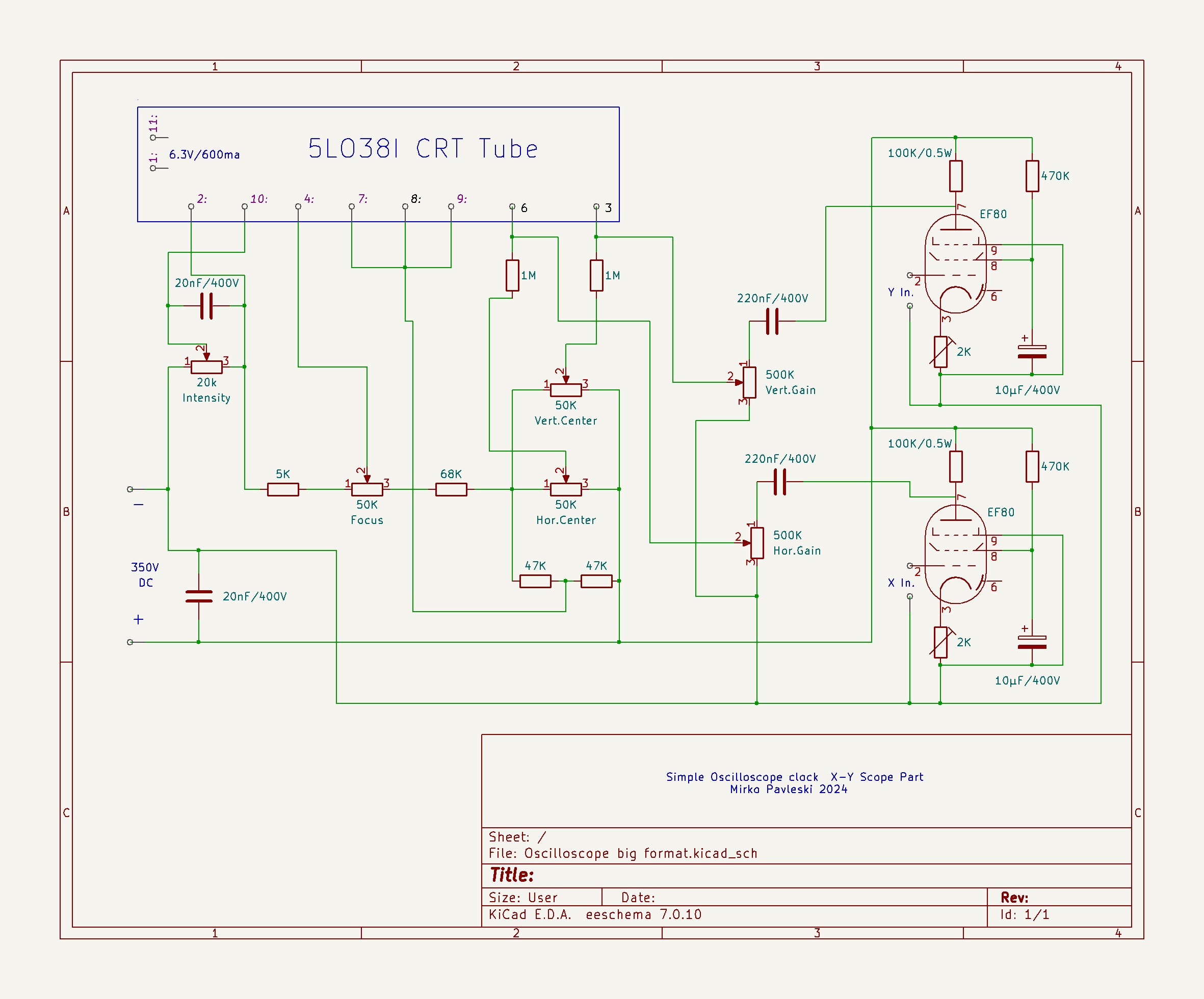
Schematic
...
Schematic X-Y Final.jpg
Comments
Only logged in users can leave comments