DIY Simple Arduino Whack-a-Mole Game
Simple to make Arduino version of the Whack-a-Mole arcade game wich consist a few components.
Devices & Components
1
Arduino Nano
1
Grove - Buzzer - Piezo
5
16mm Illuminated Pushbutton - Green Momentary
5
Resistor 470 ohm
1
Four Line I2C 16x2 LCD Display
Hardware & Tools
1
Soldering kit
Software & Tools

Arduino IDE
Project description
Code
Whack A Mole
cpp
...
1/*Arduino Whack-A-Mole Game
2by mircemk, June 2025
3*/
4
5#include <Wire.h>
6#include <LiquidCrystal_I2C.h>
7
8LiquidCrystal_I2C lcd(0x27, 16, 2);
9
10// Pin Definitions
11const int buttonPins[] = {8, 9, 10, 11, 12}; // Button pins
12const int ledPins[] = {2, 3, 4, 5, 6};      // LED pins
13const int buzzerPin = 13;                   // Buzzer pin (digital 13)
14const int numMoles = 5;                     // Number of moles/buttons/LEDs
15
16// Game variables
17int currentMole = -1;         // Current mole (LED) to be lit
18int score = 0;                // Player's score
19unsigned long reactionTime = 1000;  // Initial reaction time (milliseconds)
20unsigned long lastMoleTime = 0;     // Time when the last mole was lit
21unsigned long gameStartTime = 0;    // Start time of the game
22unsigned long gameDuration = 30000; // Total game duration (30 seconds)
23
24// Reaction time adjustment
25const unsigned long reactionTimeDecrement = 100; // Time to reduce reaction by (milliseconds)
26const unsigned long minReactionTime = 300;       // Minimum reaction time (milliseconds)
27
28void setup() {
29  lcd.backlight();
30  lcd.begin(16, 2);
31  lcd.clear();
32  lcd.setCursor(2, 0);
33  lcd.print("Whack-a-Mole");
34  lcd.setCursor(3, 1);
35  lcd.print("by mircemk");
36  delay(2000);
37  lcd.clear();
38
39  // Initialize button pins and LED pins
40  for (int i = 0; i < numMoles; i++) {
41    pinMode(buttonPins[i], INPUT_PULLUP);  // Set button pins as input with pull-up resistors
42    pinMode(ledPins[i], OUTPUT);           // Set LED pins as output
43    digitalWrite(ledPins[i], LOW);         // Turn off all LEDs initially
44  }
45
46  pinMode(buzzerPin, OUTPUT); // Set buzzer pin as output
47
48  Serial.begin(9600); // For debugging and displaying the score
49  randomSeed(analogRead(0)); // Initialize random seed from an unused analog pin
50  Serial.println("Whack-a-Mole Game Started!");
51
52  lcd.setCursor(2, 0);
53  lcd.print("GAME STARTED!");
54  delay(500);
55  lcd.clear();
56
57  gameStartTime = millis(); // Record game start time
58}
59
60void loop() {
61  unsigned long currentMillis = millis();  // Get the current time
62
63  // Update the progress bar
64  unsigned long elapsedTime = currentMillis - gameStartTime;
65  if (elapsedTime <= gameDuration) {
66    int barLength = map(gameDuration - elapsedTime, 0, gameDuration, 0, 16);
67    lcd.setCursor(0, 1);
68    for (int i = 0; i < 16; i++) {
69      lcd.print(i < barLength ? '-' : ' '); // Print '-' for remaining time, ' ' for elapsed
70    }
71  }
72
73  // Light up a mole after a certain amount of time (based on reactionTime)
74  if (currentMillis - lastMoleTime >= reactionTime) {
75    if (currentMole != -1) {
76      digitalWrite(ledPins[currentMole], LOW);  // Turn off the previous mole
77    }
78    currentMole = random(0, numMoles);  // Randomly pick a mole (LED)
79    digitalWrite(ledPins[currentMole], HIGH); // Light up the chosen LED
80
81    lastMoleTime = currentMillis;  // Update the time when the mole was lit
82  }
83
84  // Check if the player pressed the correct button for the lit mole
85  for (int i = 0; i < numMoles; i++) {
86    if (digitalRead(buttonPins[i]) == LOW) {  // Button pressed (LOW due to INPUT_PULLUP)
87      if (i == currentMole) {
88        score++;  // Correct mole hit
89 lcd.setCursor(2, 0);
90lcd.print(" Score:      "); // Clear the score field with extra spaces
91lcd.setCursor(12, 0);
92lcd.print(score); // Update the score
93
94        tone(buzzerPin, 1000, 200);  // High-pitched sound (1000Hz) for 200ms
95
96        if (reactionTime > minReactionTime) {
97          reactionTime -= reactionTimeDecrement;
98        }
99      } else {
100        score--;  // Wrong mole hit
101 lcd.setCursor(2, 0);
102lcd.print(" Score:      "); // Clear the score field with extra spaces
103lcd.setCursor(12, 0);
104lcd.print(score); // Update the score
105
106        tone(buzzerPin, 400, 200);  // Low-pitched sound (400Hz) for 200ms
107      }
108
109      digitalWrite(ledPins[currentMole], LOW);  // Turn off the current mole
110      currentMole = -1;  // Reset the mole to indicate no active mole
111      delay(500);  // Short delay to debounce button press
112    }
113  }
114
115  // End the game after the set duration
116  if (elapsedTime >= gameDuration) {
117lcd.setCursor(3, 0);
118lcd.print("Game Over!   ");
119lcd.setCursor(0, 1);
120lcd.print("Final Score: ");
121lcd.setCursor(13, 1);
122lcd.print("   ");           // Clear any leftover characters
123lcd.setCursor(13, 1);
124lcd.print(score);           // Print the final score
125
126// Flash all LEDs and play a sound three times
127for (int i = 0; i < 3; i++) {
128  for (int j = 0; j < numMoles; j++) {
129    digitalWrite(ledPins[j], HIGH);
130  }
131  tone(buzzerPin, 1000, 300);  // Play sound
132  delay(300);                  // Keep LEDs on
133  for (int j = 0; j < numMoles; j++) {
134    digitalWrite(ledPins[j], LOW);
135  }
136  delay(300);                  // Keep LEDs off
137}
138
139delay(2000);                   // Pause before resetting the game
140lcd.clear();
141score = 0;
142currentMole = -1;
143for (int i = 0; i < numMoles; i++) {
144  digitalWrite(ledPins[i], LOW);
145}
146lcd.setCursor(0, 0);
147lcd.print(" Start New Game");
148delay(5000);
149lcd.clear();
150gameStartTime = millis();
151reactionTime = 1000;
152  }
153}
Documentation
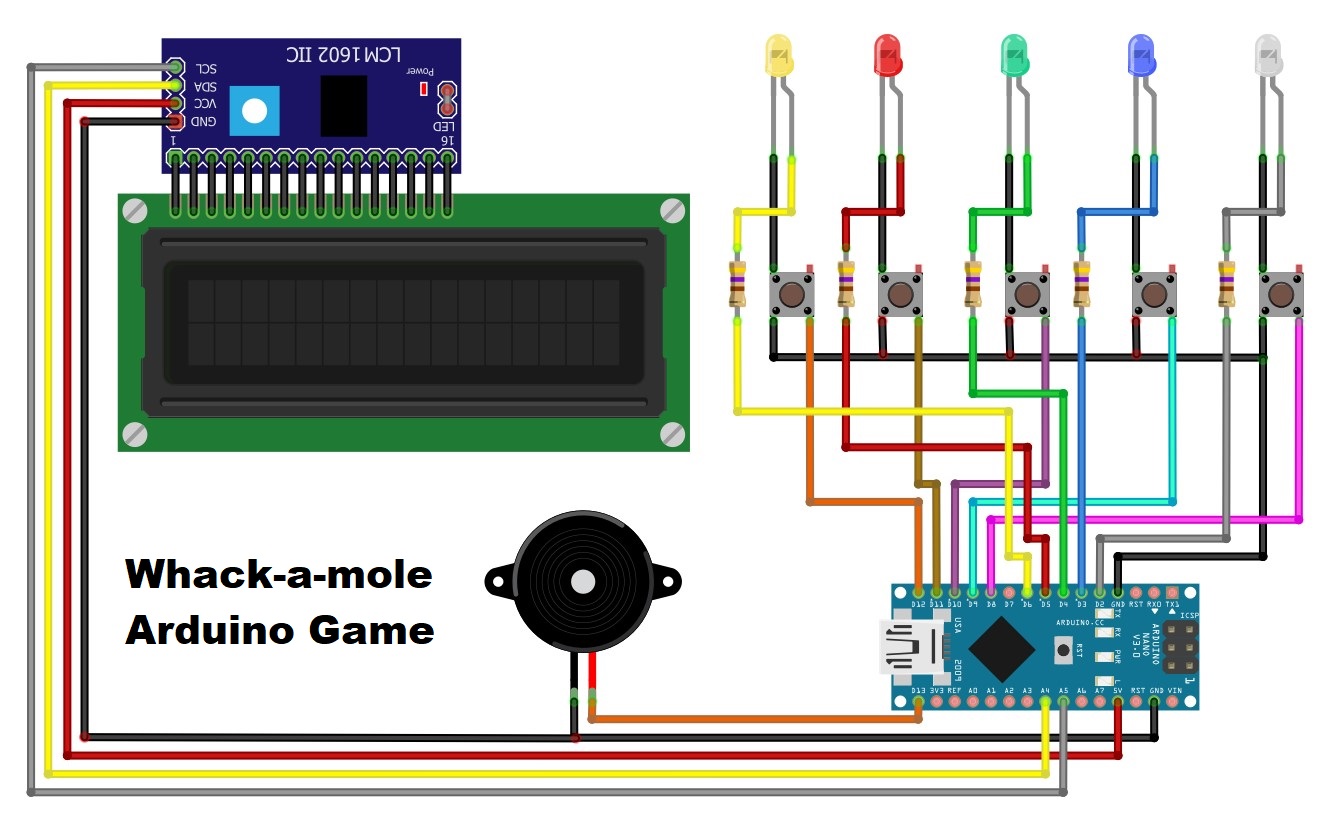
Schematic
...
Schematic.jpg
Comments
Only logged in users can leave comments