DIY ESP32 Telegram Flood Protection System - Smart Home Automation
How to build a highly reliable, automated Flood Protection System using an ESP32 microcontroller and a Telegram Bot for real-time remote monitoring and control.
Devices & Components
1
Arduino Nano ESP32 Connector Bundle
1
Piezo Buzzer
1
Photoelectric High Accuracy Liquid Level Sensor for Arduino
1
Transistor NPN (BC547 or similar)
2
LED 5mm red
Hardware & Tools
1
Soldering Iron Kit
Software & Tools

Arduino IDE
Project description
Code
Code
cpp
...
1// by mircemk May, 2025
2
3#include <WiFi.h>
4#include <WiFiClientSecure.h>
5#include <UniversalTelegramBot.h>
6#include <ArduinoJson.h>
7
8// --- WIFI & TELEGRAM CONFIGURATION ---
9const char* ssid = "***********";
10const char* password = "*********";
11#define BOTtoken "***********************************"
12#define CHAT_ID "**********"
13
14// --- PIN DEFINITIONS ---
15const int sensorPin  = 23;   // FS-IR02 Water Sensor input
16const int relayPin   = 25;   // Relay for Water Valve and Pump
17const int buzzerPin  = 15;   // Active Buzzer pin
18const int blueLedPin = 21;   // Independent LED for remote control (GPIO 21)
19const int redLedPin  = 17;   // Status Indicator LED for Flood
20
21// --- SYSTEM VARIABLES ---
22bool isFloodDetected = false;
23bool blueLedStatus = false;
24unsigned long lastBotCheck;
25int botRequestDelay = 1000;
26
27// Timing for non-blocking buzzer
28unsigned long lastBuzzerToggle = 0;
29bool buzzerState = false;
30
31// --- STABILITY FILTER VARIABLES (TUNED) ---
32unsigned long lastStateChangeTime = 0;     // Timer to check how long the signal is steady
33const unsigned long stabilityDelay = 1000; // Required time in ms for a stable signal (Tuned to 1 second)
34bool lastValidSensorState = LOW;           // Filtered/confirmed sensor state
35
36WiFiClientSecure client;
37UniversalTelegramBot bot(BOTtoken, client);
38
39// -------------------------------------------------------------
40//  Telegram Message Handler
41// -------------------------------------------------------------
42void handleNewMessages(int numNewMessages) {
43  for (int i = 0; i < numNewMessages; i++) {
44    String chat_id = String(bot.messages[i].chat_id);
45    if (chat_id != CHAT_ID) continue; // Security check
46
47    String text = bot.messages[i].text;
48    String from_name = bot.messages[i].from_name;
49
50    if (text == "/start") {
51      String welcome = "Welcome " + from_name + " to Flood Guard Bot.\n\n";
52      welcome += "COMMANDS:\n";
53      welcome += "/status - Check water levels & hardware state\n";
54      welcome += "/blueled on - Turn ON the remote LED (GPIO 21)\n";
55      welcome += "/blueled off - Turn OFF the remote LED (GPIO 21)\n";
56      bot.sendMessage(CHAT_ID, welcome, "");
57    }
58
59    // Explicit command to turn the Blue LED ON
60    if (text == "/blueled on") {
61      blueLedStatus = true;
62      digitalWrite(blueLedPin, HIGH);
63      bot.sendMessage(CHAT_ID, "External LED is now ON (High)", "");
64    }
65
66    // Explicit command to turn the Blue LED OFF
67    if (text == "/blueled off") {
68      blueLedStatus = false;
69      digitalWrite(blueLedPin, LOW);
70      bot.sendMessage(CHAT_ID, "External LED is now OFF (Low)", "");
71    }
72
73    if (text == "/status") {
74      String statusMsg = "--- SYSTEM REPORT ---\n";
75      statusMsg += isFloodDetected ? "💧 ALERT: FLOOD DETECTED!" : "✅ STATUS: ALL DRY";
76      statusMsg += "\nValve/Pump: ";
77      statusMsg += (digitalRead(relayPin) == HIGH) ? "CLOSED (Safe)" : "OPEN (Normal)";
78      statusMsg += "\nRed LED (GPIO 17): ";
79      statusMsg += (digitalRead(redLedPin) == HIGH) ? "ON" : "OFF";
80      statusMsg += "\nRemote LED (GPIO 21): ";
81      statusMsg += blueLedStatus ? "ON" : "OFF";
82      bot.sendMessage(CHAT_ID, statusMsg, "");
83    }
84  }
85}
86
87// -------------------------------------------------------------
88//  Setup
89// -------------------------------------------------------------
90void setup() {
91  Serial.begin(115200);
92
93  pinMode(sensorPin, INPUT_PULLUP);
94  pinMode(relayPin, OUTPUT);
95  pinMode(buzzerPin, OUTPUT);
96  pinMode(blueLedPin, OUTPUT);
97  pinMode(redLedPin, OUTPUT);
98
99  digitalWrite(relayPin, LOW);   // Valve starts open
100  digitalWrite(buzzerPin, LOW);  // Buzzer starts silent
101  digitalWrite(blueLedPin, LOW); // Remote LED starts OFF
102  digitalWrite(redLedPin, LOW);  // Red LED starts OFF
103
104  WiFi.begin(ssid, password);
105  client.setInsecure();
106
107  while (WiFi.status() != WL_CONNECTED) {
108    delay(500);
109    Serial.print(".");
110  }
111
112  Serial.println("\nWiFi Connected!");
113  bot.sendMessage(CHAT_ID, "System V0.3 Online: Monitoring with 1s Stability Filter...", "");
114}
115
116// -------------------------------------------------------------
117//  Main Loop
118// -------------------------------------------------------------
119void loop() {
120  // Read instant physical sensor state (HIGH = Water, LOW = Dry)
121  int currentRawInput = digitalRead(sensorPin);
122
123  // --- STABILITY FILTER (DEBOUNCE) LOGIC ---
124  if (currentRawInput != lastValidSensorState) {
125    if (lastStateChangeTime == 0) {
126      lastStateChangeTime = millis(); // Start counting
127    }
128
129    // If the signal stays changed continuously for 1 full second (1000ms)
130    if (millis() - lastStateChangeTime >= stabilityDelay) {
131      lastValidSensorState = currentRawInput; // Lock in the new state
132      lastStateChangeTime = 0;                // Reset timer
133    }
134  } else {
135    // Noise or temporary fluctuation detected, reset timer
136    lastStateChangeTime = 0;
137  }
138
139  // --- AUTOMATIC FLOOD RESPONSE (Based on Filtered State) ---
140  if (lastValidSensorState == HIGH) {
141    // Confirmed Flood Event
142    digitalWrite(relayPin, HIGH);  // Activate water valve / pump
143    digitalWrite(redLedPin, HIGH); // Light up flood indicator
144
145    // Non-blocking rapid buzzer beep (Tuned to 100ms intervals)
146    if (millis() - lastBuzzerToggle >= 100) {
147      lastBuzzerToggle = millis();
148      buzzerState = !buzzerState;
149      digitalWrite(buzzerPin, buzzerState);
150    }
151
152    // Send single alert message to Telegram
153    if (!isFloodDetected) {
154      bot.sendMessage(CHAT_ID, "⚠️ ALERT: 💧 FLOOD DETECTED! Water valve closed and pump activated.", "");
155      isFloodDetected = true;
156    }
157  }
158  else {
159    // Confirmed Dry Conditions
160    digitalWrite(relayPin, LOW);   // Reset valve/pump
161    digitalWrite(buzzerPin, LOW);  // Turn off buzzer
162    digitalWrite(redLedPin, LOW);  // Turn off flood indicator
163
164    if (isFloodDetected) {
165      bot.sendMessage(CHAT_ID, "✅ System Clear: Water level back to normal.", "");
166      isFloodDetected = false;
167    }
168  }
169
170  // --- CHECK TELEGRAM COMMANDS ---
171  if (millis() > lastBotCheck + botRequestDelay) {
172    int numNewMessages = bot.getUpdates(bot.last_message_received + 1);
173    while (numNewMessages) {
174      handleNewMessages(numNewMessages);
175      numNewMessages = bot.getUpdates(bot.last_message_received + 1);
176    }
177    lastBotCheck = millis();
178  }
179}
Documentation
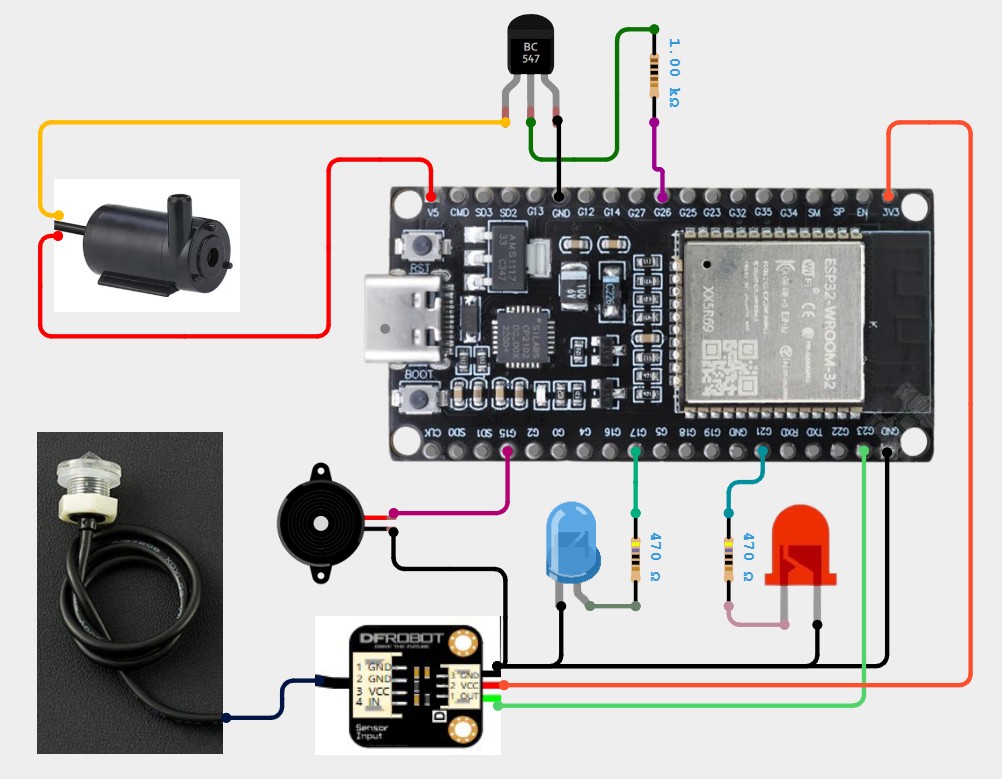
Schematic
...
Schematic.jpg
Comments
Only logged in users can leave comments